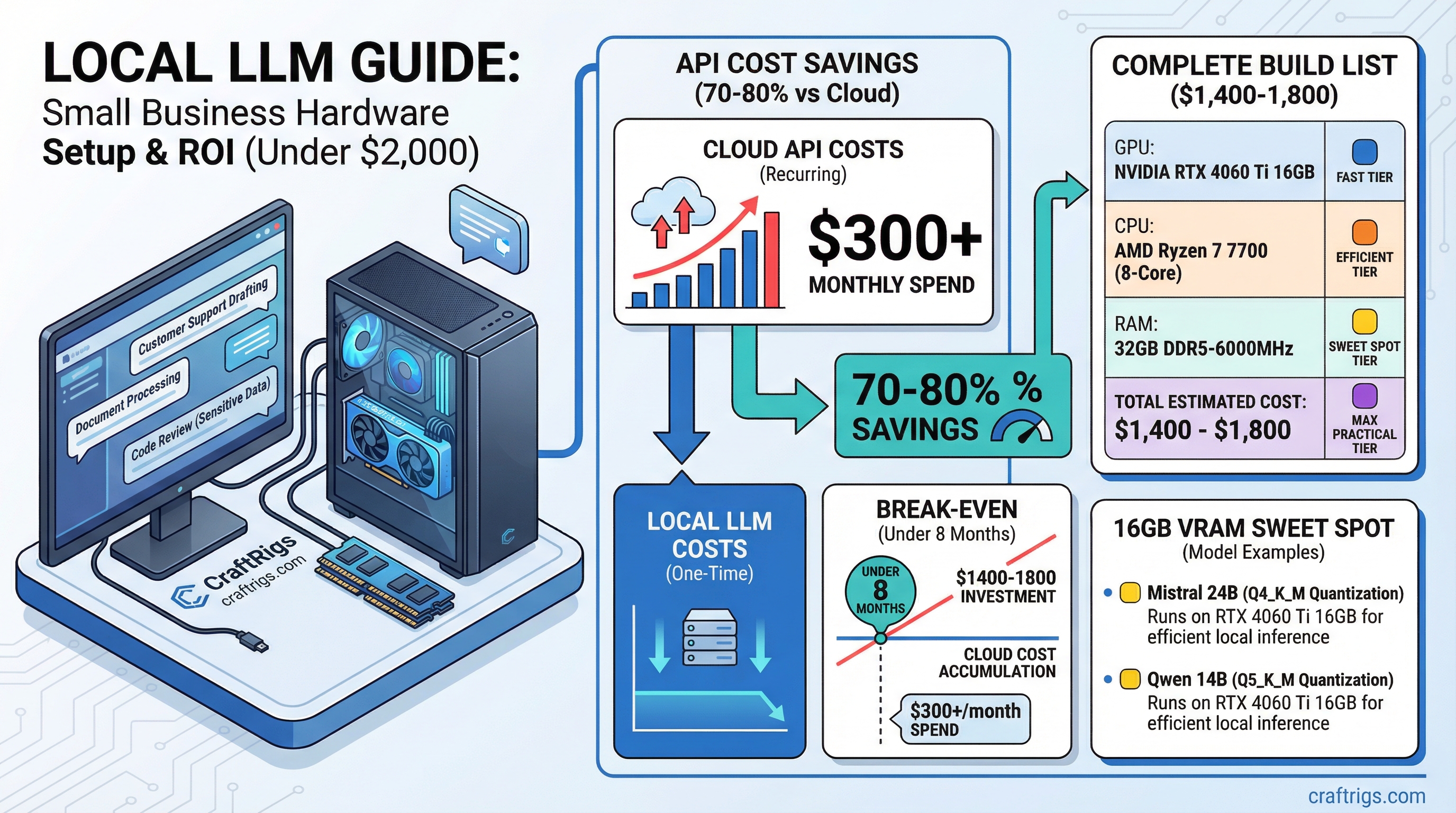
The break-even calculation changed in 2026. If your small business spends more than $300/month on AI API costs — ChatGPT Team, Claude Pro, Gemini Advanced for your staff — you can recover a $2,000 hardware investment in under 8 months. Then you're running for the cost of electricity.
That's not a hypothetical. Model API costs doubled industry-wide to $8.4 billion in 2025, and businesses doing meaningful AI work are feeling it. Academic research on self-hosted LLM deployments shows 70-80% cost savings over three years compared to commercial API access at similar capability levels.
For small businesses, the case for local AI isn't just privacy. It's money.
What Small Businesses Actually Use Local LLMs For
Three use cases dominate:
Customer support drafting. Staff use the local LLM to draft responses to customer inquiries, then review and send. No customer data goes to OpenAI. The model knows your business because you feed it your product docs and policies via a RAG layer.
Document processing. Contract review, invoice analysis, meeting transcription and summarization. Highly sensitive — exactly the category you don't want going through a cloud pipeline.
Code review and internal tooling. If you have developers, a 14B-32B code model catches issues and generates internal scripts without sending proprietary code to GitHub Copilot or Claude's API.
The common thread: these are use cases with sensitive business data where cloud AI creates either a privacy risk or a compliance problem. And they're high-volume enough that API costs add up fast.
The Under-$2,000 Hardware Target
You need a machine capable of running 13B-30B parameter models at reasonable speed. Not frontier-model speed — for business use where staff are waiting on responses, 10-20 tokens per second is more than adequate.
That target points firmly at the 16GB VRAM tier.
Price (March 2026)
$399–$449
$220–$280
$150–$200
$100–$130
$80–$100
$90–$120
$80–$120
~$1,400–$1,800 Add a Windows 11 Pro license (~$99 OEM) if needed, or run Ubuntu/Debian for free.
This build runs Mistral Small 3.1 24B at Q4 comfortably in 16GB VRAM — a model that benchmarks comparably to GPT-4 Turbo on most business tasks. For document analysis specifically, Qwen 2.5 14B is worth testing: it handles long contexts well and was specifically trained on business and technical content.
Note
16GB VRAM in 2026 is the business sweet spot. The RTX 5060 Ti launched with 16GB as the base configuration — a meaningful improvement over the 4060 Ti's 8GB base model from the previous generation. For business AI, 16GB lets you run 14B-24B models without CPU offloading, which keeps response speed consistent under concurrent use.
Software Setup for Business Use
Runtime: Ollama. Install on your local server, configure it to run as a background service. Staff access it via Open WebUI over your local network — no external ports open, no internet exposure.
Interface: Open WebUI. Runs locally via Docker, supports multiple user accounts with conversation history, and integrates with Ollama directly. One deployment serves your whole team over your LAN. Staff log in from their work machines — it feels like using ChatGPT, just hosted internally.
Document integration: AnythingLLM or the RAG layer in Open WebUI. Connect it to a shared folder of company documents. Now your staff can query your internal knowledge base alongside general model capabilities. Customer policies, product specs, company procedures — all searchable through natural language.
The Ollama setup guide covers the runtime, and the llama.cpp vs Ollama vs LM Studio comparison explains why Ollama is the right choice for multi-user server deployment.
The ROI Calculation
Real numbers. Your team uses AI for 4 hours per day across 5 people.
At Claude Pro ($20/month/user) that's $100/month — but Pro plans hit rate limits that matter for heavy business use.
At Claude API with moderate usage (5M tokens/day across the team), you're at $150-300/month depending on the model. Heavier usage or newer model tiers push costs higher fast.
A $1,700 hardware build:
- Months 1-6: Hardware investment recovered at $300/month API displacement = $1,800 in 6 months
- Month 7+: ~$15-30/month electricity cost, nothing else
- Year 2 savings: ~$3,200-3,400 vs continued API spend
That's before counting the productivity unlocks from removing rate limits — no more staff waiting on throttled API responses mid-afternoon. And unlike API calls, a second concurrent conversation costs you nothing additional.
Tip
If your team regularly hits ChatGPT or Claude rate limits mid-day, that's the clearest possible signal you need local infrastructure. Rate limits don't exist on hardware you own. The productivity tax of waiting on a throttled API is real and measurable — staff context-switch away and don't always come back to the task.
What This Build Won't Do Well
Honest caveats: the $1,700 build is not a replacement for frontier model capabilities on complex reasoning tasks. Mistral Small 3.1 24B is excellent for business tasks, but it won't match Claude 4 or GPT-5 on difficult multi-step analysis.
For tasks requiring the absolute frontier — complex legal analysis, nuanced financial modeling, sophisticated code architecture — you'll likely keep a cloud API subscription for specific high-value tasks while handling routine work locally.
That's fine. A hybrid approach makes sense for most businesses. Local AI handles the volume (sensitive docs, routine drafts, staff queries at scale). Cloud API handles the exceptions. You pay API rates only for the small fraction of queries that genuinely need frontier capability.
Building vs. Buying Prebuilt
In 2026, prebuilt AI workstations from boutique builders (Puget Systems, System76, Lambda Labs) offer this hardware tier configured and supported. Premium of $300-500 over self-build, but with professional support and pre-configured drivers. Worth considering if your IT capacity is limited.
The $1,200 workstation build guide covers component selection in detail if you're going the self-build route. The $500 budget build is available if budget is tighter, though it limits you to 7B-8B models.
Verdict
The economics of local AI for small business flipped in 2025-2026. For businesses spending $150+/month on AI APIs, the hardware pays back in under a year. For businesses with privacy or compliance requirements, the local setup removes a real legal exposure from the equation.
The 16GB VRAM tier is the right target: runs 14B-24B models that genuinely compete with cloud alternatives on typical business tasks, fits under $2,000 total, and handles multi-user workloads via Ollama's server mode.
The privacy-first local AI guide covers the software configuration in more depth if data privacy is your primary driver.
See Also
- Best GPUs for Local LLMs 2026
- Local LLM Build Cost Estimator
- Local AI for Privacy: Complete Hardware and Software Setup Guide
- The RTX 3090 Is Now the Best Value Local LLM GPU (March 2026 Price Guide) — best dollar-per-VRAM on the used market right now
- GPU Price Alert: MSI Is Warning of 15-30% Hikes — time-sensitive: buy before April if you're planning a build
Small Business LLM Hardware Stack
graph TD
    A["Small Business LLM Server"] --> B["GPU: RTX 4070 Ti 12GB"]
    A --> C["RAM: 64GB DDR5"]
    A --> D["CPU: Ryzen 7 7700X"]
    A --> E["Storage: 2TB NVMe"]
    B --> F["Run 13B Models Locally"]
    C --> G["CPU Offload 30B Models"]
    F --> H["Private AI: No Cloud Costs"]
    G --> H
    style A fill:#1A1A2E,color:#fff
    style H fill:#F5A623,color:#000