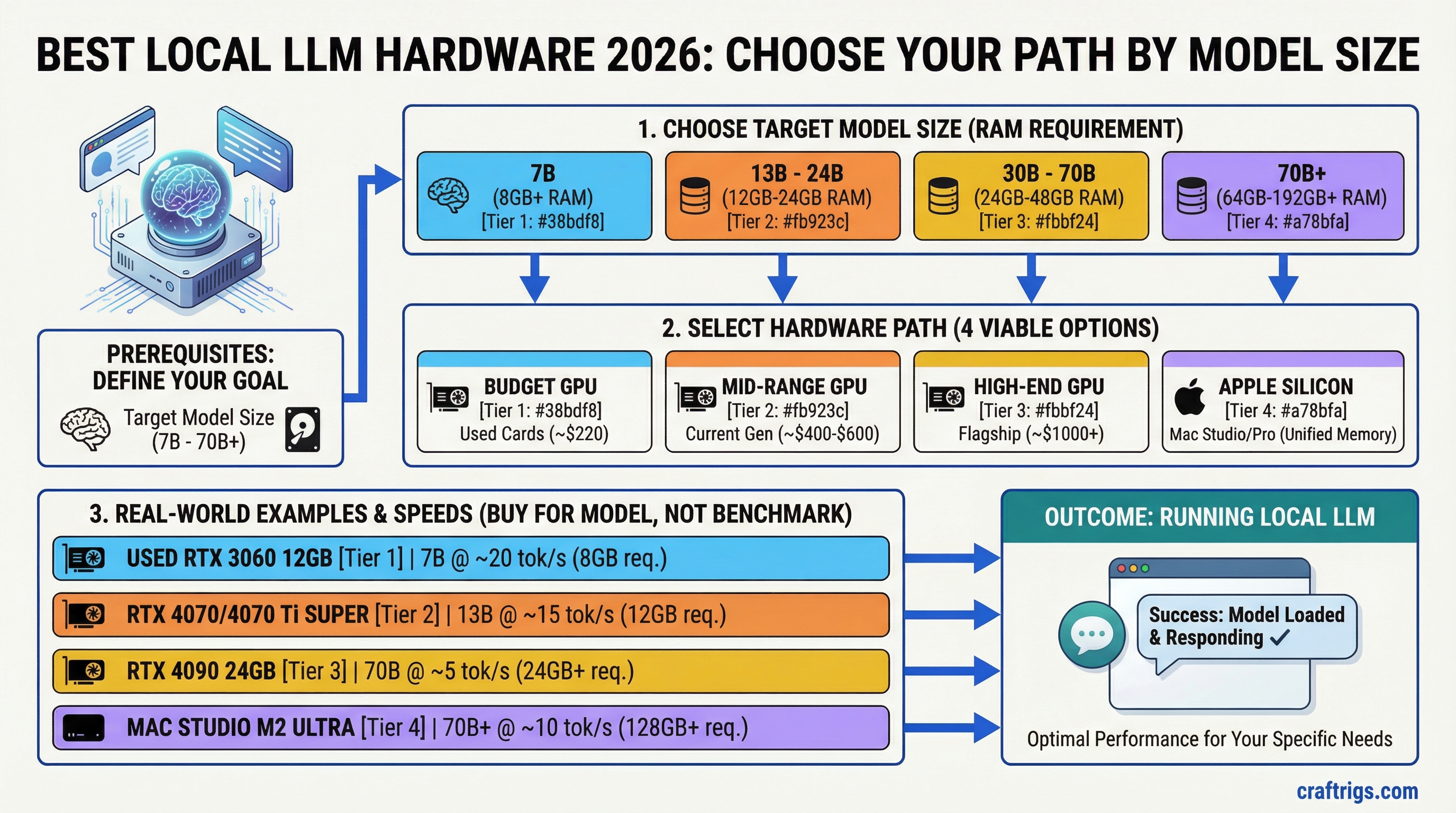
TL;DR: There are four viable hardware paths for running local LLMs in 2026: a budget GPU, a mid-range GPU, a high-end GPU, or Apple Silicon. The right choice depends almost entirely on what model sizes you want to run. Buy for the model, not the benchmark — a $400 GPU that fits your target model will always beat a $1,000 GPU that doesn't.
The spec that drives everything is VRAM (or unified memory on Apple Silicon). Get that right and everything else falls into place.
| Hardware | Price (Jun 2026) | VRAM | Bandwidth | Best for |
|---|---|---|---|---|
| RTX 3060 12GB | ~$220 used | 12 GB | 360 GB/s | 7B–13B budget entry |
| Intel Arc B580 | ~$250 new | 12 GB | 456 GB/s | 7B–13B, bandwidth value |
| RTX 4060 Ti 16GB | ~$380 new | 16 GB | 288 GB/s | 13B–20B mid-range |
| RTX 5060 Ti 16GB | ~$499–$540 | 16 GB | 448 GB/s | 13B–20B, fastest mid |
| RTX 3090 24GB | ~$700–800 used | 24 GB | 936 GB/s | 30B–34B, value king |
| RTX 4090 24GB | ~$1,500 used | 24 GB | 1,008 GB/s | 30B–34B, fastest 24GB |
| RTX 5090 32GB | ~$2,400 street | 32 GB | 1,792 GB/s | 70B Q2_K single GPU |
| Mac Mini M4 16GB | $599 | 16 GB unified | 120 GB/s | Silent 7B–13B |
| Mac Mini M4 Pro 48GB | ~$1,800 | 48 GB unified | 273 GB/s | 70B Q4_K_M, budget path |
| Mac Studio M4 Max 36GB | $1,999 | 36 GB unified | 410 GB/s | Fast 27B–34B |
| Mac Studio M3 Ultra 96GB | $3,999 | 96 GB unified | 819 GB/s | 70B+ at full quality |
Bandwidth: Apple M4 Max specs · NVIDIA product pages · Verified llama.cpp benchmarks
Contents:
- The Four Hardware Paths
- Key Specs That Actually Matter
- Quick Reference: Hardware vs. Capability
- Who Should Buy What
The Four Hardware Paths
Path 1: Budget GPU (Under $300)
Target: 7B–13B models. Good for everyday use, not for heavy research or large-context work.
The budget tier used to be a compromise. It still is, but less so than it was two years ago — because 7B models have gotten dramatically better. Llama 3.1 8B running on an RTX 3060 Ti 8GB is a genuinely capable tool for summarization, Q&A, drafting, and light coding. It's not a frontier model, but it's free to run and completely private.
Best picks:
RTX 3060 12GB (~$220 used): The single best value card in the budget tier. 12GB VRAM runs Mistral 7B, Llama 3.1 8B, and even squeaks into 13B territory at Q4. Memory bandwidth is adequate at 360 GB/s. It won't win speed contests, but it runs real models and costs about the same as two months of a frontier API subscription.
RTX 4060 8GB (~$280 new): Faster per token than the 3060 due to better architecture, but only 8GB limits you to 7B models. Good pick if speed matters more than model headroom. 272 GB/s bandwidth.
Intel Arc B580 (~$250 new): The surprising budget contender. 12GB GDDR6, 456 GB/s bandwidth — better bandwidth than the RTX 3060. Runs Llama 3.1 8B and 13B models solidly in Ollama. Intel's IPEX-LLM and llama.cpp support has matured significantly. The trade-off: less mature ecosystem, occasional driver friction. If you're Linux-comfortable and want 12GB on a tight budget, it's worth considering.
Who this is for: First-time local AI users, people who want to experiment before committing, anyone who mainly wants chat and summarization capability at zero ongoing cost.
What you're giving up: Model headroom. 8–12GB means you're capped at 13B models. 20B, 34B, 70B — none of those are accessible here. You're also accepting slower speeds: expect 20–50 t/s on 7B models depending on the card. Fast enough for conversation, slow enough that you'll notice it on long outputs.
Path 2: Mid-Range GPU ($300–$600)
Target: 13B–20B models. The sweet spot for most serious local AI users.
This is where local AI starts feeling like a real productivity tool rather than a demo. 20B models are substantially more capable than 7B — better reasoning, stronger instruction following, more nuanced outputs. And at this price tier, you can afford the VRAM to run them properly.
Best picks:
RTX 4060 Ti 16GB (~$380 new): The mid-range pick for most people. 16GB VRAM handles every 13B–20B model at full Q4 quality. At 288 GB/s bandwidth it's not the fastest, but speeds are comfortable — 30–45 t/s on 13B models. The 16GB version costs significantly more than the 8GB, but that extra VRAM is worth every dollar if you plan to run anything larger than 7B.
RTX 5060 Ti 16GB (~$499–$540, MSRP $429): Better bandwidth than the 4060 Ti (448 GB/s), same 16GB VRAM. Street prices remain above MSRP as of June 2026, but the card is widely available. If you find it near MSRP, it's the clear upgrade over the 4060 Ti 16GB.
Arc B580 12GB (~$250): Jumps tiers here because of its value. It's technically a budget card that punches into mid-range territory. The 12GB limitation means some 20B models fit only at lower quantization. But for 13B, it's excellent, and the price gap is real.
Who this is for: Developers who want a local coding assistant, anyone doing serious daily use of AI tools, researchers working with smaller-to-mid models, small businesses that want private inference.
What you're giving up: 34B and 70B models are off the table without quantization compromises or system RAM overflow (which tanks speed). You're also not getting Apple Silicon's efficiency — this card will consume 100–150W under load compared to 15–30W for an M4.
Path 3: High-End GPU ($600–$1,500)
Target: 32B–34B models. Serious capability, near-frontier performance for a single GPU.
This tier exists because 34B models are a meaningful step above 20B — especially for coding, reasoning, and long-form generation. A CodeLlama 34B or Qwen 32B running locally at 25–35 t/s on a 24GB GPU is a practical daily driver that rivals cloud API quality for many tasks.
Best picks:
RTX 3090 24GB (~$600–$800 used): The used market champion. 24GB VRAM, 936 GB/s bandwidth, still one of the fastest consumer inference cards available. Runs 34B models at Q4 with headroom to spare. Also supports NVLink — meaning two of them pool VRAM for 70B models (see the dual-GPU build guide). The downside: 350W TDP, runs hot, requires a proper PSU and case. But on pure price-to-capability ratio, nothing beats a used 3090 right now.
RTX 4090 24GB (~$1,400–$1,600 used): Same VRAM as the 3090, but 1,008 GB/s bandwidth — about 8% faster per token in practice. Significantly better price retention than the 3090. The pick if you want the fastest single 24GB card and don't need NVLink (4090 doesn't support it). At current pricing, the value case over a 3090 is narrow unless you're chasing every token.
RTX 5090 32GB (~$1,999 MSRP, ~$2,400 street): If you can find it at MSRP, this is the best single GPU for local inference. 32GB VRAM means 70B models fit at Q2_K (with quality compromise). 1,792 GB/s bandwidth — the fastest of any consumer card. The problem is availability. Most buyers are paying $400–$600 over MSRP, at which point the value case gets complicated.
Who this is for: Developers running production local inference, researchers who need 30B+ model quality, power users who've hit the ceiling on 16GB and want a real upgrade.
What you're giving up: At the 3090/4090 tier, you're running 70B only with heavy quantization (Q2_K or Q3_K), which reduces quality noticeably. Full-quality 70B requires either a dual-GPU setup or Apple Silicon with 64GB+ unified memory. You're also paying non-trivial electricity costs: a 3090 at sustained inference load runs about $25–$40/month in electricity depending on your rate.
Path 4: Apple Silicon
Target: Any model size from 7B to 70B+, prioritizing efficiency and large-model capacity over raw token speed.
Apple Silicon is a different category, not just a different GPU. The unified memory architecture means the GPU and CPU share the same physical memory pool — no discrete VRAM, no VRAM ceiling. A Mac Mini M4 Pro with 48GB unified memory can run 70B models at Q4 (the 42.5 GB file fits, though macOS reserves part of unified memory for the system — expect to raise the GPU memory limit). No PC GPU setup at comparable price does this.
The trade-off is token generation speed. Apple Silicon is slower per token than a high-bandwidth NVIDIA card running the same model at the same size. An RTX 4090 (1,008 GB/s) runs Llama 3.1 8B at roughly 130 t/s; a base M4 Mac Mini (120 GB/s) manages ~15–20 t/s on the same model — the bandwidth ratio tells the story. But the Mac Mini can also run a 70B model — the 4090 cannot, at any speed.
Best picks by use case:
Mac Mini M4 16GB (~$599): Entry point. Handles 7B–13B models well. At 16GB unified memory, you can push a 20B model with Q4 quantization. For everyday use, it's quieter, cooler, and more power-efficient than any PC equivalent. Not the right choice if you specifically want 30B+ models — the 16GB ceiling is real.
Mac Mini M4 Pro 24GB (from $1,399) or 48GB (~$1,800, configurable at Apple): The 24GB config handles 20B models cleanly and 34B at moderate quantization. The 48GB config is where Apple Silicon becomes uniquely compelling — it runs 70B models at Q4, something that otherwise requires a $3,000+ dual-GPU PC build. Be honest with yourself about speed, though: at 273 GB/s, a 70B Q4 decode tops out around 4–5 tokens/second. It's 70B capacity, not 70B speed.
Mac Studio M4 Max from $1,999 (36GB) or configurable to 64GB: The step-up for users who want faster inference than the Mac Mini M4 Pro and access to 27B–34B models at full speed. The M4 Max chip has significantly higher memory bandwidth (410 GB/s on 32-core GPU / 546 GB/s on 40-core GPU, per Apple Mac Studio specs), vs. 273 GB/s for M4 Pro. For 70B at full quality, the Mac Studio M3 Ultra (96GB, from $3,999) is the current path — the M4 Max 36GB tops out around 27B Q4_K_M without overflow.
Who this is for: Anyone who prioritizes large model capacity over speed, people who want low power consumption and silent operation, anyone working in a space where running a 400W PC tower isn't practical.
What you're giving up: Token speed at matched model size (roughly 3–5x slower than a high-end NVIDIA GPU running the same model). CUDA ecosystem — many fine-tuning tools, training scripts, and specialized inference optimizations are CUDA-first. Upgradeability — the unified memory is soldered, so the config you buy is what you have.
Key Specs That Actually Matter
VRAM / Unified Memory: The primary constraint. Model must fit in memory or speed collapses. See the full breakdown in the VRAM guide.
Memory bandwidth: Determines token generation speed once the model fits. This is why an RTX 3090 (936 GB/s) generates tokens faster than an RTX 4060 Ti (288 GB/s) even at the same model size. Higher bandwidth = more tokens per second.
Compute (TFLOPS): Largely irrelevant for inference at typical context lengths. Local LLM inference is memory-bandwidth-bound, not compute-bound. Stop comparing TFLOPS between cards for this workload.
System RAM: Needs to be large enough that model overflow to system RAM is a last resort, not a plan. 32GB minimum for a serious setup, 64GB recommended.
Quick Reference: Hardware vs. Capability
| Hardware | Price (Jun 2026) | VRAM | Bandwidth | Max model (no offload) |
|---|---|---|---|---|
| RTX 3060 12GB | ~$220 used | 12 GB | 360 GB/s | 13B Q4_K_M |
| Intel Arc B580 | ~$250 new | 12 GB | 456 GB/s | 13B Q4_K_M |
| RTX 4060 Ti 16GB | ~$380 new | 16 GB | 288 GB/s | 20B Q4_K_M |
| RTX 5060 Ti 16GB | ~$499–$540 | 16 GB | 448 GB/s | 20B Q4_K_M |
| RTX 3090 24GB | ~$650 used | 24 GB | 936 GB/s | 34B Q4_K_M |
| RTX 4090 24GB | ~$1,500 used | 24 GB | 1,008 GB/s | 34B Q4_K_M |
| RTX 5090 32GB | ~$2,400 street | 32 GB | 1,792 GB/s | 70B Q2_K |
| Mac Mini M4 16GB | $599 | 16 GB unified | 120 GB/s | 13B Q4_K_M |
| Mac Mini M4 Pro 48GB | $1,799 | 48 GB unified | 273 GB/s | 70B Q4_K_M |
| Mac Studio M4 Max 36GB | $1,999 | 36 GB unified | 410 GB/s | 27B Q4_K_M |
| Mac Studio M3 Ultra 96GB | $3,999 | 96 GB unified | 819 GB/s | 70B+ Q4_K_M |
| Dual RTX 3090 build | ~$2,500 total | 48 GB | 936 GB/s | 70B Q4_K_M |
Who Should Buy What
Complete beginner, wants to experiment: RTX 3060 12GB or Mac Mini M4 16GB. Under $300 for the GPU, $599 for the Mac. Get it running, understand what you actually need, then upgrade with better information.
Serious daily user who cares about chat and coding: RTX 4060 Ti 16GB ($380) or Mac Mini M4 Pro 24GB ($1,399). The GPU wins on speed; the Mac wins on model size access and zero-noise operation.
Developer who wants 34B+ model quality: RTX 3090 used (~$650) is the value king. The 4090 is faster but the price premium is hard to justify unless you're doing this professionally.
Anyone who specifically needs 70B models: Mac Mini M4 Pro 48GB ($1,799) is the simplest, most cost-effective path to full-quality 70B. The alternative is a dual-GPU PC build at $2,500–$3,000 — which is faster but louder, hotter, and more complex. See the full Mac vs PC comparison.
Researcher / power user, budget is secondary: Mac Studio M3 Ultra 96GB ($3,999) or dual RTX 3090 NVLink build. The Mac is quieter, lower power, and handles larger models. The dual-GPU build is faster at 70B and supports CUDA tooling.
Related Guides
Tip
For a full component breakdown across all three budget tiers — GPU, CPU, RAM, and storage — see the updated Best Hardware for Local LLMs 2026 guide.
- How Much VRAM Do You Actually Need? — the foundational spec explained
- Mac vs PC for Local AI: The Complete Comparison — deep dive on the Apple Silicon decision
- Local AI on a Budget: Every Price Tier Ranked — if cost is the primary constraint
- The Local AI Hardware Decision Framework — systematic guide to picking your rig
- Best GPUs for Local LLMs 2026 — full GPU comparison
- M4 Max vs RTX 4090 for Local LLMs — head-to-head