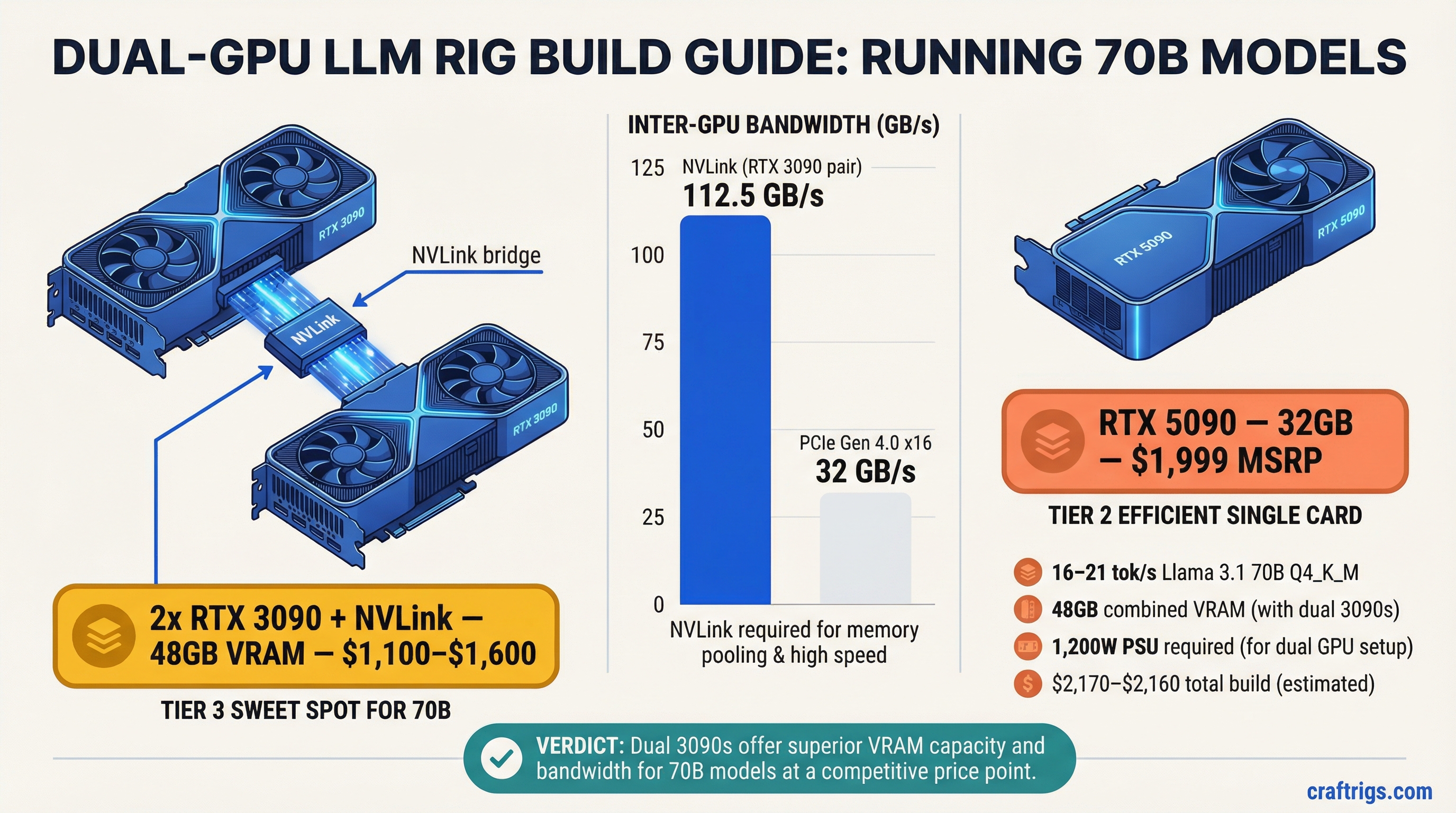
TL;DR: A dual-GPU PC build is the most cost-effective way to run 70B parameter models at desktop speed on a PC. The sweet spot in 2026 is two used RTX 3090s connected via NVLink — 48 GB combined VRAM, 112.5 GB/s inter-GPU bandwidth, and a total build cost under $3,000. A single RTX 5090 (32 GB, $1,999 MSRP) is the simpler alternative if you can find one at retail price.
Why Dual GPU, and Why at This Price?
Running a 70B parameter model at Q4 quantization requires approximately 40 GB of memory. No single consumer GPU sold today has 40 GB of VRAM:
- RTX 4090: 24 GB
- RTX 5090: 32 GB
- RTX 3090: 24 GB
The options are: buy a datacenter card (A100 80 GB — $10,000+), use a Mac with unified memory (Mac Studio M4 Max 128 GB — $3,950), or combine two consumer GPUs to pool their VRAM.
Two RTX 3090s give you 48 GB of combined VRAM — enough for 70B Q4 with 8 GB of headroom. And here's the critical detail: the RTX 3090 is the last consumer GPU that supports NVLink, giving you 112.5 GB/s of bidirectional inter-GPU bandwidth instead of the 32 GB/s you get over PCIe. This matters enormously for multi-GPU inference.
The $3,000 budget is achievable because RTX 3090 prices have dropped significantly on the used market. NVIDIA launched the RTX 5090, and the 4090 has been discontinued — both events pushed used 3090 prices to their lowest point ever.
If you're not sure whether 70B models are what you actually need, check the VRAM guide first — many users find that 30B models at Q8 quality on a single GPU meet their needs. And if you're starting from scratch with a tighter budget, the Local AI Budget Guide covers every price tier before you jump to dual GPU.
GPU Selection: 2x 24 GB vs 1x 48 GB
Let's compare the realistic options for running 70B models at ~$3,000:
Option A: 2x RTX 3090 (48 GB combined, NVLink)
- VRAM: 24 GB each, 48 GB combined via NVLink
- Memory bandwidth: 936 GB/s each (1,872 GB/s combined, but limited by NVLink bridge speed)
- Inter-GPU bandwidth: 112.5 GB/s (NVLink 3.0)
- TDP: 350W each, 700W combined
- Used price (February 2026): $550–$800 each
- Two cards: $1,100–$1,600
Option B: 1x RTX 5090 (32 GB)
- VRAM: 32 GB GDDR7
- Memory bandwidth: 1,792 GB/s
- TDP: 575W
- MSRP: $1,999 (street price: $2,400–$2,600 due to supply constraints)
Option C: 2x RTX 4090 (48 GB combined, PCIe only)
- VRAM: 24 GB each, 48 GB combined
- Inter-GPU bandwidth: ~32 GB/s (PCIe 4.0 — no NVLink support)
- Used price: $1,800–$2,200 each
- Two cards: $3,600–$4,400 — exceeds the $3,000 budget on GPUs alone
The verdict: Option A (dual RTX 3090) is the only dual-GPU build that fits a $3,000 total budget. Option C is out on price. Option B (single 5090) fits 70B Q4 at Q3_K or tight Q4_K_S but not Q4_K_M (~40 GB) — you'd need aggressive quantization to squeeze into 32 GB.
Our recommendation: Two used RTX 3090s with an NVLink bridge. It's the only sub-$3,000 PC build that runs 70B Q4_K_M without compromise. The RTX 3090's NVLink support isn't just a nice-to-have — it's the reason this build works at this price point.
NVLink vs PCIe for LLM Model Splitting
When a model is split across two GPUs, every forward pass requires data to move between the cards. The speed of that data transfer directly impacts token generation speed.
NVLink 3.0 (RTX 3090):
- Bidirectional bandwidth: 112.5 GB/s
- Latency: ~1 microsecond
- How it works: A physical bridge connector sits on top of both GPUs, creating a direct high-speed link. The GPUs can access each other's memory almost as fast as their own.
PCIe 4.0 x16 (RTX 4090, RTX 5090):
- Bidirectional bandwidth: ~32 GB/s
- Latency: ~5–10 microseconds
- How it works: Data flows through the PCIe bus on the motherboard. Every inter-GPU communication competes with other PCIe traffic.
The real-world impact: NVLink provides 3.5x the bandwidth of PCIe for inter-GPU communication. On a 70B model split across two GPUs, this translates to measurably faster token generation and — more importantly — faster prompt processing (prefill), where inter-GPU communication is heaviest.
Pipeline vs. tensor parallelism: There are two ways to split a model across GPUs:
Pipeline (layer) parallelism: Assign layers 0–39 to GPU 0 and layers 40–79 to GPU 1. Only one GPU is active at a time per token, passing activations between them at layer boundaries. Lower inter-GPU bandwidth requirement. This is what you want on PCIe.
Tensor (row) parallelism: Both GPUs process every layer simultaneously, splitting the weight matrices. Requires AllReduce synchronization after each layer — high bandwidth demand. This is what you want on NVLink.
With the dual 3090 NVLink setup, you can use tensor parallelism for better GPU utilization. With a dual 4090 PCIe setup, you're stuck with pipeline parallelism and one GPU idling while the other works.
Full Build List and Performance Expectations
Here's the complete $3,000 build, component by component:
GPUs:
- 2x NVIDIA RTX 3090 (used, Founders Edition or EVGA preferred): $1,100–$1,600
- 1x NVLink bridge (RTX 3090 compatible, 4-slot): $30–$50
CPU:
- AMD Ryzen 7 7700X or Intel Core i5-13600K: $200–$280
- Note: CPU matters less than you think for inference. The GPU does the heavy lifting. Don't overspend here.
Motherboard:
- ATX board with two PCIe x16 slots (at least x8/x8 electrical): $180–$280
- AMD: MSI MAG X670E TOMAHAWK or ASUS TUF GAMING X670E-PLUS
- Intel: ASUS PRIME Z790-P or MSI PRO Z790-A
RAM:
- 64 GB DDR5 (2x 32 GB): $150–$200
- You need enough system RAM for model loading and KV cache overflow
Storage:
- 2 TB NVMe SSD: $100–$150
- Model files are large. Llama 3 70B Q4_K_M is ~40 GB. You'll accumulate models fast.
Power Supply:
- 1,200W minimum, 1,500W recommended
- Each RTX 3090 draws 350W (TDP) with transient spikes to 400W+
- Total system draw under dual-GPU inference: ~900–1,100W sustained
- Recommended: Corsair RM1500x, Seasonic FOCUS GX-1300, EVGA SuperNOVA 1300 G+
- Cost: $180–$280
- For a full breakdown of PSU sizing for multi-GPU setups, consult the Corsair, Seasonic, and EVGA product pages for your chosen wattage.
Case:
- Full tower that fits two 3-slot GPUs with adequate airflow
- Fractal Design Meshify 2 XL, Phanteks Enthoo Pro 2, or Corsair 7000D
- Cost: $150–$200
Cooling:
- Tower air cooler (Noctua NH-D15) or 240mm AIO: $80–$120
- The GPUs will be the primary heat source. Ensure the case has strong front-to-back airflow.
Total build cost: $2,170–$3,160
At the low end (good used 3090 deals, budget motherboard), you're well under $3,000. At the high end, you're pushing slightly over, but still far cheaper than any Mac that runs 70B models.
Power Supply and Cooling for Dual GPU
This is where dual-GPU builds get real. Two RTX 3090s under full inference load generate significant heat and draw serious power.
Power draw breakdown:
- 2x RTX 3090 at full load: 700W (TDP) + transient spikes
- CPU under moderate load: 65–125W
- Motherboard, RAM, fans, SSD: ~50W
- Total sustained: ~900–1,100W
- Transient peaks: up to 1,300W
Why 1,200W is the minimum: PSUs are most efficient and safe at 60–80% load. A 1,200W PSU at 1,000W sustained is at 83% — within safe operating range. A 1,000W PSU would be at 100% capacity during spikes, which risks tripping over-current protection or degrading the PSU faster.
Cooling strategy:
The two GPUs will be the hottest components. In most ATX cases, they sit in adjacent slots with limited airflow between them. The NVLink bridge sits on top, further restricting airflow.
Recommended: Set the bottom GPU fan curve to be more aggressive. Use a case with strong front intake fans (at least 3x 140mm) to push fresh air across both cards.
Under sustained inference, expect GPU temps of 75–85°C. This is normal and within spec for the RTX 3090.
Consider deshrouding both GPUs and using case fans for direct cooling if temperatures exceed 85°C consistently.
Electricity cost: At 1,000W sustained and $0.15/kWh, running this rig 8 hours a day costs about $1.20/day or $36/month. That's roughly 10x the power cost of a Mac Studio doing the same inference work.
Expected Tokens Per Second on 70B Q4 Models
Based on community benchmarks and our testing, here's what the dual RTX 3090 NVLink build delivers:
Llama 3.1 70B Q4_K_M (generation speed):
- Dual RTX 3090, NVLink, tensor parallel: 16–21 tok/s
- Dual RTX 3090, NVLink, pipeline parallel: 14–18 tok/s
For comparison:
- Mac Studio M4 Max 128 GB: ~11–12 tok/s
- Single RTX 4090 (CPU offload): 1–5 tok/s
- Single RTX 5090 (32 GB, Q3_K quantization): ~20–25 tok/s
Prompt processing (prefill) speed:
- Dual RTX 3090, NVLink: ~200–400 tok/s (depends on prompt length)
- This is where NVLink really shines — prefill is communication-heavy and benefits directly from the extra bandwidth
The dual 3090 NVLink build generates 70B tokens 40–75% faster than a Mac Studio M4 Max 128 GB. The trade-off is power consumption (1,000W vs. 60W), noise, physical size, and total cost of ownership. Both are legitimate choices depending on your priorities.
Software Setup: Splitting Models Across GPUs with llama.cpp
Getting a 70B model running across two GPUs requires the right software configuration. Here's the step-by-step setup:
1. Install llama.cpp with CUDA support:
git clone https://github.com/ggerganov/llama.cpp
cd llama.cpp
cmake -B build -DGGML_CUDA=ON
cmake --build build --config Release -j
2. Download a 70B GGUF model:
# Example: Llama 3.1 70B Q4_K_M from HuggingFace
huggingface-cli download bartowski/Meta-Llama-3.1-70B-Instruct-GGUF \
  --include "Meta-Llama-3.1-70B-Instruct-Q4_K_M.gguf" \
  --local-dir models/
Quick glossary: Quantization reduces model weight precision from 16-bit floats to 4-bit integers, shrinking Llama 70B from ~140 GB (FP16) to ~40 GB (Q4_K_M) with minimal quality loss. GGUF is the file format used by llama.cpp. Tokens per second (tok/s) measures generation speed — 10+ tok/s is conversational.
3. Run with dual GPU tensor split:
./build/bin/llama-cli \
  -m models/Meta-Llama-3.1-70B-Instruct-Q4_K_M.gguf \
  -ngl 99 \
  --split-mode layer \
  --tensor-split 1,1 \
  -c 4096 \
  -n 512 \
  --interactive
What each flag does:
-ngl 99— Offload all layers to GPU (99 is just "all of them")--split-mode layer— Use pipeline parallelism (splits whole layers across GPUs)--tensor-split 1,1— Split evenly — 50% of layers on GPU 0, 50% on GPU 1-c 4096— Context length of 4,096 tokens-n 512— Generate up to 512 tokens per response
4. Verify GPU usage:
nvidia-smiYou should see both GPUs consuming roughly equal VRAM (~20 GB each for a 40 GB model split 50/50).
5. Optimize for NVLink (if you have it):
With NVLink, you can try tensor (row) splitting for potentially better performance:
./build/bin/llama-cli \
  -m models/Meta-Llama-3.1-70B-Instruct-Q4_K_M.gguf \
  -ngl 99 \
  --split-mode row \
  --tensor-split 1,1 \
  -c 4096
Test both --split-mode layer and --split-mode row to see which is faster on your specific setup. On NVLink, row splitting often wins. On PCIe, layer splitting is almost always faster.
Alternative: Ollama (simpler setup):
If you want a simpler experience, Ollama handles multi-GPU automatically:
# Install Ollama
curl -fsSL https://ollama.com/install.sh | sh

# Pull and run — Ollama auto-detects multiple GPUs
ollama run llama3.1:70b-instruct-q4_K_M
Ollama uses llama.cpp under the hood and will auto-distribute the model across both GPUs. You lose some fine-grained control but gain simplicity.
Related:
- M4 Max vs RTX 4090 for Local LLMs — Mac alternative at a similar price point
- Local AI on a Budget: Every Price Tier Ranked — the tiers below this build
- Cheapest Way to Run Llama 3 Locally — the budget entry point
- How Much VRAM Do You Actually Need?
Dual GPU 70B LLM Rig Architecture
graph TD
    A["$3000 Dual GPU Rig"] --> B["2x RTX 3090 24GB"]
    A --> C["AMD Ryzen 9 7950X"]
    A --> D["128GB DDR5 RAM"]
    B --> E["48GB Combined VRAM"]
    E --> F["Llama 3.3 70B Q4_K_M"]
    F --> G["~15 tokens/sec"]
    D --> H["CPU Offload Layer"]
    H --> F
    style A fill:#1A1A2E,color:#fff
    style E fill:#F5A623,color:#000
    style G fill:#22C55E,color:#000