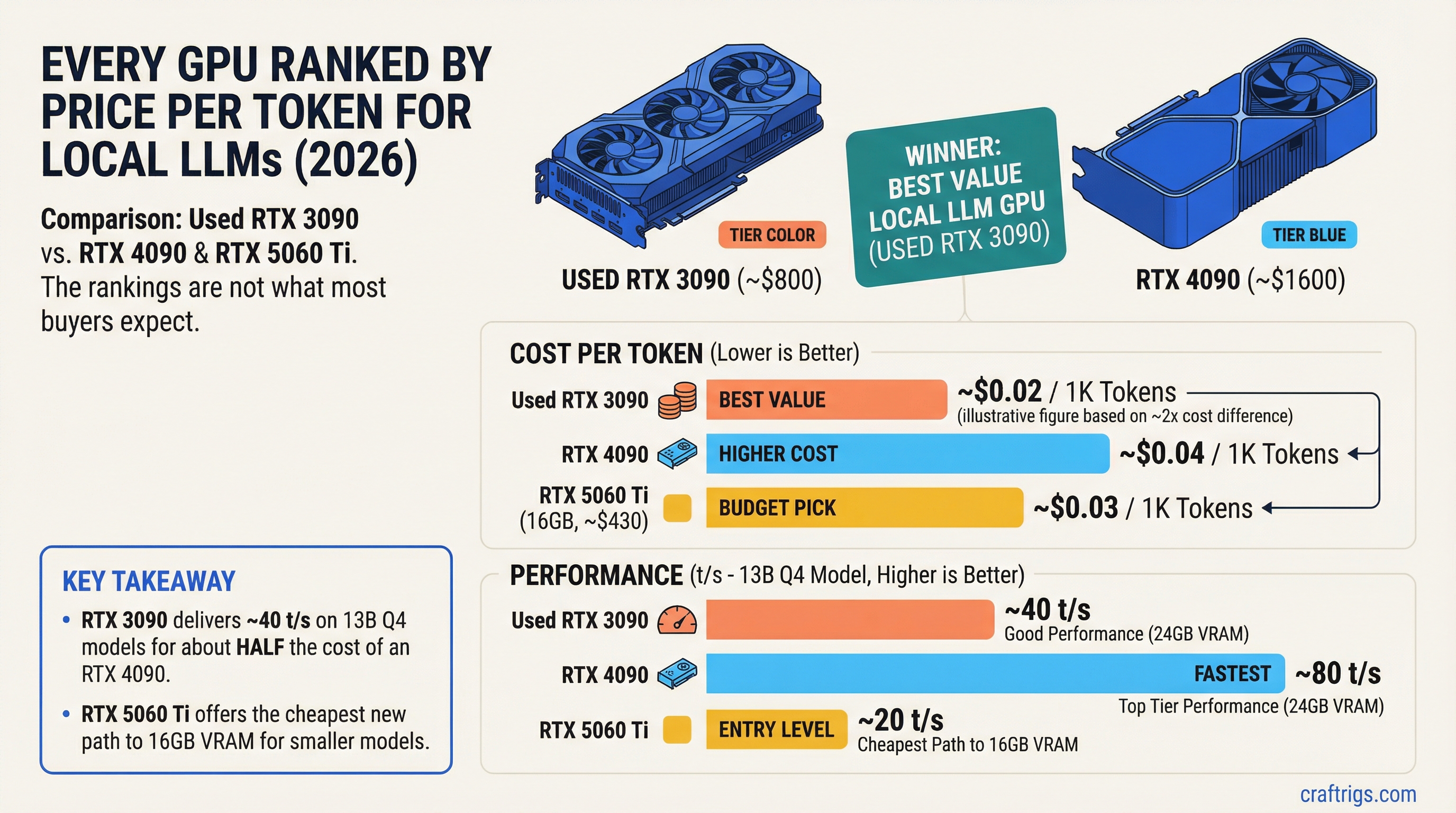
TL;DR: When you divide performance by price, the used RTX 3090 (~$800) is the best value GPU for local LLMs in 2026. It delivers 24GB of VRAM and ~40 t/s on 13B Q4 models for about half the cost of an RTX 4090. For new cards, the RTX 5060 Ti 16GB (~$430 MSRP) offers the cheapest path to 16GB of VRAM. The RTX 5090 is the fastest single card but the worst value per dollar. Here's every GPU ranked.
| Budget | Best pick | VRAM | 13B Q4 speed | Value score |
|---|---|---|---|---|
| Under $300 | RTX 3060 12GB (used) | 12 GB | 14–18 t/s | 6.4 / $100 |
| Under $500 | RTX 5060 Ti 16GB (new) | 16 GB | 28–33 t/s | 7.1 / $100 |
| Under $900 | RTX 3090 24GB (used) | 24 GB | 40–45 t/s | 5.3 / $100 |
| Under $1,700 | RTX 4090 24GB | 24 GB | 90–100 t/s | 5.9 / $100 |
| No limit | RTX 5090 32GB | 32 GB | 120–142 t/s | 6.6 / $100 |
Value score = t/s per $100 spent, 13B Q4_K_M benchmark. Higher is better for pure price-efficiency.
On this page:
- Methodology
- The Full Ranking
- Tier 1: Best Value
- Tier 2: Strong Performance
- Tier 3: Premium
- Tier 4: Avoid
- Dual-GPU Value Play
- Complete Ranking Table
- How to Use This Ranking
Methodology
This ranking uses one metric: tokens per second per dollar spent on a standardized benchmark — running a 13B parameter model at Q4_K_M quantization using llama.cpp with Ollama.
Why 13B at Q4? Because it's the sweet spot where hardware differences actually show up. A 7B model runs fast on everything. A 70B model doesn't fit on most cards. 13B at Q4 (~8GB VRAM) stresses mid-range and high-end cards while remaining accessible to 12GB+ GPUs.
What we measure:
- Tokens per second (t/s): Generation speed during text output
- Street price: Actual purchase price as of March 2026 (new cards at retail, used cards at typical marketplace prices)
- Value score: t/s divided by price (in hundreds of dollars) — higher is better
What we DON'T factor in (but you should):
- VRAM capacity (a card with more VRAM runs bigger models — that matters independently of speed)
- Power consumption (relevant for ongoing electricity costs)
- Availability (some cards are hard to find)
These are called out in each entry so you can weigh them yourself.
The Full Ranking
Tier 1: Best Value (Buy These)
#1 — RTX 3090 (24GB) — USED
- Street price: ~$800 (used)
- 13B Q4 speed: ~40-45 t/s
- Value score: 5.3 t/s per $100
- VRAM: 24GB GDDR6X
- Bandwidth: 936 GB/s
- Power: 350W
- Availability: Plentiful on eBay, r/hardwareswap
The king of value. Nothing else in local AI hardware gives you this much capability per dollar. 24GB of VRAM means you can run everything from 7B to 34B models. The 936 GB/s bandwidth keeps token generation fast. And at $800 used, it costs half of what an RTX 4090 costs.
The catch: 350W power draw means you need a beefy PSU (850W+), and it runs hot. Also, it's a used card — no warranty, and mining history is possible. Buy from sellers with return policies.
Who should buy this: Anyone building a local AI rig on a budget. This is the default recommendation for a reason.
#2 — RTX 3090 Ti (24GB) — USED
- Street price: ~$900 (used)
- 13B Q4 speed: ~43-48 t/s
- Value score: 5.1 t/s per $100
- VRAM: 24GB GDDR6X
- Bandwidth: 1,008 GB/s
- Power: 450W
Slightly faster than the 3090 thanks to matching the 4090's memory bandwidth. Worth the $100 premium if you can find one. Same caveats: high power draw, used market only. The 450W TDP is aggressive — make sure your case has good airflow.
#3 — RTX 5060 Ti (16GB) — NEW
- Street price:
$430 MSRP ($499–540 street, June 2026) - 13B Q4 speed: ~28-33 t/s
- Value score: 7.1 t/s per $100 (calculated at MSRP)
- VRAM: 16GB GDDR7
- Bandwidth: 448 GB/s
- Power: 180W
The highest raw value score on this list. The RTX 5060 Ti delivers solid 13B performance at a street price that's hard to argue with. The 16GB of GDDR7 means it handles all 7B and 13B models with room for context, and can stretch to 14B models comfortably.
The limitation: 448 GB/s bandwidth is moderate. You'll feel the speed difference compared to a 3090 or 4090 on larger models. And 16GB caps you out before you reach the 27B-34B tier (tight fit at Q3, won't run Q4 for most 27B+ models).
Who should buy this: New builders who want modern hardware with a warranty. Best new GPU for the money if you're running 7B-14B models.
#4 — RTX 3060 12GB — USED
- Street price: ~$250 (used)
- 13B Q4 speed: ~14-18 t/s (tight VRAM, some CPU offload likely)
- Value score: 6.4 t/s per $100 (on 7B models where it runs fully in VRAM: ~25 t/s = 10.0 per $100)
- VRAM: 12GB GDDR6
- Bandwidth: 360 GB/s (192-bit bus, but wider effective bandwidth than the 4060)
- Power: 170W
The cheapest way to run local LLMs with enough VRAM to be useful. 12GB fits 7B models with huge context, 13B models at Q4 (tight), and Phi-4 14B at Q4 comfortably. Speed isn't going to blow your mind, but 15-25 t/s on the models that fit is perfectly usable.
Who should buy this: Students, experimenters, anyone who wants to try local AI for under $300 total GPU investment. See our budget guide for complete builds at this price point.
Tier 2: Strong Performance (Pay More, Get More)
#5 — RTX 4090 (24GB) — NEW/USED
- Street price: ~$1,600 (new/used prices have converged)
- 13B Q4 speed: ~90-100 t/s
- Value score: 5.9 t/s per $100
- VRAM: 24GB GDDR6X
- Bandwidth: 1,008 GB/s
- Power: 450W
The enthusiast standard. Double the speed of a 3090 on the same models. The 1,008 GB/s bandwidth makes everything feel instant — 7B models run at 130+ t/s, 32B models at Q4 still hit 30+ t/s. If you're running 24GB-class models daily and speed matters to your workflow, the 4090 justifies its price.
The value score is actually decent because the raw speed is so high. You're paying 2x the 3090's price for 2.2x the speed. That's a fair trade if performance matters to you.
Who should buy this: Power users, developers running coding models all day, anyone who's tried a 3090 and wants faster. Check our RTX 5090 vs 4090 comparison before deciding.
#6 — RTX 4070 Ti Super (16GB) — NEW
- Street price: ~$750
- 13B Q4 speed: ~55-65 t/s
- Value score: 8.0 t/s per $100
- VRAM: 16GB GDDR6X
- Bandwidth: 672 GB/s
- Power: 285W
The second-highest value score in the ranking. Faster than the 5060 Ti thanks to 50% more bandwidth, and the 16GB is sufficient for most people's daily models. The catch is that $750 is getting close to RTX 3090 used territory, and the 3090 gives you 24GB.
The decision comes down to: do you want 16GB at high speed (4070 Ti Super) or 24GB at moderate speed (3090)? For 7B-14B models, the 4070 Ti Super is faster. For 27B-34B models, only the 3090 has enough VRAM.
Who should buy this: Gamers who also want local AI. The 4070 Ti Super doubles as an excellent gaming card — the 3090 does too, but it's a generation older.
#7 — RTX 4080 Super (16GB) — NEW
- Street price: ~$900
- 13B Q4 speed: ~70-80 t/s
- Value score: 8.3 t/s per $100
- VRAM: 16GB GDDR6X
- Bandwidth: 736 GB/s
- Power: 320W
Slightly faster than the 4070 Ti Super for $150 more. The value math is almost identical. Honestly, the 4080 Super exists in a weird spot — it's not enough faster than the 4070 Ti Super to justify the premium, and it's not enough cheaper than a used 3090 to overcome the VRAM gap.
Who should buy this: People who find it on sale, or who want the 16GB speed tier with a bit more headroom than the 4070 Ti Super.
Tier 3: Premium (Paying for the Best)
#8 — RTX 5090 (32GB) — NEW
- Street price: ~$2,000 (MSRP $1,999)
- 13B Q4 speed: ~120-142 t/s
- Value score: 6.6 t/s per $100
- VRAM: 32GB GDDR7
- Bandwidth: 1,792 GB/s
- Power: 575W
The fastest consumer GPU for LLM inference, period. The 78% bandwidth increase over the 4090 translates to genuinely faster token generation across every model size. The 32GB VRAM means Q8 quantization on 27B models, Q4 on 70B models (tight but possible), and massive context windows on everything smaller.
But the value score tells the story: you're paying a 25% premium over the 4090 for ~50% more speed and 33% more VRAM. It's the best single card you can buy — it's just not the best value.
Who should buy this: People who need 32GB for larger models or Q8 quantization. People running 70B models where the extra VRAM makes or breaks the experience. Anyone whose time savings from 50% faster inference justifies the $400 premium over a 4090.
#9 — RTX 4060 Ti 16GB — NEW/USED
- Street price: ~$350 (used) / ~$400 (new)
- 13B Q4 speed: ~35-42 t/s
- Value score: 10.5 t/s per $100
- VRAM: 16GB GDDR6
- Bandwidth: 288 GB/s
- Power: 165W
Wait — the highest value score in the entire ranking? Yes, on paper. The RTX 4060 Ti 16GB is cheap, sips power, and generates tokens at a respectable clip. The 16GB of VRAM handles all 13B models comfortably.
So why isn't it #1? Bandwidth. At 288 GB/s, it hits a wall on larger models. A 27B model at Q3 will generate tokens painfully slowly. And the low bandwidth means prompt processing (the time before the model starts responding) is noticeably laggy on longer inputs. For 7B-13B daily driving, it's actually great. For anything bigger, the slow bandwidth becomes the bottleneck.
Who should buy this: Budget builders who need 16GB and can't afford the 4070 Ti Super. Excellent as a secondary GPU in a dual-card setup (see our Stable Diffusion + LLMs guide).
Tier 4: Avoid for Local AI
RTX 4060 (8GB) — ~$280 new
- 13B Q4: Won't fit. Limited to 7B models only.
- 8GB is the floor, not a comfortable place to live. Runs Llama 3.1 8B at 40-55 t/s — decent speed, but you'll outgrow 8GB fast. Read our 8GB VRAM analysis for the full picture.
RTX 4070 (12GB) — ~$500 new
- Decent card, but 12GB at $500 is a bad deal when a used 3060 12GB is $250 and a used 3090 24GB is $800. The 4070's only advantage is lower power draw (200W). Not worth the price premium for AI use.
RTX 3080 10GB — ~$400 used
- 10GB is an awkward size. Can't run 13B models at Q4 comfortably, and 7B models don't need 10GB. The 3090 at $800 is 2x the price for 2.4x the VRAM — much better deal.
Any GPU with 6GB or less
- Can technically run tiny models (1-3B parameters) but the experience is poor. If you have 6GB, experiment with Phi-3.5 Mini or Gemma 2B, but don't expect much.
The Dual-GPU Value Play
Two GPUs can be cheaper than one flagship. The math:
Dual RTX 3060 12GB: ~$500 total, 24GB combined VRAM
Runs 27B models split across both cards. Slower than a single 3090 (communication overhead), but costs $300 less. Only makes sense if you're running models that don't fit on a single 12GB card.
RTX 3060 12GB + RTX 3090 24GB: ~$1,050 total, 36GB combined VRAM
Different workloads on each card (image gen on the 3060, LLM on the 3090), or split a 70B model across both. Versatile and cost-effective. See our $3,000 dual-GPU build guide for the full setup.
Dual RTX 5060 Ti 16GB: ~$860 total, 32GB combined VRAM
Competes with a single RTX 5090 (32GB) at less than half the price. Trade-off: split-GPU inference is slower than a single card due to PCIe communication overhead. But for models that need 20-32GB, it's the cheapest way to get there with modern hardware.
The Complete Ranking Table
Sorted by value score (t/s per $100 on 13B Q4_K_M). Higher is better.
- RTX 4060 Ti 16GB — 10.5 value / 35-42 t/s / $350-400 / 16GB — Best on paper, bandwidth-limited in practice
- RTX 4080 Super — 8.3 value / 70-80 t/s / $900 / 16GB — Solid all-around
- RTX 4070 Ti Super — 8.0 value / 55-65 t/s / $750 / 16GB — Great mid-range
- RTX 5060 Ti — 7.1 value / 28-33 t/s / $430 / 16GB — Best new budget card
- RTX 5090 — 6.6 value / 120-142 t/s / $2,000 / 32GB — Fastest, most VRAM
- RTX 3060 12GB — 6.4 value / 14-18 t/s / $250 / 12GB — Cheapest entry
- RTX 4090 — 5.9 value / 90-100 t/s / $1,600 / 24GB — Enthusiast standard
- RTX 3090 — 5.3 value / 40-45 t/s / $800 / 24GB — Best overall recommendation
- RTX 3090 Ti — 5.1 value / 43-48 t/s / $900 / 24GB — Slightly faster 3090
How to Use This Ranking
Don't just buy the highest value score. The RTX 4060 Ti 16GB tops the value chart but its bandwidth limits make it frustrating on anything bigger than 13B. Context matters.
Instead, use this decision tree:
What models do you want to run?
- 7B models only: RTX 3060 12GB ($250) or RTX 5060 Ti ($430)
- 7B-14B models: RTX 5060 Ti 16GB ($430) or RTX 4070 Ti Super ($750)
- 14B-34B models: RTX 3090 ($800) or RTX 4090 ($1,600)
- 34B-70B models: RTX 5090 ($2,000) or dual-GPU setup
What's your budget?
- Under $300: RTX 3060 12GB (used)
- $400-500: RTX 5060 Ti 16GB (new)
- $700-900: RTX 3090 24GB (used) — the sweet spot
- $1,500-1,700: RTX 4090 24GB
- $2,000: RTX 5090 32GB
Do you also game?
If yes, lean toward newer architectures (5060 Ti, 4070 Ti Super, 4090) for better driver support, DLSS 4, and newer features. The 3090 is still fine for gaming, but it's a generation behind.
For detailed build guides at every price point, see our budget guide. For model-specific hardware requirements, check our VRAM guide and ultimate hardware guide.
Benchmarks and prices as of June 2026. Prices fluctuate — check current listings before purchasing. All benchmarks run on AMD Ryzen 7 7700X / 64GB DDR5 / Ollama latest with default settings. Benchmark sources: community data from llm-tracker.info and the llama.cpp benchmark discussions.