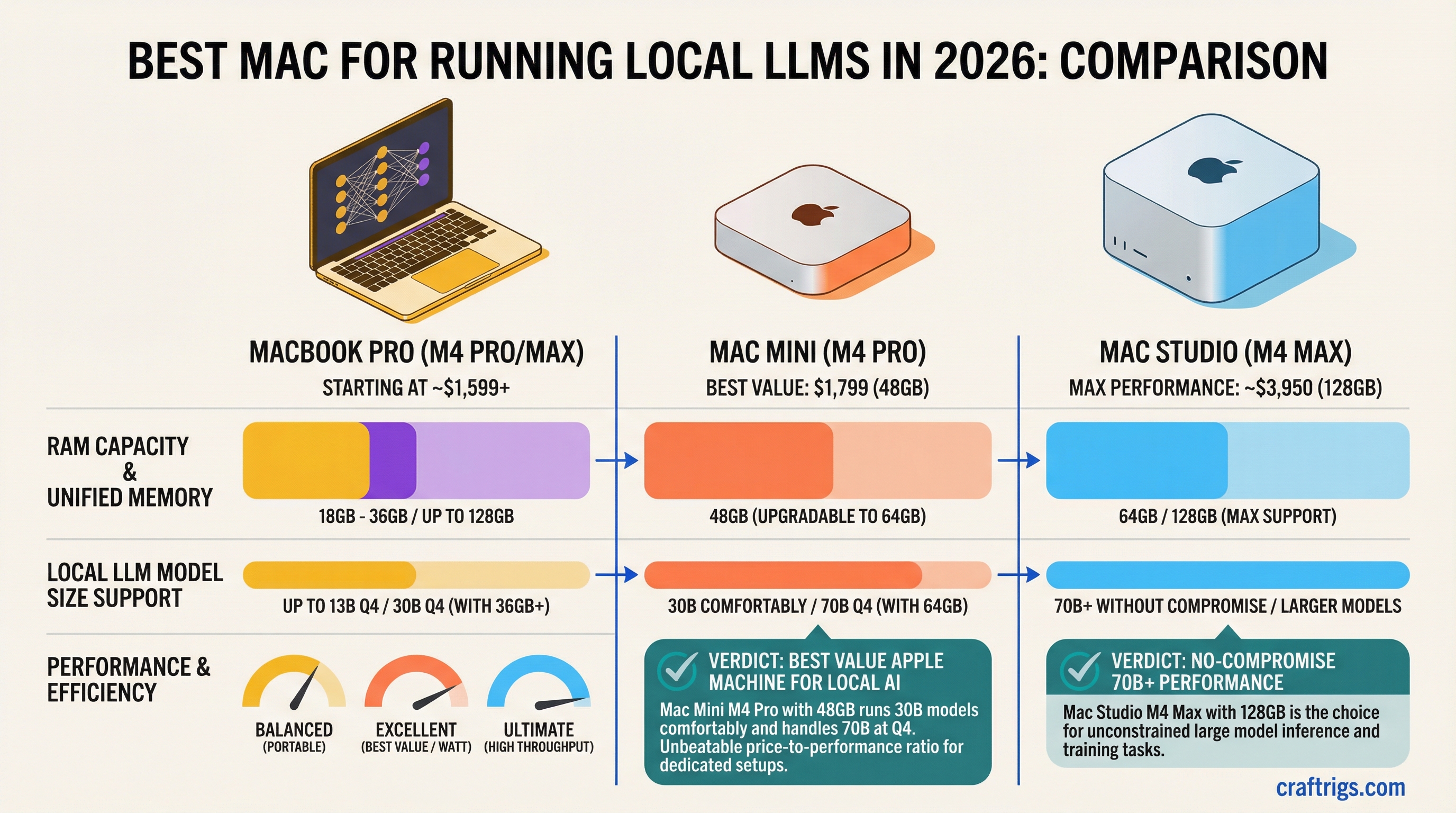
TL;DR: The Mac Mini M4 Pro with 48 GB ($1,799) is the best value Apple machine for local AI. It runs 30B models comfortably and can handle 70B models at Q4 if you upgrade to 64 GB. If you need 70B+ models without compromise, the Mac Studio M4 Max 128 GB (~$3,950) is the pick — reported results put 70B Q4 at ~11–12 tok/s with near-silent fans even in long sessions. The MacBook Pro is the pick only if you need portability — you're paying a premium for the screen and battery.
| Machine | Chip | Memory (max) | Bandwidth | Price range | Sweet spot |
|---|---|---|---|---|---|
| Mac Mini M4 | M4 | 16–32 GB | 120 GB/s | $599–$999 | 7B–8B models |
| Mac Mini M4 Pro | M4 Pro | 24–64 GB | 273 GB/s | $1,399–$1,999 | 13B–32B (70B at 64 GB) |
| Mac Studio M4 Max | M4 Max | 36–128 GB | 410–546 GB/s | $1,999–$3,950 | 70B daily use |
| MacBook Pro 16 M4 Max | M4 Max | 36–128 GB | 410–546 GB/s | $3,199–$4,800+ | 70B, portable |
| Mac Studio M3 Ultra | M3 Ultra | 96–512 GB | 819 GB/s | $3,999+ | 100B+ / DeepSeek-class |
Bandwidth figures are from Apple's Mac mini and Mac Studio spec sheets — bandwidth is the spec that sets your tokens-per-second ceiling, and capacity sets the largest model you can load. Run your model through the VRAM calculator before picking a memory tier.
On this page:
- Why Macs Run LLMs Differently
- MacBook Pro M4 Max
- Mac Mini M4 Pro
- Mac Studio M4 Max
- Memory Tier Guide
- Price-to-Performance Rankings
- Who Each Mac Is For
Why Macs Run LLMs Differently
Every Mac with Apple Silicon — from the $599 Mac Mini to the $10,000+ Mac Studio — runs LLMs using the same fundamental architecture: unified memory.
On a PC, your CPU has system RAM and your GPU has separate VRAM. The model weights need to live in VRAM for fast inference. When they don't fit, you're stuck offloading to system RAM over a narrow PCIe bus.
On Apple Silicon, the CPU and GPU share one pool of fast LPDDR5X memory. There's no offloading penalty because there's nothing to offload to — everything is already accessible to both the CPU and GPU at full memory bandwidth. For a direct comparison of how this stacks up against a discrete GPU like the RTX 4090, see the M4 Max vs RTX 4090 breakdown.
This means the two specs that determine LLM performance on a Mac are:
- Memory capacity — How large a model can you load?
- Memory bandwidth — How fast can the chip read model weights to generate tokens?
Unified memory is the total pool of RAM available to everything — the OS, your apps, and the AI model. When Apple says "48 GB unified memory," that's the same memory your browser, Slack, and the LLM share. Expect the OS and background apps to consume 4–8 GB, so a 48 GB machine gives you roughly 40–44 GB for model weights and context.
MLX is Apple's machine learning framework (open source on GitHub), built specifically for Apple Silicon. It's typically the fastest way to run LLMs on a Mac — community benchmarks generally show it ahead of Ollama (which uses llama.cpp under the hood) on the same hardware. The reference dataset for raw llama.cpp numbers is the official Apple Silicon benchmark thread, which pegs the M4 Pro (20-core GPU) at ~51 tok/s and the M4 Max (40-core GPU) at ~83 tok/s generating with a 7B Q4_0 model. For numbers across every M-series chip, see the full Apple Silicon LLM benchmarks.
MacBook Pro M4 Max: Portable Power, Premium Price
Who it's for: Developers, researchers, and creators who need to run large models while traveling or working from coffee shops. People who can't or won't have a dedicated desktop machine.
The hardware (16-inch, top config):
- M4 Max: 16-core CPU, 40-core GPU
- Up to 128 GB unified memory
- Memory bandwidth: 546 GB/s
- 16.2" Liquid Retina XDR display (3456 x 2234)
- Up to 24 hours battery life (not during LLM inference)
- Thunderbolt 5
LLM performance (128 GB config):
- Llama 3.3 70B Q4: ~11.8 tok/s
- Qwen 2.5 32B Q4: ~24 tok/s
- Llama 3 8B Q8: ~55 tok/s
- Mistral Large 123B Q4: ~6.6 tok/s
What you're paying for: The display, the battery, and the form factor. The M4 Max chip itself is the same silicon whether it's in a MacBook Pro or Mac Studio. You're paying a ~$800–$1,000 premium over the Mac Studio for the same chip with a screen attached.
The thermal reality: Under sustained LLM inference, the MacBook Pro's CPU and GPU can hit 100–103°C. The fans spin up noticeably. Power draw is ~130W at the wall — plugged in, you're fine. On battery, expect heavy inference to drain the battery in 2–3 hours, not the 24 hours Apple quotes for video playback.
Pricing (as of February 2026):
- M4 Max, 36 GB, 1 TB: ~$3,199
- M4 Max, 48 GB, 1 TB: ~$3,499
- M4 Max, 128 GB, 2 TB: ~$4,800+
If you're cross-shopping a MacBook Pro M4 Max against the new M5 Max or a discrete GPU desktop, the head-to-head against an RTX 5080 shows where 88 tok/s on Llama 13B finally matches a $1,500 card.
The honest take: If you're buying a MacBook Pro primarily for LLMs, you're overspending. The Mac Studio gives you the same chip, better thermals, and saves you $800+. Buy the MacBook Pro if you genuinely need a laptop that happens to also run 70B models.
Mac Mini M4 Pro: Best Value Apple AI Machine
Who it's for: Anyone who wants to run local LLMs on Apple Silicon without breaking the bank. Budget-conscious developers. First-time local AI experimenters. People who already have a monitor.
The hardware:
- M4 Pro: 14-core CPU (10P + 4E), 20-core GPU
- Up to 64 GB unified memory
- Memory bandwidth: 273 GB/s
- Thunderbolt 5
- Tiny form factor (5 x 5 inches)
LLM performance (48 GB config):
- Llama 3 8B Q4: ~38–42 tok/s
- Qwen 2.5 32B Q4: ~12–18 tok/s
- Mistral Nemo 12B Q4: ~30–35 tok/s
- 70B models: Don't fit comfortably at 48 GB (model is ~40 GB, leaving only 8 GB for OS + context)
LLM performance (64 GB config):
- 70B Q4 models: ~6–8 tok/s (fits with decent context headroom)
- 30B Q4 models: ~12–18 tok/s (comfortable)
Pricing (as of February 2026):
- M4 Pro, 24 GB, 512 GB: $1,399
- M4 Pro, 48 GB, 512 GB: ~$1,599
- M4 Pro, 48 GB, 1 TB: $1,799
- M4 Pro, 64 GB, 1 TB: ~$1,999
The honest take: The Mac Mini M4 Pro 48 GB at $1,799 is the best entry point for serious local AI on Apple Silicon. It comfortably runs anything up to 32B parameters and can stretch to 70B if you upgrade to 64 GB. The 273 GB/s bandwidth is exactly half the M4 Max's 546 GB/s — for a detailed breakdown of what that bandwidth gap means in practice, see M4 Pro vs M4 Max for Local AI. Dollar-for-dollar, the Mac Mini wins.
The limitation: 273 GB/s bandwidth means 70B models generate at 6–8 tok/s — usable but slow. If 70B is your primary use case, you'll want the M4 Max's bandwidth. But if you mostly run 8B–32B models with occasional 70B sessions, the Mac Mini M4 Pro is the smart buy.
Mac Studio M4 Max: The Pro Setup
Who it's for: Serious local AI practitioners who need to run 70B+ models daily. Developers building AI products. Researchers who need sustained inference without thermal throttling.
The hardware:
- M4 Max: up to 16-core CPU, 40-core GPU
- Up to 128 GB unified memory
- Memory bandwidth: up to 546 GB/s
- Desktop form factor (better thermals than MacBook)
- Thunderbolt 5
- Front-facing ports (convenient for quick connections)
LLM performance (128 GB config, same chip as MacBook Pro M4 Max):
Performance numbers are identical to the MacBook Pro M4 Max since it's the same silicon. The Mac Studio advantage is sustained performance — desktop thermals mean the chip can maintain boost clocks longer without throttling.
- Llama 3.3 70B Q4: ~11–12 tok/s
- Qwen 2.5 72B Q4: ~10.9 tok/s
- Llama 3 8B Q8: ~55 tok/s
- Mistral Large 123B Q4: ~6.6 tok/s
Want to get Llama 70B actually running on one of these machines? See the step-by-step guide to running Llama 3 70B on a Mac.
Pricing (as of February 2026):
- M4 Max, 36 GB, 512 GB: $1,999 (base)
- M4 Max, 36 GB, 1 TB: ~$2,199
- M4 Max, 48 GB, 1 TB: ~$2,699
- M4 Max, 64 GB, 1 TB: ~$3,299
- M4 Max, 128 GB, 1 TB: ~$3,950
The Mac Studio M3 Ultra option: Apple also sells the Mac Studio with an M3 Ultra chip, offering up to 512 GB of unified memory and 819 GB/s bandwidth. Starting at $3,999 for 96 GB, it can run models like DeepSeek-R1 671B at Q4 (which requires ~350 GB). This is extreme territory — most users don't need it — but if you're building AI infrastructure or working with massive models, the M3 Ultra Mac Studio is the only sub-$10,000 machine that can do it.
The honest take: The Mac Studio M4 Max 128 GB at ~$3,950 is the best high-end Apple AI machine, period. Same chip as the $4,800+ MacBook Pro, better thermals, $800+ cheaper. Unless you need portability, this is the one.
Memory Tier Guide: Which Config for Which Models
This is the most important decision you'll make. Get the memory right and the chip choice becomes secondary.
16 GB (Mac Mini M4 base):
- Runs 7B models at Q8 (7.7 GB) with headroom for context
- Runs 8B models at Q6_K (6.6 GB) cleanly
- Cannot run 13B+ models at any practical quantization
- Bottleneck: memory bandwidth (~120 GB/s on base M4) limits speed to 25–35 tok/s on 7B Q4
- Good for: Getting started with local LLMs, running smaller models, testing the ecosystem before upgrading
24 GB (Mac Mini M4 Pro entry, MacBook Pro entry):
- Runs 8B models at Q8 (full quality) comfortably
- Runs 13B models at Q4 with decent context
- Cannot run 30B+ models practically
- Good for: Learning, experimenting, running coding assistants like Codestral 22B at tight quantization
48 GB (Mac Mini M4 Pro, MacBook Pro M4 Max entry):
- Runs 32B models at Q4 comfortably (~18 GB model + headroom)
- Runs Mixtral 8x7B MoE at Q4 (~26 GB)
- 70B Q4 technically fits but leaves only ~8 GB for OS + context — not recommended
- Good for: Daily driver for 13B–32B models, occasional large model experiments
64 GB (Mac Mini M4 Pro max, Mac Studio M4 Max, MacBook Pro M4 Max):
- Runs 70B Q4 models (~40 GB) with 20+ GB headroom for context and OS
- Runs 70B Q6 models (~55 GB) tightly
- Good for: Regular 70B model usage, the sweet spot for most serious users
96 GB (Mac Studio M4 Max, MacBook Pro M4 Max):
- Runs 70B Q8 models (~80 GB) comfortably — higher quality than Q4
- Good for: Quality-focused 70B usage, running multiple smaller models simultaneously
128 GB (Mac Studio M4 Max top, MacBook Pro M4 Max top):
- Runs 70B Q8 with massive context windows
- Runs 100B+ models at Q4 (Mistral Large 123B Q4 is ~70 GB)
- Runs Mixtral 8x22B MoE at Q4 (~48 GB) with room to spare
- Good for: Maximum model size on Apple Silicon, research, production workloads
Price-to-Performance Rankings
Ranking by tokens per second per dollar spent on Llama 3 8B Q4 (the universal benchmark):
- Mac Mini M4 Pro 48 GB ($1,799) — ~38–42 tok/s → ~$45 per tok/s
- Mac Studio M4 Max 36 GB ($1,999) — ~52–59 tok/s → ~$37 per tok/s
- Mac Mini M4 Pro 24 GB ($1,399) — ~38–42 tok/s → ~$36 per tok/s
- Mac Studio M4 Max 128 GB (~$3,950) — ~55 tok/s → ~$72 per tok/s
- MacBook Pro 16 M4 Max 48 GB ($3,499) — ~52–59 tok/s → ~$63 per tok/s
- MacBook Pro 16 M4 Max 128 GB (~$4,800) — ~55 tok/s → ~$87 per tok/s
But this ranking reverses for 70B models, where memory capacity is the gating factor:
- Mac Studio M4 Max 128 GB (~$3,950) — Only desktop that runs 70B smoothly
- MacBook Pro M4 Max 128 GB (~$4,800) — Same performance, portable
- Mac Mini M4 Pro 64 GB (~$1,999) — Runs 70B at 6–8 tok/s (slower but works)
- Everything else — can't run 70B
Who Each Mac Is For
- "I just want to try local AI" → Mac Mini M4, 16 GB, $599. Runs 8B models. See if you like it before spending more.
- "I want a daily-driver AI machine for coding and chat" → Mac Mini M4 Pro, 48 GB, $1,799. Runs 13B–32B models fast. Best value.
- "I need 70B models and I'm on a budget" → Mac Mini M4 Pro, 64 GB, ~$1,999. Slower than M4 Max but it works.
- "I run 70B models every day and want the best desktop experience" → Mac Studio M4 Max, 128 GB, ~$3,950. No compromises.
- "I need portability and big models" → MacBook Pro 16 M4 Max, 128 GB, ~$4,800+. The only laptop on earth that runs 70B smoothly.
- "I'm running 100B+ models or need maximum memory" → Mac Studio M3 Ultra, 192–512 GB, $7,999+. Enterprise territory.
Related:
- M4 Max vs RTX 4090 for Local LLMs: Unified Memory Changes Everything
- How to Run Llama 3 70B on a Mac with 128 GB RAM
- M4 Pro vs M4 Max for Local AI: Is the Max Chip Worth It?
- Apple Silicon LLM Benchmarks: Every M-Series Chip Tested
- How Much VRAM Do You Actually Need?
- The Local AI Hardware Decision Framework