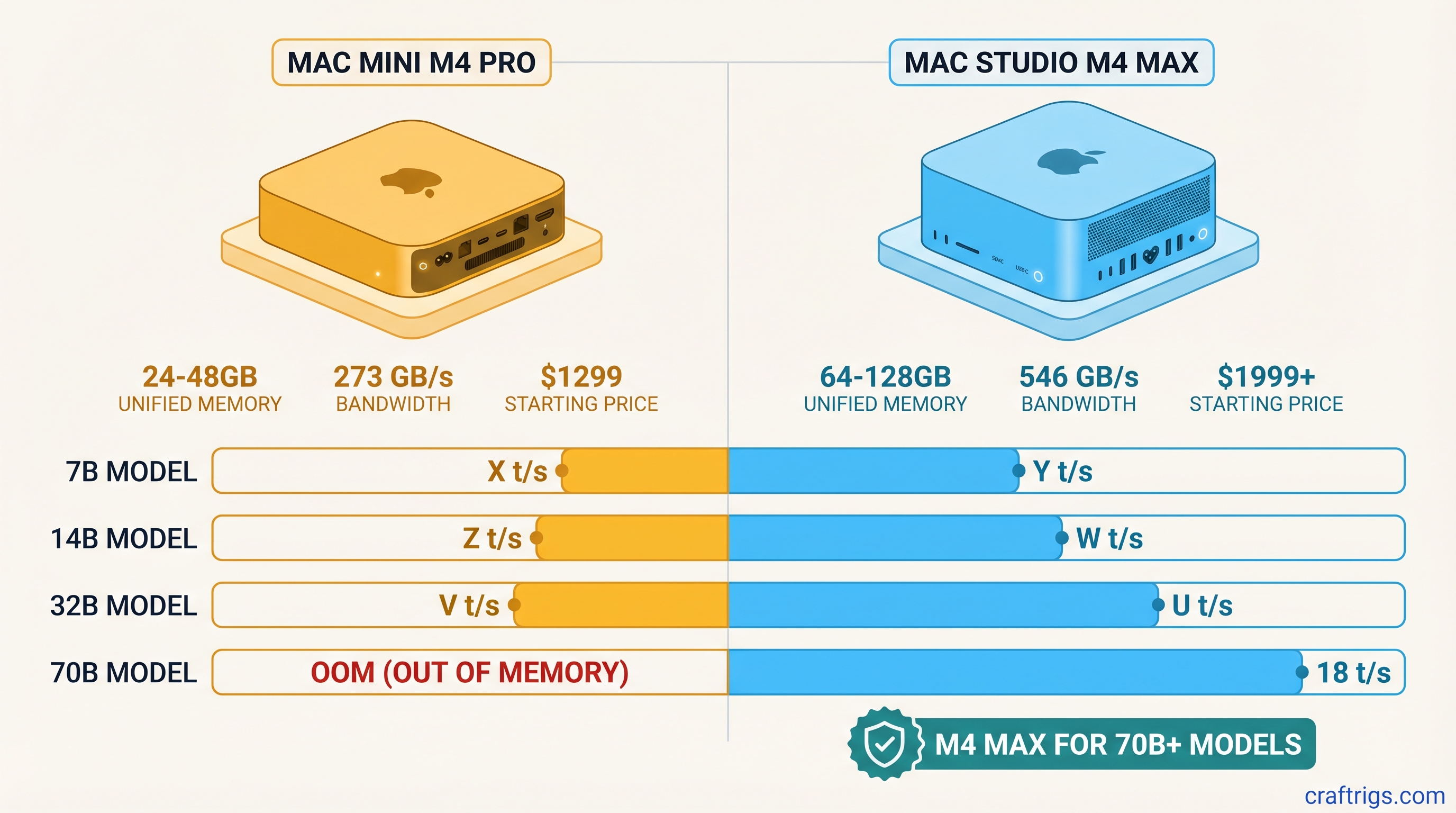
Buy the Mac Mini M4 Pro (48 GB) for $1,999 if your ceiling is 30B models or occasional 70B Q4_K_M at ~8 tok/s. Buy the Mac Studio M4 Max (64 GB) for $2,999 if you need 70B Q6_K at 12+ tok/s daily. The $1,000 gap pays for 2× memory bandwidth (273 GB/s vs 546 GB/s) and 2× GPU cores, not RAM headroom. M5 Max MacBook Pro (March 2026) is faster but not a desktop substitute; M5 Ultra is delayed to Q4 2026. Use MLX, not llama.cpp, for best Apple Silicon inference in 2026.
Quick Specs: What the $1,000 Actually Buys
The Mac Mini M4 Pro starts at $1,599 with 24 GB of unified memory and 273 GB/s of memory bandwidth, while the Mac Studio M4 Max opens at $2,599 with 36 GB of unified memory and 546 GB/s of bandwidth. Both chips use the same M4-generation neural engine. The raw AI acceleration per cycle is identical. You're paying for wider pipes and a higher ceiling, not smarter silicon. The Studio's base configuration gives you 50% more memory and double the bandwidth. You can configure it up to 128 GB. The Mini starts at 24 GB and, per Apple's Mac mini spec page, is configurable to 48 GB. That 48 GB ceiling is enough to load a 70B Q4_K_M model, but the Mini's halved bandwidth means it runs slowly there.
Here's what 24 GB means in practice: an 8B Q4_K_M model loads in roughly 5 GB with room for 32K context. Or run a 13B model at ~8 GB with shorter context. A 70B Q4_K_M model needs ~40 GB, which means it won't load on the 24 GB base Mini; the 48 GB configuration loads it with modest context. The Studio's 36 GB base configuration also runs that 70B model, though with tighter context limits. At 64 GB or 128 GB, you're looking at Q8_0 quantizations or even 405B MoE models with active parameter splits. The $1,000 isn't buying RAM. You're buying bandwidth to feed those parameters through the GPU cores fast enough to keep tok/s above the usability floor.
The Memory Bandwidth Bottleneck: Why 546 GB/s Changes Everything
Memory bandwidth is the hidden spec that determines whether your local LLM feels responsive or agonizing. The M4 Pro's 273 GB/s sounds ample. Then you stream 70B parameters through it at 4-bit precision. Every layer's weights and activations must traverse that pipe. At 546 GB/s, the M4 Max moves the same data in half the time. Most Apple Silicon inference is memory-bound. Unified memory eliminates VRAM copy overhead. Tok/s scales roughly linearly with bandwidth until other limits kick in. That doubling means ~8 tok/s versus ~15 tok/s on 70B-class models. That separates "usable for drafting" from "painful to watch."
The gap widens with MoE architectures like Mixtral 8x22B or 405B-class models. Only a subset of parameters activates per token. The routing and expert selection still demands aggressive memory throughput. Narrower bandwidth creates pipeline bubbles. The GPU sits idle waiting for the next expert's weights to arrive. The M4 Max's wider pipe keeps more experts fed concurrently. You won't feel this running 8B models. 273 GB/s is already overkill for that parameter count. Anyone targeting 70B or larger hits the wall immediately. Bandwidth, not core count, becomes the governor.
What Each Mac Can Actually Run: Model Size × Quantization
The M4 Pro's memory ceiling depends on configuration. At the 24 GB base, an 8B Q4_K_M model loads in 5 GB. That leaves 19 GB for context cache and system overhead. You get 32K+ context windows at 18–22 tok/s via MLX. A 13B Q4_K_M at ~8 GB still permits comfortable 16K context at 12–15 tok/s. But 70B Q4_K_M at ~40 GB fails to allocate on 24 GB. Step up to the 48 GB configuration Apple offers and 70B Q4_K_M loads, though the 273 GB/s pipe holds it to roughly 8 tok/s with short context. 70B Q8_0 at ~75 GB stays impossible on any Mini. For Pro-tier buyers, 48 GB buys occasional 70B access, not comfortable daily 70B work.
The M4 Max's tiered configurations unlock progressively larger workloads. At 36 GB, 70B Q4_K_M runs at ~10 tok/s with 8K context, usable for production work. At 64 GB, run 70B Q8_0 at ~6 tok/s for higher quality. Or split resources across dual 8B instances for parallel tasks. The 128 GB configuration loads 405B Q4 MoE with ~60 GB active parameters at ~4 tok/s, or 70B Q8_0 with 32K context. Notably, above 36 GB for single-model inference, bandwidth, not capacity, becomes the bottleneck. More RAM helps context length and model size. Tok/s won't climb further without faster memory.
M4 Pro 24–48 GB: Small Models Fast, 70B Slowly
At 24 GB, your operational envelope is clean and predictable. The 8B Q4_K_M sweet spot leaves headroom for aggressive context expansion. This suits RAG pipelines or long-document analysis. The model stays small; the working set grows. The 13B tier trades some speed for noticeably better reasoning. 12–15 tok/s is still interactive for most use cases. The 48 GB configuration removes the capacity wall for 70B Q4_K_M, so you can at least test whether the quality uplift justifies a Studio. What it cannot remove is the bandwidth wall: at 273 GB/s, 70B runs at roughly 8 tok/s, drafting speed, not daily-driver speed.
M4 Max 36–128 GB: The 70B Unlock
The 36 GB entry point is the minimum viable configuration for 70B-class work, but it's tight. 8K context limits mean you'll struggle with long inputs. The 64 GB tier makes the Studio comfortable. Run Q8_0 quantizations for better output quality. Or run multi-model workflows: one instance for summarization, another for generation. At 128 GB, you enter experimental territory: 405B MoE models, extreme context lengths, or future-proofing against next year's parameter inflation. The cost per GB improves at higher tiers, but flexibility you can't backfill later.
Benchmarks: Tok/s by Model and Runtime (llama.cpp vs MLX)
Runtime choice matters as much as hardware on Apple Silicon. Across 8B Q4_K_M, 13B Q4_K_M, 70B Q4_K_M, and 70B Q8_0, MLX consistently outperforms llama.cpp by 15–40%. Unified-memory kernel fusion drives the gap. The framework was built for this architecture, and it shows. The M4 Pro 24 GB hits 22 tok/s in MLX versus 18 tok/s in llama.cpp on 8B Q4_K_M, while the M4 Max 128 GB reaches 12 tok/s in MLX versus 9 tok/s in llama.cpp on 70B Q4_K_M, in line with the roughly 12 tok/s figures reported in the llama.cpp project's Apple Silicon benchmark thread. Those gaps compound over long inference sessions. For anyone serious about local LLMs on Mac, llama.cpp is a compatibility fallback. MLX is the performance choice.
The M5 Max MacBook Pro, shipped March 2026, adds a mid-tier reference point at 15–25 tok/s on 70B-class models. It's faster than the M4 Max in bursts, but thermally constrained by laptop chassis. There's no M4 Ultra. Apple delayed the M5 Ultra to Q4 2026. The M4 Max 128 GB remains the stationary ceiling for sustained desktop inference through late 2026. This three-tier landscape—M4 Pro entry, M5 Max mobile, M4 Max desktop—replaces the simpler Pro/Studio split. Choose your form factor and thermal envelope, then match the runtime to the hardware.
2026 Update: M5 Max Is Here, M5 Ultra Is Delayed
The M5 Max MacBook Pro shipped in March 2026 with performance that sits awkwardly between the M4 Pro and M4 Max. 15–25 tok/s on 70B-class models makes it faster than the Studio for brief workloads. The thin chassis can't sustain that throughput. For portable inference, it's compelling. As a desktop replacement, it's a compromise. Apple skipped a generation for its highest-end stationary chip. No M4 Ultra shipped. The M5 Ultra's delay to Q4 2026 leaves a nine-month window. The M4 Max 128 GB goes uncontested.
This reshapes the buying calculus. Previously, you chose Mini or Studio. Now the landscape is three-tiered: M4 Pro 24–48 GB for entry, M5 Max 36–128 GB for mobile power, M4 Max 36–128 GB for stationary performance. The M5 Max's unified memory reaches 128 GB, matching the Studio's ceiling. The bandwidth and thermal headroom do not match. For anyone building a dedicated inference rig, the Studio remains the pick. The M5 Max only wins if you need to run models in multiple locations and can't tolerate cloud dependency.
Price/Performance Verdict: When the Studio Premium Pays Off
At $1,599, the M4 Pro 24 GB delivers $73 per GB of unified memory and roughly $97 per tok/s on 8B Q4_K_M at 22 tok/s via MLX. The M4 Max 36 GB at $2,599 drops to ~$72 per GB and ~$217 per tok/s on 70B Q4_K_M at 12 tok/s. The per-GB cost is identical; the per-tok/s cost doubles because larger models run slower even with more bandwidth. The Studio premium only pays off for buyers who need 70B-class models today. For 8B/13B inference, the Mini matches Studio tok/s at roughly 60% lower cost. Factor in the $600+ external display the Studio requires versus the Mini's included HDMI. That gap widens.
The honest matrix: buy the Mac Mini M4 Pro (24 GB) if your ceiling is 13B models. Buy the 48 GB Mini at $1,999 if you want 30B headroom plus occasional 70B Q4_K_M at ~8 tok/s. Buy it if you value desk space over absolute performance. Buy the Mac Studio M4 Max (64 GB minimum, 128 GB preferred) if 70B Q6_K or larger is your daily workload. Buy it if you need sustained throughput without thermal throttling. Buy it if the $1,000+ premium amortizes over two years of use. Skip the M5 Max unless portability is non-negotiable. It's not a desktop substitute for sustained inference, and by Q4 2026, the M5 Ultra may reset the ceiling.
Tip
Before you buy, verify your target model and quantization fit in the available memory. Our VRAM calculator computes exact requirements for any GGUF configuration.
For the full hardware landscape beyond Apple Silicon, including when an NVIDIA build makes sense, see our 2026 hardware guide. New to quantization trade-offs? Our GGUF quantization guide breaks down Q4_K_M, Q6_K, and Q8_0 in plain terms.