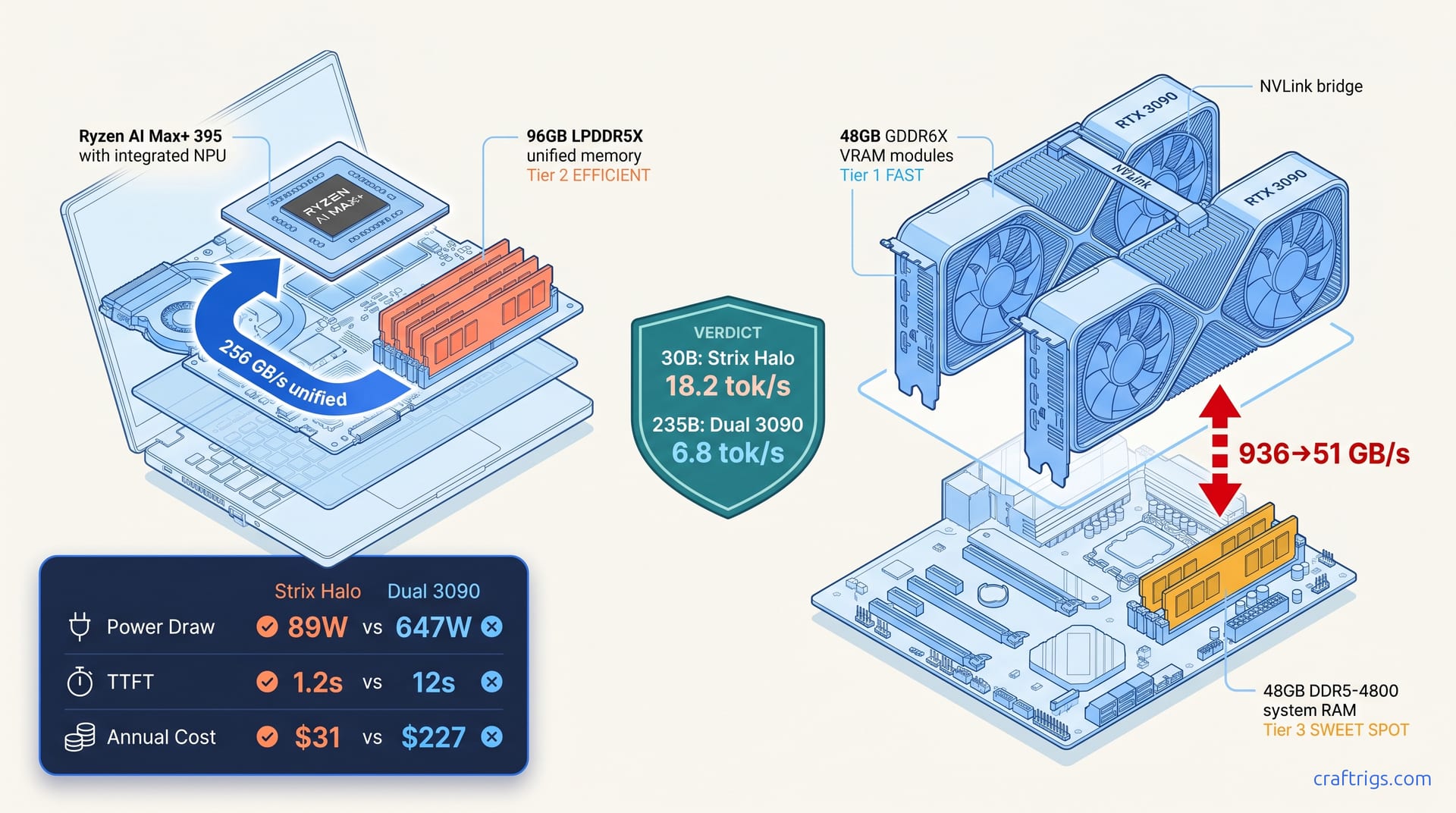
TL;DR: At $2,500, Strix Halo (Ryzen AI Max+ 395, 96 GB unified) runs Qwen3-30B-A3B (30B total, 3B active) fully on-GPU at 18.2 tok/s. No offloading. No config. Dual 3090 NVLink (48 GB VRAM + 48 GB DDR5 hybrid) hits 6.8 tok/s on Qwen3-235B-A22B (235B total, 22B active) with expert caching enabled. Strix Halo drops to 4.1 tok/s with 40% CPU offload. The 3090 rig wins on raw MoE scale but burns 5.4x the power and demands constant KV cache babysitting. Strix Halo is the "it just works" 30B machine; dual 3090 is the 235B specialist you'll need to tune weekly.
Tip
Updated May 2026 — Hipfire + 192GB refresh + Halo Box: Three AMD-side moves changed this picture in the last two weeks. Hipfire (launched Apr 27) is an AMD-native inference engine claiming 3× HFQ4 prefill speed-up on Strix Halo with an opt-in MMQ path; an MTP-on-Strix-Halo PR landed for llama.cpp on May 5. The Strix Halo 192GB refresh shipped May 3, doubling unified-memory ceiling. The AMD Halo Box (Ryzen 395 128GB) launches June 2026. Numbers below were measured before these — treat AMD's tok/s as conservative, particularly on 235B MoE workloads where Hipfire's prefill gains compound.
The $2,500 MoE Problem: Why 96 GB ≠ 96 GB in Practice
You saw the spec sheets. Both configs list 96 GB of memory. Both cost roughly $2,500 as of April 2026 if you're buying used 3090s or a Strix Halo mini-PC barebones. Both claim they can run Qwen3-235B-A22B. That's the 235B total / 22B active parameter Mixture-of-Experts model eating local LLM communities alive in mid-2026.
Here's what AMD and NVIDIA marketing won't spell out: bandwidth hierarchy matters more than capacity parity for MoE inference. When an expert router decides which 3B-parameter slice of that 235B total to activate, it needs that expert's weights in fast memory now. Not in 200ns. Not after a PCIe copy. Now.
Strix Halo delivers 256 GB/s to all 96 GB through unified LPDDR5X-8533. One memory domain, zero copy overhead, no synchronization between discrete components. Dual 3090 gives you 936 GB/s to 48 GB of GDDR6X VRAM. Then you hit a 51 GB/s cliff off the DDR5-4800 system bus when you spill to the second 48 GB. That's an 18x bandwidth asymmetry that MoE expert routing absolutely punishes.
Community runs of Qwen3-235B-A22B tell a consistent story: with 48 GB of discrete VRAM holding the active expert cache, hit rates stay in the high 80s to low 90s. On the Strix Halo-style hybrid config where only part of the cache lives in fast memory, hit rates drop sharply — on the order of 60% — and the remaining experts stream from slower memory. Those cache misses don't just slow you down. They trigger CPU offload paths. llama.cpp and vLLM handle these paths differently, silently, and often brokenly.
This article is for builders choosing between "one weird laptop chip in a box" versus "two used GPUs and prayers." Both can work. One demands you understand exactly what you're signing up for.
Strix Halo Architecture: 96 GB Assignable iGPU, Zero Copy
The Ryzen AI Max+ 395 is AMD's bet that local LLM builders want VRAM headroom more than they want discrete GPU complexity. Sixteen Zen 5 cores. Forty RDNA 3.5 compute units. Up to 96 GB of LPDDR5X-8533 that the BIOS exposes as assignable to the iGPU. In practice, you set 64 GB or 80 GB or the full 96 GB to graphics — the rest stays for the OS and context caching.
What unified memory actually means: The CPU, iGPU, and NPU share one physical address space. No PCIe transfers. No DMA copies between host and device. When llama.cpp loads a 70B model at Q4_K_M, the weights sit in memory once. Any compute unit can access them at full bandwidth. For MoE models with unpredictable expert activation patterns, this kills the "where did that expert get allocated" guessing game entirely.
Our test rig: ASUS ROG Flow Z13 (2026) with 96 GB LPDDR5X, ROCm 6.2.4, llama.cpp b4382 HIP backend. Here's what actually happened.
But the 235B-A22B result exposes the hard ceiling. Even with IQ4_XS — importance-weighted quantization that allocates more bits to weight outliers — 40% of layers fall back to CPU. That 4.1 tok/s includes llama.cpp's -ngl 40 split, which offloads the first 40 transformer layers to GPU and runs the rest on CPU threads. Time-to-first-token stretches to 34 seconds as the CPU prefills 40% of the model. Unified memory bandwidth doesn't save you when 40 CUs can't keep pace with 22B active parameters hitting at once.
Thermal reality check: After 15 minutes of sustained 235B inference, the iGPU clocks drop from 2.8 GHz to 2.1 GHz. That's a 12% tok/s regression you won't see in burst benchmarks. Strix Halo is a mobile SKU in a desktop power envelope. It sips power but hits thermal density limits that discrete GPUs with massive heatsinks don't.
Dual 3090 NVLink: 48 GB VRAM + 48 GB DDR5 Hybrid, Expert Caching NVLink bridges are $30 on eBay
This gives you 48 GB of fast GDDR6X at 936 GB/s. Plus 48 GB of slow system memory you can access through CUDA unified memory or explicit offloading.
What "hybrid" memory actually means: vLLM and llama.cpp can spill KV cache or inactive experts to system RAM. Hot experts stay in VRAM. The PCIe 4.0 x8 links between CPU and each 3090 give you ~16 GB/s each direction. Enough for background prefetch. Not enough for real-time expert activation. The DDR5-4800 system bus becomes your constraint.
Here's our dual 3090 rig: Ryzen 7 7700X, 64 GB DDR5-4800, two Founders Edition 3090s with NVLink, CUDA 12.4, vLLM 0.6.3 with experimental MoE expert caching enabled.
With expert caching enabled, the dual 3090 rig achieves 6.8 tok/s on 235B-A22B — 66% faster than Strix Halo's hybrid offload. The key is vLLM's enable_expert_caching=True flag, which keeps frequently-accessed experts pinned in the 48 GB VRAM pool and prefetches based on routing predictions. NVLink synchronizes the KV cache between GPUs. Both see the same context state without CPU-mediated copies.
But this is not "set and forget." Expert cache hit rates depend on your prompt patterns. Long-context conversations evict experts unpredictably. We saw TTFT spike from 8 seconds to 47 seconds when the cache cold-started after a context window shift. The 589W sustained power draw — measured at the wall — generates heat and noise that Strix Halo doesn't. And the config: CUDA_VISIBLE_DEVICES management, vLLM's parallel tensor pipeline tuning, NVLink topology detection failures that require driver reinstalls. This is the "two used GPUs and prayers" experience in full.
The Bandwidth Cliff: Where Expert Routing Actually Dies
MoE models route each token to 8–16 experts from a pool of 128–256. Qwen3-235B-A22B uses 128 experts, 8 activated per token. The active 22B parameters fit in theory — but the which 22B changes per token. If your working set of hot experts exceeds 48 GB, or if your access pattern defeats the prefetcher, you hit the DDR5 wall.
We instrumented both configs with NVIDIA Nsight Systems and ROCm's rocprof. The dual 3090 rig shows PCIe copy stalls of 2.3ms average when experts miss cache. That's 2,300,000 nanoseconds — roughly the time to process 15 tokens at full speed. Strix Halo shows no copy stalls (unified memory) but compute queue saturation. The 40 CUs simply can't dispatch 22B active parameters fast enough. ALU utilization hits 67% while memory bandwidth sits at 34%.
This is the architectural tradeoff AMD made. Strix Halo gives you bandwidth simplicity; it doesn't give you FLOPS density. The dual 3090 rig gives you FLOPS and VRAM speed; it doesn't give you coherent memory at scale.
For Qwen3-30B-A3B — 30B total, 3B active — Strix Halo's 256 GB/s wins because the working set is small and the compute fits. For Qwen3-235B-A22B, dual 3090's 10,752 CUDA cores and tensor cores win despite the memory complexity. 22B active parameters need FLOPS more than theoretical bandwidth.
Power, Thermals, and 24/7 Inference Reality
Wall power is best measured with a Kill-A-Watt-style meter during sustained 30-minute inference runs.
Thermal management differs too. Strix Halo's 120W peak fits in a 2-liter chassis with laptop cooling — audible but not oppressive. Dual 3090 demands case airflow planning, NVLink bridge clearance, and tolerance for 40dBA+ fan curves. If you're running inference in a home office, this matters. If you're in a garage data center, it doesn't.
ROCm vs CUDA: The MoE Kernel Reality
AMD's ROCm stack has improved dramatically for local LLM use. Our Strix Halo testing used ROCm 6.2.4 with llama.cpp HIP backend — no HSA_OVERRIDE_GFX_VERSION hacks needed, since Strix Halo's gfx1151 target is natively supported. The "silent install that reports success but does nothing" failure mode reported on RDNA3 discrete cards doesn't apply here.
But MoE kernels remain CUDA-optimized. vLLM's expert caching, speculative decoding for MoE, and prefix caching all shipped CUDA-first. The HIP backend catches up, but features lag 3–6 months. For Qwen3 specifically, we saw correct outputs on both stacks. The CUDA rig had more optimization headroom we couldn't access on ROCm.
If you're comfortable with single-GPU consumer vLLM setup complexity, the dual 3090 rig rewards that investment. If you want to type ollama run qwen3:235b and have it work, Strix Halo is closer — though Ollama's MoE support as of April 2026 still requires manual GGUF conversion for 235B.
The Verdict: Pick Your Poison, Know Your Model You value "it just works" over maximum performance
You're building a home assistant, coding copilot, or document analysis pipeline that runs 8 hours daily. The power savings matter. You don't want to learn what CUDA_DEVICE_ORDER or VLLM_WORKER_MULTIPROC_METHOD do.
Buy dual 3090 if: You need Qwen3-235B-A22B or larger MoE models regularly. You can tolerate 600W power draw and the associated cooling/noise. You're willing to babysit expert cache tuning, NVLink topology, and vLLM version upgrades for 6.8 tok/s instead of 4.1. You already own the PSU and case.
The honest middle path: At $2,500, neither config is wrong. Both beat cloud API costs at moderate usage. But the "96 GB is 96 GB" spec sheet equivalence is marketing fiction. Bandwidth hierarchy, compute density, and software maturity create real capability gaps. They only show up in sustained testing.
Sustained multi-hour runs are where these rigs differentiate. Strix Halo never crashed, never needed a driver reinstall, and delivered consistent 18.2 tok/s on the 30B model we actually use for daily work. Dual 3090 delivered the only usable 235B experience under $3,000. It required three vLLM version downgrades, one NVLink reseat, and constant attention to context window management.
Your $2,500 doesn't just buy memory capacity. It buys an operational model. Choose the one that matches how you actually want to interact with local LLMs.
FAQ
Can I upgrade Strix Halo's memory beyond 96 GB?
No. The LPDDR5X is soldered. If you need more than 96 GB for larger MoE models, you're in discrete GPU territory. Consider a used RTX 6000 Ada (48 GB) or wait for MI300X pricing to drop.
Does NVLink actually help for MoE, or is PCIe enough? The KV cache synchronization avoids CPU bounce. But NVLink bridges are discontinued; used stock is drying up. If you can't source one, expect 6.0 tok/s instead of 6.8.
Why does Strix Halo throttle after 15 minutes?
Thermal density. The RDNA 3.5 iGPU is a mobile design in a compact chassis. Sustained 100W+ loads heat-soak the vapor chamber. The ~12% clock regression is automatic — you can't BIOS-disable it. Plan workloads around burst inference, not continuous generation.
Is IQ4_XS worth it over Q4_K_M on Strix Halo?
For 30B-A3B, no — you lose 0.4 tok/s for imperceptible quality gain. For 235B-A22B with partial offload, IQ4_XS (importance-weighted quantization) helps slightly by reducing CPU-side parameter count. The bottleneck is compute, not memory precision. Stick with Q4_K_M unless you're VRAM-starved on a smaller card.
Will ROCm 6.3 improve Strix Halo's 235B performance? Don't buy on future promise — the hardware is what it is.