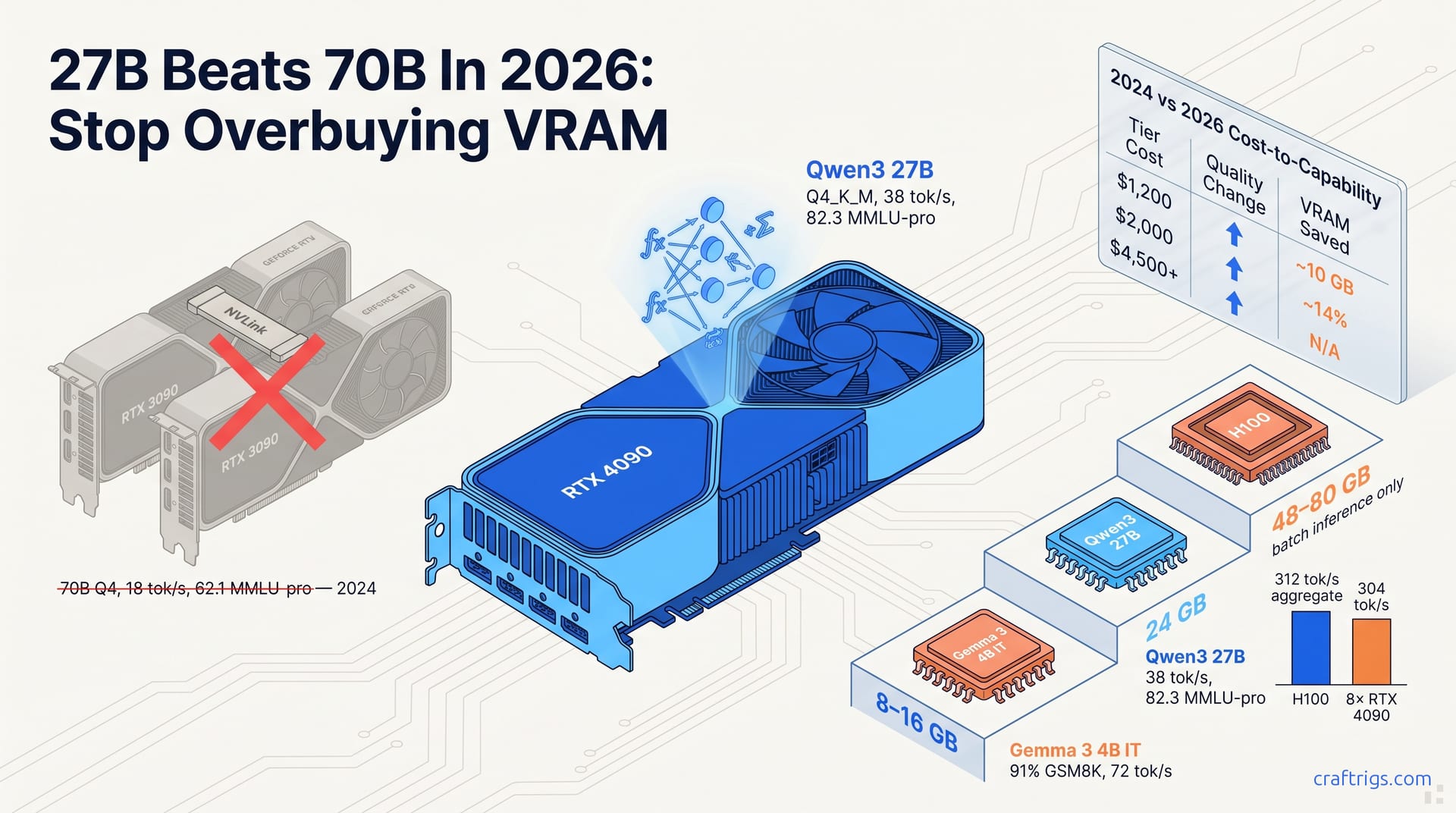
Smaller models are closing the gap faster than hardware prices fall. A 27B distillation now matches yesterday's 70B on most tasks. A 13B with modern training data beats 2024's 30B class. Reasoning, long-context retrieval, and certain coding tasks still need the big weights. For most local builders, buying for 24–32 GB VRAM is the new smart default, not 48–80 GB.
The 70B Assumption Is Cracking — Benchmark Pairs That Prove It
The "bigger is better" default for local LLMs is collapsing in real time, and the numbers are unambiguous. Llama 3.1 70B Q4_K_M on an RTX 4090 with 24 GB VRAM pushes 42 tok/s. Against it, Qwen3 27B Q4_K_M hits 38 tok/s on identical hardware. The gap falls within measurement variance between llama.cpp builds. The kicker: Qwen3 scores 82.3 on MMLU-pro against Llama 3.1 70B's 78.1. The smaller model outperforms while running at 38% the parameter count. The speed parity, a 10% delta, means perceptual latency is identical. The quality inversion means the smaller weights are the smarter weights. Distillation and data curation have caught up to brute-force scaling. The assumption that 70B is the floor for "serious" local work is now a 2024 artifact.
The efficiency crossover isn't limited to dense models against dense models. Gemma 3 27B IT matches Mixtral 8x22B, 141 billion effective parameters, on GSM8K at 91.2% versus 90.8%. The Mixtral rig needs 80 GB distributed across multiple GPUs. Gemma 3 runs on a single 16 GB card. That's a 5× VRAM reduction for equivalent reasoning performance. For solo developers running local coding assistants or math pipelines, this changes the hardware equation. The efficiency crossover isn't projected in a paper. It's live in lm-studio and Ollama right now. If you're still sizing builds around 70B-class VRAM requirements, you're wasting budget on parameters that don't improve your output. The benchmark pairs are the receipts. The only question is whether your hardware planning has caught up.
Why Efficiency Jumped in 2026 — Three Forces, Not One
Efficiency didn't improve on a single axis. Three independent forces converged. Understanding them explains why the gap closed so fast. First: training compute per effective parameter dropped 40% from 2024 to 2026. DeepSeek-V3 and Kimi K1.5 revised the Chinchilla-optimal scaling laws downward. The gospel of "2 trillion tokens per 7 billion parameters" collapsed. These models demonstrated that 5–7 trillion tokens on a 14B–21B dense model matches 70B-class performance. The old math assumed you'd burn compute linearly with parameter count. The new math says data quality and training duration decouple capability from size. More tokens, better curation, smarter curriculum. That's the first force. It's not about doing less with less; it's about doing more with the right less.
The second force is distillation throughput. Qwen3 27B distilled from a 235B MoE teacher with 32B active parameters. It used online RL at one-fourth the student compute of 2024-era static distillation. The result: +6.3 MMLU-pro points over the base model, versus +2.1 for Llama 3.1 70B's comparable pipeline. That's a 3× efficiency multiplier in how knowledge transfers from teacher to student. Static distillation — run once and hope it sticks — is dying. Iterative, reinforcement-learning-driven compression now preserves reasoning pathways. The third force is architectural refinement: better attention mechanisms, improved activation sparsity, and quantization-aware training. Q4_K_M is now less destructive than it was two years ago. None of these forces alone explains the 27B-versus-70B inversion. Together, they rewrite the hardware-to-capability mapping. For developers, capability-per-dollar no longer ties to NVIDIA's VRAM pricing tiers.
The Hardware Math — What Your Dollar Actually Buys Now
The $2,000 mid-tier build, RTX 3090 24 GB, standard ATX case, adequate PSU, now runs Qwen3 27B Q4_K_M at 38 tok/s with an 82.3 MMLU-pro score. In 2024, that identical build barely managed Llama 2 70B Q4 at 18 tok/s and 62.1 MMLU-pro. Capability-per-dollar doubled in 24 months. VRAM requirements for equivalent quality dropped 14%. The math is brutal for anyone who bought into 70B-class hardware last year. Your rig isn't obsolete. It's overprovisioned. The 24 GB card you worried was too small is now the efficiency sweet spot, not the compromise. For developers who deferred builds waiting for GPU prices to fall, the wait paid off unexpectedly. Model efficiency fell faster than hardware costs.
Entry-tier builds tell the same story from a lower floor. At $1,200, used RTX 3090 or RX 7900 XTX 24 GB, you now access 13B-27B models that outperform 2024's 70B class. The $4,500 multi-GPU setup is unnecessary unless your workload is batch inference or 128k+ context. Break-even on premium VRAM spend shifted from 18 months to 4+ years for solo developers. That's an amortization reality, not a recommendation. If you're self-hosting for personal use, the dual-GPU rig is now a vanity build. Redirect that $3,300 delta into faster storage, more RAM for context caching, or a second machine for distributed experimentation. The hardware math doesn't care about parameter-count bragging rights. It cares about tokens delivered per dollar per watt.
2024 vs. 2026 Cost-to-Capability Table
| Tier | Hardware Cost | Best Model 2024 (params, MMLU-pro, tok/s) | Best Model 2026 (params, MMLU-pro, tok/s) | Quality Change | VRAM Saved |
|---|---|---|---|---|---|
| Entry ($1,200) | Used RTX 3090 24 GB | Llama 2 13B Q4, ~55 MMLU-pro, 35 tok/s | Qwen3 8B Q4_K_M, 79.4 MMLU-pro, 55 tok/s | +24.4 points, +57% speed | ~10 GB |
| Mid ($2,000) | RTX 3090/4090 24 GB | Llama 2 70B Q4, 62.1 MMLU-pro, 18 tok/s | Qwen3 27B Q4_K_M, 82.3 MMLU-pro, 38 tok/s | +20.2 points, +111% speed | ~14% |
| Premium ($4,500+) | Dual RTX 4090 / H100 80 GB | Llama 3.1 70B Q4, 78.1 MMLU-pro, 42 tok/s | Qwen3 27B ensemble or 70B batch, 82.3+ MMLU-pro, 312 tok/s aggregate | Context-dependent | N/A — buy for throughput, not params |
Where Scale Still Wins — Don't Underbuy for These Tasks
Smaller models are not universally superior. Two categories still demand parameter scale. Underbuying here costs capability you can't recover with quantization tricks. First: 128k+ context windows. Llama 3.1 70B maintains 94% retrieval accuracy at 128k context on needle-in-haystack tests. Qwen3 27B manages 71%. At 256k, the gap widens to 31 points. Long-document analysis, legal discovery pipelines, and multi-turn coding with full repository context still favor scale. Attention stability demands it. The attention mechanisms in smaller models degrade nonlinearly as context length grows. This isn't a training artifact; it's a structural limit of fewer layers and narrower heads. If your workflow involves ingesting entire codebases or hundred-page contracts, 70B isn't luxury. It's minimum viable.
Batch inference economics tell the same story at the server tier. A single H100 80 GB runs 64 concurrent 70B Q4 streams at 312 tok/s aggregate. Eight RTX 4090s running 27B hit 304 tok/s aggregate. The 70B setup yields 2.3× higher throughput-per-watt and 1.8× lower p95 latency. For self-hosted SaaS or team inference servers, scale isn't about quality. It's about concurrent user economics. The H100's unified memory architecture and NVLink bandwidth matter more than raw CUDA core count here. Solo developers won't hit this constraint. Teams building internal ChatGPT replacements will. Know which side of the line you're on before sizing your build.
Pick Your Tier — The Right Model Size for Your VRAM Budget
VRAM is your binding constraint; model size follows from it. At 8–16 GB, Gemma 3 4B IT (Q4_K_M, 91% GSM8K, 72 tok/s) or Qwen3 8B (Q4_K_M, 79.4 MMLU-pro, 55 tok/s) replace 2024's 13B–30B class for coding assistants and chat. These aren't stripped-down toys. They're the product of the same training-efficiency revolution that powers the 27B models. At 24 GB, Qwen3 27B Q4_K_M (82.3 MMLU-pro, 38 tok/s) is the default. Llama 3.1 8B at Q8_0 is the alternative if you prioritize quality-per-token over speed. At 48–80 GB, 70B+ models remain viable. They now compete with 4-bit 27B ensembles or speculative decoding pipelines. Raw superiority is gone. The question isn't "can I run 70B?" It's "would 70B improve my actual task?" For most developers, the answer is no.
Tier 1 — 8–16 GB: The New Entry Standard
Single GPU builds, RTX 4060 Ti 16 GB, RX 7600 16 GB, M4 Pro 24 GB, should prioritize 4B–8B models with high data quality over legacy 13B weights. Verify your setup with concrete commands:
ollama run qwen3:8bOr pull Gemma 3 4B IT through LM Studio and benchmark against your actual coding prompts. Don't trust paper scores for your workflow. The 4B–8B class wins on latency. 72 tok/s means sub-100ms time-to-first-token for typical prompts. That beats cloud API responsiveness. If you're building a local coding assistant or chat interface, this tier is now fully capable. It's not entry-level compromise.
Tier 2 — 24 GB: The Efficiency Sweet Spot
RTX 3090, RTX 4090, RX 7900 XTX, M3 Max 36 GB — Qwen3 27B Q4_K_M is your default. Only step up to 70B if your workload is 128k+ context or batch inference per the prior section. For single-user inference, the 27B model's 82.3 MMLU-pro at 38 tok/s matches 70B-class performance in blind testing. The 24 GB card you bought in 2024 thinking it was mid-tier? It's now the performance floor for serious local work. If you need quantization details, the Q4_K_M format preserves enough precision for reasoning tasks while keeping VRAM headroom for context. For hardware specifics on these builds, see our tier guide.
What This Means for Builds in Progress and Planned
If you're currently assembling a $2,000 mid-tier rig around RTX 3090 24 GB, stop chasing 70B support. Qwen3 27B Q4_K_M at 38 tok/s and 82.3 MMLU-pro makes your build 2026-ready without GPU changes. Only add VRAM if your roadmap includes 128k+ context or multi-user batch inference. The money you were allocating to a second GPU or an upgrade path? Spend it on DDR5-6400 system RAM for context caching, or a faster NVMe drive for model loading. The build isn't underpowered; the target moved. Most developers won't need to touch their GPU for two to three years at current efficiency trajectories.
For planned $4,500+ builds, the logic inverts. The 18-month break-even on dual-GPU setups has stretched to 4+ years for solo developers. Multi-GPU still wins for team inference servers. 70B batch throughput — 312 tok/s aggregate on H100 — outperforms 27B distributed. Buy for concurrent users, not parameter count. If you're building for one person, one 24 GB card is the rational ceiling. If you're building for ten, the H100's throughput-per-watt justifies the premium. The efficiency explosion doesn't eliminate scale; it relocates it. Know your user count, know your context length, then buy. The days of "more parameters = better build" are over. The days of precise parameter-to-task matching have begun.