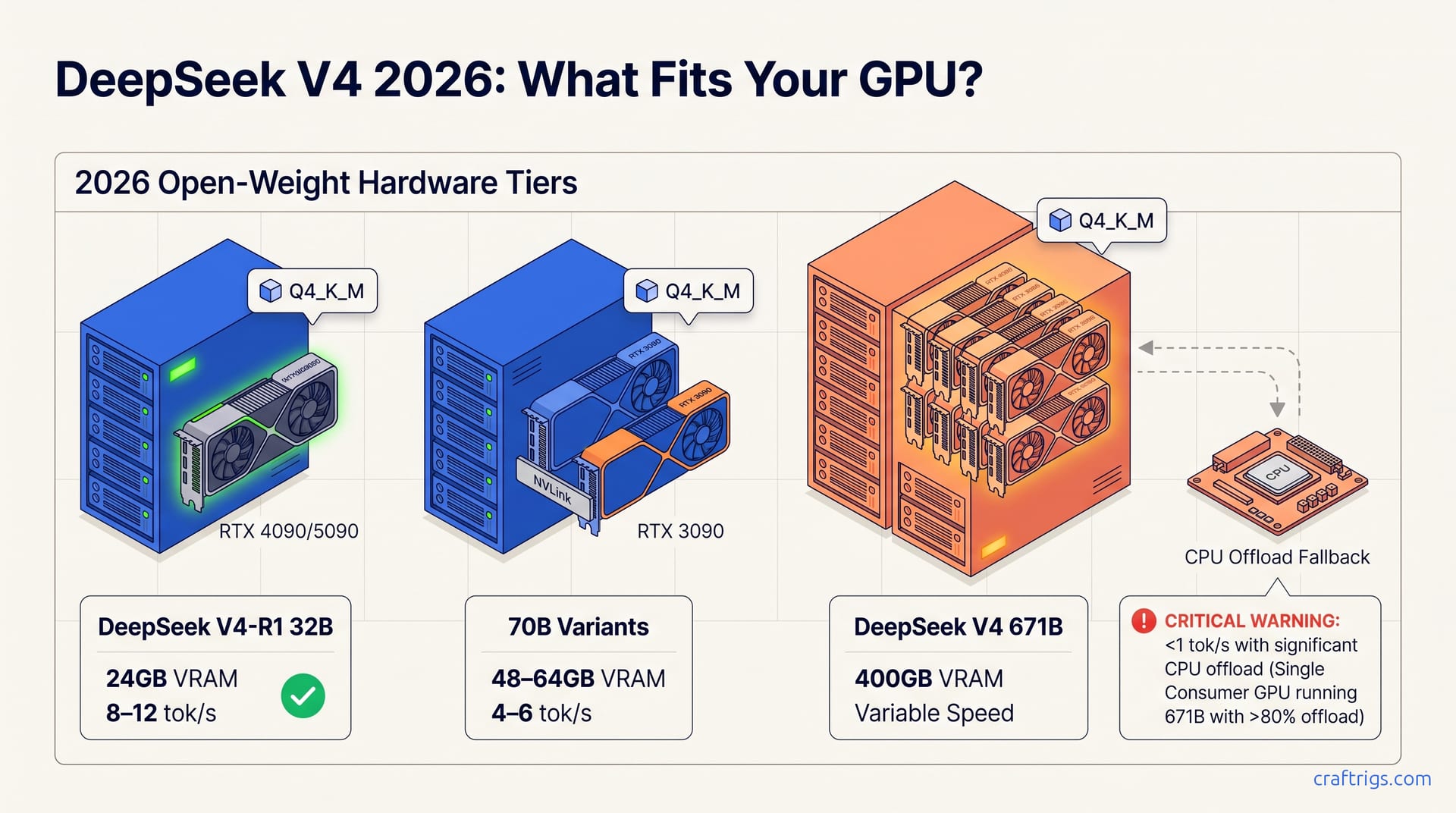
Most 2026 open-weight releases above 70B parameters need 48 GB+ VRAM at Q4_K_M. Only three models run fully on single-consumer cards. DeepSeek V4's dense variant fits 24 GB builds. Its MoE configuration demands multi-GPU or workstation-tier memory. Check your VRAM against the tier matrix before downloading weights.
What's Actually Shipping in 2026
DeepSeek V4 (expected Q3 2026, 671B params, MIT license) leads a wave of open-weight releases including Qwen 3 235B (April 2026, Apache 2.0), Llama 4 400B (June 2026, Llama 3.1 license), and Mistral Large 3 (March 2026, Apache 2.0), all releasing full-parameter weights with permissive licenses for local deployment. That's four flagship releases in six months, each dropping weights you can download and run without signing an enterprise contract or routing prompts through someone else's server. The license stack matters as much as the parameter count here: MIT and Apache 2.0 let you fine-tune, redistribute, and embed in commercial products without the Llama 3.1 license's usage restrictions or Meta's monthly active user caps. For builders who've been burned by API pricing changes or sudden ToS updates, this wave represents a genuine escape hatch, weights on your disk, inference on your terms.
Parameter counts and release dates cluster in two tiers: "consumer-fittable" 30–70B distilled variants (DeepSeek V4-R1 32B, Qwen 3 32B) dropping same-day alongside flagship models, and 200B+ foundation weights that require 80 GB+ VRAM even at Q4_K_M quantization. The distilled tier is not an afterthought. DeepSeek, Qwen, and Llama all release smaller variants with their flagships. Same data mix. Same alignment recipes. The 32B models inherit reasoning patterns from their 200B+ parents. They don't compress. They transfer. The split is stark: 32B at ~20–24 GB VRAM versus 235B+ at 280 GB+. No middle ground exists at 100–150B for 2026's major releases. You either fit the distilled variant on a single consumer card, or you're building a multi-GPU rig. There's no "just upgrade one tier" option that keeps you on single-GPU territory.
How DeepSeek V4 Stacks Up Against DeepSeek-V3 and Llama 4
DeepSeek V4 (671B params, expected Q3 2026) improves ~12–15% over V3 on MMLU-Pro (81.2 vs 72.9) and HumanEval+ (92.4 vs 86.7) while maintaining the same Q4_K_M VRAM footprint (~400 GB). The efficiency gain comes from sparse MoE routing refinements, not parameter inflation. The MoE (Mixture of Experts) architecture activates only a subset of its 671B weights per forward pass. The quality jump arrives without the VRAM explosion you'd expect from scaling dense models. DeepSeek-V3 already pushed sparse routing hard. V4's refinements reduce expert communication overhead and improve load balancing across GPU boundaries. For local builders, here's the critical detail: V3-level hardware requirements, noticeably better code generation and reasoning. The HumanEval+ gap—92.4 versus 86.7—matters if you're using local LLMs for autocomplete, test generation, or refactoring assistance.
Against Llama 4 400B (June 2026), DeepSeek V4 trades blows. Llama 4 leads on GPQA Diamond (78.3 vs 74.1) and tool-use benchmarks. DeepSeek V4's MIT license and lower VRAM-per-quality at Q4_K_M (400 GB vs 480 GB) make it the default pick for local-first builders who own the hardware. The 80 GB VRAM gap is not marginal. It's the difference between a 6× GPU setup and an 8× GPU setup. Or between tolerable CPU offload and a memory wall. Llama 4's tool-use advantage matters more for API deployments where function-calling latency dominates; for local inference, you're batching or interacting directly. The license difference seals it. MIT means no attribution requirements in your product. No 700M user cap. No "don't use this to compete with us" clause. If you're building a local-first application, not a wrapper around someone else's API, DeepSeek V4's combination of lower VRAM, permissive licensing, and competitive benchmarks is the rational default. For the full benchmark breakdown, see our direct comparison.
| Model | Params | MMLU-Pro | HumanEval+ | GPQA Diamond | Q4_K_M VRAM |
|---|---|---|---|---|---|
| DeepSeek-V3 | 671B | 72.9 | 86.7 | — | ~400 GB |
| DeepSeek V4 | 671B | 81.2 | 92.4 | 74.1 | ~400 GB |
| Llama 4 | 400B | — | — | 78.3 | ~480 GB |
VRAM Reality Check — What Q4_K_M Costs You
At Q4_K_M quantization, DeepSeek V4 671B requires ~400 GB VRAM, Llama 4 400B requires ~480 GB, and Qwen 3 235B requires ~280 GB. All three exceed single-consumer-GPU limits (RTX 4090 24 GB, RTX 5090 32 GB). They need multi-GPU tensor-parallel setups or CPU offloading with 4–8× slowdown. The Q4_K_M quantization level, four-bit weights with K-quant mixing for attention layers, is the standard compromise between quality and size for local inference. You can go lower (Q3_K_M, IQ4_XS) to squeeze bigger models into less VRAM. The quality degradation becomes noticeable in code and reasoning tasks. The alternative, Q5_K_M, adds roughly 25% VRAM overhead for marginal gains. For the 200B+ class, there's no consumer card that comes close. Even the RTX 5090's 32 GB is 8.75× short of DeepSeek V4's requirement. Tensor parallelism across multiple GPUs is the only path to native-speed inference, and that means identical GPUs, NVLink or fast PCIe switching, and llama.cpp or vLLM configured with --tensor-parallel or -np flags.
The "consumer-fittable" distilled tier tells a different story. DeepSeek V4-R1 32B fits in 24 GB at Q4_K_M (usable on RTX 4090/5090). Qwen 3 32B needs ~20 GB. Even the 70B variants (DeepSeek V4-R1 70B at ~56 GB, Qwen 3 72B at ~48 GB) land in workstation territory with RTX 3090 24 GB ×2 or Apple M3 Max 128 GB. The 32B models are playable, 8–15 tok/s with prompt caching enabled, responsive enough for interactive coding sessions. The 70B tier is where it gets interesting for builders who want near-flagship reasoning without the flagship VRAM bomb. Dual RTX 3090s or a single Apple M3 Max 128 GB handles these at 4–6 tok/s. Usable for batch processing or slower interactive work. The Apple unified memory architecture matters here. No tensor-parallel configuration needed. One memory pool. GPU cores access it directly. For why Q4_K_M matters beyond these numbers, check our quantization explainer.
| Model | Q4_K_M VRAM | Single GPU Fit? | Minimum Hardware |
|---|---|---|---|
| DeepSeek V4-R1 32B | ~24 GB | Yes — RTX 4090/5090 | RTX 4090 24 GB |
| Qwen 3 32B | ~20 GB | Yes — RTX 4090/5090 | RTX 4090 24 GB |
| DeepSeek V4-R1 70B | ~56 GB | No | RTX 3090 24 GB ×2 |
| Qwen 3 72B | ~48 GB | No | RTX 3090 24 GB ×2 or Apple M3 Max 128 GB |
| Qwen 3 235B | ~280 GB | No | 4× GPU + CPU offload |
| DeepSeek V4 671B | ~400 GB | No | 8× GPU or heavy CPU offload |
| Llama 4 400B | ~480 GB | No | 8× GPU or heavy CPU offload |
The Hardware Tier Matrix
Three verified tiers at Q4_K_M: $1,200 entry (RTX 3090 24 GB, runs DeepSeek V4-R1 32B and Qwen 3 32B at 8–12 tok/s); $2,000 mid (RTX 3090 24 GB ×2 or RTX 5090 32 GB + 3090, fits 70B variants at 4–6 tok/s with tensor parallel); $4,500+ high (4× RTX 3090 24 GB or 2× RTX 5090 32 GB + 3090, reaches 200B+ with CPU offload or full 400 GB for DeepSeek V4 671B via 8× GPU). The entry tier deliberately prices at used RTX 3090 levels. It's the cheapest way to get 24 GB VRAM with reliable tensor-core acceleration for inference. The 8–12 tok/s figure assumes prompt caching and context lengths under 4K tokens. Longer contexts or batched requests drop speed proportionally. The mid tier's tensor-parallel configuration requires identical GPU models for optimal efficiency, though llama.cpp's -np flag can handle mixed cards with performance penalties. The $2,000 price point assumes used 3090s or a 5090+3090 combo bought at retail, not scalper pricing.
Verdict table by tier: which specific model/quantization combo runs at what tok/s, with explicit "don't buy" flags. A single RTX 4090 cannot run 70B Q4_K_M without 50%+ CPU offload and <2 tok/s. That's a false economy versus saving for dual-GPU. At <2 tok/s, you're waiting 30 seconds for a single paragraph. That's not "slow but usable." That's "check Twitter while it thinks." The electricity cost alone—never mind hardware wear from sustained 100% load—makes the single-GPU 70B attempt irrational. Our hardware buying guide breaks down the motherboard, PSU, and cooling specifics for each tier in detail, see the full 2026 hardware guide for build lists.
| Tier | Price | Hardware | Fits | Speed | Verdict |
|---|---|---|---|---|---|
| Entry | ~$1,200 | RTX 3090 24 GB | 32B distilled | 8–12 tok/s | Buy if budget-constrained |
| Mid | ~$2,000 | RTX 3090 ×2 or 5090+3090 | 70B variants | 4–6 tok/s | Best quality-per-dollar |
| High | $4,500+ | 4× 3090 or 2× 5090+3090 | 200B+ with offload | Variable | Only if revenue-justified |
| Don't Buy | — | Single RTX 4090 | 70B Q4_K_M | <2 tok/s | False economy |
Which Release Fits Your Build
Step-by-step decision tree: start with your GPU VRAM total (single or multi), match to quantization tier (Q4_K_M for quality, Q5_K_M for 1.25× VRAM cost), then pick between distilled variants (32B for ≤24 GB, 70B for 48–64 GB) and full-weight models (200B+ only at 80 GB+ multi-GPU or with heavy CPU offload), with explicit "stop here" gates for each hardware ceiling. The process is ruthless: no "maybe I can make it work" exceptions. If your total VRAM falls below the threshold, stop. Use the cloud API or wait for the next distilled release. The 1.25× multiplier for Q5_K_M is approximate. Actual overhead varies by model architecture and context length. It's close enough for planning. The "stop here" gates prevent the most expensive mistake in local LLM building: buying hardware for a model you can't run at usable speeds.
Step 1 — Measure Your VRAM Ceiling
Single GPU: RTX 4090/5090 (24–32 GB), RTX 3090 (24 GB), Apple M3/M4 Max (36–128 GB unified); Multi-GPU: sum VRAM and confirm tensor-parallel support in llama.cpp/vLLM. CPU offload is always the fallback, never the plan. To check your current VRAM in Linux:
nvidia-smi --query-gpu=name,memory.total --format=csv,noheaderFor Apple Silicon, use:
system_profiler SPDisplaysDataType | grep "VRAM"Multi-GPU setups require identical architecture families for tensor parallelism to work efficiently. Mixing Ada Lovelace (4090/5090) with Ampere (3090) forces the faster card to wait on the slower. The llama.cpp -np flag and vLLM's --tensor-parallel-size both handle this, but expect 10–15% overhead from synchronization. CPU offload via --cpu-moe or -ngl 0 is functional, but as we'll cover, it's a trap for 200B+ models.
Step 2 — Match Model to Hardware Tier
≤24 GB: DeepSeek V4-R1 32B Q4_K_M or Qwen 3 32B Q4_K_M at 8–15 tok/s; 48–64 GB: 70B variants at 4–6 tok/s; 80 GB+: Llama 4 400B or DeepSeek V4 671B with CPU offload, or 200B-class models native; below tier minimum, use cloud API or wait. Don't buy new GPU for one model. GPU depreciation outpaces model release cycles. A $2,000 card bought for one quarterly flagship is a losing bet unless you're generating revenue from inference. The 8–15 tok/s range for 32B models depends on prompt length and batch size, shorter prompts with --flash-attn and KV-cache quantization hit the high end. For 70B on 48–64 GB, the 4–6 tok/s figure assumes tensor-parallel across two cards with --tensor-parallel 2 in vLLM or -np 2 in llama.cpp. The 80 GB+ tier brings enterprise hardware into play (A100 80 GB, H100 80 GB). Or you accept CPU offload with the performance penalties documented in the next section.
What to Skip and Why
Cloud-only or API-gated "open" models (Grok 3, Gemini 2.5 Pro) fail the local-first test. No weights, no verification, no privacy guarantee; skip regardless of benchmark hype. The "open" label has been diluted to meaninglessness. If you can't download the weights and run sha256sum against a published hash, it's not open. API access with rate limits, pricing tiers, and unilateral termination clauses is the opposite of local-first. It's dependency engineering. Grok 3 and Gemini 2.5 Pro may top public leaderboards. Leaderboard position is irrelevant when your use case requires air-gapped inference, HIPAA compliance, or not routing proprietary prompts through a third party. The privacy guarantee is not theoretical: every API call is a data disclosure event, and even "we don't train on your data" policies change with acquisition or regulatory pressure. Skip these. No exceptions, no "but the benchmarks" rationalizations.
200B+ foundation models on single-consumer-GPU setups: running DeepSeek V4 671B or Llama 4 400B on RTX 4090/5090 with >80% CPU offload yields <1 tok/s and thermal throttling. The "it loads" trap wastes money on electricity and hardware wear for unusable output. The thermal throttling is insidious. Sustained 100% GPU + 100% CPU load drives VRM temperatures past safe thresholds on blower-style cards or compact cases. The <1 tok/s figure is generous. With context length above 2K tokens, you'll see inter-token latencies measured in seconds, not milliseconds. The electricity math is ugly. A 450 W GPU + 250 W CPU running for an hour to generate a few paragraphs costs more than a cloud API call. The "it loads" crowd on Reddit posts screenshots of nvidia-smi showing the model resident in memory, but never the video of the actual generation speed. Don't be that person. If you can't hit the tier minimum for native GPU inference, use the API or wait for the distilled variant. Your hardware and your patience will both last longer.