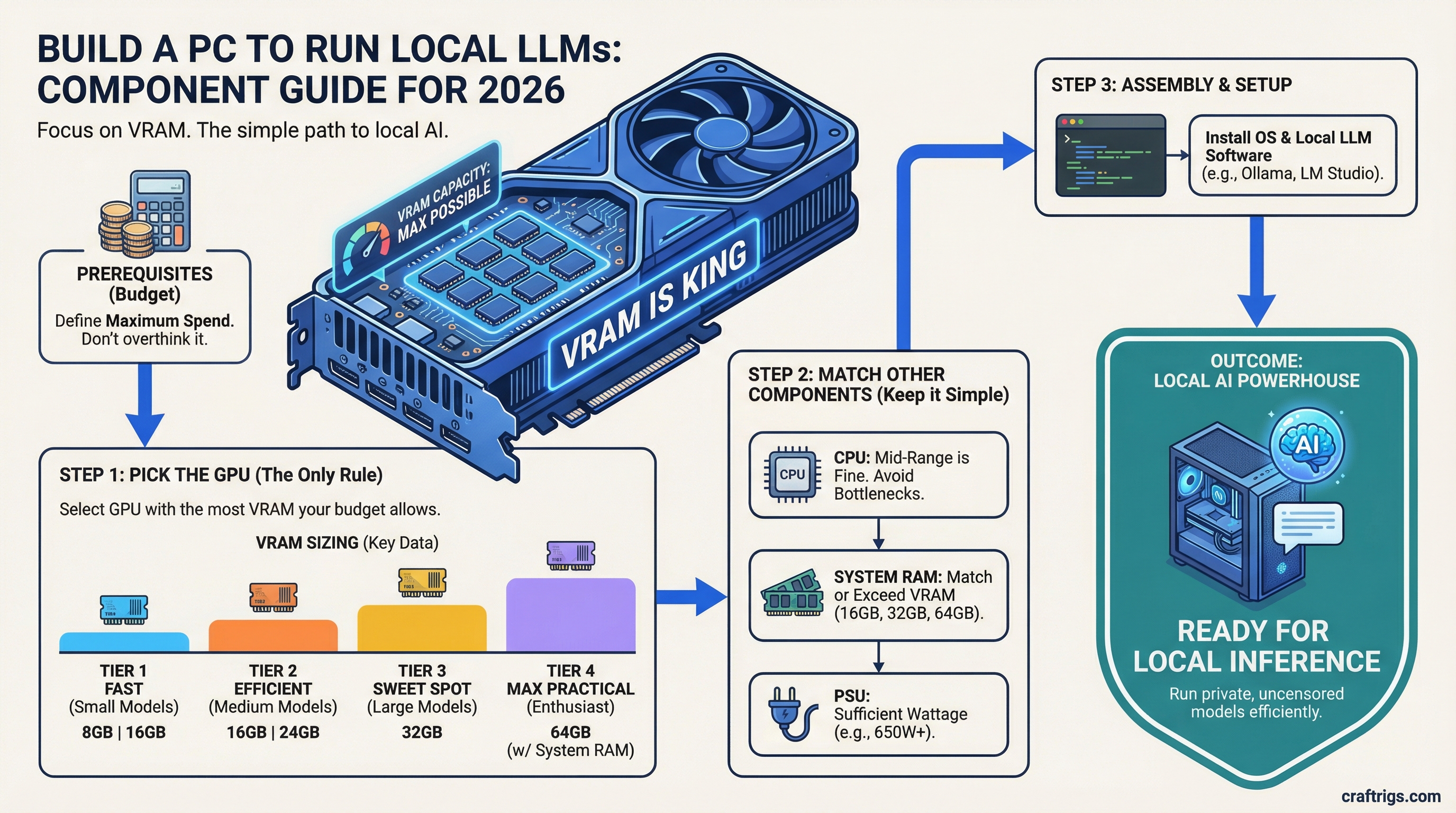
You don't need a $5,000 machine to run AI locally. You need enough VRAM. That's it. Most guides overcomplicate this with benchmarks, cooling debates, and spec sheets. Here's the simple version: pick your budget, buy the GPU with the most VRAM in that range, and you're done.
Bottom line: A $1,200 build with an RTX 4060 Ti 16GB runs 7B–13B models comfortably. That's enough for most local AI work.
Why VRAM Is the Only Spec That Matters
When you run a large language model locally, the entire model needs to fit in your GPU's memory. Not your RAM — your VRAM.
- 8GB VRAM — runs small models (7B parameters) with quantization
- 16GB VRAM — runs 7B–13B models comfortably, some 30B with heavy quantization
- 24GB VRAM — runs most open-source models including 30B+ without compromises
Everything else — your CPU, your RAM, your storage speed — matters way less. A mid-tier CPU and 32GB of system RAM is plenty. Don't overspend on those.
The Three Budget Tiers
Tier 1: The Starter ($1,000–$1,200)
What you get: Runs 7B–13B models. Good for Llama 3, Mistral, Phi, and similar sized models.
- GPU: RTX 4060 Ti 16GB (~$400–$450)
- CPU: Ryzen 5 7600 or Intel i5-13400F (~$150–$180)
- RAM: 32GB DDR5 (~$80–$100)
- Storage: 1TB NVMe SSD (~$70)
- Motherboard: B650 or B760 (~$120–$150)
- PSU: 650W 80+ Bronze (~$60)
- Case: Whatever's cheapest with decent airflow (~$50–$70)
What to skip: Don't pay extra for RGB, liquid cooling, or a fancy case. None of that makes your AI faster.
Tier 2: The Sweet Spot ($1,800–$2,500)
What you get: Runs 13B–30B models. Handles most open-source LLMs without heavy quantization.
- GPU: RTX 3090 used (
$700–$900) or RTX 4070 Ti Super 16GB ($800) - CPU: Ryzen 7 7700X or Intel i7-13700F (~$250–$300)
- RAM: 64GB DDR5 (~$160–$200)
- Storage: 2TB NVMe SSD (~$120)
- Motherboard: B650 or B760 (~$130–$160)
- PSU: 850W 80+ Gold (~$100)
- Case: Mid-tower with good airflow (~$70–$90)
Why the RTX 3090? It's an older card, but it has 24GB of VRAM — same as the RTX 4090 at a fraction of the price. For LLM inference, VRAM matters more than generation speed. A used 3090 is the best value GPU for local AI right now.
Tier 3: No Compromises ($4,000–$5,000+)
What you get: Runs 30B–70B+ models. Full-size Llama 3 70B, Code Llama, and large multimodal models.
- GPU: RTX 4090 24GB (~$1,600–$2,000) or dual RTX 3090s
- CPU: Ryzen 9 7950X or Intel i9-13900K (~$400–$500)
- RAM: 128GB DDR5 (~$350–$400)
- Storage: 4TB NVMe SSD (~$250)
- Motherboard: X670E or Z790 (~$250–$350)
- PSU: 1000W+ 80+ Platinum (~$150–$180)
- Case: Full tower (~$100–$150)
Dual GPU note: Running two GPUs for LLMs works with Ollama and other tools, but not every model supports it cleanly. If you go this route, two RTX 3090s (48GB total VRAM) can be cheaper than one 4090 and give you twice the memory.
What About Mac?
Apple Silicon Macs use unified memory — their RAM doubles as VRAM. A Mac Mini M4 Pro with 48GB unified memory (~$2,000) can run 30B+ models surprisingly well.
Pros: Dead simple setup, low power draw, quiet, good for Ollama. Cons: Slower inference than a dedicated GPU, can't upgrade the memory later, no dual-GPU option.
If you want zero hassle and already use Mac, it's a solid choice. If you want maximum performance per dollar, build a PC.
Software: Getting Models Running
Once your hardware is ready, getting models running is the easy part:
- Install Ollama — one command on Mac/Linux, installer on Windows
- Pull a model:
ollama pull llama3(or mistral, phi3, codellama, etc.) - Run it:
ollama run llama3
That's literally it. Three steps from hardware to chatting with a local LLM.
Model formats you'll see:
- GGUF — the standard format for running on consumer hardware. Most models on Hugging Face offer GGUF versions. This is what you want.
- AWQ — a more efficient quantization format, but not as widely supported yet. Stick with GGUF unless you know you need AWQ.
What About Quantization?
Quantization compresses a model so it needs less VRAM. Think of it like a JPEG for AI — smaller file, slightly lower quality.
- Q8 — barely any quality loss, needs the most VRAM
- Q6 — good balance of quality and size
- Q4 — noticeable quality drop but runs on less VRAM
- Q2 — significant quality loss, only use if you're desperate for VRAM
Rule of thumb: Run the largest quantization your VRAM can handle. If a Q8 model fits, use Q8. Don't go smaller than you need to.
The Quick Decision Guide
What You Can Run
7B–13B models (Llama 3 8B, Mistral 7B, Phi-3)
30B+ models with easy setup
30B–70B models at full speed
70B+ models, maximum open-source range Still unsure? Start with Tier 1. A $1,200 build with the RTX 4060 Ti 16GB handles most use cases, and you can always upgrade the GPU later. That's the beauty of building your own — nothing is permanent.
What to Read Next
- Best Hardware for Local LLMs 2026 — GPU, CPU, RAM ranked across $500–$2,000+ tiers
- Getting Started with Ollama — step-by-step setup guide
- Cheapest Way to Run Llama 3 Locally — deep dive on budget options
- RTX 4060 Ti 16GB vs RTX 3060 12GB for LLMs — head-to-head GPU comparison