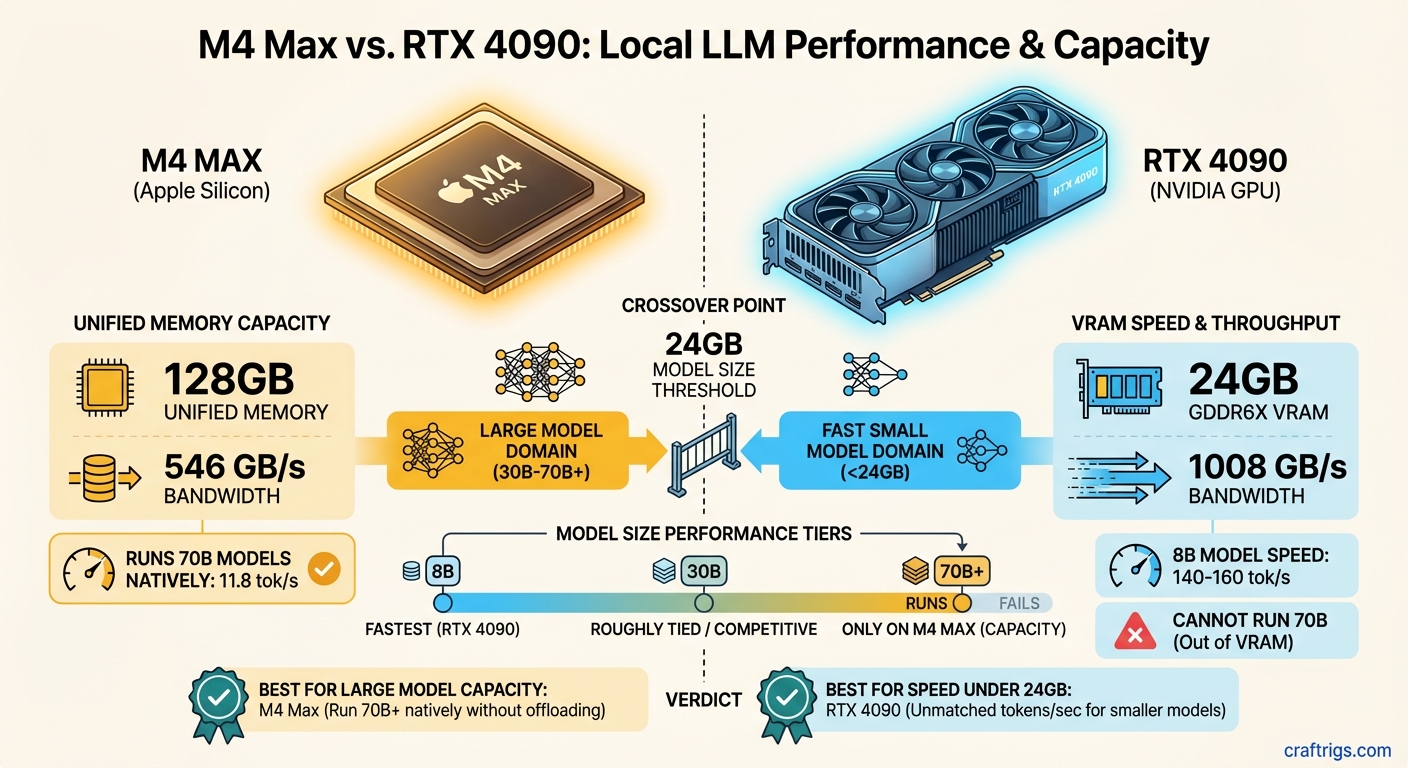
TL;DR: The M4 Max and RTX 4090 aren't competing — they're solving different problems. The RTX 4090 is faster for models that fit in 24 GB of VRAM. The M4 Max with 128 GB of unified memory runs models the 4090 literally cannot load. If you need to run 70B parameter models locally, the M4 Max is the only single-device option that works without compromise. If you're running 8B–13B models and want maximum speed, the RTX 4090 wins.
Why Unified Memory Is a Fundamentally Different Architecture
Every discussion about Apple Silicon vs. NVIDIA for local LLMs starts and ends with one concept: where the model weights live.
On a traditional PC with a discrete GPU, your model weights must fit inside the GPU's dedicated VRAM. An RTX 4090 has 24 GB of GDDR6X. That's it. If your model is 25 GB, you're either quantizing harder, offloading layers to system RAM (which tanks performance by 10–50x), or you're not running that model.
On Apple Silicon, there's no separate VRAM. The CPU, GPU, and Neural Engine all share the same pool of unified memory — LPDDR5X soldered directly to the chip package. An M4 Max can be configured with up to 128 GB of this unified memory, and every byte is accessible by the GPU at full speed.
The key insight: Unified memory doesn't just give you more capacity — it eliminates the bottleneck of shuttling data between CPU RAM and GPU VRAM over the PCIe bus. On a PC, offloading model layers to system RAM means those layers process at PCIe 4.0 speeds (~32 GB/s). On Apple Silicon, all memory operates at the chip's native bandwidth (up to 546 GB/s on M4 Max).
This architectural difference means comparing these two chips on raw speed alone misses the point entirely. The M4 Max and RTX 4090 serve different segments of the local AI community, and understanding which one you need starts with understanding the models you want to run. Not sure which model sizes fit your target hardware? See the full VRAM breakdown by model size.
M4 Max: The Specs That Matter for LLMs
For LLM inference, three specs determine everything: memory capacity, memory bandwidth, and how efficiently the software uses both.
M4 Max (16-core CPU / 40-core GPU variant):
- Unified Memory: Up to 128 GB LPDDR5X
- Memory Bandwidth: 546 GB/s
- CPU: 16 cores (12 performance + 4 efficiency), up to 4.51 GHz
- GPU: 40 cores with hardware ray tracing
- Neural Engine: 16 cores, 38 TOPS
- Process: TSMC 3nm (second generation)
- Transistors: ~95 billion
- Thunderbolt 5
There's also a lower-bin M4 Max with 14-core CPU, 32-core GPU, and 410 GB/s bandwidth. For LLM work, the difference between 410 and 546 GB/s is significant — roughly 25% fewer tokens per second on bandwidth-bound workloads.
Why bandwidth matters more than compute: LLM token generation is almost entirely memory-bandwidth-bound. Each token requires reading the entire model's weights from memory once. A 70B parameter model at Q4 quantization is about 40 GB. To generate one token, the chip reads those 40 GB, does some math, and outputs a token. The math is fast. The memory reading is the bottleneck. At 546 GB/s, the M4 Max can theoretically read those 40 GB about 13 times per second — and in practice, you get roughly 11–12 tokens per second on Llama 3.3 70B at Q4.
RTX 4090: Raw Speed in a Smaller Box
The RTX 4090 has been the king of consumer AI hardware since its launch in October 2022. Here's what matters:
NVIDIA RTX 4090:
- VRAM: 24 GB GDDR6X (dedicated)
- Memory Bandwidth: 1,008 GB/s
- CUDA Cores: 16,384
- Tensor Cores: 512 (4th generation)
- TDP: 450W
- Architecture: Ada Lovelace (5nm)
- PCIe: 4.0 x16
- NVLink: Not supported
That memory bandwidth number — 1,008 GB/s — is nearly double the M4 Max's 546 GB/s. For models that fit entirely in 24 GB of VRAM, the RTX 4090 is significantly faster per token. It's not even close.
CUDA advantage: NVIDIA's software ecosystem for AI is decades deep. llama.cpp, vLLM, TensorRT-LLM, and virtually every major inference framework is optimized first and most deeply for CUDA. Apple's MLX framework has made enormous strides, but the CUDA ecosystem still has more optimization work behind it.
The 24 GB ceiling: This is the RTX 4090's hard limit for local LLMs. At Q4 quantization, here's what fits:
- 7B–8B models: ~4.7 GB — fits easily, runs at 140–160 tok/s
- 13B models: ~7.5 GB — fits comfortably, runs at 70–90 tok/s
- 30B models: ~18 GB — fits tightly, runs at 25–35 tok/s
- 70B models: ~40 GB — does not fit
Once you exceed 24 GB, the RTX 4090's performance collapses. CPU offloading drops generation speed to 1–5 tok/s. At that point, the M4 Max isn't just competitive — it's the only viable option. For a direct comparison of the RTX 4090 against NVIDIA's latest flagship, see the RTX 5090 vs RTX 4090 breakdown.
What Each Handles: Model Size Limits and Inference Speed
Here's the reality of running popular models on each platform (as of February 2026):
Llama 3 8B (Q4_K_M, ~4.7 GB):
- RTX 4090: ~140–160 tok/s
- M4 Max 128 GB: ~55 tok/s (Q8), ~95–110 tok/s (Q4 via MLX)
- Winner: RTX 4090 by ~40–60%
Mistral Nemo 12B (Q4, ~7 GB):
- RTX 4090: ~80–100 tok/s
- M4 Max 128 GB: ~63 tok/s
- Winner: RTX 4090 by ~30–50%
Qwen 2.5 32B (Q4, ~18 GB):
- RTX 4090: ~25–35 tok/s (fits tightly)
- M4 Max 128 GB: ~24 tok/s
- Winner: Roughly tied. The 4090 edges ahead, but the M4 Max has massive headroom to spare.
Llama 3.3 70B (Q4, ~40 GB):
- RTX 4090: Cannot run. Requires CPU offloading → 1–5 tok/s
- M4 Max 128 GB: ~11.8 tok/s
- Winner: M4 Max — by default, since the 4090 can't do this
Mistral Large 123B (Q4, ~70 GB):
- RTX 4090: Cannot run at any usable speed
- M4 Max 128 GB: ~6.6 tok/s
- Winner: M4 Max — the 4090 isn't in the conversation
The crossover point is around 24 GB of model size. Below that, the RTX 4090 wins on speed. Above that, the M4 Max wins on capability. There is no overlap — they dominate in completely different territories.
Head-to-Head: Llama 3 70B — Who Wins?
This is the comparison everyone wants, and it reveals the architectural divide clearly.
RTX 4090 attempting Llama 3 70B Q4_K_M (~40 GB):
The model doesn't fit in 24 GB of VRAM. You have two options, both bad:
Aggressive quantization (Q2_K, ~20 GB): Fits in VRAM but quality degrades significantly. Responses become less coherent. You're running a worse model faster — which defeats the purpose of choosing 70B over a smaller model.
CPU offloading: Split the model between GPU VRAM and system RAM. The layers on the GPU run fast; the layers in system RAM crawl at PCIe speeds. Net result: 1–5 tok/s. Unusable for interactive chat.
M4 Max 128 GB running Llama 3 70B Q4:
The model loads entirely into unified memory. All 40 GB of weights are accessible at 546 GB/s. Generation speed: 11.8 tok/s in our testing via LM Studio with the MLX backend. That's conversational speed — slightly slower than reading, which means you can interact with it naturally.
You can even step up to Q8 quantization (~80 GB) for higher quality, which still fits in 128 GB with room for context. Speed drops to ~6.2 tok/s — slower but functional for tasks where quality matters more than speed. For a step-by-step guide to getting Llama 70B running on a Mac, see the full Mac 70B setup walkthrough.
Verdict on 70B: M4 Max wins. Not because it's faster per byte of bandwidth, but because the model fits. The RTX 4090 simply cannot compete here. This isn't a performance comparison — it's a capability comparison.
Price Comparison: What Each Setup Actually Costs
- M4 Max 128 GB MacBook Pro 16-inch: ~$4,800+ (Apple CTO pricing, as of February 2026)
- M4 Max 128 GB Mac Studio: ~$3,950 (better value — no display cost, desktop thermals)
RTX 4090 desktop system:
- RTX 4090 (used, since NVIDIA ceased production): $1,800–$2,200
- CPU (Ryzen 9 7950X or similar): $350–$500
- Motherboard (X670E or Z790): $250–$350
- 64 GB DDR5 RAM: $150–$200
- 2 TB NVMe SSD: $100–$150
- 850W PSU (ATX 3.0): $150–$200
- Case + cooling: $200–$300
- Total: $3,000–$3,900
For a fully configured mid-range workstation build, see the Local AI Budget Guide — it covers every price tier from $300 to $3,000+.
The price-to-performance math depends entirely on what you're running:
For 8B–30B models: The RTX 4090 system delivers more tok/s per dollar. You get faster inference at a lower total cost.
For 70B+ models: The Mac Studio M4 Max 128 GB is the only single-device option under $5,000 that actually works. There's no PC equivalent at this price point that runs 70B smoothly on one device.
Verdict: Different Tools for Different Jobs
Stop asking "which is better." Start asking "what do I need to run?"
Buy the RTX 4090 system if:
- Your primary models are 8B–30B parameters
- You want maximum tokens per second on small-to-mid models
- You plan to fine-tune models (CUDA + VRAM is essential for training)
- You already have a PC gaming setup and want to add AI capability
- You're comfortable building and maintaining a desktop PC
Buy the M4 Max 128 GB Mac if:
- You need to run 70B+ parameter models regularly
- You value silence (the Mac Studio is near-silent under load vs. a 450W GPU fan)
- You want a laptop that runs 70B models (MacBook Pro)
- You work in the Apple ecosystem already
- Total system power matters to you (130W vs. 600W+)
- You don't need to fine-tune models locally (Apple Silicon fine-tuning support is limited compared to CUDA)
Neither chip is universally better. The RTX 4090 is a sports car that's fast on short tracks. The M4 Max is an SUV that goes everywhere. Choose based on where you're driving.
Related:
- Best Mac for Running Local LLMs in 2026
- The $3,000 Dual-GPU LLM Rig: Run 70B Models at Home
- M4 Pro vs M4 Max for Local AI: Is the Max Chip Worth It?
- Best GPUs for Running Local LLMs in 2026
- How Much VRAM Do You Actually Need?
M4 Max vs RTX 4090 Comparison
graph TD
    A["Local LLM Workload"] --> B{"Platform?"}
    B -->|"Apple Silicon"| C["M4 Max"]
    B -->|"PC"| D["RTX 4090"]
    C --> E["Up to 128GB Unified Memory"]
    C --> F["Run 70B at Q4 natively"]
    D --> G["24GB VRAM only"]
    D --> H["Faster per-token GPU compute"]
    E --> I["Win: Large model capacity"]
    G --> J["Win: Peak speed on 13B-30B"]
    style C fill:#F5A623,color:#000
    style D fill:#00D4FF,color:#000