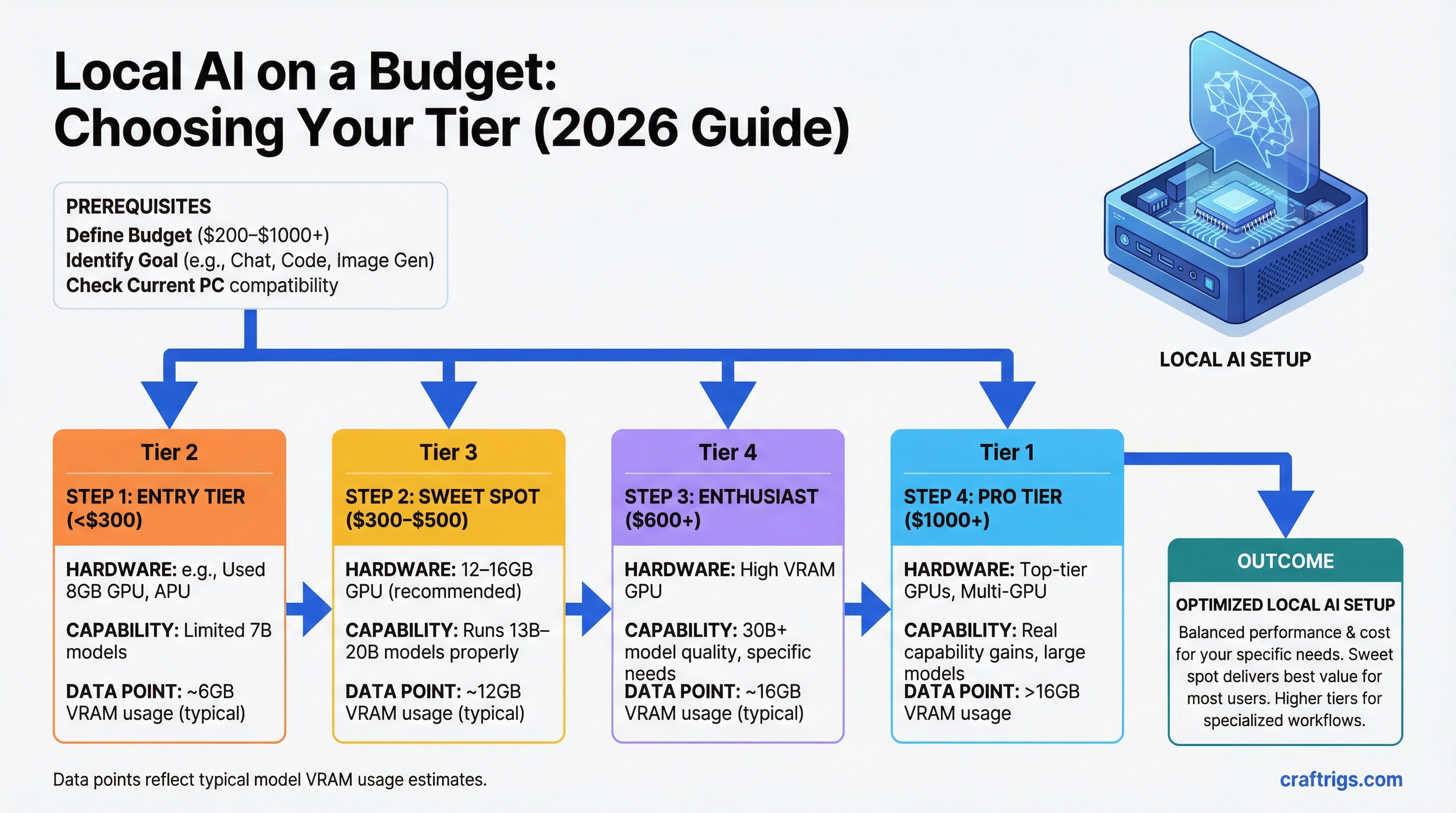
TL;DR: The sweet spot for most people is $300–$500 — specifically a 12–16GB GPU that runs 13B–20B models properly. Under $300 is viable but limited to 7B models. Over $600 is for people who specifically need 30B+ model quality and know it. The expensive tiers deliver real capability gains, but the jump from $0 to $400 is larger than the jump from $400 to $1,500.
Every number below includes GPU cost only — not a full PC build — unless noted. Add $600–$900 for a complete system if you're building from scratch.
Under $200: What's Possible
The honest answer: You can run local AI. You can't run anything impressive.
At this price, you're looking at older discrete GPUs or integrated/CPU-only inference. The options:
RTX 2060 6GB (~$130–$160 used): Technically runs 7B models, but 6GB VRAM cuts it close. Llama 3.1 8B at Q4 is ~5GB — it fits but leaves almost no headroom for context. You'll experience slowdowns on longer conversations. Not a good buy unless you got it for free.
GTX 1660 Super 6GB (~$100–$130 used): Older architecture, adequate for experimentation. Same 6GB ceiling. Turing-era cards have CUDA support, so Ollama works. Speed on 7B models is around 15–25 tok/s — usable but not comfortable.
CPU inference on existing hardware: If you have a modern laptop or desktop with 16GB+ RAM, you can run Llama 3.1 8B on CPU right now, free, without buying anything. Expect 2–5 t/s. Slow, but it's a real AI model running locally. This is the right starting point before spending money.
AMD integrated graphics (Ryzen APUs): Some Ryzen 7000/8000 APUs have enough shared memory to run 7B models at low quantization. Speed is poor (5–15 t/s), but for laptops or mini PCs where a discrete GPU isn't an option, it works.
The bottleneck at this tier: Everything. Limited VRAM means 7B only. Limited bandwidth means even 7B is slow. There's no 13B, no 20B, no upgrade path without buying a new card.
Buy here if: You want to experiment before committing real money, or you're attaching a GPU to an older system and can't justify more.
$200–$300: The Entry Point for Real Use
This is where local AI becomes a daily tool rather than an experiment.
RTX 3060 12GB (~$200–$230 used): The pick of this tier. 12GB VRAM runs Llama 3.1 8B and Mistral 7B with headroom, and stretches to 13B models at Q4 (~9.5GB). Memory bandwidth is modest at 360 GB/s, so expect 35–45 t/s on 7B and 20–28 t/s on 13B. That's comfortable for conversational use.
The 12GB is critical here. The RTX 3060 8GB version exists and should be avoided — 8GB is a real ceiling that becomes frustrating quickly as models improve.
RTX 4060 8GB (~$270–$290 new): Faster than the 3060 (272 GB/s bandwidth) but only 8GB VRAM. Better for speed on 7B, worse for model access. The 3060 12GB is the better buy for most people unless you specifically need new hardware with a warranty.
Intel Arc B580 12GB (~$250 new): The dark horse at this price. 12GB GDDR6 and 456 GB/s bandwidth — better bandwidth than the RTX 3060 12GB at a similar price. In practice, the Arc B580 runs 7B and 13B models well in Ollama and llama.cpp. Intel's AI inference support has improved significantly in the past year. The trade-off: smaller ecosystem, occasional driver friction on Linux, less community knowledge if something goes wrong.
If you're on Windows and comfortable troubleshooting, the B580 12GB is genuinely competitive here. If you want the path of least resistance, the RTX 3060 12GB remains the safer buy.
The bottleneck at this tier: VRAM. You're capped at 13B models (12GB cards) or 7B models (8GB cards). 20B and above require more VRAM than you have. Speed is adequate — not fast, but usable.
Buy here if: You want a real daily-use local AI tool on a tight budget. The RTX 3060 12GB is the value champion of the entire market right now.
$300–$500: The Sweet Spot
This is where most serious local AI users land. The capability jump over the $200–$300 tier is meaningful: 16GB VRAM opens up 20B models, and the better cards here have significantly higher bandwidth.
RTX 4060 Ti 16GB (~$370–$400 new): The main pick at this tier. 16GB VRAM handles every 13B and 20B model at full Q4 quality. Mistral 22B fits cleanly. The bandwidth (288 GB/s) is lower than older high-end cards, but at 20B model sizes, speeds are solid: 20–30 t/s. The 16GB version is a notable price premium over the 8GB version, but that VRAM is the entire point of the card for this workload.
RTX 5060 Ti 16GB (~$430 MSRP if available): Better bandwidth than the 4060 Ti (448 GB/s) at the same 16GB VRAM. If you can find one at MSRP, it's the superior buy. Supply has been constrained — check before planning around it.
RTX 3060 Ti 8GB ($200 used) + RTX 3060 12GB ($220 used): If you're considering dual GPU, forget it at this tier. PCIe multi-GPU inference is painful to set up and much slower than a single good card. Spend the money on one good 16GB card.
What you get for the extra $100–$150 over the previous tier: The ability to run 20B models, which are meaningfully more capable than 13B. Better instruction following, stronger reasoning, more coherent long-form output. If you're using local AI for actual work (drafting, analysis, coding), the quality difference justifies the cost.
The bottleneck at this tier: Still VRAM, but the ceiling is now 20B models — which is quite capable. 30B and 34B models don't fit at full quality. You can run them with lower quantization (Q3_K or Q2_K), but quality degrades noticeably at 20B-worth of VRAM being stretched to 34B models. Better to stay in the model size range your VRAM actually supports.
Buy here if: You're a serious daily user who wants real capability, not just experimentation. The RTX 4060 Ti 16GB is the right default recommendation for most people reading this guide.
$500–$1,000: Where Real Capability Starts
This tier is for people who've hit the ceiling on 16GB and specifically want 30B+ model quality. The jump in capability is significant.
RTX 3090 24GB (~$600–$800 used): The value king of this tier — and arguably the best price-to-capability card in the entire GPU market for local LLMs right now. 24GB VRAM runs CodeLlama 34B, Qwen 32B, and similar models at full Q4 quality. Memory bandwidth is 936 GB/s — faster than most newer cards. Token speeds on 34B models hit 25–35 t/s, which is legitimately fast.
There's one other thing the RTX 3090 has that no other consumer card does: NVLink support. Two RTX 3090s connected via NVLink give you 48GB of pooled VRAM for 70B models at a total PC build cost under $3,000. See the dual-GPU build guide for details.
The downsides: 350W TDP (requires a serious PSU and case), runs hot, loud under load. For a desktop workstation where those trade-offs are acceptable, it's an outstanding buy.
RTX 4070 Ti Super 16GB (~$700 new): 16GB VRAM but much higher bandwidth (672 GB/s) than the 4060 Ti. Runs 16GB-tier models noticeably faster. But — and this matters — it still tops out at 20B models. You're paying 75% more than a 4060 Ti for speed, not model access. If speed at 13B–20B models is specifically your bottleneck, this makes sense. Otherwise, the RTX 3090 is the better buy for the same money: more VRAM, more model access, more path forward.
RTX 4080 Super 16GB (~$950–$1,000 new/used): Same 16GB VRAM as the 4060 Ti and 4070 Ti Super, but 736 GB/s bandwidth — the fastest 16GB card available. Blazing fast on 7B–20B models. Same model ceiling as the 4060 Ti. Unless you're optimizing for maximum speed on 16GB-tier models specifically, the RTX 3090 gives you more capability per dollar.
The bottleneck at this tier (for 24GB cards): You can run 34B models but can't fit 70B at full quality. You're one GPU short of the full capability picture.
Buy here if: You want the best single-GPU value for 34B models (RTX 3090), or you need very high speed on 16GB models and have the budget (RTX 4080 Super).
$1,000–$2,000: Professional Tier
Past $1,000, you're either chasing the highest single-GPU performance or positioning for 70B models.
RTX 4090 24GB (~$1,400–$1,600 used): The fastest consumer GPU for local LLMs at standard model sizes. 1,008 GB/s bandwidth, 24GB VRAM. Runs 34B models at 32–40 t/s — measurably faster than an RTX 3090. The question is whether that speed premium justifies $700–$900 more than a used 3090. For most use cases, no. For power users where inference speed is a genuine bottleneck, yes.
RTX 5090 32GB (~$1,999 MSRP, ~$2,400 street): The single-GPU ceiling for 2026. 32GB VRAM can fit a 70B model at Q2_K quantization (quality compromise) or a 34B at full Q8 quality. 1,792 GB/s bandwidth — the fastest of any consumer card. The value case is strong if you can find it at MSRP. At street prices ($2,400+), you're close to the cost of a Mac Mini M4 Pro 48GB ($1,799) that runs 70B at full Q4 quality with less complexity.
Mac Mini M4 Pro 48GB ($1,799): Not a GPU, but this is where it enters the conversation seriously. At $1,799, it runs 70B models at full Q4 quality. Nothing else at this price does that on the PC side without multi-GPU complexity. For 70B model access specifically, the Mac Mini M4 Pro 48GB is the most cost-effective path available.
The bottleneck at this tier: For PC GPUs — still the 24GB ceiling on 4090 (can't do 70B full quality), and limited supply/high prices on the 5090 32GB. For Mac — slower token generation speed compared to high-end NVIDIA at matched model sizes.
Buy here if: You need maximum inference speed on 34B models (RTX 4090), want the best single GPU (RTX 5090 at MSRP), or want 70B capability with minimal complexity (Mac Mini M4 Pro 48GB).
$2,000+: Only Makes Sense If...
Past $2,000, you're in territory where the use case needs to justify the hardware.
The dual RTX 3090 NVLink build (~$2,500 total): Two used RTX 3090s, an NVLink bridge, and supporting hardware. The result is 48GB of pooled VRAM and ~18 t/s on Llama 3.1 70B Q4. This is the fastest way to run 70B models under $4,000 on the PC side. Complex to set up, high power draw (~1,000W sustained), but the performance is real.
Mac Studio M4 Max 64GB ($1,999) or 128GB ($2,799): For people who want large models with better speed than the Mac Mini M4 Pro. The M4 Max chip has higher memory bandwidth (410 GB/s vs 273 GB/s for M4 Pro), and the 128GB config runs 100B+ experimental models. Silent, efficient, and genuinely fast for Apple Silicon.
Workstation GPUs (NVIDIA A5000, A6000): Data center and workstation cards offer more VRAM (24GB–80GB) in a single card. The A6000 Ada (48GB) can fit 70B at Q4 on a single card. Price: $4,000–$8,000 new, $2,000–$3,000 used depending on model. The use case here is professional inference or fine-tuning work where the CUDA ecosystem matters and you need high VRAM in a single card.
Buy here if: You specifically need 70B at real speeds on PC (dual 3090 build), want maximum model size with Apple Silicon efficiency (Mac Studio M4 Max), or need large single-GPU VRAM for professional work (workstation cards).
Value Champions at Each Tier
Speed
~35 t/s
35–50 t/s
~30 t/s
~30 t/s
~11 t/s
~18 t/s
Related Guides
- Best 16GB GPUs: RTX 5060 Ti vs 4060 Ti vs Arc B580 — detailed 16GB card comparison
- Best GPUs for Local LLMs 2026 — full GPU ranking
- How Much VRAM Do You Actually Need? — why VRAM is the key spec
- Best Local LLM Hardware 2026: The Ultimate Guide — full hardware path comparison
- The $3,000 Dual-GPU LLM Rig — the path to 70B on PC