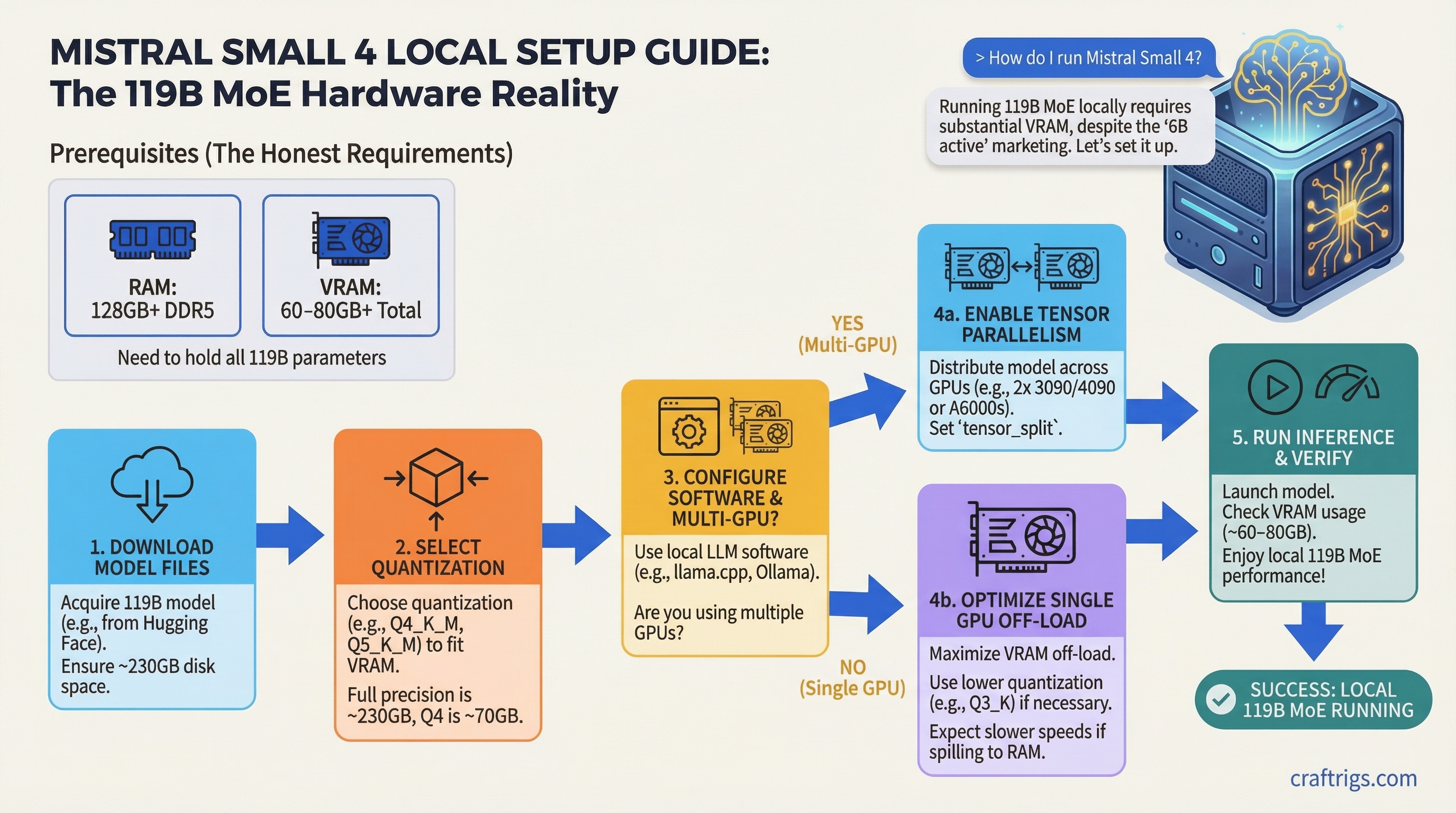
Six billion active parameters. That's the number Mistral keeps putting in front of the marketing. And it sounds great — run a 119B model on the same compute budget as a 6B dense model. But here's what the announcement didn't spell out clearly: you still need every one of those 119 billion parameters loaded into memory before the router can pick which 6B to activate.
That distinction matters enormously for anyone planning to run this locally. If you buy the "6B active = 6B hardware" line, you're going to have a bad time.
Released March 16 at NVIDIA GTC 2026, Mistral Small 4 consolidates four previously separate products — Mistral Small (instruct), Magistral (reasoning), Pixtral (vision), and Devstral (coding) — into one 119B MoE checkpoint under an Apache 2.0 license. It's genuinely interesting. It's also one of the most hardware-demanding models to ever carry the word "Small" in its name.
Here's what you actually need to run it.
What Mistral Small 4 Actually Is
Before getting to VRAM numbers, worth understanding the architecture because it changes how you plan your setup.
Mistral Small 4 uses a Mixture-of-Experts design with 128 total experts and 4 active per forward pass. Total parameter count is 119B, with 6B active per token (8B if you include the embedding and output layers). Context window is 256K tokens. Supports text and image input, text output. And notably, reasoning effort is configurable per request — you can toggle between instruct mode (fast, cheap) and reasoning mode (slower, deeper) without switching models.
The MoE architecture means inference is genuinely fast at the API level — Mistral claims 40% lower latency and 3x throughput versus Mistral Small 3. On their servers, with proper hardware, that tracks. Locally, you're fighting a different constraint entirely.
Note
Architecture at a glance: 128 experts, 4 active per token. 119B total params, 6B active, 8B including embeddings. 256K context. Text + image in, text out. Apache 2.0. Released March 16, 2026.
The Memory Trap Nobody Tells You About
Here's the thing about MoE models that trips up even experienced local AI runners: sparse activation doesn't reduce memory requirements. It reduces compute.
When a token arrives, the router examines all 128 experts to decide which 4 to activate. To do that, all 128 experts need to be reachable — which means all 119B parameters have to live somewhere accessible. VRAM, system RAM, or some combination. Offloading experts to CPU RAM is possible, but there's a latency hit every time the router needs to pull a cold expert.
This is the opposite of what most people assume. Dense models and MoE models of the same total size need the same memory. The MoE advantage shows up in FLOP efficiency and output speed, not memory footprint.
VRAM Requirements at Q4, Q6, and Q8
Quantization math is simple: bytes needed ≈ total_params × bits_per_weight ÷ 8, plus KV cache overhead.
For Mistral Small 4's 119B parameters:
Notes
Recommended balance of quality and size
Noticeably better output quality
Near-lossless, needs pro hardware
Full precision, multi-H100 territory Add 2–8GB on top of model weights for KV cache depending on your context length. At 256K context, KV cache alone can eat 10–20GB more.
GGUF versions are already available from bartowski on HuggingFace at bartowski/mistralai_Mistral-Small-4-119B-2603-GGUF. Q4_K_M is your starting point for almost any consumer hardware setup.
Recommended Hardware Tiers
8GB VRAM (RTX 4060, RTX 3070 Ti)
Technically runnable. Not practically useful. At Q4_K_M, you can offload maybe 6–7 transformer layers to your GPU and push everything else to system RAM. You'll need at least 96GB of DDR4/DDR5 RAM for this to work at all. Expect 1–2 tokens per second, limited by CPU memory bandwidth. If this is your situation, just run Mistral Small 3.1 (24B) or Qwen 2.5 32B instead.
16GB VRAM (RTX 4080, RTX 3090 Ti)
More manageable but still CPU-heavy. With 64GB system RAM, you can put roughly 20 layers onto the GPU and handle the rest via CPU. Speed lands around 2–5 tok/s for Q4_K_M. Passable for one-off reasoning tasks where you can wait 30 seconds for a response. Not usable for interactive chat. The 16GB tier makes more sense for smaller models.
24GB VRAM (RTX 4090, RTX 3090)
This is the minimum "worth considering" tier. A single 4090 can handle roughly 40% of Q4_K_M in VRAM — about 30–35 layers — with the rest in system RAM. You need at least 64GB RAM total for this split to work without touching swap. Realistic output speed: 5–10 tok/s.
That's slow enough that interactive chat feels like watching paint dry. But for batch reasoning tasks, agent pipelines that tolerate latency, or overnight coding runs, it's functional. Pair it with at least 64GB of fast DDR5 RAM and keep your context size under 8K to minimize KV cache bleed.
If you're evaluating whether a used RTX 3090 is worth buying specifically for Mistral Small 4, the honest answer is: only if you already have other models to run at full speed. At $700, the 3090 is excellent for 7B–30B models — just don't expect smooth interactive inference from a 119B model on a single card.
Tip
On llama.cpp, start with -ngl 20 to push 20 layers to GPU, then increase until you hit OOM. The sweet spot for a 24GB card with 64GB RAM is usually around 28–35 layers for Q4_K_M.
Multi-GPU (2x RTX 4090, 3x RTX 4090)
Two 4090s give you 48GB of VRAM. Q4_K_M at ~63GB still doesn't fully fit, but you'll have ~75% in VRAM with only a small CPU spillover. With 32GB of system RAM as buffer, expect 14–20 tok/s. That's actually usable for real work.
Three 4090s (72GB VRAM) fit Q4_K_M entirely. Speed jumps to 22–32 tok/s. That's a practical setup for a serious home lab, though the cost (~$4,500+ for three used 4090s) makes it a deliberate choice.
Apple Silicon (M3/M4 Max or Ultra)
Apple Silicon deserves its own call-out because unified memory changes the math. An M4 Ultra with 192GB of unified memory can hold Q4_K_M (63GB) with room to spare, and Metal GPU acceleration gives you 10–18 tok/s depending on memory bandwidth. The M4 Max at 128GB fits Q4_K_M comfortably with headroom for a long context window.
This is the most cost-effective consumer path to running Mistral Small 4 at usable speeds, assuming you already own or were planning to buy Apple Silicon. A Mac Studio M4 Ultra runs about $3,999 at the base 192GB config.
Enterprise (2x H100 80GB, 4x H100)
Two H100 80GB cards give you 160GB of VRAM — enough for Q8_0 fully in VRAM. Output speed at Q8 on dual H100: 55–85 tok/s. That's API-like responsiveness for local deployment. Mistral's own official setup uses --tensor-parallel-size 2 on H100s for the vLLM serving path.
Caution
The official Awesome Agents review lists "4x H100 minimum" for production self-hosting. That's not a consumer use case. If you're planning a team deployment, budget for at least 2x H100 80GB, and understand that 2x still limits you to Q8 with tight headroom.
Setup Walkthrough: llama.cpp or Ollama?
For a model this size, use llama.cpp. Ollama doesn't offer fine-grained control over which tensor types get offloaded to GPU, which matters a lot with MoE models where you want attention and shared layers on GPU and expert weights distributed between VRAM and RAM.
llama.cpp setup:
# Download Q4_K_M GGUF
huggingface-cli download bartowski/mistralai_Mistral-Small-4-119B-2603-GGUF \
  --include "mistralai_Mistral-Small-4-119B-2603-Q4_K_M.gguf" \
  --local-dir ./mistral-small-4/

# Run with partial GPU offload (adjust -ngl based on your VRAM)
./llama-cli \
  -m ./mistral-small-4/mistralai_Mistral-Small-4-119B-2603-Q4_K_M.gguf \
  -ngl 30 \
  -t 16 \
  --ctx-size 4096 \
  -p "[INST] Your prompt here [/INST]"
For a two-GPU setup, add --tensor-split 1,1 to split evenly across both cards. For MoE-specific expert offloading, the --override-tensor flag lets you assign expert FFN layers to CPU and keep attention layers on GPU — which is the optimal split for speed on GPU-poor hardware.
Ollama is fine if and when it adds native Mistral Small 4 support with proper MoE handling. Check ollama.com/library for availability. When it lands, it'll be one command: ollama run mistral-small-4. But right now, llama.cpp gives you the control you need.
Real Performance Expectations
Here's a realistic picture by tier:
Usability
No
Marginal
Patience required
Usable
Comfortable
Good
Excellent Keep context sizes under 8K unless you've verified your memory can handle the KV cache. At 256K context and Q4, you're looking at an additional 15–20GB just for the cache.
Is It Worth Running Over Smaller Models?
Honest answer: for most hardware configs below 48GB VRAM, no. Not because the model is bad — the unified reasoning/vision/coding capability is genuinely useful — but because the speed penalty is brutal.
A 5 tok/s experience on a 24GB GPU means a 500-token response takes 100 seconds. Compare that to Mistral Small 3.1 (24B) running at 35–45 tok/s on the same hardware with solid benchmark numbers. Or Qwen 2.5 32B at 25–35 tok/s.
The LocalLLaMA community's take on Mistral Small 4 has been lukewarm for a related reason: raw benchmark numbers from Qwen3.5-35B-A3B (which has only 3B active params) beat it on GPQA Diamond, MMLU Pro, and IFBench. Mistral Small 4 leads on LiveCodeBench. So for pure coding agent work, it earns its place.
Where Mistral Small 4 actually wins locally is the three-in-one architecture. If you're building an agent pipeline that needs instruction following, structured reasoning, and image understanding — without juggling separate models, separate endpoints, separate context — having one checkpoint that handles all three with a simple reasoning_effort toggle is worth real engineering overhead. One model, one API surface, one download.
Tip
Mistral Small 4's reasoning mode is toggled via the reasoning_effort parameter in the model settings block. Set it to "none" for standard instruct tasks and "high" for multi-step reasoning. Don't run everything at "high" — it's slower and burns tokens on problems that don't need it.
If you're comparing it against NVIDIA's competing release from the same week, see the Nemotron 3 Super vs Mistral Small 4 comparison — two large MoE models built for similar use cases with different licensing and architecture tradeoffs.
Bottom Line
Mistral Small 4 is a serious model for serious hardware. The 119B parameter count is not a typo, and the "6B active" framing doesn't save you on memory. At Q4_K_M, plan for 63GB minimum memory footprint before KV cache. That means 48GB+ VRAM for a pure GPU setup or 128GB+ unified/system RAM for a hybrid approach.
Single 24GB GPU owners: you can run it, and it will work, and you will also develop a zen-like relationship with latency. For most single-GPU home lab setups, the smaller Mistral models or Qwen 2.5 32B remain the better trade. For multi-GPU rigs, Mac Ultra users, or anyone building agent workflows that genuinely need combined reasoning and vision — Mistral Small 4 is worth the storage cost and the patience.
The GGUF is live. bartowski's quantized builds are on HuggingFace now. Give it a run.
See Also
- Nemotron 3 Super vs Mistral Small 4 — side-by-side comparison of both 120B MoE models
- The RTX 3090 Is Now the Best Value Local LLM GPU — 24GB VRAM at ~$700 used
- Used RTX 3090 vs Mac Mini M4 — which $800 platform handles large models better