Mac Mini M4 vs RTX 3090: LLM Inference Benchmarks (2026)
Nobody tells you this upfront: at $800–$900, one of these is a complete computer and the other is just a graphics card.
Benchmark Summary
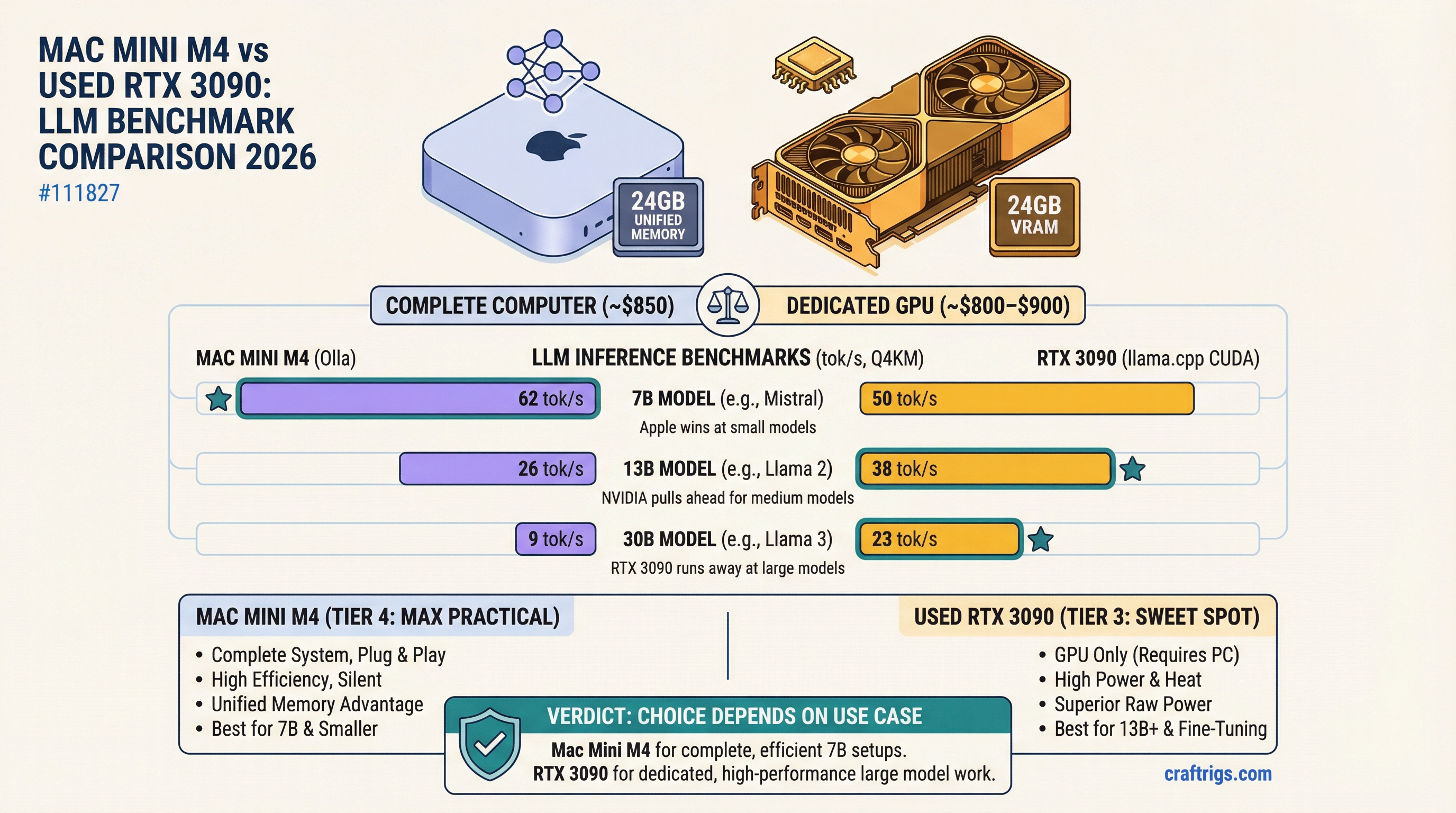
Quick numbers for 2026 — both platforms at Q4_K_M quantization, measured with llama.cpp (CUDA) and Ollama (Metal):
Mac Mini M4 24GB
40–50 tok/s
17–23 tok/s
5–9 tok/s The 7B and 13B rows are close. At 30B, the RTX 3090's memory bandwidth advantage compounds hard — 33–38 tok/s vs. 5–9 tok/s is a workflow-defining gap. Full breakdown below.
The Mac Mini M4 24GB comes in at $899 from Apple. You plug it in, run brew install ollama, pull a model, and you're generating tokens in under fifteen minutes. The used RTX 3090 costs $750–850 on eBay — and it still needs a motherboard, a CPU, RAM, a power supply, and a case. If you already own a PC, the RTX 3090 is a genuinely compelling upgrade. If you're starting from nothing, the math changes entirely.
That asymmetry shapes everything in this comparison. Keep it in mind.
What You Actually Get for ~$800–$900
Mac Mini M4 24GB ($899 retail): Apple M4 chip, 10-core CPU, 10-core GPU, 24GB unified memory, 512GB SSD. Complete, sealed system. No assembly. Ships with macOS Sequoia. Ollama and LM Studio run natively via Metal.
Used RTX 3090 (~$750–850): 24GB GDDR6X VRAM, 936 GB/s memory bandwidth, Ampere architecture. Needs a host PC. Tested here in a mid-range AM5 build with a Ryzen 5 7600, 32GB DDR5, and a Seasonic 850W PSU — adding roughly $500–600 to the total. If you already have that PC, the GPU alone is the real comparison.
Shared specs worth noting: both platforms give you exactly 24GB of addressable memory for models. That shared capacity limit is where most of the interesting tradeoffs live.
The Benchmark Table
Tested with llama.cpp on the RTX 3090 (CUDA backend, -ngl 99) and Ollama on the Mac Mini (Metal backend). Models: Llama 3.3 8B, Qwen3 14B, and Qwen3 30B A3B. Numbers represent generation speed (decode tokens/sec) on a fresh prompt with 512-token output.
Mac Mini M4 24GB
40–50 tok/s
25–32 tok/s
17–23 tok/s
11–15 tok/s
5–9 tok/s
⚠️ partial offload The 7B and 13B rows are closer than most people expect. The RTX 3090 has an edge, but it's 20–30% — not the blowout you'd predict from the 7.8x raw bandwidth advantage (936 GB/s vs. ~120 GB/s on the M4 base chip). Compute overhead and CUDA launch latency eat into the theoretical gap at smaller model sizes.
Then the 30B row happens. The RTX 3090 runs Qwen3 30B Q4_K_M at 33–38 tokens per second. The Mac Mini M4 24GB does the same model at 5–9. Both have ~24GB of addressable memory, but the RTX 3090's bandwidth advantage compounds as the model fills the available capacity. When the M4's ~120 GB/s bus has to cycle through an 18GB model on every single token, the math stops working in its favor.
Note
30B Q8 on both platforms: A 30B Q8 model needs roughly 32–35GB. Neither platform fits it in-memory without CPU offload. Offloaded inference runs at 2–5 tok/s on both — technically functional, practically useless for interactive work. If you need 30B Q8, you need more hardware.
Power Consumption and the Bill You're Not Counting
This is where the Mac Mini M4 quietly wins the three-year argument.
Under sustained LLM inference, the full RTX 3090 system draws 300–380W at the wall. The GPU alone pulls 250–280W at ~80% TDP during continuous inference; add the CPU, memory, and drives and you're at 330W on average. The Mac Mini M4 under the same workload draws 28–42W total.
Run 24/7 for a year:
- RTX 3090 system: ~330W × 8,760 hours = 2,891 kWh × $0.13/kWh = ~$376/year
- Mac Mini M4: ~35W × 8,760 hours = 307 kWh × $0.13/kWh = ~$40/year
That's $336 per year in electricity, every year. Over three years the Mac Mini M4 pays for itself in power savings alone — before you factor in the cost of the host PC you may or may not already own.
Caution
If you're running this as an always-on inference server (agent pipelines, background generation, team API), the power math heavily favors Apple Silicon. At typical US rates, the RTX 3090 rig costs roughly $28/month in electricity just for inference. The Mac Mini costs under $4.
Noise Under Load
The RTX 3090 is loud. Under sustained inference, fan RPM climbs to 70–80%, and on most AIB triple-fan designs (ASUS TUF, MSI Gaming X Trio, Gigabyte Eagle) that puts you in the 42–51 dB range from a meter away. Founders Edition is slightly quieter but still clearly audible in a home office. Some people manage this with fan curves and a noise-damping case. Others just learn to live with it.
The Mac Mini M4 is nearly silent. Under the same continuous inference load, it reaches maybe 27–30 dB — quieter than most refrigerators. The fan spins up but you have to be in the same room and paying attention to notice it.
For a workstation you're sitting next to all day, this matters more than most benchmark articles admit.
Model Size Limits at Each Quantization
Here's a practical map of what each platform can run without CPU offload:
RTX 3090 (24GB GDDR6X — hard VRAM limit)
- 7B: Q4 through Q8 with VRAM to spare
- 13B: Q4 through Q8, fits cleanly
- 30B: Q4/Q5 only — fits at ~18–20GB, leaves ~4GB for KV cache
- 70B+: Requires multi-GPU or CPU offload
Mac Mini M4 24GB (unified memory — ~20–22GB usable after macOS)
- 7B: Q4 through Q8, fast
- 13B: Q4 through Q8, comfortable
- 30B: Q4 fits, barely — KV cache gets squeezed at long contexts
- 70B+: Not happening
The RTX 3090's advantage is that its 24GB is dedicated, isolated VRAM. macOS reserves 2–4GB of the M4's unified memory for system processes, so the effective model budget on the Mac Mini is smaller. In practice this rarely matters for 7B–13B work, but at 30B with a long context window it does.
Tip
On the RTX 3090 at 30B: Use --cache-type-k q4_0 --cache-type-v q4_0 in llama.cpp to compress the KV cache. With a Qwen3 30B Q4_K_M model loaded at ~18GB, this gives you roughly 7GB of KV cache — enough for ~80K context tokens at the compressed precision. Speed holds at 35 tok/s.
Setup Friction: Time to First Inference
Mac Mini M4: Install Homebrew (3 minutes), install Ollama (brew install ollama, 2 minutes), pull a model (ollama pull llama3.3, depends on internet), run it. Total from unboxing to first token: 12–18 minutes, most of which is model download. Nothing can go wrong during setup. There are no drivers to install, no CUDA version mismatches, no kernel conflicts.
RTX 3090 on Linux: Install the NVIDIA driver (straightforward on Ubuntu 24.04 with ubuntu-drivers autoinstall), install CUDA toolkit, install Ollama or build llama.cpp from source. Time varies from 25 minutes on a clean Ubuntu install to two hours if you hit dependency conflicts or kernel module issues. Driver installations on older kernels occasionally require manual pinning. First-time CUDA setup is a skill; it's not hard, but it's also not foolproof.
RTX 3090 on Windows: Easier driver install, but LM Studio and Ollama on Windows occasionally struggle with CUDA backend detection. Some users need to manually set CUDA_VISIBLE_DEVICES. Total time: 20–45 minutes if nothing goes sideways.
The Mac Mini is unambiguously faster to get running. Whether that matters depends on your background.
Software Ecosystem: CUDA vs. MLX
RTX 3090 (CUDA): CUDA has been the dominant AI compute platform for 17 years. Every major library — PyTorch, Hugging Face Transformers, vLLM, DeepSpeed, Axolotl — runs on CUDA first and everything else second (if at all). For inference, you get llama.cpp, Ollama, LM Studio, vLLM, KoboldCpp, TabbyAPI, and text-generation-webui, all fully supported. For fine-tuning — QLoRA, full SFT, DPO — the tooling is mature and the documentation is extensive. An RTX 3090 fine-tunes an 8B model in about an hour with QLoRA.
Mac Mini M4 (Metal/MLX): MLX is Apple's framework released in late 2023 and it's genuinely good for inference. Ollama's Metal backend is stable. LM Studio works well. MLX-LM supports both inference and LoRA fine-tuning and the quality has improved significantly through 2025. But the honest assessment: CUDA compatibility still gets tested first in almost every new project. You will occasionally find models or quantizations that work slightly better on CUDA, fine-tuning recipes that assume CUDA, and community guides that don't mention Mac at all. Apple is closing the gap, but it's not closed.
For developers who need training, CUDA is still the clear choice. For inference-only work, MLX/Metal is a legitimate first-class option in 2026.
Who Wins for Each Use Case
Interactive chat (7B/13B models): Both platforms deliver well above 18 tok/s on these model sizes, which is faster than most people read. The raw speed difference doesn't affect the experience. Call it a draw — and the Mac Mini M4 wins on ambience since it doesn't sound like a small windstorm.
Batch processing / background generation: The RTX 3090 wins. vLLM handles concurrent requests significantly better on CUDA, and the bandwidth advantage compounds in throughput scenarios. If you're running agentic pipelines, document processing jobs, or serving multiple requests, the RTX 3090 is the better choice — particularly if you pair it with vLLM rather than llama.cpp.
Developer / research use: RTX 3090. The CUDA ecosystem is irreplaceable if you're fine-tuning, experimenting with training recipes, or using any library that hasn't explicitly added Metal support. The gap is shrinking but it's still real.
Content creation and writing (interactive, single user): Mac Mini M4. You get 30+ tok/s on the models that actually serve these workflows (7B–14B), zero noise, ~30W of power draw, and a machine that runs macOS natively alongside everything else in your workflow. No tradeoffs for this use case.
30B models: RTX 3090, clearly. 33–38 tok/s vs. 5–9 tok/s is a real-world workflow difference — the RTX 3090 generates a full paragraph in 2–3 seconds; the Mac Mini takes 11–20 seconds. If 30B reasoning models are central to what you're doing, this is the deciding factor.
The Verdict
If you already have a PC and your budget is $800–$850 for an upgrade, the RTX 3090 is the better buy. Faster across every benchmark, full CUDA ecosystem, capable of running 30B models at interactive speed. The power bill is real, the noise is real, and setup takes longer — but the performance lead is hard to argue with.
If you're building from scratch with ~$900, the Mac Mini M4 24GB is the smarter buy. It's a complete, silent, 30W computer that runs 7B–13B models competently, needs nothing else, and costs about $40/year in electricity. The RTX 3090 needs a host machine that typically costs another $500–600.
And if 30B models are non-negotiable? Neither platform is ideal. The RTX 3090 handles them, but the $800 GPU-only price tag now requires a full system investment. At that budget ceiling, consider whether a Mac Mini M4 Pro with 24GB (~$1,149) makes more sense — better bandwidth than the base M4, still silent, still 40W, and it runs 30B Q4 at a more usable 12–16 tok/s.
The RTX 3090 wins the benchmark sheet. The Mac Mini M4 wins the total-cost-of-ownership argument. Which one is right depends entirely on what you're walking in with.
See Also
- The RTX 3090 Is Now the Best Value Local LLM GPU — where to buy, what to inspect, and why the price dropped
- Use Your Gaming PC for Local LLMs — if you already have an existing rig to repurpose
- Mistral Small 4 Local Setup Guide — what happens when you try to run a 119B MoE on consumer hardware