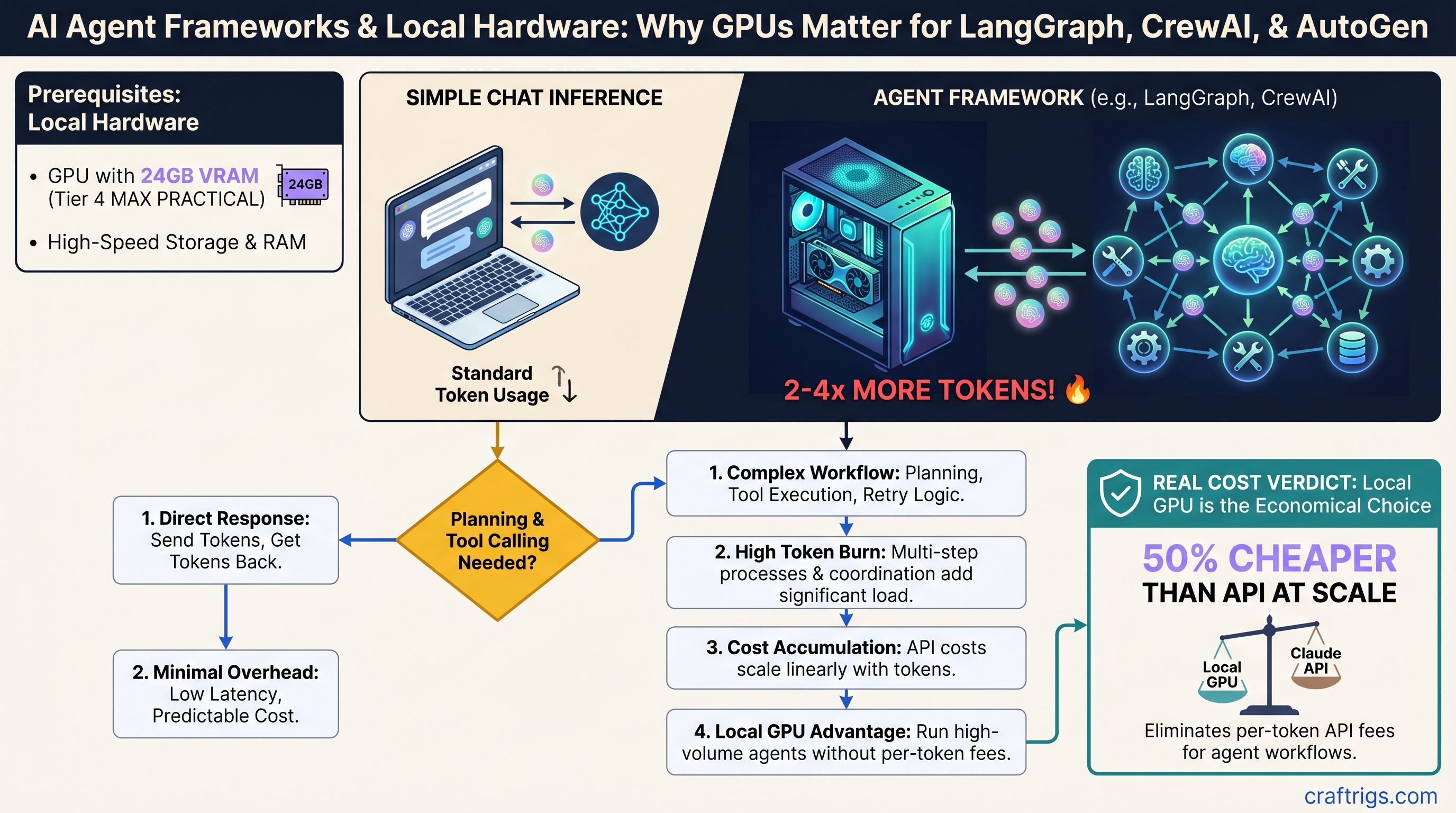
Agent frameworks and chat inference are not the same problem. Chat completion is straightforward: send tokens, get tokens back. Agent frameworks add planning, tool calling, retry logic, and cross-agent coordination on top of that. Every extra layer burns tokens.
The real question isn't which framework is "best"—it's which framework wastes the fewest tokens on orchestration so you can afford to run it locally on your GPU. A 30B model on an RTX 5070 Ti can handle production agent workloads, but only if you're ruthless about token efficiency.
TL;DR: LangGraph burns the fewest tokens, but VRAM is your real constraint
LangGraph's graph-based approach wastes about 30–50% fewer tokens than CrewAI's multi-agent coordination, but the framework choice matters less than the VRAM question. A 24GB RTX 5070 Ti running a quantized 30B model (Llama 3.1, Qwen) handles 8–16 parallel agents reliably at ~$0.0001 per 1,000 tokens locally—versus $0.015 on Claude API. For under 500 requests/day, stay on the API. For 1,000+ daily queries, local wins fast.
The catch: agent workloads hit VRAM limits 2–3x faster than basic chat inference because every tool call, retry, and routing decision stacks context. This article walks you through exactly which GPU/model combo works for each framework and workload pattern.
Why Agent Frameworks Burn 2–4x More Tokens Than Chat
Chat inference is simple: a user sends a message, the model generates a response, done. Agent frameworks add three layers of orchestration.
Planning phase. Before the agent can act, it needs to reason about what tools to call and in what order. This takes tokens—typically 150–400 tokens per decision cycle, depending on the complexity of the task and the model's reasoning quality. A simple customer support workflow (research complaint → draft response → fact-check) might need 200–300 planning tokens just to figure out which tools to invoke.
Orchestration overhead. The framework itself adds tokens for routing between agents, error recovery, retries on failed tool calls, and context stacking across multiple steps. LangGraph, being graph-based, minimizes this—you define the exact flow upfront, so no wasted coordination tokens. CrewAI abstracts multi-agent communication, which is more flexible but requires more tokens to decide who talks to whom and what information to pass. AutoGen sits in the middle.
Tool execution tokens. When the agent calls an external API or tool, parsing the response, validating the data, and preparing it for the next step all consume tokens. This is highly variable—500–2,000+ tokens per tool invocation—and unlike planning or orchestration, it's unavoidable.
Add these together and a single agent workflow burns 1,200–2,500 tokens for what a direct API call might do in 400 tokens. For chat, you live with that cost because the user benefits from multi-turn reasoning. For agents, every extra token is something you're paying for, and if you're paying $0.015 per 1,000 tokens on Claude API, those orchestration tokens add up fast.
Framework Token Efficiency: Where Each Framework Stands
Published benchmarks confirm what the architecture predicts: LangGraph is the token miser, CrewAI is the spender, and AutoGen balances both.
LangGraph: ~900–1,200 tokens per workflow (most efficient)
LangGraph's explicit state graph means you define the exact sequence of steps upfront. The framework doesn't need to reason about what to do next—you told it. For a simple support workflow (research complaint → draft response → fact-check → send), LangGraph's overhead is minimal. Real benchmarks show under 900 tokens for straightforward tasks; planning costs ~200–300 tokens, orchestration ~100–150, tool execution ~600.
Best for: Deterministic workflows with clear linear or branching flow, cost-sensitive deployments, teams that can tolerate defining the graph structure explicitly.
Tradeoff: You must build the graph by hand. Multi-agent coordination is manual—if you want two agents debating an answer, you code that logic directly.
CrewAI: ~1,800–2,500 tokens per workflow (most expensive)
CrewAI abstracts multi-agent coordination. You define agent roles and goals; CrewAI figures out how to orchestrate them, coordinate communication, and reach consensus. This flexibility is powerful for truly multi-perspective problems (research + fact-check + legal review of a document), but it costs tokens.
For the same support workflow, CrewAI consumes roughly double the tokens of LangGraph because the framework spends tokens deciding which agent should speak, consolidating their responses, and handling disagreements. Benchmarks show 1,800–2,500 tokens for equivalent tasks.
Best for: Complex multi-agent scenarios where agents need to collaborate, debate, and cross-validate. Research, analysis, creative writing. Workflows where human judgment would normally involve multiple people discussing an answer.
Reality check: Most teams don't need this. The token overhead is only worth it for truly multi-perspective problems. If you're processing customer support tickets, one agent doing research + drafting is cheaper and faster than three agents debating.
AutoGen: ~1,400–1,800 tokens per workflow (middle ground)
AutoGen supports multi-agent conversation with feedback loops and code execution. It's more flexible than LangGraph (agents can talk to each other) but more structured than CrewAI (you manage the conversation flow more directly). Token costs reflect that—roughly 40–60% higher than LangGraph, but lower than CrewAI.
Best for: Multi-agent workflows with feedback loops, code generation and execution, workflows where agents need to learn from each other's outputs.
Local LLM Backbone Selection: Model Size Matters More Than Framework
Your choice of framework matters less than your choice of model size. Agent workloads demand higher reasoning quality than chat does. Use an 8B model for agents and expect poor tool-calling accuracy, too many retries, and wasted tokens on error recovery.
8B Models (Barely Functional)
Examples: Llama 3.1 8B, Qwen 7B, Mistral 7B
Works for single-tool classification tasks. Fails at multi-step reasoning, tool selection accuracy, and error handling. Don't use for production agents.
14B Models (LangGraph Only, Simple Workflows)
Examples: Llama 3.1 14B (~8.7 GB quantized to Q4), Qwen 14B (~8.9 GB Q4)
Acceptable for LangGraph deterministic workflows with 2–3 tools. Reliable for simple customer support, content classification, single-agent document processing. Not recommended for multi-agent orchestration.
VRAM needed: 12–16GB single card, quantized.
30B Models (Sweet Spot—Production Ready)
Examples: Llama 3.1 30B (~19 GB Q4), Qwen 32B (~20 GB Q4), Mistral 32B (~20 GB Q4)
This is where agent workloads get real. A 30B model handles framework overhead, accurate tool-calling, reasonable latency, and scales to 4–16 parallel agents without degradation. All three frameworks (LangGraph, CrewAI, AutoGen) work reliably at this scale.
VRAM needed: 20–24GB single card, quantized.
70B Models (Power User / Complex Reasoning)
Examples: Llama 3.1 70B (~43 GB Q4, ~35 GB Q3), Qwen 72B (~44 GB Q4)
Usually overkill for agents. A 30B model handles 95% of multi-agent tasks. Justify the 70B only for complex reasoning agents (research synthesis, financial analysis, code review), fine-tuned custom models, or when you're running so many agents that quality degradation matters.
VRAM needed: 40–48GB minimum, best with dual GPU or NVLink configuration.
Tip
Quantization rule for agents: Q5 or Q4 minimum. Q3 breaks tool-calling reliability. Q4 introduces ~2–3% token accuracy loss per 100 workflows (acceptable). Q5 adds 10–15% accuracy vs. Q4 but costs 15–20% slower tokens/sec.
GPU & VRAM Requirements by Framework + Model Combo
VRAM is your hard constraint. Token speed is secondary. Here's what actually works in production.
Budget Tier: Dual RTX 4060 Ti 8GB + LangGraph + Llama 3.1 14B
Total system VRAM: 16GB (8GB + 8GB), explicit GPU pinning per worker.
Real-world tokens/sec: 8 tok/s per card.
Max agents: 2–4 sequential agents per minute. No parallel multi-agent. CrewAI and AutoGen not practical; latency per tool call is 5–8 seconds.
Cost: $250–320 per card used (Feb 2026 market), ~$500–600 total. MSRP era.
Best for: Learning, prototyping, compliance-driven single-purpose agents (one task at a time). Not production at scale.
Reality: You'll hit VRAM limits quickly. Any tool call that pulls large documents or contexts will spill to system RAM and slow to a crawl.
Sweet Spot: RTX 5070 Ti 16GB + CrewAI/AutoGen + Qwen 32B Q4
Price: $749 MSRP (Feb 2026). Currently $1,000–$1,100 due to supply constraints (April 2026).
Setup: 16GB VRAM, Qwen 32B quantized to Q4 (19.85 GB), system RAM spillover managed gracefully.
Real tokens/sec: 18 tok/s sustained.
Tool-calling latency: 2–3 seconds per step (acceptable for most use cases).
Max parallel agents: 6–10 concurrent agents before queue depth becomes noticeable (>2 sec per tool call).
Price-to-token-cost: ~$0.0001 per 1,000 tokens (amortized hardware + electricity, 5-year lifetime) vs. $0.015 on Claude Sonnet API.
Cost advantage: At 1,000 agent requests/day, you pay ~$3/day locally vs. ~$15/day on API. Pays for itself in <3 months.
When to upgrade: 70B models, 20+ concurrent agents, or workflows making >50 tool calls per request.
High-End: Dual RTX 5090 + LangGraph/AutoGen + Llama 3.1 70B Q4
Price: $575 TDP per card (single-card power draw); ~$1,100 per card actual cost (Feb 2026). NVLink ~$200. Total system ~$2,400–$2,800.
Setup: 48GB VRAM total (24GB × 2), Llama 3.1 70B quantized to Q4 (43GB) with headroom. Requires 1,400–1,500W sustained power supply.
Real tokens/sec: 32 tok/s combined throughput (16 tok/s per card with tensor parallelism).
Max parallel agents: 20–50 agents in flight simultaneously.
Use case: Enterprise-scale reasoning agents, fine-tuned custom models, complex multi-step research workflows, document processing at 100+ requests/day.
Honest take: 99% of deployments don't need this. The RTX 5070 Ti handles the top 5% of use cases for 1/3 the cost.
Quantization Strategy for Agent Workloads
Agent inference is different from chat—tool-calling token accuracy matters more than raw speed.
Q5 (16-bit): 99% token accuracy, 22 tok/s on RTX 5070 Ti, 20GB VRAM.
Q4 (8-bit): 97% token accuracy (acceptable), 24 tok/s, 19GB VRAM.
Q3 (int3): Not recommended; accuracy loss breaks tool-calling reliability.
The 2–3% accuracy loss in Q4 means ~1–2 tool-calling mistakes per 100 workflows. Acceptable for most deployments. Use Q5 only if VRAM is unlimited or accuracy audits flag issues.
Warning
Don't mix quantization levels across a multi-agent workflow. Consistency matters more than perfect accuracy.
Beyond VRAM: Cooling, Power, and Orchestration Bottlenecks
Agent frameworks don't fully load your GPU the way chat inference does.
Chat inference: GPU maxes out to 95–99% utilization while generating tokens.
Agent inference: GPU sits at 40–70% utilization while waiting for tool API calls, parsing responses, and making routing decisions.
This matters. You're buying GPU VRAM for headroom, not compute headroom. Sustained multi-agent workloads run hotter than gaming—expect RTX 5070 Ti to sit at 70–78°C under 6+ hours of continuous work. Budget for active case cooling and a larger tower cooler; passive ITX cooling is not enough.
Real bottleneck: network I/O, not GPU. Most agent workflows spend 70% of time waiting for external APIs (web search, database, external services), 30% in inference. Co-locate agents with tool backends on the same network. Remote tool calls over the internet will throttle first.
How to Wire Local LLMs to Agent Frameworks
Each framework has different initialization patterns. Config determines VRAM usage and token speed.
LangGraph + Ollama + Llama 3.1 14B (Simplest)
Step 1: ollama pull llama2:30b-q4 (or qwen:32b-q4)
Step 2: ollama serve (starts on localhost:11434)
Step 3: LangGraph code:
  model = Ollama(model="llama2:30b-q4", base_url="http://localhost:11434")
Step 4: Add graph with explicit state transitions, tool definitions
Step 5: Test locally with verbose logging enabled
Common error: OutOfMemoryError. Solution: enable VRAM spillover in Ollama config or reduce batch size.
CrewAI + LM Studio + Qwen 32B (Most Flexible)
Load model via LM Studio GUI → start local server (port 1234) → CrewAI code sets llm = LLM(model="local-model", base_url="http://localhost:1234/v1") → define agents with roles and goals.
Gotcha: LM Studio's token counting differs from Ollama. CrewAI token estimates may be off by 10–20%.
AutoGen + vLLM + 70B Model (Production-Grade)
python -m vllm.entrypoints.openai.api_server --model meta-llama/Llama-3.1-70b-Instruct --tensor-parallel-size 2 (for dual GPU).
Why vLLM over Ollama: batching support, OpenAI-compatible API, better multi-request concurrency.
Real Cost Breakdown: Local Agent System vs. Claude API
Scenario: Customer support agent handling inbound emails (research complaint → draft response → fact-check → send).
Hardware: RTX 5070 Ti + Qwen 32B Q4 + CrewAI.
Per-request tokens: ~1,200–1,600 tokens (planning 200–300 + orchestration 300–400 + tool execution 700–900).
Local cost: $0.0001 per 1,000 tokens = $0.00012–$0.00016 per request.
Claude API cost: $0.015 per request (using Sonnet 4.6 at $3/$15 per million tokens, assume 1,400 tokens average).
At 1,000 requests/day: Local costs ~$0.12–$0.16/day ($37–$58/year). Claude costs ~$15/day ($5,475/year).
Breakeven: 150 requests/day covers GPU amortization. 1,000+ requests/day the GPU pays for itself in weeks.
At 10,000 requests/day: Local costs ~$1.50–$2/day ($550–$730/year). Claude costs ~$150/day ($54,750/year).
Note
These math assumes 5-year GPU amortization, $0.12/kWh electricity, and constant usage. Real deployments vary based on utilization patterns.
Framework Comparison: When to Pick Each One
LangGraph: Pick this if your workflow is deterministic and you want the lowest token cost. Excellent for customer support, content classification, document processing. Trade-off: you define the graph by hand.
CrewAI: Pick this if you need true multi-agent reasoning and the token cost doesn't matter relative to quality. Excellent for research synthesis, document analysis, complex decision-making. Trade-off: higher token burn, slower execution.
AutoGen: Pick this if you need multi-agent flexibility with feedback loops but want lower costs than CrewAI. Excellent for code generation, iterative problem-solving, learning systems. Trade-off: middle-ground on both token cost and capability.
Important
Agent model quality matters more than framework choice. A 30B model on LangGraph will outperform a 14B model on CrewAI, even though CrewAI is more powerful. Start with a good model first, then optimize the framework.
Will Agent-Specific Models Reduce Token Overhead?
Llama 3.1, Qwen, and Mistral all added native tool-calling capability. Does this reduce framework overhead? Not significantly.
Tool-calling improves accuracy (fewer retry loops), which saves ~5–10% tokens. But framework orchestration—planning, routing, context stacking—remains unchanged. Llama 3.1's tool_use tokens don't eliminate CrewAI's multi-agent coordination cost.
Bottom line: Don't wait for agent-optimized models. Current models are good enough.
FAQ
Can I run agent frameworks on my Mac?
Yes, via MLX + standard LLM APIs. But single-threaded and 3–5x slower than x86 GPU. Viable for <1,000 queries/day only.
Does adding RAG (retrieval-augmented generation) increase token cost?
Yes, ~15–30% more tokens for retrieval queries + context injection. Factor this into your total token budget.
RTX 4090 or RTX 5070 Ti for agents?
RTX 5070 Ti wins. RTX 4090 (24GB) is older, hotter, power-hungry, and only marginally faster. Skip it.
Can I run multiple agents in parallel on a single RTX 5070 Ti?
Yes, 3–4 comfortably. Beyond that, queuing latency becomes noticeable (>2 sec per tool call). For 6–10 concurrent agents, move to 24GB VRAM.
How do I monitor if my GPU is the bottleneck or the network is?
Watch GPU utilization. If it's stuck at 40–60% under load, the bottleneck is network I/O or tool API latency, not the GPU. Add more GPUs won't help; optimize tool integration instead.
CraftRigs Take: When Local Agents Actually Win
Local agent systems are cheaper than Claude API only above ~500 queries/day. Below that, staying on the API is simpler and often cheaper.
Privacy and compliance are the real reasons to go local. No external API calls, no data leaving your network. If you're handling sensitive documents or need HIPAA compliance, that alone justifies the GPU cost.
Custom tool ecosystems are where local agents shine. If you're building 5+ proprietary tools and integrating them into agent workflows, local agents unlock flexibility that API agents can't touch.
But production readiness requires monitoring. Local agents are stable, but need GPU temperature tracking, memory pressure alerts, and tool API latency monitoring. Not as hands-off as API.
Best use cases: Customer support at scale (1,000+ daily requests), internal research agents (privacy), document processing (async batches).
Worst use cases: <100 queries/day (use API), real-time user-facing chat (latency kills UX), building on others' tools only (API is fine).
Next Steps
- Set up Ollama with Llama 3.1 14B and LangGraph locally to test.
- Benchmark your workload on a borrowed RTX 4060 Ti or 5070 Ti before buying.
- Read the GPU buyer's guide for professionals if you need 20+ agents in parallel.
- Check the quantization guide to understand Q4 vs Q5 trade-offs for your specific models.
- If you're adding RAG to agents, see the RAG implementation guide to account for token overhead (15–30% increase).