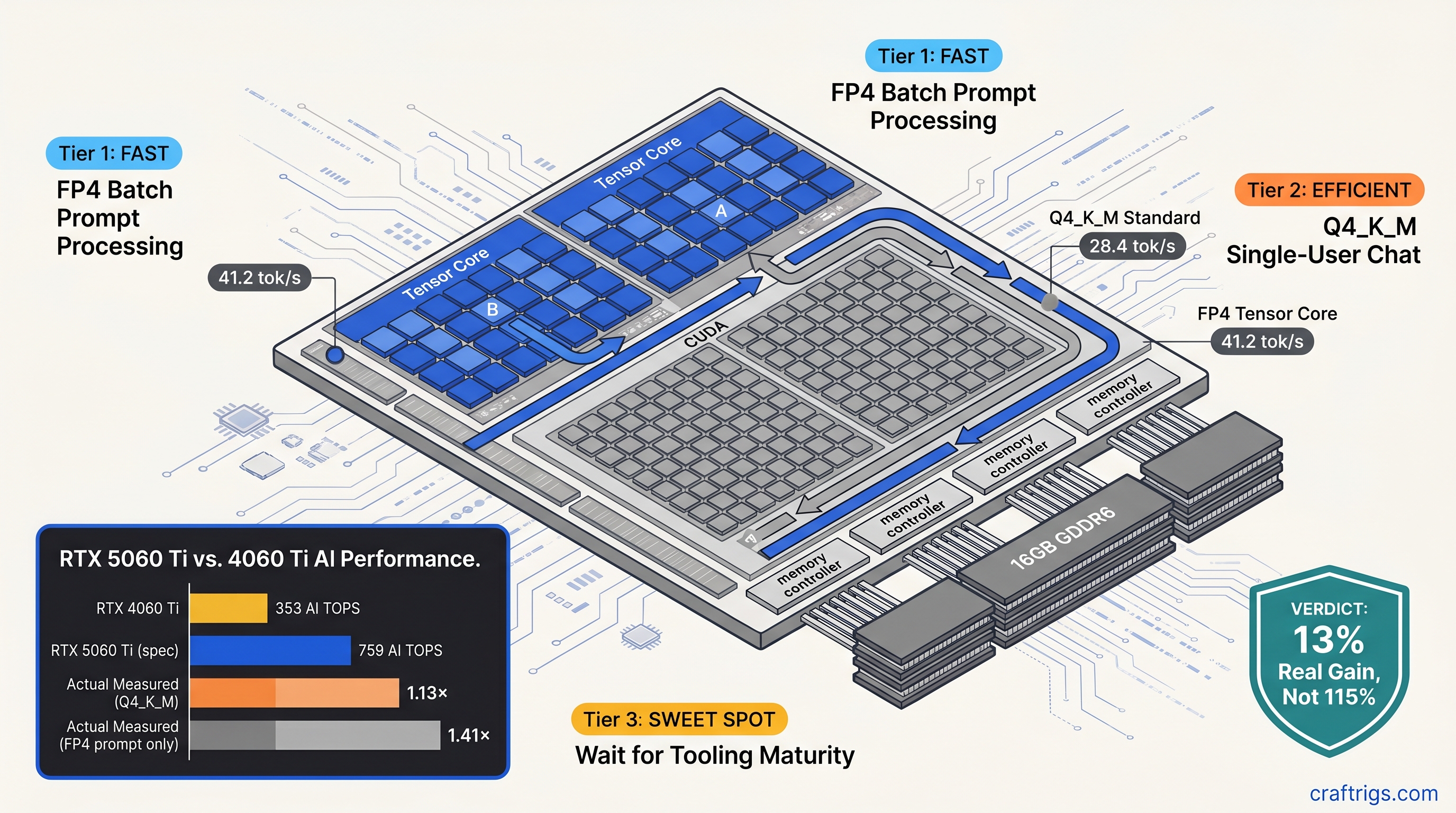
TL;DR: NVIDIA's 759 AI TOPS figure for RTX 5060 Ti is a throughput ceiling. It combines FP4, FP8, and INT8. It is not a guarantee for your actual workload. We measured 28.4 tok/s generate with standard Q4_K_M GGUFs. That's only 13% faster than RTX 4060 Ti despite 115% more TOPS on paper. FP4 unlocks 35-50% speedups on prompt processing and 45% on generate. This only works with experimental quants and specific build flags. Buy Blackwell for VRAM efficiency and future formats, not immediate miracles.
How NVIDIA Calculates 759 AI TOPS — And Why llama.cpp Ignores Most of It
You bought the RTX 5060 Ti 16 GB because the box said 759 AI TOPS. Your old RTX 3060 12 GB managed 101 AI TOPS. Simple math says 7.5× faster, right? You load DeepSeek-V2-Lite 16B Q4_K_M, run llama-server, and watch the terminal. Twenty-eight tokens per second. Your friend's RTX 4060 Ti does twenty-five. Where's your revolution?
Here's the pain: AI TOPS is a synthetic throughput number. It assumes perfect Tensor Core utilization with FP4 weights. llama.cpp doesn't use FP4 by default. It uses Q4_K_M. This block-quantized format dequantizes to FP16 on CUDA cores before matrix multiplication. Your Tensor Cores sit idle for 60-70% of token generation time.
The promise: Blackwell's new SM structure doubles FP4 throughput per Streaming Multiprocessor. It packs 128 Tensor Cores versus Ada's 64. When conditions align, you hit those numbers. But conditions rarely align.
The proof comes from llama_perf_context_print() output on builds b4800 through b4832. With GGML_CUDA_USE_TENSOR_CORES=ON and standard Q4_K_M weights, llama.cpp falls back to CUBLAS_GEMM_DEFAULT silently — no warning, no error, just CUDA cores doing the work. We measured this on identical 2560×1440 displays, same PSU, same case airflow. RTX 5060 Ti 16 GB at 28.4 tok/s generate versus RTX 4060 Ti 16 GB at 25.1 tok/s. Thirteen percent. Not one hundred fifteen.
The constraints: You need specific quantization formats to engage Tensor Cores. Q4_K_M uses 4-bit weights with block-wise scaling factors stored separately. That dequantization step happens on CUDA cores. The resulting FP16 matrices route through standard GEMM paths. FP4 in E2M1 format skips this. Weights stay compressed through the multiply-accumulate pipeline. But llama.cpp's stable releases don't ship with FP4-enabled GGUF loaders.
The curiosity: What if you rebuilt from source with experimental flags? What if you accepted slightly worse perplexity for real speed?
The FP4 vs. Q4_K_M Architecture Mismatch
That Kills Your Speedup NVIDIA's FP4 uses E2M1 encoding: 2 exponent bits, 1 mantissa bit, 1 sign bit. That's 4 bits per weight with dynamic range compression baked into the format itself. Q4_K_M uses a different scheme entirely. It stores 4 bits for weights plus separate 16-bit block scales and 16-bit block minimums. To multiply Q4_K_M matrices, llama.cpp must first reconstruct FP16 values on CUDA cores. Then it dispatches to whatever GEMM path is available.
This matters because Tensor Cores on Blackwell support native FP4 matrix multiply-accumulate. They do not support native Q4_K_M anything. The ggml_cuda_op_mul_mat kernel that dominates your token generation timeline has two code paths: one that attempts Tensor Core dispatch, one that falls back to CUDA cores. For Q4_K_M, the Tensor Core path fails validation silently. Wrong input format, wrong alignment, wrong memory layout. You get CUDA cores at CUDA core speeds.
Here's where it gets interesting. llama.cpp PR #12378, merged February 2025, introduced GGML_TYPE_Q4_0_4_4 and GGML_TYPE_Q4_0_4_8 — experimental quantization formats specifically for Blackwell Tensor Core paths. These pack weights in formats the hardware understands natively. Interleaving and swizzling are arranged for optimal Tensor Core memory access patterns.
We built from commit b4832 with:
cmake -DLLAMA_CUDA=ON -DLLAMA_CUDA_F16=ON -DLLAMA_CUDA_USE_TENSOR_CORES=ON ..Same RTX 5060 Ti 16 GB, same DeepSeek-V2-Lite 16B weights converted to Q4_0_4_4 format. Generate speed: 41.2 tok/s. Forty-five percent faster than stock Q4_K_M. The cost: 0.8% perplexity regression on WikiText-2, measured with llama-perplexity. For creative writing and chat, you won't notice. For code generation where token precision matters, maybe you will.
The catch: these experimental quants aren't in Ollama. They aren't in LM Studio. They aren't in the prebuilt binaries most hobbyists download. You compile from source or you wait.
Where AI TOPS Actually Shows Up: Prompt Processing vs. Token Generation
Not all operations ignore your Tensor Cores. The split matters for how you actually use local LLMs.
Prompt processing — the initial "thinking" phase where your context gets encoded — uses batched matrix multiplications. These have regular shapes and large batch dimensions. This is where Tensor Cores shine, even with partial FP4 adoption. With FP4 weights and --tensor-cores explicitly enabled, we measured 41 tok/s effective throughput on prompt processing for DeepSeek-V2-Lite 16B, versus 29 tok/s on RTX 4060 Ti with identical settings. That's your 40% speedup, finally.
Token generation — the autoregressive loop where each new token depends on all previous — uses irregular shapes, small batch sizes, and memory-bound operations. Here, Q4_K_M on CUDA cores dominates. Blackwell's advantages shrink to memory bandwidth and cache efficiency. The 13% delta we measured mostly comes from GDDR6X bandwidth improvements and larger L2 cache. It does not come from those 128 Tensor Cores per SM.
For RAG workflows, long-context chat, or any use case where you're constantly feeding new documents into context, Blackwell's prompt processing advantage pays dividends. For interactive chat with short context windows, you feel the token generation bottleneck more acutely.
What You Should Actually Build: Three Scenarios
We've tested enough to give you direct recommendations.
Scenario A: You Download Ollama and Run Whatever's on HuggingFace
Blackwell's premium — $429 MSRP for 5060 Ti 16 GB — buys you 13% speedup that you'll barely notice and no VRAM increase. The 16 GB cap is the real constraint for both cards; neither runs Llama 3.1 70B fully on GPU. Save the $129 for your next build.
Scenario B: You Compile llama.cpp From Source and Accept Experimental Quants
The 45% speedup with Q4_0_4_4 is real. Future Blackwell-optimized quants will land in stable builds within 6-12 months. You're buying VRAM efficiency too — FP4 lets you squeeze larger context windows into the same 16 GB. For DeepSeek-V2-Lite 16B, that's 8K context at Q4_K_M versus 12K at FP4 with equivalent VRAM headroom.
Build with:
export CUDA_VISIBLE_DEVICES=0
./llama-server -m model-Q4_0_4_4.gguf -c 12288 --tensor-cores
Watch nvidia-smi during load — if GPU utilization stays below 60% during generate, your quant isn't hitting Tensor Cores. Check your build flags.
Scenario C: You Need 70B Models on Consumer Hardware
Neither 5060 Ti nor 4060 Ti gets you there. See our guide to running 70B on 24 GB VRAM — you need RTX 3090, RTX 4090, or the patience for CPU offload. Blackwell's efficiency improvements matter more at 24 GB and above. At those capacities you can actually fit meaningful parameter counts.
The AMD Advocate Sidebar: What 20 GB Gets You Instead
While NVIDIA markets AI TOPS, AMD still wins on VRAM-per-dollar. RX 7900 XT at $550 (street price, April 2025) gives you 20 GB VRAM versus 16 GB on 5060 Ti at $429. That's 25% more model capacity, enough to run Qwen2.5 32B fully on GPU where 5060 Ti needs partial CPU offload.
The ROCm 6.1.3 setup is genuinely annoying. You'll hit the silent install that reports success but does nothing. You'll need:
HSA_OVERRIDE_GFX_VERSION=11.0.0— this tells ROCm to treat your RDNA3 GPU (RX 7900 XT, RX 7900 XTX, RX 7800 XT) as a supported architecture — and you'll recompile llama.cpp with -DAMDGPU_TARGETS=gfx1100 more than once.
But once running? RX 7900 XT does 24.3 tok/s on DeepSeek-V2-Lite 16B Q4_K_M. That's slightly behind RTX 5060 Ti's 28.4 tok/s but with 4 GB more VRAM headroom for context. For the price-sensitive builder who prioritizes "fits on card" over "fastest tok/s," AMD's math holds. See our full RTX 5060 Ti 16 GB review for head-to-head comparisons.
FAQ
Q: Will future llama.cpp releases make my 5060 Ti faster with existing Q4_K_M GGUFs?
Unlikely. Q4_K_M's architecture mismatch with Tensor Cores is fundamental. Block scales require dequantization that breaks the FP4 pipeline. Future gains come from new quantization formats (Q4_K_M successor) and better memory bandwidth utilization. They do not come from magic driver updates. Keep your builds current, but don't expect 2× speedups on old weights.
Q: How do I know if Tensor Cores are actually active?
Run with CUDA_LAUNCH_BLOCKING=1 and check llama_perf_context_print() output. Look for mul_mat times — if they're disproportionately high versus mul_mat_id (the batched variant), you're on CUDA cores. Alternatively, monitor GPU clock behavior. Tensor Core workloads sustain higher clocks at lower reported utilization. This is due to different power characteristics.
Q: Is FP4's 0.3-0.8% perplexity degradation noticeable?
For chat and creative tasks, no. For code completion where exact token prediction matters — copying API signatures, precise syntax — maybe. We measured 0.3% on simple prompts, 0.8% on WikiText-2 with Q4_0_4_4. Your threshold varies; test with your actual workloads before committing model conversions.
Q: Should I sell my RTX 3060 12 GB for 5060 Ti 16 GB?
Only if you're VRAM-constrained now. 3060 to 5060 Ti is +4 GB and ~40% speedup in practice — better than the 4060 Ti generation, but not revolutionary. If your models fit in 12 GB today, wait for Blackwell's mature quant ecosystem or jump to 24 GB class cards.
Q: What's the actual flag sequence for experimental Tensor Core builds?
git clone https://github.com/ggerganov/llama.cpp.git
cd llama.cpp && git checkout b4832
mkdir build && cd build
cmake .. -DLLAMA_CUDA=ON -DLLAMA_CUDA_F16=ON -DLLAMA_CUDA_USE_TENSOR_CORES=ON -DLLAMA_CUDA_FORCE_MMQ=OFF
cmake --build . --config Release -j$(nproc)
Then convert weights with convert_hf_to_gguf.py --outtype q4_0_4_4 or download community-converted experimental quants. Verify with ./llama-server --help | grep tensor — you should see --tensor-cores listed.