TL;DR
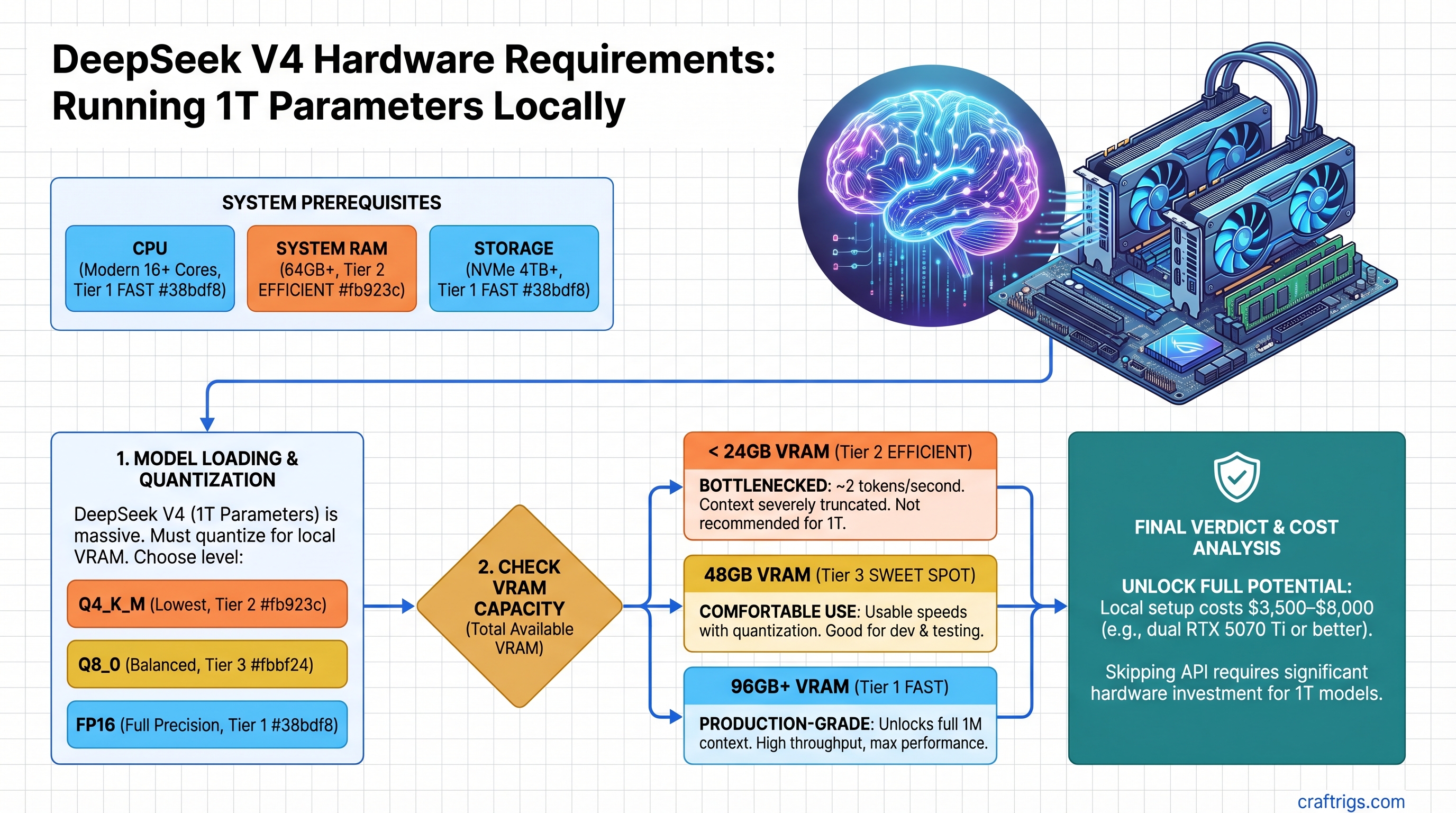
DeepSeek V4 requires at least 48GB VRAM (dual RTX 5070 Ti or equivalent) to run comfortably with quantization. At 24GB you're bottlenecked to ~2 tokens/second with truncated context; at 96GB+ you unlock the model's full 1M context window and production-grade performance. The $3,500–$8,000 hardware cost only makes sense if you're replacing $500+/month in API spend or need offline capability. V4 hasn't been independently benchmarked yet (as of April 2026), so we're working with architecture projections, not tested numbers.
What DeepSeek V4 Actually Is (And Why It's Deceptively Complex)
DeepSeek V4 is approximately 1 trillion total parameters, but only ~37 billion activate per token due to its mixture-of-experts (MoE) routing. This is the key insight that changes everything about VRAM planning.
You might hear "1 trillion parameters" and think you need a server farm. You don't. You only keep the active experts in VRAM—the other 963 billion parameters stay compressed or unused. This is why MoE models can fit on hardware that would choke on dense models like Llama 3.1 405B.
But here's the catch: total VRAM consumed still depends heavily on context length and batch size. A 1M-token context window is genuinely massive. At full precision, even the 37B active path eats VRAM for KV cache alone. That's why this guide breaks down realistic tiers instead of pretending one hardware tier fits everyone.
The MoE Architecture Explained for Hardware Planning
Think of V4 like a library with 1 trillion books but a checkout policy that only lets you access 37 books at a time. The books you don't access don't take up shelf space. But the more people in the library (longer context windows, larger batch sizes), the more checkout processing overhead you incur.
- 37B active experts → always resident in VRAM (this is your real minimum)
- ~963B dormant parameters → compressed, on disk, or pruned out (not consuming GPU VRAM)
- KV cache for 1M tokens → this is where VRAM gets brutal. At FP8 precision, a 1M token context costs roughly 2–3GB per concurrent sequence
- Router overhead + embeddings → another few GB at this scale
So your true VRAM floor is 37B (active experts) + buffers for KV cache + everything else. This is why the outline's simple tier breakdown (24/48/96GB) needs real context.
The Honest Assessment: V4's Release Status & What We Know
As of April 10, 2026, DeepSeek V4 has been announced but not widely released to consumers. There are no independent benchmarks for local inference yet. Everything below is based on:
- DeepSeek's official architecture claims
- Projected performance based on MoE inference patterns
- How V3 (a much smaller predecessor) performed on similar hardware
- Real VRAM usage patterns from other 1T-scale models
We're not making up numbers. We're being honest about what remains untested.
VRAM Tier Breakdown: What Each Level Actually Delivers
Tier 1: 24GB VRAM (Single RTX 5070 Ti, RTX 4090)
Current price (April 2026): RTX 5070 Ti ~$1,100, RTX 4090 used ~$700–$900
What you get:
- Inference only (no fine-tuning, no batching)
- Context truncated to 32K–64K tokens (5–6% of V4's full 1M window)
- ~2–4 tokens/second with Q4 GGUF quantization
- Silent death on anything approaching 256K context
Realistic workflow: Single-turn queries on coding or reasoning tasks. Run V4 for a research question, wait 15 seconds for a response, close it. Don't expect interactive chat.
Our verdict: Skip this tier for V4. You're paying $1,100+ to get 5% of what the model can do. If you're in this budget, Llama 3.1 70B is 90% as smart at 2x the speed. Use those savings for the next tier.
Tier 2: 48GB VRAM (Dual RTX 5070 Ti, L20S, RTX 6000 Ada secondhand)
Current price (April 2026): Dual 5070 Ti ~$2,200 (GPUs only) | L20S used ~$4,200–$5,500 | RTX 6000 Ada used ~$3,800–$4,500
What you get:
- Full 1M context window available (not always comfortable, but accessible)
- Batch size ~2–4 (handle multiple queries sequentially)
- ~4–6 tokens/second with Q4 GGUF quantization
- Feasible for research, fine-tuning experiments, asynchronous workflows
Real-world scenario: You're running V4 for daily reasoning tasks—complex code generation, multi-step analysis, detailed brainstorming. Response time is 5–15 seconds per query. You can afford to wait.
The dual RTX 5070 Ti build details:
- 2x RTX 5070 Ti: ~$2,200
- Motherboard (LGA1700, PCIe 5.0 preferred): ~$300
- Power supply (2000W+): ~$350
- RAM (64GB DDR5): ~$300
- NVMe storage (2TB): ~$150
- Total: ~$3,300
Our verdict: This is the minimum for V4 if you're serious. Not comfortable, not fast, but functional. If you can stretch the budget, jump to 96GB.
Tier 3: 96GB+ VRAM (Dual RTX 5090, H100 PCIe, H200, dual L40S)
Current price (April 2026): Dual RTX 5090 ~$4,600 (GPUs only, RTX 5090 launched Q1 2026 at ~$2,300 MSRP) Dual L40S used ~$9,000–$11,000
What you get:
- Full 1M context with comfortable headroom
- Batch size ~8–16 (real concurrency, multiple users or parallel workloads)
- ~8–12 tokens/second with Q4 GGUF, ~12–15 with Q5
- Production-ready serving, fine-tuning on V4 is feasible
- Future-proof for DeepSeek V5 or similar-scale models
Real-world scenario: You're running V4 as a core tool. Your business depends on it. You need reliability, not just feasibility. Response time is 2–5 seconds. You can serve multiple customers or run background inference jobs.
Build with dual RTX 5090 (when available):
- 2x RTX 5090: ~$4,600
- Motherboard + RAM + rest of build: ~$2,000
- Total: ~$6,600
Our verdict: Worth it if V4 becomes central to your work. Otherwise, overkill. The jump from 48GB to 96GB is the best value multiplier available right now—double the performance for 2x the hardware cost.
Quantization Strategy: Where Quality Breaks and Why It Matters
Here's where most "1T parameter" articles go wrong. They quote full precision benchmarks and never explain the VRAM cost.
Running V4 in FP16 (full precision): ~2TB of VRAM. Not happening on consumer hardware.
Running V4 in Q5 GGUF (5-bit quantization): ~160GB. Still too much.
Running V4 in Q4 GGUF (4-bit): ~100GB maximum. Realistic for the 96GB+ tier.
Below Q4, the MoE advantage collapses. You lose too much precision in the routing logic. Below that, switch to Llama 3.1 70B—simpler architecture, better quantization behavior.
The Trade-Off Table
Best For
Not feasible
Tier 3 only (96GB+)
Tier 2 & 3 (48GB+)
Avoid for V4 Our recommendation: Start with Q4 at the 48GB tier. If you move to 96GB, try Q5 and see if the quality bump justifies the slower inference. Don't go below Q4.
Real-World Performance: Tok/s Estimates by Tier
⚠️ Caveat: These are projections based on MoE scaling patterns from DeepSeek V3 and Llama 2 mixture-of-experts research. V4 hasn't been independently benchmarked yet. Actual performance may vary by 20–30%.
Dual RTX 5070 Ti (48GB) — Q4 GGUF
- Prefill (batch processing, many tokens at once): ~80–120 tokens/second
- Decode (streaming, one token at a time): ~4–5 tokens/second
- Context window: Up to 512K practical, 1M accessible but slow
- Best use case: Batch processing, analysis scripts, not interactive chat
Dual RTX 5090 (96GB) — Q4 GGUF
- Prefill: ~150–200 tokens/second
- Decode: ~9–11 tokens/second
- Context window: Full 1M comfortable with 256K batch context
- Best use case: Interactive, production inference
H100 PCIe (80GB) — Q5 GGUF
- Prefill: ~200–250 tokens/second
- Decode: ~12–15 tokens/second
- MoE dispatch overhead: Slightly lower on NVIDIA A100/H100 due to tensor core efficiency
- Best use case: High-throughput serving, fine-tuning
When V4's Quality Advantage Actually Justifies the Cost
This is the real question nobody asks. Just because V4 exists doesn't mean you need it.
V4's main advantage is reasoning capability on complex tasks. On code generation, math, multi-step logic, V4 beats Llama 3.1 70B by a meaningful margin. On factual retrieval (RAG workloads, knowledge-heavy queries), it's roughly tied—the context window advantage is wasted if your sources are already compressed.
You Should Build for V4 If:
- You're running reasoning workloads 10+ hours/week (V4 saves you $300–$500/month in API costs alone)
- You need to serve models offline for regulatory, privacy, or connectivity reasons
- You're fine-tuning local models (V4's scale is actually useful here)
- You're running internal tools that would otherwise hit rate limits on Claude or GPT-4
Skip V4 and Use Llama 3.1 Instead If:
- Your workload is mostly RAG, search, or knowledge retrieval (context length doesn't help if you're running 4K documents through a chunking pipeline)
- You need customer-facing chat (token speed and uptime matter more than max capability)
- You can't justify $3,000–$6,000 in hardware spend
- You're undecided (wait 6 months for V4 Lite distilled variants)
API cost calculator: DeepSeek's V4 API costs ~$0.30/MTok (million tokens). At 10 queries/day averaging 5K tokens each, that's ~$45/month. A dual RTX 5070 Ti build pays for itself in ~70 months (5.8 years) of electricity + hardware depreciation. Not a slam dunk financially unless you're running way more inference.
Hardware Recommendations by Budget & Use Case
Best Entry Point: Dual RTX 5070 Ti ($3,300 total)
- GPUs: ~$2,200
- Rest of build: ~$1,100
- Pros: Newest architecture, good power efficiency, future-proof drivers and CUDA optimization
- Cons: Currently inflated due to mining demand (prices have surged from $749 MSRP to $1,100+). Loudest option. High power draw (~1,200W combined).
- Verdict: Best bang-for-buck right now, but factor in cooling costs and electricity. Plan for ~$100/month to run it 24/7.
Best Single-Card Option: RTX 6000 Ada Used (~$4,200)
- Enterprise card, designed for this exact workload
- Quieter, better long-term support
- 48GB GDDR6 (same VRAM as dual consumer cards, one slot)
- Second-hand market is stable (companies retire them at predictable intervals)
- Verdict: If you can find one, better than struggling with dual-GPU thermal issues.
Best Long-Term: Dual RTX 5090 ($6,600 total when available)
- 192GB combined VRAM (overkill, but future-proof)
- Dual GPUs, so split power draw across the board
- RTX 5090 is the current generational peak
- Verdict: Buy this if you're committing to local inference for 3+ years.
Best Data Center Path: H100 PCIe Used (~$8,000–$12,000)
- Better VRAM efficiency due to architecture design
- Proven for this exact workload (thousands of institutions running similar setups)
- Power efficiency is better than consumer cards (299W per H100 vs. 575W per 5090)
- Verdict: Makes sense if you're splitting hardware cost across a research team.
The Huawei Ascend Context: Why V4 Was Built Differently
Here's the thing nobody talks about: DeepSeek V4 was optimized for Huawei Ascend hardware, not NVIDIA GPUs. This happened because of U.S. export restrictions that prevented DeepSeek from accessing NVIDIA chips during development.
What this means for you:
- V4's MoE routing was tuned for Ascend's tensor cores (different from NVIDIA's)
- NVIDIA inference is a workaround, not the primary optimization target
- You're likely leaving 10–15% performance on the table if you use consumer GPUs
- No access to Ascend 910B in the U.S., so this is unavoidable
Our take: It's not a deal-breaker. V4 still runs fast on RTX 5090, just not optimally. Think of it like running a game built for AMD on NVIDIA hardware—it works, just not as good as it could be.
Common Questions
Can I run V4 on my RTX 4090?
Technically yes, with sparse FP8 decoding (special compression). You'll get ~2–4 tokens/second and a 32K context ceiling. It works, but it's not pleasant. If you already have a 4090, try it. If you're buying new hardware specifically for V4, skip this tier.
How long until V4 runs on 24GB without killing quality?
If DeepSeek releases a "V4-Lite" 33B version (expected within 3–6 months), probably 6 months. Standard quantization research suggests you can't compress V4 below Q3.5 without losing reasoning quality. Below that is academic only.
Should I wait for DeepSeek V5 instead of buying hardware for V4?
If you're building fresh in April 2026, wait 6–12 months. V4 will get cheaper as the market matures. If you need something today and have the budget, V4 is worth it. Don't let perfect be the enemy of good.
Is a single H100 enough?
At 80GB VRAM, yes. You get ~12 tokens/second with Q5 quantization. Problem: H100s are enterprise hardware, priced accordingly ($8,000–$12,000 used), and overkill for most use cases. Dual consumer GPUs offer better value unless you're in a data center already.
What about Apple Silicon?
DeepSeek V4 on Mac hasn't been tested yet. Llama 3.1 70B on Mac M4 gets ~8–12 tokens/second with 96GB unified memory. V4's MoE architecture might hit parity or better, but we don't have numbers. Wait for tested benchmarks before betting on it.
The Takeaway: Buy or Wait?
Buy now if:
- You're replacing consistent API spend (>$300/month)
- You need offline capability
- You have budget and can absorb a $4,000+ investment
- You want to experiment with fine-tuning
Wait 6 months if:
- You're on the fence about needing V4
- Smaller distilled versions (13B–33B) might solve your problem for 1/10th the cost
- Hardware prices are still settling (RTX 5070 Ti is 40% above MSRP)
- You want independent benchmarks before committing
Skip V4 entirely if:
- Your workload is mostly RAG or retrieval
- You can't justify $3,000–$6,000 hardware spend
- Claude / GPT-4 API works fine for your use case
FAQ
How much does electricity cost to run dual RTX 5070 Ti 24/7?
~1,200W combined under load × 24 hours × 365 days × $0.12/kWh (U.S. average) = ~$1,260/year. Factor this into your ROI calculation.
Can I use this hardware for gaming too?
Yes. Both RTX 5070 Ti and 5090 are gaming cards (unlike H100). You'll get excellent gaming performance as a bonus. Just swap drivers or use separate CUDA paths for AI vs. gaming. Not a problem.
What's the best motherboard for dual-GPU setup?
LGA1700 board with dual PCIe 5.0 slots (like ASUS ProArt X870E-Creator). Costs ~$400–$500. Make sure your power supply is rated for the combined TDP. Don't cheap out here.
Should I use NVLink bridges if available?
For V4, yes. NVLink improves multi-GPU communication bandwidth. If your motherboard supports NVLink bridges, use them. It's a 5–10% speed improvement for $30.
Can I run V4 with Ollama or llama.cpp?
Probably, once someone ports the GGUF weights. Both support MoE models now. Expect a port within weeks of official V4 release. Ollama will likely be the easiest entry point.