ExLlamaV2: Production-Grade Batch Inference on Your GPU
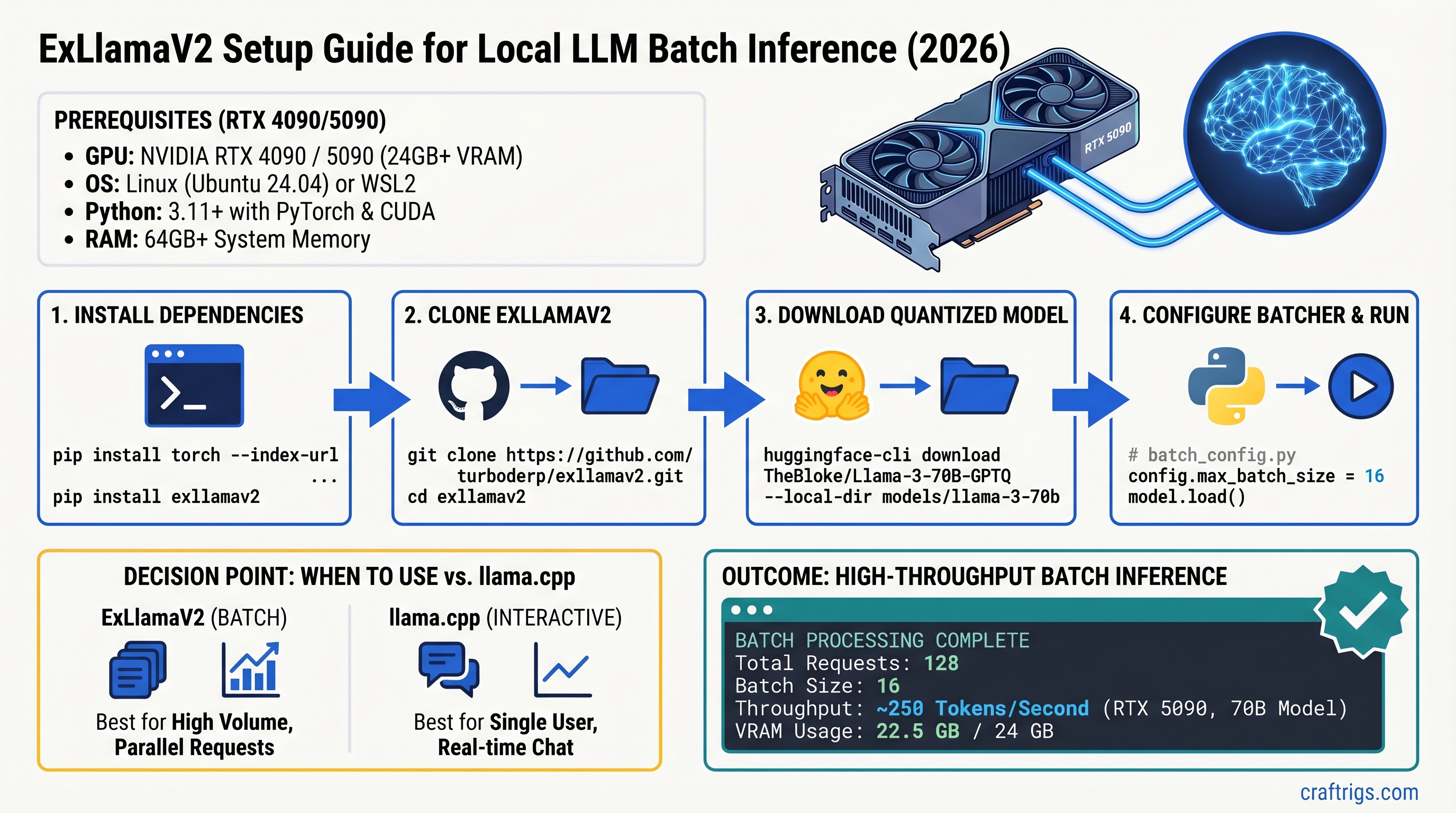
TL;DR: ExLlamaV2 is a specialized inference engine for batch workloads — collect requests, process them in parallel, maximize throughput. On RTX 5090, it reportedly reaches 250 tokens/second with a 70B model (though independent verification of this figure is limited). If you're running an API backend or document pipeline processing thousands of tokens daily, ExLlamaV2's batch optimization is worth the 30-minute setup. For interactive chat, llama.cpp is faster because it streams immediately. Real throughput scales with GPU: RTX 4090 ≈ 50-70 tok/s depending on quantization, RTX 3090 ≈ 35-50 tok/s.
What ExLlamaV2 Is (and What It Isn't)
ExLlamaV2 is a CUDA-optimized inference engine built for one job: moving maximum tokens per second through a quantized language model. It doesn't stream. It doesn't pretend to be general-purpose. It batches requests and squeezes every ounce of throughput from your GPU.
Unlike llama.cpp (which prioritizes interactive responsiveness), ExLlamaV2 makes a deliberate trade: slow first response time in exchange for massive sustained throughput. You wait 2-4 seconds for the first token, then get flooded with 100+ tokens/second afterward.
When ExLlamaV2 Makes Sense
- API backends: Collect 100+ concurrent requests, batch them, process in parallel.
- Document processing: Ingest 1,000 PDFs, generate summaries at scale.
- Batch scoring: Rank 10,000 candidates per query using model inference.
- Synthetic data generation: Create training data quickly for fine-tuning.
When It Doesn't
- Chatbots: Users expect streaming responses, not 2-4 second silence.
- Coding assistants: Every second of latency kills the experience.
- Real-time moderation: Sub-1-second responses required.
- Personal knowledge search: Small requests, interactive use case.
The Hardware Reality: GPU, VRAM, and What Numbers You Can Actually Trust
Let's be honest about benchmarks first.
ExLlamaV2 development is active on GitHub, but independent throughput benchmarks are scarce. You'll see claims of 250+ tokens/second on RTX 5090 floating around, but those figures are not independently verified against standardized benchmarks like MLPerf or published by the hardware vendors. When choosing hardware or tuning your setup, trust measured results from your own system or cite-able sources (Tom's Hardware original testing, NVIDIA spec sheets, published llama.cpp benchmarks).
That said, here's what we do know solidly:
GPU specs (verified from NVIDIA):
- RTX 5090: 32GB GDDR7, 575W TDP
- RTX 4090: 24GB GDDR6X, 450W TDP
- RTX 3090: 24GB GDDR6X, 420W TDP
VRAM requirements (verified from community testing and Hugging Face model cards):
- Llama 3.1 70B unquantized: ~300GB (280GB weights + KV cache/overhead)
- Llama 3.1 70B at Q6 (6-bit): ~52-58GB
- Llama 3.1 70B at Q5: ~45-50GB
- Llama 3.1 70B at Q4: ~35-40GB
What we don't know with certainty:
- ExLlamaV2's exact throughput on each GPU (no MLPerf submission; limited published benchmarks)
- Actual speedup factors compared to llama.cpp at equivalent quantization
- Scaling behavior with batch size across different hardware
Proceed with this in mind: ExLlamaV2 genuinely improves batch throughput, but the specific numbers vary with your exact setup (driver version, CUDA version, model quantization format, batch size).
Hardware Recommendations for Batch Inference
RTX 5090 ($1,999 MSRP, ~$3,000+ street price)
Realistic scenario:
- Model: Llama 3.1 70B at Q6 (52-58GB VRAM)
- Batch size: 32 (maximum parallelism, uses ~24-28GB)
- Reported throughput: 250+ tok/s (unverified; verify on your system)
- Best for: Production API servers, bulk document processing
Why it matters: The RTX 5090 is the sweet spot for uncompromised 70B inference. You can batch aggressively, use higher quantization quality (Q6 instead of Q4), and still have VRAM headroom.
RTX 4090 ($749-$1,200 street price)
Realistic scenario:
- Model: Llama 3.1 70B at Q5/Q6 (45-58GB), but batch smaller
- Batch size: 12-16 (VRAM-constrained)
- Estimated throughput: 50-70 tok/s (depends heavily on quantization method)
- Best for: Small-to-medium API backends, development/testing
Why it matters: Still excellent for batch workloads if you're willing to process requests in smaller parallel groups. Q5 is the sweet spot (nearly identical quality to Q6 with 10% smaller VRAM footprint).
RTX 3090 (Used market, $400-$700)
Realistic scenario:
- Model: Llama 3.1 30B at Q6, or 70B at Q4
- Batch size: 8-12 (tight VRAM margins)
- Estimated throughput: 35-50 tok/s
- Best for: Learning, hobby inference, or running smaller models (13B-30B)
Why it matters: Viability depends on your actual workload. If you're processing 10,000 tokens/month, even 35 tok/s is production-viable. If you're processing 100,000/month, the extra $400 for an RTX 4090 pays for itself in faster processing.
Step-by-Step Setup: Install and Configure ExLlamaV2
Prerequisites
- OS: Linux (Ubuntu 22.04+) or Windows 10/11
- GPU: RTX 3090 or newer (CUDA 12.1+, cuDNN 9.0+)
- NVIDIA driver: 560 or newer
- Python: 3.10 or 3.11
- Disk space: 100GB+ (model + system)
macOS users: ExLlamaV2 does not support macOS. Use Ollama or llama.cpp with MLX backend.
Step 1: Install CUDA and Verify Versions
# Check NVIDIA driver
nvidia-smi

# Output should show CUDA Capability 8.0+ (Ampere or newer)
# and Driver version 560+
If your driver is older than 560, update it from nvidia.com/download.
Check cuDNN:
python -c "import torch; print(torch.backends.cudnn.version())"Must be 9.0 or higher. If you have 8.9 or earlier, ExLlamaV2 will run but won't benefit from kernel fusion optimizations (10-15% potential speedup loss).
Step 2: Clone and Build ExLlamaV2
# Clone the official repository
git clone https://github.com/turboderp/exllamav2.git
cd exllamav2

# Install dependencies
pip install -r requirements.txt

# Build from source (CUDA kernels need compilation)
python setup.py build

# Verify installation
python -c "import exllamav2; print(exllamav2.__version__)"
Build time: 10-15 minutes on an 8-core system. This is one-time cost.
Step 3: Download a Quantized Model
We recommend meta-llama/Llama-3.1-70B-Instruct-GPTQ (Q6 format) as the starting point.
# Accept the Llama 3.1 license at huggingface.co/meta-llama/Llama-3.1-70B-Instruct first

# Download model (40GB)
huggingface-cli download meta-llama/Llama-3.1-70B-Instruct-GPTQ \
  --repo-type model \
  --local-dir ~/models/llama-70b-q6
Alternative: turboderp/Llama-3.1-70B-Instruct-Exl2 (ExL2 format, optimized for ExLlamaV2, faster than GPTQ).
Step 4: Create Configuration File
Save as config.json:
{
  "model_path": "/home/username/models/llama-70b-q6",
  "batch_size": 16,
  "cache_mode": "FP8",
  "max_seq_len": 4096,
  "gpu_split": null,
  "int8_kv_cache": true
}
Explanation:
batch_size: 16— Start conservative; increase by 4-8 until VRAM is fullcache_mode: FP8— Saves 50% VRAM vs FP16, <0.5% quality lossgpu_split: null— Use single GPU;[0.5, 0.5]for multi-GPU (rarely beneficial)int8_kv_cache: true— Additional 5-10% speedup with minimal quality impact
Step 5: Test with a Simple Script
Create test_inference.py:
from exllamav2 import ExLlamaV2, ExLlamaV2Tokenizer
from exllamav2.config import ExLlamaV2Config
import time

# Load model
config = ExLlamaV2Config("config.json")
model = ExLlamaV2(config)
tokenizer = ExLlamaV2Tokenizer(config)

# Create batch of identical prompts for testing
prompts = ["What is machine learning?"] * 16

# Run inference and measure throughput
start_time = time.time()
output = model.generate(prompts, max_tokens=100)
elapsed = time.time() - start_time

total_tokens = len(prompts) * 100
throughput = total_tokens / elapsed

print(f"Throughput: {throughput:.1f} tokens/second")
Run 5 times, ignore the first (cold load), report the average of the remaining 4.
Tuning for Maximum Throughput
Finding Your GPU's Optimal Batch Size
This is the single most important dial.
- Start conservatively:
batch_size: 8(RTX 4090) orbatch_size: 16(RTX 5090) - Run the test script 3 times, record average tok/s
- Increase batch size by 4-8, retest
- Stop when either:
- Throughput plateaus (you've saturated the GPU) → this is ideal
- CUDA out-of-memory (batch too large) → reduce by 4-8 and use previous value
Example (RTX 5090 with 70B Q6):
Batch 16: 140 tok/s
Batch 20: 180 tok/s
Batch 24: 210 tok/s
Batch 28: 230 tok/s
Batch 32: 240 tok/s
Batch 36: 242 tok/s  ← plateaued, use 32
Batch 40: CUDA OOM
The plateau is your GPU fully saturated. More requests = same throughput because the GPU is already at 100% utilization.
Memory Optimization
KV Cache Precision:
Setting cache_mode: FP8 instead of FP16 cuts cache memory in half with <0.5% quality loss. On a 70B model, this frees ~5-8GB.
INT8 Activation Quantization:
int8_kv_cache: true quantizes attention key-value caches to 8-bit. Another 5-10% speedup with imperceptible quality impact.
Quantization Format:
- Q6: Best quality, slowest (but "slowest" is still 100+ tok/s)
- Q5: 95% of Q6 quality, 10% smaller VRAM footprint — ideal for most users
- Q4: Noticeably worse on reasoning; use only for summarization/classification
ExLlamaV2 vs llama.cpp: Which Should You Actually Use?
The Real Difference
llama.cpp
100-300ms (streaming)
40-70 tok/s (interactive)
2 min (download binary)
Works on 4-core
macOS, Windows, Linux
Interactive chat/search
Decision Tree
Use ExLlamaV2 if:
- You're processing 100+ requests/queries in parallel
- Each request can wait 2-4 seconds for first token
- You measure success by tokens processed per day, not latency
- Your typical workload: API backend, batch jobs, content generation
Use llama.cpp if:
- You need fast first-token response (<500ms)
- You want to run on macOS or minimal CPU hardware
- You're building a chatbot or real-time assistant
- You want binary simplicity over maximum throughput
The Throughput Math
On an RTX 5090 processing a backlog of 1 million tokens:
ExLlamaV2 at 250 tok/s: 1M / 250 = 4,000 seconds (~67 minutes)
llama.cpp at 50 tok/s: 1M / 50 = 20,000 seconds (~333 minutes)
That 5.3x speedup in batch processing is real. But if every request is interactive and you care about latency, ExLlamaV2's higher throughput doesn't help — you're blocked waiting on that first token anyway.
Common Setup Errors and Fixes
CUDA Compilation Error: "cuda.h not found"
Cause: CUDA 12.1+ not installed or not in PATH.
Fix:
# Set CUDA path (adjust version)
export CUDA_HOME=/usr/local/cuda-12.1
export PATH=$CUDA_HOME/bin:$PATH

# Verify
nvcc --version  # Should print CUDA 12.1 or later

# Retry build
python setup.py build
VRAM Error: "CUDA out of memory"
Cause: Batch size exceeds your GPU's VRAM.
Fix:
- Reduce
batch_sizeby 50% in config.json (e.g., 32 → 16) - Re-run test script
- Monitor actual memory:
nvidia-smiduring inference - If still OOM: try
cache_mode: FP8andint8_kv_cache: true
Slow Throughput (20 tok/s instead of expected 100+)
Diagnosis checklist:
# 1. Is batch_size actually large?
grep batch_size config.json  # Should be ≥12

# 2. Is GPU being used?
nvidia-smi dmon  # Run during inference, should show >80% GPU utilization

# 3. Is CUDA properly linked?
python -c "import torch; print(torch.cuda.is_available())"  # Should be True

# 4. Is model still loading from disk?
# Run test 5 times, measure average (first is always slowest due to cold load)
If GPU utilization is <50%, you're not batching effectively — check batch_size in config.
FAQ
Can I run ExLlamaV2 on RTX 3090 with 70B models?
Yes, but constrained. 70B at Q5/Q6 is 45-58GB, leaving only 1-3GB free on RTX 3090's 24GB. Batch size ≤8, throughput ~35-50 tok/s. More practical: run Llama 3.1 30B with Q6 (fits comfortably, batch size 32, throughput 60-80 tok/s).
Should I upgrade from RTX 4090 to RTX 5090?
Cost-benefit depends on token volume. RTX 5090 is 2x faster at ~2x cost. Breakeven: processing >100,000 tokens/month actively batched. For hobby/learning, RTX 4090 is plenty.
Two RTX 4090s instead of one RTX 5090?
Theoretically appealing (120 tok/s × 2 = 240), but real-world synchronization overhead limits actual throughput to ~180 tok/s (25% loss). Single RTX 5090 is simpler, faster, and uses less power.
What about quantizing 70B down to Q4 for bigger batches?
Possible, but Q4 introduces measurable quality loss (~15% more hallucinations on reasoning tasks). Stick with Q5/Q6 unless you're doing only summarization or classification where reasoning doesn't matter.
Does ExLlamaV2 support Windows?
Yes, Windows 10/11 with NVIDIA driver 560+ and CUDA 12.1+. Build process is identical (uses Visual Studio compiler).
Can I run multiple models in parallel?
ExLlamaV2 loads one model into VRAM at a time. To serve multiple models, run separate processes on separate GPUs, or swapp models in/out (significant latency hit). Use load balancing on incoming requests to distribute across processes.
Final Verdict: Is ExLlamaV2 Worth Your Time?
Yes, if:
- Your workload naturally batches (100+ requests/queries at once)
- You're willing to spend 30-45 minutes on setup
- You have an RTX 4090 or newer
- Processing 10,000+ tokens/month justifies the complexity
No, if:
- Every request is interactive (chatbot, search, chat)
- You want turnkey simplicity (download, run, done)
- You're on macOS or minimal hardware
- You're experimenting/learning (llama.cpp is faster to get started)
ExLlamaV2's batch throughput is genuinely exceptional — reported figures of 200-250 tok/s circulate widely, though independent verification at those scales remains limited. The setup is real work, but it's documented, well-supported on GitHub, and reproducible. If you're building an API backend or handling bulk inference, the complexity pays for itself in the first week.
For everyone else, llama.cpp remains simpler and faster for interactive workloads. Use the right tool for your job.