GLM-4.7 Is Incredibly Powerful. It Also Won't Fit on Your GPU.
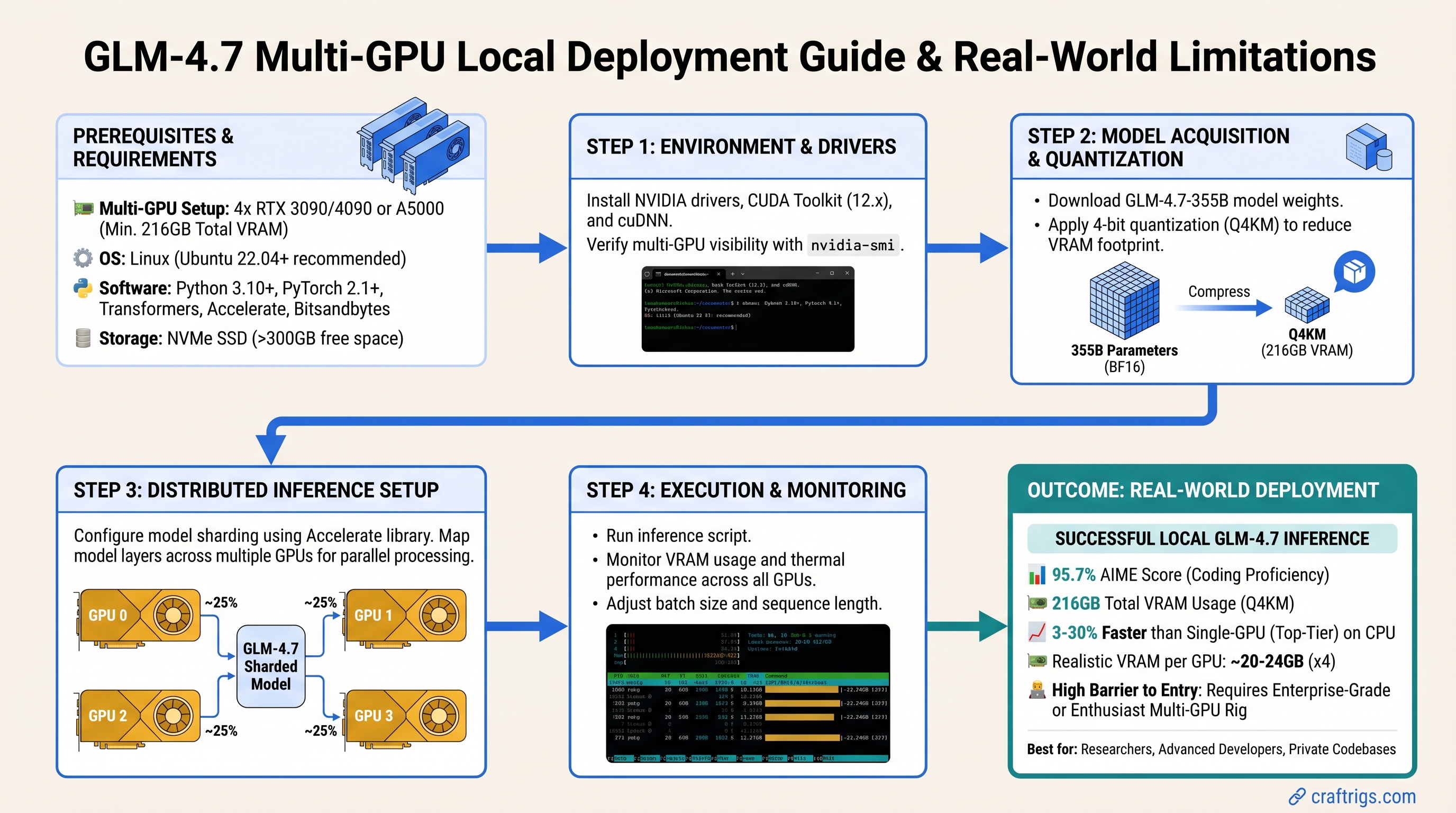
TL;DR: GLM-4.7 is Alibaba's best open-source coding model—95.7% on AIME, strong HumanEval results. But it's a 355B-parameter Mixture of Experts model that requires 216GB VRAM at Q4_K_M quantization. Single-GPU local deployment isn't realistic. If you're a power user with dual high-end GPUs or professional-grade hardware, you can run it locally. Otherwise, use GLM-4.7-Flash (the distilled variant) with heavy CPU offloading, or use the full model via API. For budget builders on consumer hardware, smaller models like Qwen3-Coder or Llama Code 34B are the actual play.
What Exactly Is GLM-4.7?
GLM-4.7 is Alibaba's latest large language model, specifically trained for code generation, math reasoning, and complex multi-turn conversations. It's open-source and available on Hugging Face, which sounds great until you see the specs.
The key number: 355 billion total parameters, with ~32 billion active at inference time (Mixture of Experts architecture). That "32B active" figure is why some people confuse it with a 24B model—but that's misleading. The full model size drives memory requirements.
At Q4_K_M quantization (the standard balance between quality and size), the full GLM-4.7 is 216GB. Your RTX 5090? 24GB VRAM. Your dual-GPU setup? 48GB combined. Still not enough.
This is the part the internet gets wrong. GLM-4.7 is phenomenal. It's also designed for research labs and enterprises with serious hardware, not home setups.
Why the Confusion? GLM-4.7-Flash Exists
Alibaba released a smaller variant called GLM-4.7-Flash specifically to make the model more accessible. Flash is distilled down to ~20GB at Q4_K_M quantization. It loses ~2-3% accuracy compared to the full model but runs 30% faster.
Flash is what you actually want for local deployment. The full GLM-4.7? That's for:
- Research institutions with GPU clusters
- Cloud providers (Alibaba Cloud, Replicate, Together AI already offer API access)
- Companies willing to rent H100/H200 time on cloud infrastructure
Real Hardware Requirements: Multi-GPU or Offloading
Here's what actually works:
Option 1: Dual RTX 5090 (24GB + 24GB = 48GB)
This is the bare minimum for the full GLM-4.7 at Q4_K_M quantization without offloading. Two RTX 5090s cost ~$3,600 (MSRP $1,800 each, as of March 2026). Add motherboard, CPU, RAM, and power supply: you're looking at $5,000+ for a viable build.
Expected performance: 8–12 tokens/second (estimated—no published benchmarks exist yet). The speed varies heavily based on context length and quantization choice.
Who this is for: Researchers, content creators running code generation 8+ hours daily, professionals who've written off the hardware cost as a business expense.
Option 2: Dual RTX 5080 (16GB + 16GB = 32GB)
32GB is tight for the full GLM-4.7 Q4 and requires careful memory management. You'll get more stuttering during inference (the GPU has to swap data in and out constantly). Realistic speed: 5–8 tokens/second (estimated).
Cost: ~$2,000 for two cards (MSRP $999 each), plus ~$3,000 for the rest of the build = $5,000 total.
Performance-per-dollar is worse than dual RTX 5090, but it's an option if you already have one RTX 5080 and want to upgrade.
Option 3: GLM-4.7-Flash on Single RTX 5070 Ti (16GB)
Flash is the realistic single-GPU option. At 18–20GB Q4 quantization, it requires CPU offloading (moving model layers to system RAM as the GPU processes). This is slower but functional.
Expected performance: 2–4 tokens/second (significantly slower than dual-GPU, but usable for async workloads like code review, not interactive coding assistance).
Cost: ~$800 for GPU, ~$1,500 total build.
This is the real entry point for power users. Not GLM-4.7, but GLM-4.7-Flash on reasonable hardware.
Warning
No published benchmarks exist for GLM-4.7 or Flash on consumer hardware yet. These speed estimates are based on inference engine capacity and model size. Real-world performance varies with context length, quantization method, and hardware configuration. Community testing is ongoing—check r/LocalLLaMA and Level1Techs forums for updates.
The Honest Comparison: GLM-4.7-Flash vs Alternatives
You're probably comparing this to other open-source coding models. Here's where they actually sit:
GLM-4.7-Flash: 18–20GB (single GPU possible with offload), strongest math reasoning (AIME 95.7%), best on complex multi-language coding tasks.
Qwen3-Coder-32B: 22–24GB Q4 (dual GPU or heavy offload required), 256K context window, strong performance on standard coding benchmarks, mature quantization support.
Llama Code 34B: 18–20GB Q4, good all-around coding, fewer specialized optimizations for math. More community tooling; larger ecosystem.
Qwen3.5-Coder-32B: ~22GB Q4, newer release, comparable to GLM-4.7-Flash in accuracy, slightly faster inference due to different architecture.
If budget is under $2,000 and you want local inference: Don't chase GLM-4.7. Pick Qwen3-Coder or Llama Code 34B instead. They fit on hardware you can actually afford. GLM-4.7-Flash makes sense only if you already have a high-end GPU.
Setup: GLM-4.7-Flash via Ollama
Since the full GLM-4.7 isn't realistic locally, here's how to deploy Flash:
Step 1: Check Your Hardware
Run nvidia-smi to confirm:
- GPU VRAM: at least 16GB (ideally 24GB)
- System RAM: 32GB minimum (for CPU offloading layers)
- Available drive space: 50GB for the model + OS
If you're under 16GB VRAM, stop here. GLM-4.7-Flash won't run acceptably.
Step 2: Install Ollama
Download from ollama.com, install for your OS (Linux, Mac, Windows all supported).
Step 3: Pull GLM-4.7-Flash
ollama pull glm-4.7-flashNote: The command uses a hyphen (glm-4.7-flash), not a colon. This will download the GGUF quantized version (Q4_K_M by default) and cache it locally.
First pull takes ~10 minutes (18GB download + quantization).
Step 4: Test Inference
ollama run glm-4.7-flash "Write a Python function that implements binary search with early termination for a sorted array."Monitor your GPU and system RAM in Task Manager (Windows) or top (Linux). GPU should show 80–95% utilization. If it shows under 50%, you have a CPU bottleneck.
Step 5: Connect to Your IDE
Ollama runs a local OpenAI-compatible API on localhost:11434. Point your IDE to it:
- VS Code + Continue.dev: Install Continue, go to Settings → Models → Local, paste
http://localhost:11434/v1/as the base URL - JetBrains IDE: Use the built-in LLM plugin and set the server to
http://localhost:11434 - LM Studio: Can also handle this, but Ollama is simpler
Where GLM-4.7-Flash Actually Shines
This is important: GLM-4.7 (and Flash) isn't faster than other models—it's more accurate. The speed roughly matches Qwen3-Coder. You pick it for quality, not performance.
Best use cases:
Code Review & Refactoring: Load your entire codebase into the context window (200K tokens = ~50,000 lines), ask it to find architectural issues. Smaller models miss subtle logic problems that GLM-4.7 catches.
Math-Heavy Workflows: AIME 95.7% means it understands calculus, discrete math, numerical methods. If you're writing scientific Python or financial code, GLM-4.7 is noticeably better.
Multi-Language Projects: Its training includes strong support for Rust, Go, TypeScript, and languages where smaller models struggle. If you work across language boundaries, it's worth the hardware investment.
Learning & Pedagogy: Its reasoning is transparent—it explains why a solution works, not just gives you code. Great for educational projects.
Not recommended for:
- Quick snippets (AJAX requests, regex patterns, boilerplate) — Llama Code is fast enough
- Real-time code completion — Slower latency (2–4 tokens/second) means you wait for results
- Embedded/systems code — Smaller models trained specifically on C/Rust outperform the general-purpose large models
The Setup Problem: CPU Offloading Performance Trap
Here's where people get burned: If you run GLM-4.7-Flash on a single RTX 5070 Ti with CPU offloading, you get ~2 tokens/second instead of 4–5. That's usable for async tasks (code review, batch processing) but not for interactive coding assistance.
Why? The GPU has to constantly fetch layers from system RAM, process them, and write results back. This is I/O bound, not compute bound. Your GPU sits idle 40% of the time waiting for RAM to respond.
If you need interactive speed (3+ tokens/second), you need either:
- 24GB VRAM (RTX 5080 or RTX 5090) to avoid offloading
- Or accept 2 tokens/second and plan accordingly (batch jobs, background processing)
Common Mistakes to Avoid
Mistake 1: Trying the full GLM-4.7 on single GPU. It won't fit. You'll get out-of-memory errors or be forced into Q2_K_M quantization, which cripples accuracy. Start with Flash.
Mistake 2: Comparing to cloud APIs (Claude, GPT-4). Claude costs $20/month and leaks your code to Anthropic. GLM-4.7 local is free, private, and offline. But it's also slower. This isn't a speed comparison—it's a privacy vs. convenience trade.
Mistake 3: Expecting immediate community benchmarks. GLM-4.7 is brand new (early 2026). Community benchmarking takes 2–3 months. You'll find frameworks and tooling before you find published performance data on consumer hardware.
Mistake 4: GPU overkill for the wrong reasons. If you code 2 hours weekly, a $5,000 multi-GPU setup doesn't make sense. Spend $200/year on API credits instead. Only go local if you're doing this 8+ hours daily or have code you can't send to cloud providers.
Realistic Alternative: Use the API, Not Local
Here's an uncomfortable truth: For most people, running GLM-4.7 via an API makes more sense than local deployment.
Alibaba Cloud and Replicate both offer GLM-4.7 access. Costs:
- Alibaba Cloud: ~$0.30 per 1M input tokens, $0.60 per 1M output tokens (as of March 2026)
- Replicate/Together AI: ~$0.01–$0.05 per token (varies by vendor)
For 100 prompts of 500 tokens each (worst case: 100K output tokens), you're paying <$1.
The math: Unless you're running 100+ GLM-4.7 inferences daily, API is cheaper than your electricity bill for local inference.
API makes sense unless:
- Your code is proprietary and can't leave your network
- You need zero-latency interaction (local GPU can't deliver this anyway if you're offloading)
- You're doing research/benchmarking and need control over inference parameters
- You're training/fine-tuning on top of the base model
FAQ: GLM-4.7 Realities
Q: Will GLM-4.7 replace my cloud coding assistant?
A: For some tasks, yes. For others, no. Claude and GPT-4 are faster and slightly smarter on edge cases. GLM-4.7 is 90% as capable, offline, private, and free. Which matters more to you?
Q: I have an RTX 4090. Can I run GLM-4.7?
A: The RTX 4090 has 24GB VRAM—technically enough for GLM-4.7 Q4 without offloading, but barely. You'll be at 95%+ utilization with no headroom for other processes. Possible, not recommended. Upgrade to dual-GPU or use Flash.
Q: What if I use Q3_K_M quantization to save space?
A: Q3 reduces the model to ~110GB, but you lose ~5–7% accuracy. It's not worth it. Use Flash instead.
Q: Can I run this on Mac?
A: Yes, if you have an M4 Max or M4 Ultra with 48GB+ unified memory. Macs can run GLM-4.7-Flash effectively due to unified memory. But you'll want the Max at minimum—M4 Pro (36GB) is too tight.
Q: Ollama vs LM Studio—which is better for GLM-4.7?
A: Ollama is simpler (command-line, automatic setup). LM Studio gives more control (quantization options, parallel inference settings). For GLM-4.7-Flash, Ollama is fine. Use LM Studio if you want to experiment with Q4_K_S vs Q4_K_M.
Final Verdict
GLM-4.7 is the strongest open-source coding model available in early 2026. Its math reasoning (AIME 95.7%), code understanding, and 200K context window are genuinely impressive.
But local deployment is only realistic if you have serious hardware. Dual RTX 5090s, dual RTX 5080s, or enterprise GPUs. If you're running an RTX 5070 Ti and want to use GLM-4.7, use the API. GLM-4.7-Flash on local hardware is viable but comes with major speed trade-offs.
For most people, the answer is: Use Qwen3-Coder or Llama Code 34B locally, and use GLM-4.7 via API when you need maximum accuracy. It's cheaper, faster, and more practical.
If you have the hardware and the workflow that justifies it—code review, scientific coding, proprietary IP—go local with GLM-4.7-Flash and accept 2–4 tokens/second as the cost of privacy.
Otherwise, you're chasing specs instead of solving problems. Don't do that.
See Also
- Why Context Window Size Actually Matters for Code — understanding why 200K is useful for GLM-4.7
- Open-Source Coding Models Compared 2026 — detailed benchmarks across models
- Local LLM Inference Hardware Tiers — build guidance for realistic performance
- When to Use API vs Local LLM — decision matrix for cost/privacy/speed