Quick TL;DR
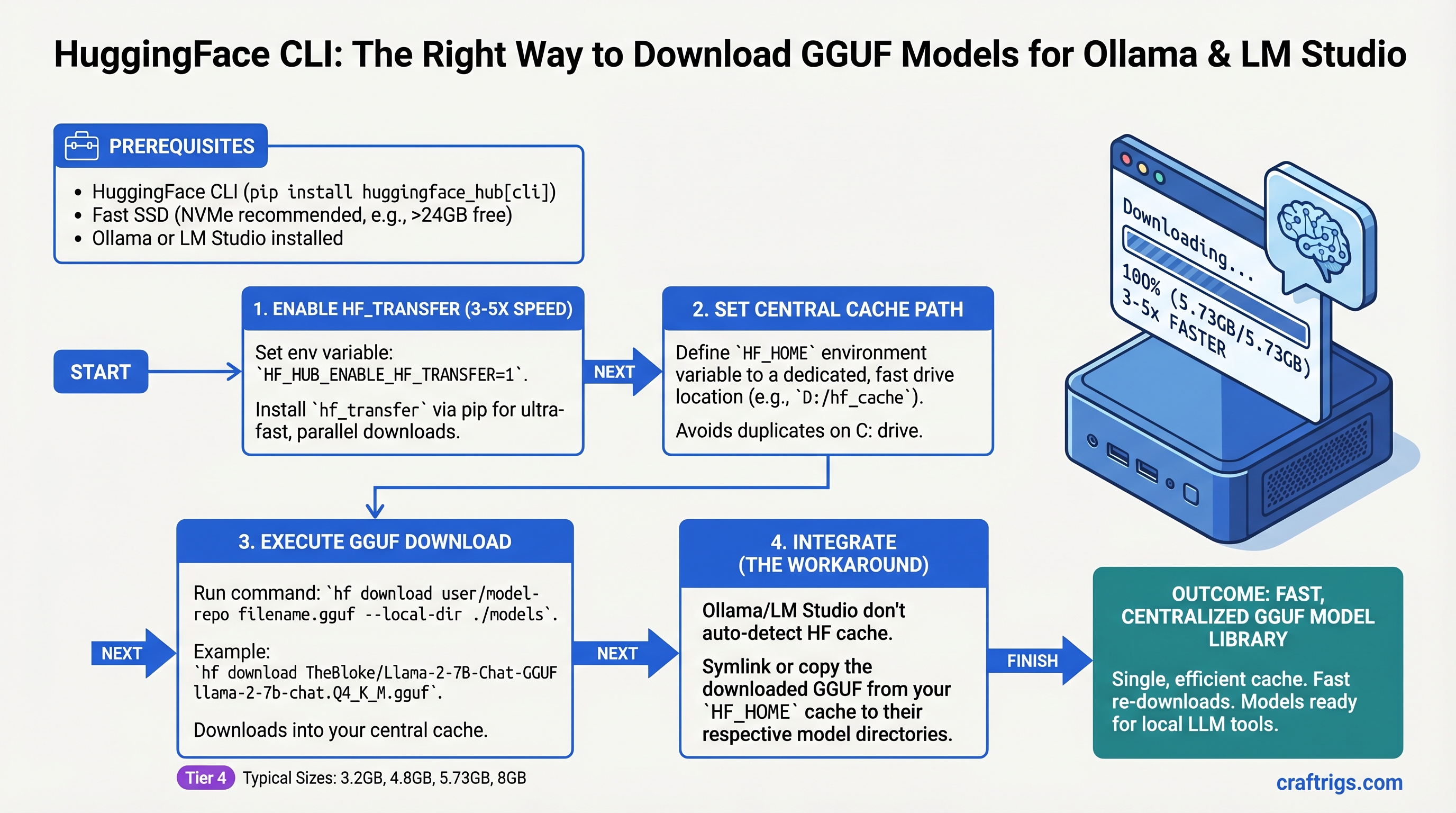
Use hf download with hf_transfer enabled to grab GGUF models 3-5x faster than browser downloads. Set your HF_HOME once to a fast drive, and every tool that can find your models reads from the same cache—no wasted re-downloads. The catch: Ollama and LM Studio don't automatically respect HF_HOME, so you'll need symlinks or workarounds to point them at your collection. Worth it for the bandwidth saved.
Why Not Just Download in Your Browser?
You can—but you'll waste time and bandwidth. Browser downloads are sequential, capped at your connection's single-stream speed (20-30MB/s on a 1Gbps line). HuggingFace CLI with hf_transfer uses parallel chunks, hitting 100MB/s+ on the same connection. For an 8GB GGUF, that's the difference between 5 minutes and 60 seconds.
But speed isn't the real win. The real win is caching. Download Llama 3.1 8B once. Switch from Ollama to LM Studio to a local Python script. They all read from the same cached file—no re-download, no duplicate storage. Download five quantization variants of the same model. They coexist in one cache directory, hard-linked or deduplicated. This is how people with extensive model collections actually manage them.
Browser downloads? You re-download every single time.
Understanding GGUF: The Format That Makes Local AI Practical
GGUF is a single-file format designed for inference, not training. One model = one file. No shard juggling, no mysterious missing chunks, no "which version of this model am I actually running?" confusion.
The single file contains everything: weights, architecture, tokenizer. It also contains quantization—the compression that makes inference possible on consumer hardware. You'll see files named like:
Meta-Llama-3.1-8B-Instruct-Q5_K_M.gguf(5.73GB — recommended for quality + speed balance)Meta-Llama-3.1-8B-Instruct-Q4_K_M.gguf(4.8GB — tighter fit, still coherent)Meta-Llama-3.1-8B-Instruct-Q3_K_S.gguf(3.2GB — last resort, noticeable quality drop)
The Q-codes matter. Q5_K_M means 5-bit quantization with K-quant method and medium variant. You don't need to memorize this—just know: higher Q number = better quality, larger file, slower inference. Q5 is the sweet spot for 8B models. Q4 is the workhorse for 70B on 24GB VRAM. Q3 is for "I have 8GB and I'm desperate."
Step 1: Install HuggingFace CLI and Get an API Token
First, Python 3.8 or higher. Check with:
python --versionInstall the CLI:
pip install huggingface-hubVerify:
hf --versionNow you need a HuggingFace account (free at huggingface.co). Create one if you don't have it. Then generate an API token:
- Go to https://huggingface.co/settings/tokens
- Click "New token"
- Name it something like "local-llm-downloads"
- Give it "Read" permissions (write not needed)
- Copy the token (starts with
hf_)
Now log in:
huggingface-cli loginPaste your token when prompted. The token gets saved to ~/.huggingface/token (this is gitignored and safe).
Verify it worked:
huggingface-cli whoamiShould print your HuggingFace username.
Step 2: Install hf_transfer for Speed (The Key Step)
This is where download speed actually jumps.
hf_transfer is a Rust-based parallel downloader maintained by HuggingFace. Instead of sequential HTTP GET, it opens multiple connections to different chunks of the file simultaneously. On a 1Gbps line, you'll hit 100MB/s+ instead of the Python default's 20-30MB/s.
Install it:
pip install hf_transferEnable it globally in your shell:
export HF_HUB_ENABLE_HF_TRANSFER=1Add this to your .bashrc or .zshrc so it persists:
echo 'export HF_HUB_ENABLE_HF_TRANSFER=1' >> ~/.bashrc
source ~/.bashrc
Test it. Download a small file and watch the speed:
hf download bartowski/Llama-3.1-8B-GGUF --include "*.gguf" --exclude "*.Q2_K_S*" --revision mainWatch the download speed in the progress bar. If you see lines printing at ~100MB/s or better, hf_transfer is working. Without it, you'll see 20-30MB/s.
Tip
Even on DSL (10Mbps), hf_transfer helps by using parallel chunks more efficiently. The benefit is smaller but real.
Step 3: Download Your First Model (Llama 3.1 8B)
The basic command:
hf download bartowski/Llama-3.1-8B-GGUF --repo-type model --revision mainWhat you're telling it:
hf download— use the download commandbartowski/Llama-3.1-8B-GGUF— the repo (namespace/model-name)--repo-type model— you're downloading a model, not a dataset--revision main— download from the main branch
Wait, what's bartowski? It's a community member on HuggingFace who quantizes Meta's official Llama models into GGUF format. This is your bridge between the official model (which is in full precision, too large for consumer inference) and GGUF (which is quantized and practical). Other popular quantizers: QuantFactory, lmstudio-community. They all host variants of the same base models.
The download will stream to your terminal:
Fetching 4 files: 100%|████████████| 4/4 [00:45<00:00, 0.09it/s]When it finishes, your model is at:
~/.cache/huggingface/hub/models--bartowski--Llama-3.1-8B-GGUF/snapshots/{HASH}/That hash is the commit ID of that model version. Don't worry about memorizing it—your tools handle the navigation.
Understanding HF_HOME: Where Your Models Actually Live
By default, HuggingFace stores everything in ~/.cache/huggingface/. This is fine until it isn't—the .cache directory on your system drive can fill up fast, and cache directories are often cleared on system cleanup.
Better approach: Set HF_HOME to a dedicated path on a fast drive (preferably an SSD).
export HF_HOME=/mnt/ssd/huggingface
mkdir -p $HF_HOME
Add to .bashrc:
echo 'export HF_HOME=/mnt/ssd/huggingface' >> ~/.bashrc
source ~/.bashrc
Verify:
echo $HF_HOMEEvery future download goes to that path. If you have multiple drives, put your "active" models on the fast SSD and archive old ones to USB or external storage.
Storage math for your build:
- One 8B model (Q5 quantization): ~6GB
- One 70B model (Q4 quantization): ~40GB
- Typical "hobby" collection (3-5 models): 50-150GB
- Power user collection (10+ models): 500GB+
If you're collecting models, budget accordingly. A 2TB external USB 3.1 drive costs $50-80 and is worth it.
The Truth About Ollama and LM Studio Integration
Here's where the outline gets honest, and you should too: neither Ollama nor LM Studio automatically respects HF_HOME. This is a pain point that the community keeps asking for and the projects keep not implementing.
Ollama uses OLLAMA_MODELS as its own storage directory (default: ~/.ollama/models/). When you run ollama pull llama2, it downloads to that directory, not to HF_HOME.
LM Studio uses ~/.cache/lm-studio/models/ hardcoded. It doesn't check HF_HOME.
So if you download a model via hf download, you can't just point Ollama or LM Studio at it and have it magically work. You have options:
Option A: Symlink (Advanced, Saves Space)
Create a symlink from Ollama's model directory to your HF cache:
ln -s $HF_HOME/models--bartowski--Llama-3.1-8B-GGUF/snapshots/{HASH}/Meta-Llama-3.1-8B-Instruct-Q5_K_M.gguf \
  ~/.ollama/models/blobs/sha256-{some-hash}
Then reference it in a Modelfile. This works but requires knowing the blob hash, which is tedious.
Option B: Copy (Simple, Wastes Space)
cp $HF_HOME/models--bartowski--Llama-3.1-8B-GGUF/snapshots/{HASH}/*.gguf \
  ~/.ollama/models/blobs/
Now Ollama sees it. The downside: you've duplicated the file. That 6GB model is now 12GB on disk.
Option C: Use Ollama's Native Pull (Simplest, No Integration)
ollama pull bartowski/llama-3.1-8bOllama downloads to its own directory. No HF_HOME integration, but it's one command. Trade-off: space not pooled with your other tools.
Warning
The dream of "one cache, all tools read from it" doesn't exist yet. Until Ollama and LM Studio implement HF_HOME support, you choose: manual symlinks (complex but space-efficient), file copies (simple but wastes space), or separate downloads per tool (easiest but most bandwidth waste).
LM Studio is slightly better: its models directory can be changed in settings. You can point it at a subdirectory of HF_HOME manually. Still not automatic, but less awkward than Ollama's symlink dance.
Handling Gated Models (Meta-Llama and Others)
Some models require accepting a license before download. Meta's Llama models, Mistral's proprietary variants, and others have this gate.
When you try to download a gated model without acceptance, you'll get:
Error 403: Unauthorized. Make sure to accept the license at...Fix it:
- Visit the model repo on HuggingFace (e.g., https://huggingface.co/meta-llama/Llama-3.1-8B-Instruct)
- Click "Agree and access repository"
- Read the license, click the checkbox, submit
- Wait 1-2 minutes (HuggingFace needs time to update your permissions)
- Try the download again
No need to re-login. Your token already has the permission now.
Batch Downloading Multiple Models at Once
Set up a script to download several models in sequence. Useful for testing quantization trade-offs or setting up a fresh system.
#!/bin/bash

export HF_HUB_ENABLE_HF_TRANSFER=1

models=(
  "bartowski/Llama-3.1-8B-GGUF"
  "bartowski/Llama-3.1-70B-GGUF"
  "QuantFactory/Mistral-7B-Instruct-v0.2-GGUF"
)

for model in "${models[@]}"; do
  echo "Downloading $model..."
  hf download "$model" --repo-type model --revision main
  echo "Done: $model"
done
Run it:
bash download-models.shEach download waits for the previous one to finish. Total time for 3 models (8B + 70B + 7B variants) is roughly 5-8 minutes with hf_transfer enabled. Without hf_transfer, expect 20+ minutes.
What Happens If Your Download Gets Interrupted?
The truth: hf_transfer's resume behavior is unreliable. Documented issues include downloads hanging without failing, interrupted downloads restarting from 0% instead of resuming, and poor error handling on connection drops. GitHub issues #30 and #63 on the hf_transfer repo discuss this.
The standard huggingface-cli (without hf_transfer) handles resume more gracefully via .incomplete cache files.
Practical advice: If your connection is unstable (satellite, mobile hotspot), consider disabling hf_transfer for very large files:
unset HF_HUB_ENABLE_HF_TRANSFER
hf download bartowski/Llama-3.1-70B-GGUF  # downloads without hf_transfer, better resume behavior
export HF_HUB_ENABLE_HF_TRANSFER=1  # re-enable for next downloads
If a download dies mid-way, you can always run the command again. Completed chunks stay cached; only missing chunks re-download. But with hf_transfer, sometimes it hangs instead of resuming cleanly.
Smart Caching: Multiple Quantizations, One Model
Here's the power of HF_HOME: download 5 different quantizations of the same base model and they coexist without duplication.
Example: Test Llama 3.1 8B at different quality levels:
hf download bartowski/Llama-3.1-8B-GGUF \
  --include "*Q8_0*" --revision main

hf download bartowski/Llama-3.1-8B-GGUF \
  --include "*Q5_K_M*" --revision main

hf download bartowski/Llama-3.1-8B-GGUF \
  --include "*Q4_K_M*" --revision main
You now have three files in the same cache repo (all under models--bartowski--Llama-3.1-8B-GGUF/). Total space: roughly 6GB + 4.8GB + 4GB = ~15GB (not duplicated).
Compare inference speed and output quality:
- Q8_0 (largest, slowest): full precision quality
- Q5_K_M (balanced): imperceptible quality loss, ~30% faster
- Q4_K_M (aggressive): noticeable but usable, ~50% faster
This is how you actually dial in the right quantization for your hardware.
Troubleshooting
"403 Forbidden" or "You need to accept the license" Visit the model repo on HuggingFace, click "Agree," wait 2 minutes, try again.
"hf: command not found"
You installed huggingface-hub but it's not in your PATH. Try python -m huggingface_hub download ... instead, or reinstall:
pip install --upgrade huggingface-hubDownload is slow (10MB/s instead of 100MB/s)
hf_transfer isn't enabled. Check: echo $HF_HUB_ENABLE_HF_TRANSFER. Should print 1. If not, set it in .bashrc and reload.
"Disk full" error halfway through
Your HF_HOME is on the wrong partition. Check: df -h $HF_HOME. If it's nearly full, move HF_HOME to a larger drive and update the environment variable.
Model downloaded but Ollama/LM Studio can't find it They don't read HF_HOME automatically. Use Option B (copy) or Option C (separate download) from the integration section above.
FAQ: What Power Users Actually Ask
Can I download models on a headless server (no GUI, over SSH)?
Yes. hf download works over SSH. Make sure your token is configured on that machine: huggingface-cli login there too, or copy your token to ~/.huggingface/token.
What if my connection is really slow (DSL, satellite)?
hf_transfer still helps—it opens 4-8 parallel connections even on slow speeds. But if you're seeing hangs, disable it for that download: unset HF_HUB_ENABLE_HF_TRANSFER.
Can I upload my own quantized GGUF to HuggingFace and download it with hf download?
Yes. Create a public or private repo, upload your files, and use the same command: hf download yourusername/your-gguf-repo.
Do I need to download every quantization, or just one? Start with Q5_K_M (best balance of quality and speed for 8B models) or Q4_K_M (best for 70B on 24GB VRAM). Download others only if you want to test trade-offs. One model per system is enough to get started.
What about Windows?
hf_transfer works on Windows with Python 3.8+. Paths use backslashes; in scripts, use raw strings (r"C:\path\to\models"). The core workflow is identical.
Verdict
hf download with hf_transfer is the fastest, cleanest way to manage GGUF models locally. Set HF_HOME once, configure hf_transfer, and you've solved the bandwidth problem. The integration with Ollama and LM Studio isn't seamless—yet—but symlinks or manual copies bridge the gap.
For builders collecting models, the caching alone saves enough bandwidth to pay for an SSD in a month. Start with one 8B model (Llama 3.1 8B Q5_K_M, 5.73GB), test it in Ollama and LM Studio, then expand your collection from there.