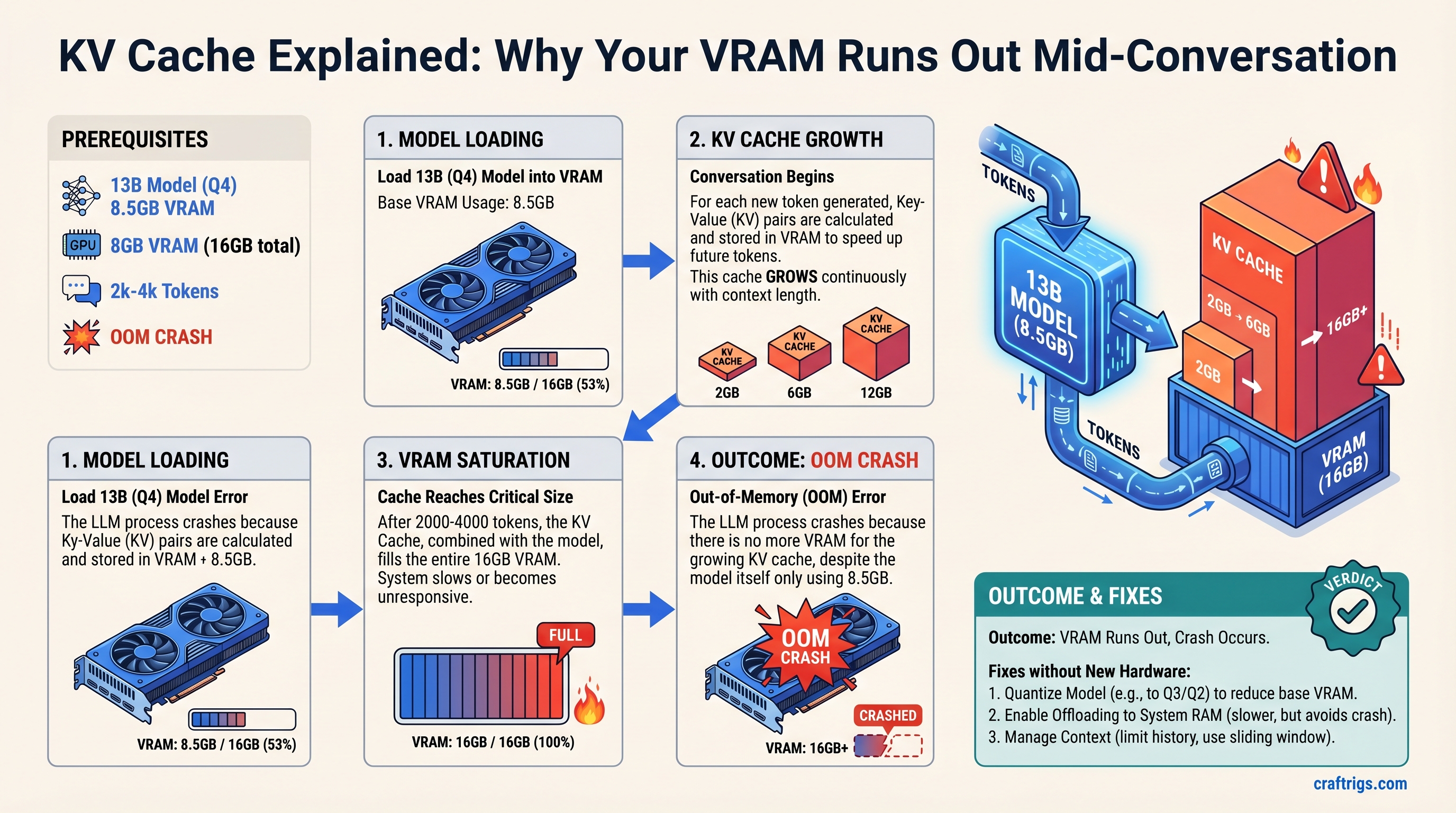
Your 13B model in Q4 quantization fits in 12-16GB of VRAM on paper—until the KV cache grows. After 2000-4000 tokens of conversation, you hit an out-of-memory crash even though the model itself only uses 8GB. This guide explains exactly why that happens, shows you the math behind the crash point, and gives you three concrete strategies to solve it without buying new hardware.
What Is KV Cache and Why It's Not Just Another VRAM Consumer
When a transformer model processes your message, it needs to "attend" to every previous token in the conversation to generate the next token. Computing that attention fresh every single time is impossibly slow. So instead, the model stores intermediate values called key and value tensors—one pair for every token ever processed—and reuses them. That storage is the KV cache.
Unlike model weights (which are fixed and knowable) or activations (which are temporary and freed after each token), KV cache stays in VRAM for your entire conversation. It's the hidden memory cost of longer context windows.
Here's the critical part: KV cache is not the same as context window. Context window is how many tokens the model can see. KV cache is how much VRAM that visibility costs. You can have a 4096-token context window on paper and run out of memory after 2000 tokens in practice. (This is why so many builders have models that "fit" until they crash mid-chat—they miscalculated the cache footprint.)
Why Models Need KV Cache at All
Transformers predict the next token by running attention: each new token looks at all previous tokens and learns which ones matter. Without caching, after 1000 tokens you'd recalculate that attention 1000 times. With caching, you calculate each attention once and reuse it. The trade-off is obvious: less speed, no caching; less VRAM, caching. Every local LLM setup chooses caching.
The Three VRAM Consumers in Local LLMs (and Why KV Cache Sneaks Up on You)
When you run a 13B model locally, VRAM gets divided among three things:
Model weights — The actual parameters. A 13B model in Q4_K_M quantization uses about 8-8.5GB. This is fixed, knowable, and shrinks when you quantize more aggressively.
Activation memory — The temporary tensors computed during each forward pass. These are freed after every token, so they stay small. ~1-2GB for a 13B model.
KV cache — Every key and value tensor from every token in your conversation. This grows with every single token. At 2048 tokens, a 13B model needs ~6GB. At 4096 tokens, ~12GB.
Most builders calculate VRAM based on model weights alone. They see "8.5GB model, I have 12GB" and think they're fine. They are—until 2500 tokens later. (If you want a detailed breakdown of all three VRAM consumers, see our VRAM breakdown guide.)
Comparing the Three: A 13B Model Example
For a Llama 2 13B model running a single conversation at batch size 1:
- Model weights (Q4_K_M): 8.5GB
- Activation memory (2048 tokens): ~1.2GB
- KV cache at 2048 tokens (FP32): ~6.4GB
That's already 16.1GB on a 16GB GPU. Add one more context window and you're over.
Notice: your quantization level shrinks the weights but does nothing for the KV cache. Q2 vs. Q6 makes no difference to cache memory—that stays FP32 or whatever precision the model is running inference in.
How KV Cache Grows with Conversation Length—The Math
The formula is straightforward:
KV cache size = 2 × num_layers × hidden_dim × sequence_length × bytes_per_token
For Llama 2 13B:
- 40 layers
- Hidden dimension: 5120
- 2 (key + value)
At FP32 (4 bytes per token):
6.4 MB per token (approximately)
That's the math. Chain it out:
- 1000 tokens: 6.4GB KV cache
- 2000 tokens: 12.8GB KV cache
- 4000 tokens: 25.6GB KV cache (solo KV cache, no model)
For most 13B models, you hit VRAM exhaustion around 2500-3000 tokens when you add the model weights and activation memory. On a 16GB GPU with a 13B model, 4000-5000 tokens is the realistic breaking point.
Notice: this scales linearly. The only way to double your context length is to buy a GPU with double the VRAM or find a way to compress the cache itself.
Why Your 13B Model Crashes After 5 Minutes of Chat (Real Example)
You load your 13B model into Ollama on an RTX 4070 Ti (12GB). You start chatting. The first few responses feel instant. The model is working. You get cocky—your VRAM calc was right.
But here's what's actually happening:
First 1000 tokens (1-2 minutes of conversation):
- Model weights: 8.5GB
- KV cache: 6.4GB
- Free VRAM: ~5.1GB (safety cushion exists)
The model flies. You don't notice the memory meter creeping up.
2500 tokens (5-7 minutes of typical multi-turn chat):
- Model weights: 8.5GB
- KV cache: 16GB
- Total: 24.5GB on a 12GB GPU
The model stops mid-token. CUDA out of memory. Crash.
This isn't a gradual slowdown. CUDA doesn't gracefully degrade. You have memory or you don't. One more token pushes you over the edge, and the entire generation stops. (If you're seeing crashes like this, check our troubleshooting guide for local LLM crashes to confirm it's KV cache, not something else.)
The crash point depends entirely on your hardware and model size:
- RTX 4070 (8GB): ~1200-1500 tokens before OOM
- RTX 4070 Ti (12GB): ~2500-3000 tokens before OOM
- RTX 5070 Ti (16GB): ~4000-5000 tokens before OOM
- RTX 6000 Ada (48GB): ~13000-16000 tokens before OOM
Larger models have larger hidden dimensions, so larger KV caches per token. A 70B model hits the OOM wall 3-4× faster than a 13B.
Three Ways to Fix KV Cache Bloat (With Trade-Offs)
There's no magic fix. Every solution trades off something: conversation length, inference speed, or quality. Which one you pick depends on what you can afford to lose.
Strategy 1: Limit Context Window (Safest, Predictable)
The simplest fix: cap the context window. Tell the model "you can only see the last 2000 tokens of our conversation." After that, oldest messages disappear from the model's view.
In Ollama, you set --num-ctx at launch:
ollama run llama2:13b --num-ctx=2000In other frameworks, look for max_sequence_length or context_size config.
The upside: Completely predictable memory usage. 2000 tokens = always the same KV cache size. No crashes. Simple to implement.
The downside: After a few minutes of real conversation, the model "forgets" early context. Ask it to remember something from ten messages ago and it's gone. This feels jarring in practice—users quickly notice the conversation is amnesia-prone.
Who this works for: Budget Builders on 12GB GPUs who need stability more than long conversations. Chatbot use cases where short, stateless interactions are normal. Anyone who values zero crashes over conversation continuity.
Strategy 2: Cache Eviction / Sliding Window (Moderate Trade-Off)
Instead of hard-cutting old tokens, slide the window forward. Drop the oldest tokens from KV cache once you hit your limit, but do it gracefully.
This requires model support. Llama 2 with RoPE (rotary position embeddings) can handle it. Modern models increasingly support it. The config flag is often rope_theta or sliding_window depending on the framework.
rope_theta=500000 # enables better sliding window behaviorOr in vLLM:
--enable-chunked-prefill # allows dynamic slidingThe upside: Keeps memory constant (no surprises) while allowing longer conversations than hard limits. The model "gradually forgets" old context instead of having a sharp cutoff. Quality is better than hard limits because recent context stays sharp.
The downside: Slightly slower inference (more bookkeeping), and there's still context loss—the model just doesn't see ancient history. Earlier tokens bias less, which is actually how human attention works, but it means facts from the start of conversation can get lost.
Who this works for: Power Users running models for extended brainstorming or research sessions. Anyone who prefers smooth degradation to sharp cutoffs.
Strategy 3: KV Cache Quantization (Aggressive, Advanced)
For llama.cpp users, KV Cache Quantization is exposed directly via --cache-type q8_0 — the simplest flag-level fix before reaching for vLLM or rebuilds.
Compress the cache itself to INT8 or INT4. Instead of storing each key/value at full precision, store fewer bits.
Recent techniques like TurboQuant (Google Research, 2026) can compress KV cache 4-6× with minimal quality loss. Flash Attention v2 doesn't directly compress the cache, but grouped query attention (GQA) reduces cache size by sharing keys across query heads—this is an architectural choice, not a post-hoc compression.
If your model supports it:
kv_cache_dtype=int8 # in vLLM or TinyLLaMAThis is framework-dependent. Ollama doesn't expose this easily. vLLM and TinyLLaMA do.
The upside: Dramatic memory reduction (4-6× smaller cache). A 13B model that normally crashes at 2500 tokens can now run 8000+ tokens. No conversation truncation, no context amnesia.
The downside: Requires model support (not all models work with INT8 KV). Slight quality degradation on edge cases (reasoning tasks, long-form code generation). Inference can be marginally slower due to dequantization overhead. Not plug-and-play—you need to rebuild or find a pre-quantized checkpoint.
Who this works for: Power Users running 70B+ models who have the technical depth to manage quantized checkpoints. Anyone willing to trade ~2-3% quality for 4-6× more context.
Common Misconceptions About KV Cache
"More quantization helps KV cache"
No. Q2 vs. Q6 quantization affects model weights. The KV cache is a separate thing. Quantizing your model from 16-bit to 4-bit saves ~8GB on weights but zero bytes on cache. To reduce cache, you need cache-specific quantization (INT8, INT4 on the cache tensors themselves).
"Bigger batch size = higher KV cache"
True, but irrelevant for single-user local setups. Batch size is how many conversations you run in parallel. If you're running one conversation, batch = 1, and cache grows with sequence length only. Cloud deployments care about batch size; local builders don't.
"Bigger GPUs solve KV cache forever"
Temporarily, yes. A 48GB GPU lets you run longer conversations. But as you use the model more, conversation length scales with time. Even 48GB hits a wall—it just takes longer. The fundamental problem (linear KV cache growth with sequence length) isn't solved by hardware alone.
"You can just use SWAP/disk memory for KV cache"
Technically possible, but terrible in practice. KV cache needs fast access on every token generation. GPU VRAM is 100GB/s+ bandwidth. NVMe is ~7GB/s. Swapping KV cache to disk drops inference speed from 20 tokens/sec to 2-3. Not worth it.
Practical Takeaway: Sizing Your VRAM for Real Conversations
Here's a formula that actually works:
VRAM needed = model_weights + (KV_cache_per_1000_tokens × expected_tokens) + activation_buffer
For a 13B model in Q4 on a 12GB GPU:
- Model: 8.5GB
- Activation buffer: 1.5GB
- Remaining for cache: 2GB
At 6.4GB per 1000 tokens, you get ~300 tokens of breathing room. But real chat hits 2500 tokens in 5-10 minutes. You will crash.
The Budget Builder fix (12GB GPU, 13B model):
- Set context window to 2000 tokens
- Accept 5-minute conversation amnesia
- Get stable, no crashes
The Power User fix (16GB GPU, 13B model, wants longer chat):
- Enable sliding window attention (
rope_theta=500000) - Set context window to 3500 tokens
- Accept graceful, not sharp, context degradation
- Get 10-15 minute conversations with stability
- (See our Ollama configuration guide for exact syntax for your OS)
The Advanced fix (16GB+ GPU, 70B model):
- Enable KV cache INT8 quantization if your framework supports it
- Set context window to 8000+ tokens
- Accept 2-3% quality loss on edge cases
- Get truly long conversations
The math scales. Double your VRAM, roughly double your context. Double your quantization (Q4 to Q8), roughly double your context. No free lunch—every solution has a cost.
FAQ
Can I run Llama 3.1 70B on a consumer GPU?
Only at very short context windows (512-1024 tokens) or with aggressive quantization (INT4 KV cache + Q3 weights). A 70B model at FP16 uses ~140GB for weights alone. Even at Q4, it's 35GB. Add KV cache for 2000 tokens and you need 45GB+. RTX 6000 Ada or better, or accept conversation limits.
Why not just use smaller models?
You can—a Qwen 7B runs comfortably in 8GB and can maintain longer conversations. But if you want a 13B or 70B model specifically for reasoning tasks, you can't escape KV cache math. Smaller isn't always better for quality.
Does using a smaller quantization (Q2 instead of Q4) help with KV cache?
No. Q2 vs. Q4 is about model weights, not cache. Your KV cache stays the same size regardless of how aggressively you quantize the weights. You need cache-specific compression (INT8 quantization of the cache tensors themselves) to shrink KV memory.
What's the difference between context window and KV cache?
Context window is a setting—"how many tokens can the model see at once?" KV cache is the memory cost of that setting—"how much VRAM does that visibility require?" A 4096-token context window might require 25GB of KV cache for a 13B model. You can have a large context window and small VRAM budget. They're independent.
Should I wait for 12GB GPUs with more VRAM?
VRAM is limited by the GPU architecture. RTX 4070 Ti maxes at 12GB; RTX 5070 Ti is 16GB. As models and conversations grow longer, you'll eventually outgrow any single GPU. The real fix is architectural (better cache compression, smaller models, or distributed inference). Hardware improvements are useful but not a permanent solution.
Is there a model that doesn't have this problem?
Not really. All transformer models use KV cache. Some models (like those using GQA or Multi-Query Attention) have smaller caches by design, but the problem remains fundamental to the architecture. Smaller context windows or better compression are the only real solutions.
The bottom line: your VRAM budget is spent on three things, and KV cache grows the fastest. Understand which one is eating your memory, then pick a fix that matches your tolerance for trade-offs. A 12GB GPU with a 13B model isn't broken—it's just designed for shorter conversations than you probably expected. Once you accept that reality, you can plan around it instead of hitting crashes mid-chat.