TL;DR
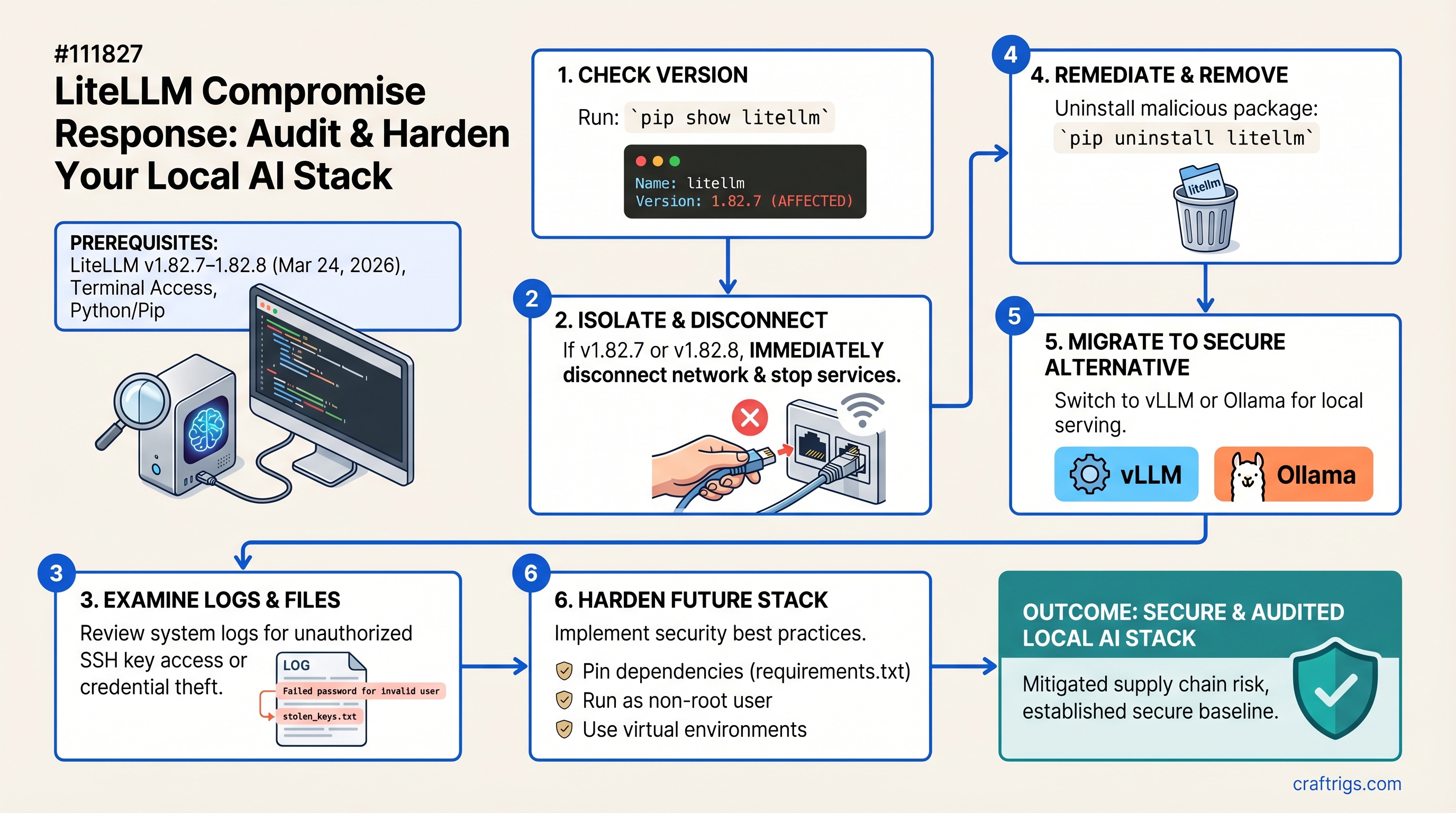
Two LiteLLM versions (1.82.7 and 1.82.8) released on March 24, 2026, contained malicious code that stole SSH keys, cloud credentials, and Kubernetes secrets from every Python startup. If you're running LiteLLM in production, audit your version now. Safe versions: everything except 1.82.7–1.82.8. Our recommendation: migrate to vLLM 0.6.0+ (high-performance routing) or Ollama (simplicity). Both are supply-chain-safe, cost $0, and take 2–4 hours to migrate. Rotate all credentials after migration.
What LiteLLM Does (And Why It Matters for Your Stack)
LiteLLM is an API proxy layer that orchestrates multiple LLM models—it routes requests across Ollama, OpenAI, vLLM, and llama.cpp servers from a single endpoint. It handles routing logic, rate limiting, fallback strategies, and cost tracking. On paper, it's compelling: one proxy, unified interface, flexible backend switching.
But that centralization is also a liability. Every request and every credential flows through LiteLLM's process. If the proxy itself is compromised, attackers get access to your entire AI infrastructure—not just the models, but the keys to your cloud accounts, Kubernetes clusters, and databases.
The Attack Surface: Where Secrets Live
LiteLLM typically stores API keys for authentication to your inference endpoints. Every request passes through its logging and routing layers, potentially exposing prompts, API keys, or sensitive queries. A compromised proxy doesn't break your models—it silently exfiltrates your secrets while requests continue flowing normally. You'd never know until you check your cloud bills or see unauthorized access.
The March 24 Supply Chain Attack: What Actually Happened
On March 24, 2026, at 10:52 UTC, a threat actor group known as TeamPCP published two malicious versions of LiteLLM to PyPI: version 1.82.7 and 1.82.8. They obtained the maintainer's credentials by compromising Trivy, an open-source security scanner used in LiteLLM's CI/CD pipeline. It's a perfect example of supply chain attack nesting: compromise a security tool, use it to compromise the thing it's supposed to protect.
The malicious code was elegant in its persistence. Instead of injecting directly into source files (which might be spotted in code review), the attackers added a .pth file called litellm_init.pth to the site-packages directory. Python executes .pth files automatically on every interpreter startup—no import statement required. Every time you ran any Python script with LiteLLM installed, the malicious code fired.
What Did It Do?
The .pth file executed a three-stage credential harvester targeting over 50 categories of secrets:
- Stage 1: SSH keys from
~/.ssh/, AWS credentials from~/.aws/credentials, GCP application default credentials, Azure tokens, Kubernetes configs from~/.kube/, API keys in .env files, database passwords, Discord/Slack tokens. - Stage 2: Kubernetes lateral movement toolkit—once it had cluster configs, it attempted to compromise the entire cluster through API server vulnerabilities.
- Stage 3: Persistent backdoor for ongoing remote code execution.
All collected credentials were encrypted with a hardcoded RSA-4096 key and exfiltrated to attacker infrastructure.
Scope and Duration
- Compromised versions available: ~2–3 hours (March 24, 2026, 10:52 UTC until PyPI quarantine)
- LiteLLM's reach: 95 million monthly downloads, present in 36% of cloud environments
- Estimated exposure: Millions of installations triggered the malicious code during that window
- Detection: Security researchers noticed unusual network traffic patterns exfiltrating credentials; PyPI quarantined the package
Who's Actually at Risk?
- Anyone running LiteLLM version 1.82.7 or 1.82.8 during March 24, 2026 (or later if the package wasn't updated)
- Professional deployments with sensitive infrastructure: cloud accounts, Kubernetes clusters, databases
- Multi-model setups where LiteLLM is the central routing hub
- CI/CD pipelines using LiteLLM for automated inference workflows
What Was NOT Compromised
- Ollama (unaffected—separate codebase)
- vLLM (unaffected—separate codebase)
- llama.cpp (unaffected—runs natively without proxy)
- Direct model inference—only the proxy layer was compromised
- Your model weights or fine-tuned data (the attack targeted infrastructure secrets, not model data)
Step 1: Audit Your Current Stack
Before deciding on a path forward, you need to know: Is LiteLLM in your deployment? Which version? What secrets does it have access to?
Check If LiteLLM Is Even Running
pip list | grep litellmIf nothing returns, you're not using LiteLLM. Skip this guide—you're safe.
Look for imports in your main application files:
grep -r "from litellm import\|import litellm" .Check PM2 processes or systemd services for anything running litellm proxy:
pm2 list | grep litellm
systemctl list-units --type service | grep litellm
If LiteLLM is in your requirements.txt or pyproject.toml but not actively used, remove it now. Zero benefit, zero risk cost.
Identify Your LiteLLM Version
pip show litellm | grep Version- Version 1.82.7 or 1.82.8: You're affected. Proceed to Step 2 immediately.
- Version 1.82.9 or later: The malicious code is gone, but credentials may have been exfiltrated. Follow Step 3 (credential rotation) and consider migrating anyway to eliminate the dependency.
- Any other version: You're safe from this attack.
What Data Did LiteLLM Have Access To?
Review your configuration files or environment variables:
cat ~/.litellm/config.yaml  # if it exists
env | grep -i "api\|key\|token\|cred"
Check LiteLLM's log directory for files created on March 24, 2026:
ls -la ~/.litellm/logs/ 2>/dev/null | head -20
find ~/.litellm/logs/ -newermt "2026-03-24" -type f
Assume any data in those logs was exfiltrated. Prompts, model names, request routing decisions, API keys—all potentially compromised.
Step 2: Decide Your Path (Upgrade + Harden vs. Migrate)
You have two options:
Option A: Upgrade LiteLLM to 1.82.9+ (Short-term fix)
Pros:
- Minimal code changes—existing applications continue working
- Quick deployment (30 minutes)
- Removes the malicious .pth file immediately
Cons:
- Still trusts LiteLLM's supply chain and dependencies
- One step removes the current attack but doesn't address the underlying risk
- Doesn't prevent future vulnerabilities in LiteLLM or its own dependencies
When to choose: Development environments, non-critical inference, or if your infrastructure is heavily dependent on LiteLLM-specific features (advanced scheduling, cost tracking across 50+ providers).
Cost: 30 minutes, $0
Action: pip install litellm==1.82.9 and rotate credentials (Step 4).
Option B: Migrate to vLLM 0.6.0+ (Recommended for production)
vLLM is a high-performance inference server that handles batching, scheduling, and multi-model routing. It's actively maintained by UC Berkeley's Sky Computing Lab with a strong security posture.
Pros:
- Drop-in OpenAI-compatible API replacement
- Higher concurrency throughput (793 TPS vs. Ollama's 41 TPS at scale)
- No dependency on LiteLLM's supply chain
- Excellent for multi-GPU setups, production workloads
Cons:
- More configuration than Ollama (30–60 minutes to learn)
- Requires understanding vLLM's scheduling and model serving concepts
Performance example: A dual-GPU setup (RTX 4090 + RTX 4090) running vLLM achieves ~150–200 tokens/second on Llama 3.1 70B with quantization, versus ~120–150 tok/s without the proxy overhead. The routing cost is negligible.
When to choose: Professional deployments, power users, high-concurrency production inference, multi-model orchestration.
Cost: 2–3 hours, $0
Option C: Migrate to Ollama Direct API (Recommended for simplicity)
Ollama is a single-command local inference server. No proxy, no routing, no complexity—just one model at a time.
Pros:
- Zero configuration; runs on
localhost:11434by default - Smallest attack surface (fewer dependencies, fewer moving parts)
- Built-in API authentication (with reverse proxy)
- Excellent for single-model deployments
Cons:
- Maxes out at ~4 parallel requests by default (sufficient for most use cases)
- If you need simultaneous access to multiple models, custom routing logic required
- Less flexible than vLLM for advanced scheduling
When to choose: Single-model deployments, development, privacy-first stacks where you want the absolute minimum surface area, consumer hardware.
Cost: 30 minutes, $0
Step 3: Migrate Away From LiteLLM
I'll walk through both migration paths. Pick one.
Path A: Migrate to vLLM Proxy
Step 1: Install vLLM
pip install vllm[serving](The [serving] extra installs the OpenAI-compatible API server.)
Step 2: Create a vLLM config file
vLLM uses a YAML config to define models and routing rules. Create vllm_config.yaml:
served_model_names:
  - llama-3.1-70b
  - mistral-7b

model_configs:
  - model: meta-llama/Llama-3.1-70B-Instruct
    served_name: llama-3.1-70b
    gpu_memory_utilization: 0.9

  - model: mistralai/Mistral-7B-Instruct-v0.2
    served_name: mistral-7b
    gpu_memory_utilization: 0.9
(Replace with your actual models. See vLLM docs for the full schema.)
Step 3: Start vLLM
python -m vllm.entrypoints.openai.api_server \
  --config=vllm_config.yaml \
  --port=8000
Step 4: Test a single endpoint
curl -X POST http://localhost:8000/v1/completions \
  -H "Content-Type: application/json" \
  -d '{
    "model": "llama-3.1-70b",
    "prompt": "Hello world",
    "max_tokens": 50
  }'
You should get a completion back.
Step 5: Update your application
Find any references to LiteLLM and swap them to vLLM:
# Before (LiteLLM)
from litellm import completion
response = completion(model="llama-3.1-70b", messages=[...])

# After (vLLM)
import openai
openai.api_base = "http://localhost:8000/v1"
response = openai.ChatCompletion.create(
    model="llama-3.1-70b",
    messages=[...]
)
vLLM's API is fully OpenAI-compatible, so your existing code often works with just the endpoint change.
Step 6: Verify all models load
curl http://localhost:8000/v1/modelsYou should see your model list. Test inference with your actual workload. Measure latency before/after to confirm there's no regression.
Step 7: Tear down LiteLLM
Once vLLM is stable and handling your workload:
pip uninstall litellm -y
rm -rf ~/.litellm/
Remove LiteLLM from requirements.txt and pyproject.toml.
Path B: Migrate to Ollama Direct API
Step 1: Ensure Ollama is running
ollama serve(Runs on localhost:11434 by default.)
Step 2: Update your client code
import requests

response = requests.post(
    "http://localhost:11434/api/generate",
    json={
        "model": "llama2",
        "prompt": "Hello, world!",
        "stream": False
    }
)
print(response.json()["response"])
Or use Ollama's OpenAI-compatible endpoint (if you have a reverse proxy with auth):
import openai
openai.api_base = "http://localhost:11434/v1"
response = openai.ChatCompletion.create(
    model="llama2",
    messages=[{"role": "user", "content": "Hello"}]
)
Step 3: Add API authentication (optional)
If you're exposing Ollama remotely, wrap it with a reverse proxy for authentication. Using nginx:
server {
    listen 8000;
    auth_basic "Ollama API";
    auth_basic_user_file /etc/nginx/.htpasswd;

    location / {
        proxy_pass http://localhost:11434;
    }
}
(Create .htpasswd with htpasswd -c /etc/nginx/.htpasswd username.)
Step 4: Test your actual inference workload
Run your application against Ollama. Measure latency. Confirm all prompts are working.
Step 5: Uninstall LiteLLM
pip uninstall litellm -yStep 4: Audit Your Logs and Rotate Credentials
Now that you've migrated away from the compromised proxy, you need to assess what was exposed.
What to Check
Find LiteLLM's logs (if available):
find ~/.litellm -name "*.log" -o -name "*.jsonl" 2>/dev/null
ls -la ~/.litellm/logs/ | grep "2026-03-24"
Any logs created on March 24 were potentially exfiltrated. Review them for:
- API keys or authentication tokens
- Full request/response bodies (which might include user prompts)
- Model names or orchestration logic that could hint at your infrastructure
Check LiteLLM's configuration:
cat ~/.litellm/config.yaml 2>/dev/nullEvery API key stored here was potentially compromised. Note each one.
Check .env files:
find ~ -maxdepth 3 -name ".env*" -type f 2>/dev/nullAny secrets in .env files on the same machine as LiteLLM were harvested.
Rotate All Credentials (Critical)
Assume every secret on your machine during March 24 was exfiltrated. Rotate proactively:
- AWS credentials: Delete the old keys from IAM console, create new ones
- GCP: Rotate service account keys, revoke old ADC tokens
- Azure: Regenerate connection strings and access keys
- Kubernetes: Regenerate cluster certificates and service account tokens
- API keys (OpenAI, Anthropic, etc.): Revoke old keys, generate new ones
- SSH keys: Generate new key pairs, update authorized_keys everywhere
- Database passwords: Change all passwords for databases accessible from your machine
For each credential:
- Note where it was used (which scripts, which config files)
- Rotate the credential
- Update your application or config to use the new one
- Deploy the change
- Monitor for access errors (indicates a place you missed)
Step 5: Harden Your New Stack
Whether you chose vLLM or Ollama, apply these hardening practices to prevent future supply chain risks.
API Key Management
Never store API keys in config files:
# Bad
API_KEY="sk-1234567890abcdef" in config.yaml

# Good
export API_KEY="sk-1234567890abcdef"  # from .env
source .env
Use python-dotenv to load from .env (make sure .gitignore includes .env):
from dotenv import load_dotenv
import os

load_dotenv()
api_key = os.getenv("API_KEY")
For highly sensitive credentials, use OS-level secrets:
# macOS
security add-generic-password -a "$USER" -s "api_key" -w "secret_value"

# Linux with systemd
systemd-ask-password "Enter API key"
Rotate keys on a schedule: Monthly minimum, more frequently for production.
Request Logging — What to Log, What NOT to
DO log:
- Timestamps
- Model name
- Token counts
- Latency
- Error codes
- HTTP status
DO NOT log:
- Full prompts or responses
- API keys or authentication headers
- User identities (unless anonymized/hashed)
- Inference details that hint at your workload
If you must log prompts for auditing, encrypt them at rest and store them on a separate, secured machine—not your inference server.
Dependency Scanning
Check for known vulnerabilities weekly:
pip install pip-audit
pip-audit --desc
Add it to your CI/CD pipeline:
pip-audit --desc --fail-on=highPin dependencies to specific versions in requirements.txt to prevent automatic upgrades to compromised versions:
# Good
litellm==1.82.9
vllm==0.6.0

# Risky (auto-upgrades to potentially compromised versions)
litellm>=1.82.0
vllm>=0.6.0
Network Isolation
Run vLLM or Ollama on a private interface, not 0.0.0.0:
# vLLM: edit config or run with --host
python -m vllm.entrypoints.openai.api_server --host 127.0.0.1 --port 8000

# Ollama: default is already localhost
Use firewall rules to whitelist only your application IPs:
sudo ufw allow from 192.168.1.100 to any port 8000If you expose the API remotely, always use TLS + authentication (never plain HTTP):
# Example: nginx reverse proxy with TLS
server {
    listen 8443 ssl;
    ssl_certificate /path/to/cert.pem;
    ssl_certificate_key /path/to/key.pem;

    auth_basic "vLLM API";
    auth_basic_user_file /etc/nginx/.htpasswd;

    location / {
        proxy_pass http://127.0.0.1:8000;
    }
}
Why This Matters: Supply Chain Lessons for Local AI
Here's the hard truth: Local AI isn't automatically safer just because it's running on your hardware.
Many builders believe "local = secure" because data doesn't leave the machine. But LiteLLM proved that a local service can silently exfiltrate credentials and secrets without you knowing. The moment you install a dependency, you're trusting not just that library's code, but every library it depends on. And every library those depend on. It's dependencies all the way down.
The False Security of "It's Running Locally"
Your security model for local AI isn't "the machine is trusted because it's mine." It's "every process running on the machine is suspect until proven otherwise."
A compromised proxy can steal your AWS keys while serving inference requests correctly. You'd never notice. The infrastructure breach would appear months later when an attacker spins up expensive instances in your account.
Evaluating New Tools (Going Forward)
Before adopting a new proxy, orchestrator, or wrapper, ask:
- Is it actively maintained? (Last commit in the last month?)
- Does it have security audits or bug bounties? (Community trust signals)
- What dependencies does it pull in? (Use
pip-treeorpipdeptreeto visualize the dependency tree—the deeper and wider, the higher your supply chain risk) - Could I replace it with a simpler alternative? (vLLM vs. LiteLLM — vLLM is simpler and more focused)
- Who maintains it? (Individual maintainer = bus factor risk; organization = better bus factor)
Simple is more secure. Fewer moving parts = fewer attack surfaces = fewer places for attackers to hide malicious code.
Open Source Doesn't Mean Safe
LiteLLM is open source and popular. That didn't prevent the attack. Audited code is safer than unaudited code, but audits aren't perfect and audited code can still have supply chain vulnerabilities (as we saw: the attack wasn't in LiteLLM's code, it was in Trivy, which was used to validate LiteLLM's code).
Trust the process, not the fact of being open-source: active maintenance, rapid response to security issues, transparency about vulnerabilities.
FAQ
"Do I need to take my system offline?"
No, but you should migrate away from LiteLLM immediately (within 24 hours if you ran 1.82.7–1.82.8). You can run both LiteLLM and vLLM side-by-side during migration, gradually shifting traffic. Once vLLM or Ollama is handling all requests, uninstall LiteLLM and rotate credentials.
"What if I've already upgraded to 1.82.9 or later?"
The patch removed the malicious .pth file. The attacker's code is gone. But anything harvested before the patch (SSH keys, cloud credentials, API keys) was potentially exfiltrated. Still rotate credentials as a precaution. Still audit your logs for March 24 activity. Consider migrating to vLLM or Ollama anyway—it eliminates LiteLLM's supply chain dependency entirely.
"Can I trust vLLM now?"
vLLM was not affected by this attack (separate codebase). It's maintained by UC Berkeley's Sky Computing Lab with good security practices and a strong community. Like any dependency, monitor security advisories: use pip-audit weekly and keep it updated.
"How do I know if attackers accessed my AWS account?"
Check CloudTrail for unauthorized API calls during and after March 24, 2026. Look for:
- Unusual EC2 instance launches in unexpected regions
- IAM role assumption from unfamiliar IP addresses
- S3 bucket access from unknown principals
- VPC flow logs showing exfiltration to external IPs
If you see suspicious activity, isolate your environment immediately and contact AWS support.
"Should I use a different proxy layer instead?"
If you need multi-model routing, vLLM is the best-in-class option (actively maintained, audited, high-performance, no supply chain bloat). If you don't need routing, Ollama's direct API is simpler and more secure. There are other orchestrators (LocalAI, sgLang), but they solve different problems and may introduce their own supply chain risks. Stick with actively maintained projects with clear security practices.
The Bottom Line
The LiteLLM compromise shows that "local" doesn't mean "safe." Supply chain attacks are now table stakes for self-hosted infrastructure. The lesson isn't "never use third-party tools"—it's "use them carefully, understand your dependencies, rotate credentials regularly, and be ready to migrate."
vLLM and Ollama are solid, maintained alternatives. Both cost $0. Both take a few hours to migrate to. The security upside—eliminating LiteLLM's supply chain risk—is permanent.
If you're running 1.82.7 or 1.82.8, audit your version today. If you're on 1.82.9+, rotate credentials and consider migrating. Either way, apply the hardening steps above and you'll sleep better.
Sources
- Compromised litellm PyPI Package Delivers Multi-Stage Credential Stealer
- Security Update: Suspected Supply Chain Incident | liteLLM
- LiteLLM Supply Chain Attack: What Happened and How to Respond
- The LiteLLM Supply Chain Attack: What Happened, Why It Matters, and What to Do Next
- litellm 1.82.8 Supply Chain Attack on PyPI (March 2026)
- Your AI Gateway Was a Backdoor: Inside the LiteLLM Supply Chain Compromise | Trend Micro
- Trojanization of Trivy, Checkmarx, and LiteLLM solutions | Kaspersky
- How a Poisoned Security Scanner Became the Key to Backdooring LiteLLM | Snyk
- LiteLLM Supply Chain Attack: What Happened, Who's Affected, and What You Should Do Right Now - Comet
- vLLM vs Ollama: A Comprehensive Guide to Local LLM Serving
- vLLM vs Ollama: Which LLM Server Actually Fits in 2026
- Ollama vs vLLM: Key differences, performance, and how to run them | Northflank