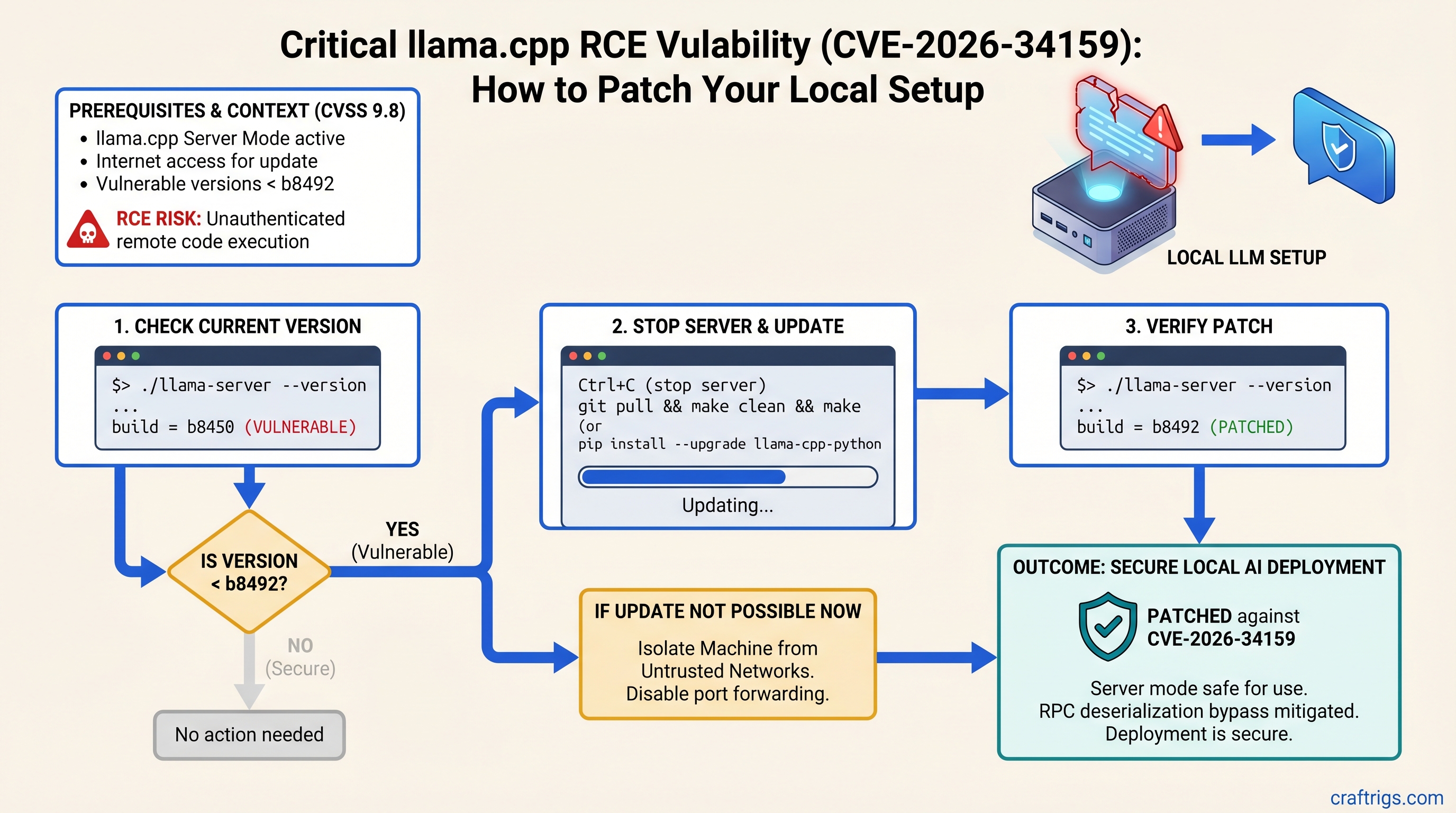
If you're running llama.cpp in server mode, update to build b8492 or later immediately. A CVSS 9.8 RPC deserialization bypass allows unauthenticated remote code execution on vulnerable versions. The patch takes five minutes. If you can't update yet, isolate your machine from untrusted networks and disable RPC server mode.
Understanding CVE-2026-34159 and Why It Matters
CVE-2026-34159 is a critical vulnerability in llama.cpp's RPC backend. An attacker with network access to the RPC server port can send specially crafted messages that bypass authentication and deserialization checks, gaining arbitrary code execution on the machine running llama.cpp.
This isn't a theoretical risk. It's full system compromise — attackers can install miners, steal SSH keys, exfiltrate models, or establish persistence. And it requires zero authentication.
Who Is Affected
Anyone running llama.cpp in server mode with build numbers prior to b8492. This includes:
- Local multi-GPU homelabs sharing network infrastructure
- Machines on shared networks with untrusted users
- Professional deployments where llama.cpp serves inference APIs to internal tools
- Ollama installations on versions released before mid-2026 (Ollama bundles vulnerable llama.cpp internally)
What the Attack Looks Like
The attacker sends a malformed RPC request to the llama.cpp RPC server port (default: 50052). The deserialization function fails to validate the input properly, allowing arbitrary memory read/write within the process. From there, the attacker executes code with full privileges of the llama.cpp process.
No logs. No prompts. No warnings. The machine is compromised silently.
Check Your Current Version in 30 Seconds
Finding whether you're vulnerable takes one terminal command.
For Ollama Users
Run this:
ollama --versionOllama versions released after mid-2026 include patched llama.cpp. Earlier versions are vulnerable. If you're running Ollama from 2025 or early 2026, update immediately.
For Direct llama.cpp Server Users
Run this:
./llama-server --versionLook for the build number in the output. If it shows "build b8491" or lower, you're vulnerable. If it shows "build b8492" or higher, you're patched.
If the command returns nothing or isn't found, you're running an older version — update now.
Step-by-Step Patch Instructions
The update process is the same across Windows, Mac, and Linux. Total time: 5–10 minutes, including restart.
Patch Ollama (All Platforms)
Step 1: Verify your current Ollama version.
ollama --versionStep 2: Update Ollama for your operating system.
Windows: Open Settings → Apps → Apps & Features, find Ollama, click Update.
Mac: Drag Ollama from Applications to Trash, download the latest from ollama.com, run the installer.
Linux: Run the install script again:
curl -fsSL https://ollama.ai/install.sh | shStep 3: Restart any running Ollama processes.
ollama serve(Or let systemd restart it automatically if you have it configured.)
Step 4: Verify the patch.
ollama --versionShould show a recent version from 2026.
Patch Direct llama.cpp Server
Step 1: Back up your models directory (optional but recommended).
cp -r /path/to/models /path/to/models.backupStep 2: Stop any running llama-server process.
Press Ctrl+C in the terminal where it's running.
Step 3: Download the latest llama-server binary.
Go to github.com/ggml-org/llama.cpp/releases and download the llama-server binary for your OS (build b8492 or later).
Windows: llama-server.exe
Mac/Linux: llama-server (then run chmod +x llama-server)
Step 4: Replace your old binary with the new one.
Copy the new llama-server over your old one in the project directory.
Step 5: Restart llama-server with your usual parameters.
./llama-server -m model.gguf -c 2048(Adjust flags as needed for your setup.)
Step 6: Verify the patch.
./llama-server --versionShould show build b8492 or higher.
Verify You're Patched
Verification takes two minutes.
- Check version number: Confirm it matches b8492 or later (see patch step 6 above).
- Start the server: Look for "RPC server listening on" in the logs — should start without deserialization errors.
- Test one inference query:
(Use port 8080 for the HTTP API; the RPC server is on port 50052 and isn't directly queryable this way.)curl http://localhost:8080/v1/completions \ -d '{"model":"your-model","prompt":"test"}' \ -H "Content-Type: application/json"
If all three work without errors, you're patched and safe.
Temporary Mitigations (If You Can't Update Yet)
Some setups can't update immediately — production constraints, custom builds, or dependencies. Use these only as stopgaps while you plan your upgrade.
Warning
These mitigations are NOT a replacement for patching. They reduce risk but don't eliminate it. Update as soon as you can.
Network Isolation
Don't expose the RPC server port (50052) to untrusted networks or the internet.
On shared networks, firewall port 50052 to localhost only. On Linux:
sudo iptables -A INPUT -p tcp --dport 50052 ! -s 127.0.0.1 -j DROPThis prevents anyone except local processes from connecting to the RPC server.
Disable RPC Server Mode
If you only need inference and don't need the RPC API, disable it entirely.
For Ollama: The web interface (localhost:11434) is already safe by default; it doesn't expose the vulnerable RPC backend.
For direct llama.cpp: Start without the --server flag to disable RPC mode:
./llama-server -m model.ggufThis eliminates API access but also eliminates the attack surface.
Monitor for Scanning
Enable connection logging to port 50052 and watch for unexpected inbound traffic:
sudo tcpdump -i any 'tcp port 50052'If you see connection attempts from unfamiliar IPs, your machine is being scanned. Isolation plus patching is the actual fix; logging is detection only.
Why Multi-GPU Setups Are at Higher Risk
Multi-GPU homelabs compound the risk. These rigs share power supplies, cooling loops, and network infrastructure. Compromising one machine can enable lateral movement across your entire setup.
An RCE on a power GPU rig doesn't just mean a stolen model — it means access to SSH keys, fine-tuning datasets, training credentials, and a foothold into your home network.
Power users running inference 24/7 become persistent targets for automated scanning. The vulnerability is quiet and effective.
FAQ — Common Questions
Is Ollama 0.2.8 vulnerable?
Ollama versions released before mid-2026 bundled vulnerable llama.cpp. Update to a recent release from 2026 immediately.
What if I compiled llama.cpp myself?
Check the build number:
./llama-server --versionIf it shows a build number below b8492, or if the build date is before February 2026, likely vulnerable. Pull the latest and recompile:
git pull
make clean
make -j$(nproc) llama-server
./llama-server --version
Should show b8492 or higher.
Can this steal my models?
Not directly — it's RCE, not exfiltration. But arbitrary code execution means an attacker can copy your models, weights, training data, or fine-tuning datasets. The risk is complete system access.
What if my server isn't internet-exposed?
Lower risk, but not zero. Visitors, coworkers, or compromised LAN devices can exploit it. Patch anyway — it's five minutes.
Do I need to patch if not using server mode?
If you run Ollama with just the web interface (localhost:11434), you're already isolated from this vulnerability. But update anyway for other security fixes in new versions.
Your Next Steps
Patch now. This is not optional.
The upgrade takes five minutes. Staying vulnerable accepts unnecessary risk on hardware and data that matter to you. After patching, review your network security posture — this vulnerability is a reminder that server mode on untrusted networks is inherently risky, patched or not.
If you're running multi-GPU setups that serve inference to shared networks, consider an architecture that puts llama.cpp behind a validated API gateway with authentication and rate limiting. That's the long-term fix.
For now: update, verify, and move on. You've got models to run.