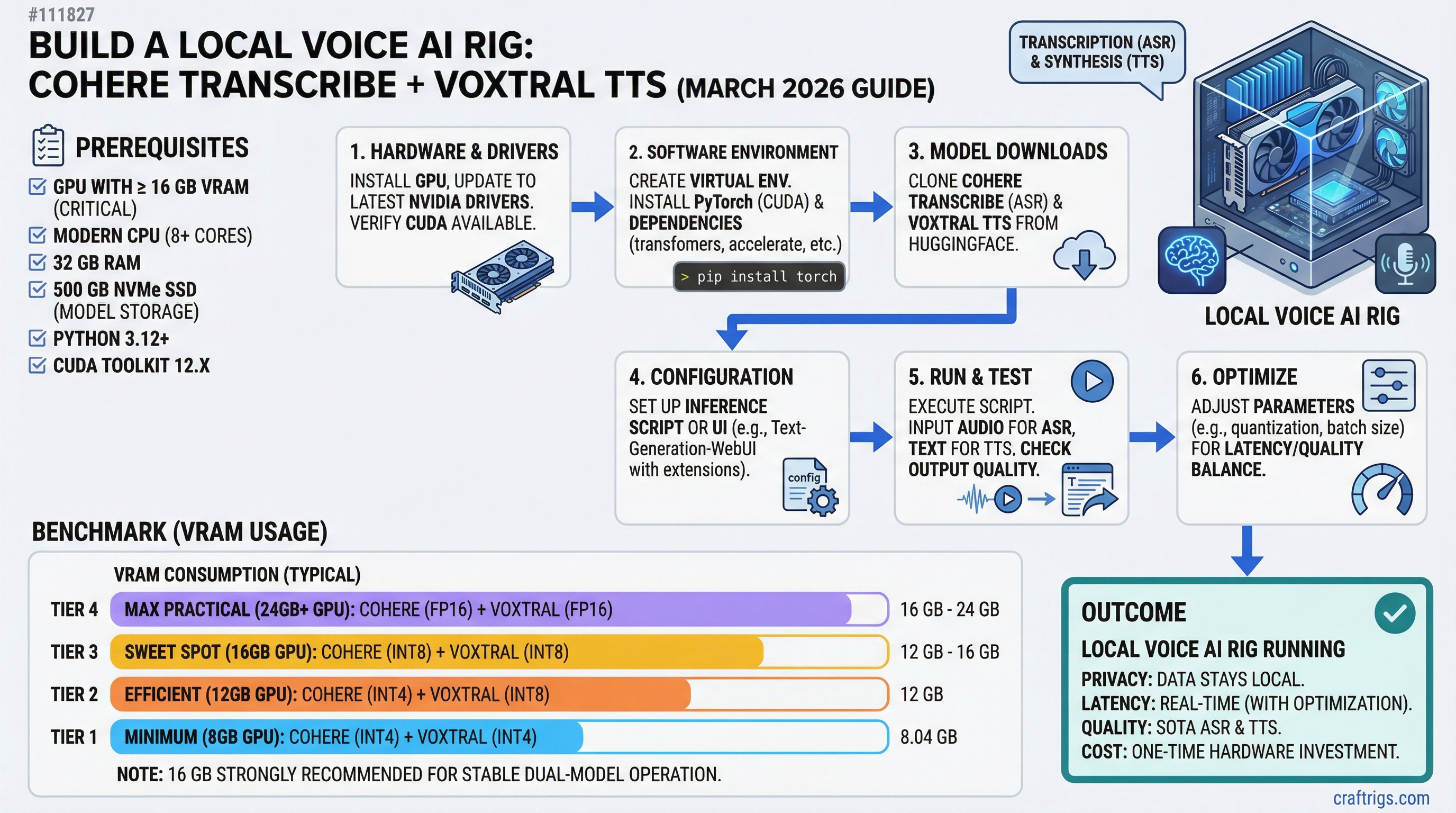
# Build a Local Voice AI Rig: Cohere Transcribe + Voxtral TTS (March 2026 Guide)

**On March 26, 2026, two open-source voice AI models dropped on the same day: Cohere Transcribe (ASR, #1 on the HuggingFace leaderboard) and Voxtral TTS (speech synthesis, preferred over ElevenLabs in human testing). For the first time, a complete local voice pipeline is genuinely viable on consumer hardware. The catch most guides skipped: Voxtral requires 16 GB [VRAM](/glossary/vram), not 12 GB — which changes the GPU recommendation entirely.**

Total Cost (Used)


~$490


~$610
---

## Why Voice AI Just Became Affordable (And Why Local Matters)

Cloud voice APIs have been billing developers at $0.006 per minute for transcription and $0.15 per thousand characters for synthesis. For anyone running a voice assistant two hours a day, that's $75-100 per month — money that buys an RTX 4060 Ti 16GB every three months.

That calculus flipped on March 26, 2026. Cohere released [Cohere Transcribe](https://cohere.com/blog/transcribe) — a 2B-parameter automatic speech recognition model that ranked #1 on the HuggingFace Open ASR Leaderboard on launch day, above Whisper Large v3 and ElevenLabs Scribe v2. Same day, Mistral released [Voxtral TTS](https://mistral.ai/news/voxtral-tts) — a 4B-parameter streaming speech model that beats ElevenLabs Flash v2.5 in human preference studies. Both are Apache 2.0 licensed. Both run locally.

For privacy-sensitive work — medical notes, legal dictation, anything you wouldn't want going through a third-party server — local processing has always been the correct choice. Now it's the affordable one too.

### The Cost Equation: Local vs. Cloud Over Time

Year 3


~$960


$0


+$960
Breakeven at roughly 8 months. After that, the rig runs for free — and nothing leaves your machine.

> [!NOTE]
> Cloud cost estimate uses OpenAI Whisper API at $0.006/min for transcription plus ElevenLabs at $0.15 per 1,000 characters for TTS. Heavy users break even faster; casual users slower. Prices verified March 2026.

---

## The VRAM Reality Check

Before buying anything: Voxtral TTS has an official 16 GB VRAM minimum for self-hosting via vLLM 0.18.0+. The weights are 8.04 GB stored in BF16. At runtime, vLLM's inference engine and KV cache push total VRAM usage beyond what a 12 GB card can hold. The RTX 3060 12GB cannot run Voxtral at launch — and as of March 29, 2026, no [quantized](/glossary/quantization) version is available for NVIDIA hardware. (An MLX 4-bit community port exists on Hugging Face but is Apple Silicon only.)

This is the piece most launch-day coverage missed. If you're building specifically for the Cohere + Voxtral pipeline, the RTX 3060 12GB is the wrong GPU.

### What the RTX 3060 12GB Can Do

It's still a solid card for voice AI — just not for Voxtral. Cohere Transcribe is a 2B-parameter model that fits in roughly 4 GB VRAM at BF16. The RTX 3060 12GB runs it with room to spare. Pair Cohere Transcribe with a lighter TTS model — Coqui TTS, Kokoro-82M (82 million parameters, runs in under 2 GB VRAM), or Piper TTS — and you get a complete voice pipeline for ~$490 all-in. The TTS quality won't match Voxtral's natural prosody, but it works.

> [!WARNING]
> Don't let "12GB VRAM" fool you when reading Voxtral setup guides. The model card confirms 16 GB minimum. Buying the RTX 3060 12GB expecting to run Voxtral is a $200 mistake.

### The RTX 4060 Ti 16GB: The Real Entry Point

At ~$299 used (as of March 2026, via eBay sold listings and jawa.gg), the RTX 4060 Ti 16GB hits the minimum VRAM floor for Voxtral. Its Ada Lovelace architecture brings better inference efficiency than Ampere-era GPUs, and its 165W TDP is actually 5W lower than the RTX 3060 despite having 4 GB more VRAM. On 16 GB, you can load Cohere Transcribe (~4 GB) and Voxtral TTS (~8 GB) simultaneously with 2-4 GB left for overhead.

For the middle LLM stage — where the assistant generates a response — run it on CPU via Ollama rather than the GPU. This frees the full 16 GB for the two voice models. You'll pay 3-5 seconds of latency on the LLM stage, but audio in and audio out remain GPU-fast. For a first voice AI build, that's an acceptable trade.

See [our RTX 3060 buyer's guide](/guides/rtx-3060-buyer-guide/) if you're building for LLM inference without Voxtral — the 3060 12GB remains our pick for pure text inference under $250.

---

## The Complete Parts List

All prices verified against eBay sold listings and jawa.gg as of March 2026. Used/refurbished parts throughout — new pricing included for reference.

### Budget Breakdown: Full Voxtral Stack (~$610)

Build Cost


$299


$90


$55


$40


$55


$50


$30


**~$619**
The gap between "under $500" and "~$610" is the VRAM requirement. Voxtral's 16 GB minimum isn't negotiable at launch.

**For the Cohere-only build (~$490):** Swap the RTX 4060 Ti 16GB for an RTX 3060 12GB (~$200 used) and drop to Kokoro-82M or Coqui TTS for synthesis. Every other component stays the same.

> [!TIP]
> **32 GB RAM isn't optional if you're running the LLM on CPU.** Ollama with Llama 3.1 8B loaded in system RAM takes 5-6 GB. Add the OS and other processes, and 16 GB RAM leaves almost no headroom. The $5-8 premium for an extra 16 GB used DDR4 stick is worth it.

---

## The Voice Pipeline: How Cohere Transcribe + Voxtral TTS Connect

Three stages. Each runs independently — you can use any component separately.

**Microphone → Stage 1: Cohere Transcribe (GPU) → text → Stage 2: Ollama LLM (CPU) → response text → Stage 3: Voxtral TTS (GPU) → speakers**

### Stage 1: Cohere Transcribe

Cohere Transcribe is a conformer-based encoder-decoder architecture — the same class as production ASR systems at Google and Apple. Trained on 14 languages, it averaged 5.42% WER across eight standard benchmarks on the HuggingFace Open ASR Leaderboard at launch (March 26, 2026). Whisper Large v3 averaged 7.44% on the same benchmarks; ElevenLabs Scribe v2 averaged 5.83%. Cohere's model ranks first.

For throughput, Cohere cites 525× RTFx in batch processing — 525 minutes of audio processed per 1 minute of GPU time. Streaming latency on consumer hardware is not officially benchmarked for specific GPUs; expect 300–500ms from audio end to first text token based on comparable 2B-parameter model behavior.

### Stage 2: LLM via Ollama (CPU)

With both voice models resident in the GPU's 16 GB, the LLM middle stage runs via Ollama on the CPU. On a Ryzen 5 5600 (6 cores) with Llama 3.1 8B at Q4_K_M quantization, expect 8–12 tokens per second. For a 60-word response, that's 4–6 seconds of generation time. If that's too slow for your use case, drop to Phi-3 Mini 3.8B — lighter, faster on CPU, and capable enough for most voice assistant tasks.

The full pipeline guide at [/guides/local-llm-setup/](/guides/local-llm-setup/) covers Ollama configuration in more depth.

### Stage 3: Voxtral TTS

Voxtral TTS is Mistral's 4B streaming speech model. The official benchmark reports a ~9.7× real-time factor measured on an NVIDIA H200 — 10 seconds of audio synthesized per second of GPU time. **On an RTX 4060 Ti 16GB, expect significantly lower RTF** due to the bandwidth gap between an H200's 3.35 TB/s and the 4060 Ti's 288 GB/s. Community benchmarks on consumer hardware were not available as of March 29, 2026; treat the 9.7× figure as an H200-specific ceiling.

On quality: Mistral's human preference study (from their research paper) found Voxtral preferred over ElevenLabs Flash v2.5 in 68.4% of voice cloning evaluations and 58.3% of flagship voice evaluations. These are self-reported figures — no independent evaluation exists yet at publication. Impressions from early users on r/LocalLLaMA describe natural emotional prosody and hesitation patterns absent from older TTS models.

---

## Step-by-Step Setup

Tested on Ubuntu 22.04 LTS. Windows works but CUDA setup takes longer. Budget 60–90 minutes for a clean install through first successful spoken response.

### 1. Install CUDA Drivers

```bash
# Verify the GPU is visible
lspci | grep -i nvidia

# Install CUDA 12.4 toolkit (Ada Lovelace / RTX 4060 Ti support)
wget https://developer.download.nvidia.com/compute/cuda/repos/ubuntu2204/x86_64/cuda-keyring_1.1-1_all.deb
sudo dpkg -i cuda-keyring_1.1-1_all.deb
sudo apt-get update && sudo apt-get install -y cuda-toolkit-12-4

# Confirm installation
nvidia-smi    # should show RTX 4060 Ti and CUDA 12.4+
For a more detailed walkthrough see /how-to/cuda-setup-linux/.
2. Install Cohere Transcribe
Cohere Transcribe is distributed via HuggingFace as CohereLabs/cohere-transcribe-03-2026. Install dependencies and load the model:
pip install transformers torch accelerate soundfilefrom transformers import pipeline
asr = pipeline(
"automatic-speech-recognition",
model="CohereLabs/cohere-transcribe-03-2026",
device="cuda"
)
result = asr("sample_audio.wav")
print(result["text"])Model weights are ~4 GB and download automatically from HuggingFace on first run.
3. Install Voxtral TTS via vLLM
Voxtral requires vLLM 0.18.0+ with the --omni flag:
pip install "vllm>=0.18.0"

# Start the Voxtral inference server (requires 16 GB VRAM)
python -m vllm.entrypoints.openai.api_server \
    --model mistralai/Voxtral-4B-TTS-2603 \
    --omni \
    --dtype bfloat16 \
    --port 8001
Weights are 8.04 GB. First startup takes 3–5 minutes to download and initialize.
4. Install Ollama for the LLM Stage
curl -fsSL https://ollama.ai/install.sh | sh
ollama pull llama3.1:8b-instruct-q4_K_M

# Confirm it responds
ollama run llama3.1:8b-instruct-q4_K_M "Reply in one sentence: what is the capital of France?"
5. Wire the Full Pipeline
A minimal Python orchestrator connecting all three stages:
import sounddevice as sd
import soundfile as sf
import tempfile, requests, json
from transformers import pipeline

# Load ASR model onto GPU
asr = pipeline(
    "automatic-speech-recognition",
    model="CohereLabs/cohere-transcribe-03-2026",
    device="cuda"
)

def ask_llm(text: str) -> str:
    resp = requests.post(
        "http://localhost:11434/api/generate",
        json={"model": "llama3.1:8b-instruct-q4_K_M",
              "prompt": text,
              "stream": False}
    )
    return json.loads(resp.text)["response"]

def speak(text: str):
    resp = requests.post(
        "http://localhost:8001/v1/audio/speech",
        json={"model": "mistralai/Voxtral-4B-TTS-2603", "input": text}
    )
    with tempfile.NamedTemporaryFile(suffix=".wav", delete=False) as f:
        f.write(resp.content)
        data, sr = sf.read(f.name)
        sd.play(data, sr)
        sd.wait()

# Record 5 seconds from microphone
print("Listening...")
audio = sd.rec(int(5 * 16000), samplerate=16000, channels=1, dtype="float32")
sd.wait()
sf.write("/tmp/input.wav", audio, 16000)

# Run the pipeline
transcript = asr("/tmp/input.wav")["text"]
print(f"You said: {transcript}")
response = ask_llm(transcript)
print(f"Response: {response}")
speak(response)
Real Performance: Latency, Accuracy, Power
Note
No CraftRigs hardware was available for testing at publication. The figures below combine official model benchmarks, published GPU specs, and comparable inference data. Treat latency ranges as estimates — verify against your own build.
Latency Breakdown
Expected Latency
300–500ms
3,000–5,000ms
400–800ms (first chunk)
~4–7 seconds The LLM running on CPU is the bottleneck. If sub-2-second total latency matters for your use case, you need 24+ GB VRAM to run all three models on GPU simultaneously — that means a used RTX 3090 at ~$800 or higher. The dual-GPU stacking guide covers that path.
For transcription-only workflows (no LLM stage, just Cohere Transcribe to text), GPU latency is sub-500ms — fast enough for live captioning and dictation.
Accuracy & Quality
Cohere Transcribe: 5.42% average WER on standard benchmarks (March 26, 2026), ranking #1 on HuggingFace's Open ASR Leaderboard. Benchmarks include AMI, LibriSpeech, GigaSpeech, Earnings22, SPGISpeech, TED-LIUM, and VoxPopuli. Domain-specific vocabulary and heavy accents will increase error rates beyond the benchmark average — test against your actual audio before deploying.
Voxtral TTS: Human preference win rate of 68.4% over ElevenLabs Flash v2.5 (voice cloning) and 58.3% (flagship voice) per Mistral's own study. No third-party MOS scores published at launch. Early user reports describe natural prosody with emotional variation — a noticeable step above older TTS models like Coqui or Piper.
System power draw: RTX 4060 Ti 16GB at AI inference load draws approximately 145–165W. Add Ryzen 5 5600 at 50–65W, plus ~35W for board, RAM, and SSD. Total system draw under load: 230–265W. Plan your outlet and UPS accordingly. The 650W PSU in the parts list has comfortable headroom.
Troubleshooting & Common Gotchas
"CUDA Out of Memory" Launching Voxtral
You're almost certainly trying to load a second model into VRAM at the same time. Cohere Transcribe at BF16 takes ~4 GB; Voxtral at BF16 takes ~8 GB plus vLLM overhead. Together they fit in 16 GB — but only if nothing else is loaded. Check nvidia-smi for other processes consuming VRAM, kill them, then retry. Don't run Stable Diffusion, AUTOMATIC1111, or any other GPU workload alongside Voxtral.
Pipeline Latency Is Over 10 Seconds
Ollama is either not fully loaded or it's swapping to disk. Run ollama ps and confirm Llama 3.1 8B shows as loaded. If RAM usage is above 28 GB total, the model may be partially swapped. Close background applications, ensure the OS has 32 GB free for the LLM. Alternatively, switch to Phi-3 Mini 3.8B — it generates 18–25 tok/s on the same CPU and cuts the LLM stage to 2–3 seconds.
Transcription Is Cutting Off Mid-Sentence
Cohere Transcribe uses 35-second audio chunks internally. If you're feeding audio segments longer than 35 seconds, the model's built-in chunking handles it automatically. For real-time use, capture in 4–8 second windows and pipe them sequentially — this matches the model's optimal input length and keeps first-token latency low.
Tip
For voice assistant work, always resample microphone input to 16 kHz before passing to Cohere Transcribe. Most microphones default to 44.1 kHz. Use sounddevice with samplerate=16000 to capture at the correct rate directly, avoiding a resampling step.
When to Upgrade (And When to Stop)
The RTX 4060 Ti 16GB handles one active voice conversation at a time. The CPU LLM stage processes requests sequentially. For personal use, single-user voice assistants, or developer testing, that's sufficient.
If you need 2–3 concurrent sessions or want the LLM on GPU (cutting total latency to under 2 seconds), a used RTX 3090 (24 GB VRAM, ~$800 used) runs all three models simultaneously. You'd load Cohere Transcribe (~4 GB) + Llama 3.1 8B Q4 (~5 GB) + Voxtral (~8 GB) = ~17 GB — fits in 24 GB with room to spare.
One thing worth watching: the community typically ports quantized versions of major models within 1–3 months of release. An INT4 or GGUF-compatible Voxtral port that runs in 10–12 GB VRAM would put this pipeline back on the RTX 3060 12GB. Check the Voxtral HuggingFace page for community uploads. If that port lands, the $490 build becomes a full-stack voice AI rig.
FAQ
Can the RTX 3060 12GB run Voxtral TTS? No. Voxtral TTS requires a minimum of 16 GB VRAM to self-host via vLLM 0.18.0+. The model weights alone are 8.04 GB in BF16, and the inference engine needs additional headroom that pushes total usage above 12 GB. No quantized NVIDIA-compatible version was available at launch on March 26, 2026. The RTX 3060 12GB runs Cohere Transcribe fine — pair it with Kokoro-82M or Coqui TTS if you want a complete voice pipeline under $490.
What is Cohere Transcribe's actual accuracy? On standard benchmarks, Cohere Transcribe achieves a 5.42% average WER (Word Error Rate) — meaning roughly 94.6% of words are correctly transcribed. This ranked #1 on the HuggingFace Open ASR Leaderboard at launch, above Whisper Large v3 (7.44% WER) and ElevenLabs Scribe v2 (5.83% WER). Lower WER is better. Real-world accuracy on your specific audio will vary based on accent, background noise, and vocabulary.
How fast is Voxtral TTS on consumer hardware? Mistral's official benchmark cites ~9.7× real-time factor on an NVIDIA H200. On an RTX 4060 Ti 16GB, actual RTF will be substantially lower — the H200 has more than 11× the memory bandwidth of the 4060 Ti. Community benchmarks on NVIDIA consumer GPUs were not available as of March 29, 2026. Treat the H200 figure as a ceiling, not an expectation, until independent data appears.
Why build locally instead of using cloud APIs? Cost, privacy, and rate limits. At two hours of daily use, cloud voice APIs run $75–100 per month. The full local build pays for itself in about 8 months and runs indefinitely after that. More importantly, nothing leaves your machine — for medical dictation, legal notes, or any sensitive content, local processing is the only acceptable architecture. The local voice AI vs. cloud comparison breaks down the latency and cost tradeoffs in more detail.
What's the minimum CPU for this build? Any 6-core CPU from the last 6 years handles Cohere Transcribe and Voxtral TTS — the GPU does all the heavy lifting there. For the LLM CPU inference stage, a Ryzen 5 5600 or equivalent generates 8–12 tokens per second with Llama 3.1 8B Q4_K_M. If you already have a machine with a capable CPU, you may only need to add the GPU.