TL;DR
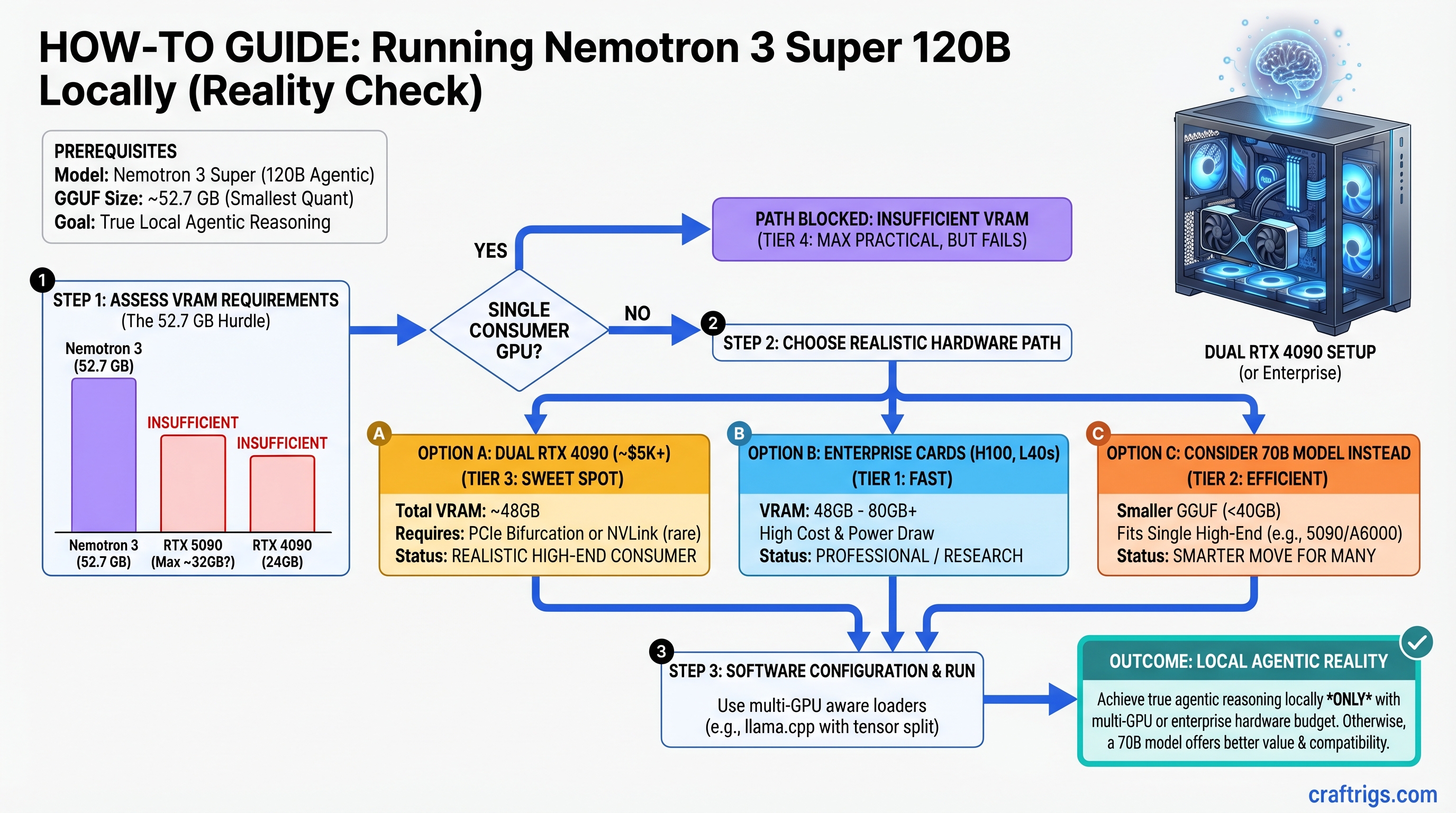
Nemotron 3 Super is genuinely agentic reasoning at scale—but not on a single consumer GPU. The 120B model's smallest GGUF (52.7 GB) exceeds even RTX 5090's VRAM. Realistic setups start at dual RTX 4090 ($5K) or enterprise cards (H100, L40s). The real innovation isn't the parameter count—it's the reasoning budget parameter, a runtime knob that controls thinking depth from instant responses to deep multi-step reasoning. If you're building a local agent that plans, self-corrects, and orchestrates tools, Nemotron is worth the hardware investment. If you want the fastest chat assistant, a 70B model on a single GPU is the better call.
What Is Nemotron 3 Super and Why It Changes the Game
Nemotron 3 Super, released March 11, 2026, is a 120B mixture-of-experts (MoE) model where only ~12B parameters activate per token. This architecture—combined with agent-optimized training—gives you reasoning capability that looks like a smaller model's speed but a larger model's intelligence.
Here's what that actually means: traditional 120B dense models are dead weight for consumer builders. A dense 120B model activates every parameter on every token, crushing VRAM and tanking inference speed. Nemotron's MoE gates activate only the relevant experts, cutting effective computational cost by roughly 10x. That's the difference between "impossible" and "barely feasible with dual-GPU."
But MoE architecture alone isn't the story. The reasoning budget parameter is. Unlike standard LLMs that generate tokens at fixed speed, Nemotron can trade tokens for thinking. A reasoning budget of 1 gives you instant, shallow responses. A budget of 8–10 gives you multi-step planning, self-correction, and tool orchestration—but slower. You adjust this per query, not at install time. This is genuinely novel for a local model.
Why Agentic Reasoning Matters Locally
Standard chat models (Llama 3.1, Qwen) are great at token generation. They're not great at planning. Ask them to "plan a multi-step workflow to optimize my GPU setup," and they'll give you a list. Nemotron actually thinks through dependencies, proposes sub-tasks, and can simulate the outcome before proposing. It's not magic—it's trained reasoning—but it's the difference between a helpful assistant and an agent that actually manages complex tasks.
For local deployment, that changes everything. You're not sending queries to a $10/month API. You're running genuine agentic planning on your own hardware, under your control, with zero latency to a remote server.
The Hardware Reality: Why Single-GPU Consumer Setups Don't Work
Let's be direct: you cannot run Nemotron 3 Super at practical inference speeds on a single consumer GPU in April 2026. This isn't a gotcha—it's a physical constraint worth understanding.
The Unsloth GGUF repository (unsloth/NVIDIA-Nemotron-3-Super-120B-A12B-GGUF) provides day-zero quantized versions. Sizes:
Practical?
No—RTX 5090 only has 32 GB
No
No
No Every single quantization exceeds RTX 5090's 32 GB VRAM. The RTX 4090 (24 GB) and RTX 3090 Ti (24 GB) are even further out of reach.
This isn't a mistake in the outline or the quantization tool. It's the model size. 120B parameters at 4-bit precision = 60 GB base + overhead. MoE routing networks and KV cache push it higher. There's no secret quantization that magically fits this into 32 GB.
What This Means for Your Build
If you have a single RTX 4090 or RTX 5090 and want to run Nemotron:
- CPU offloading: load layers into system RAM, keep some on GPU. Expect 0.2–0.5 tok/s. Viable for batch jobs, not interactive work.
- Run a smaller model instead: Llama 3.1 70B on your RTX 4090 gives you 4–6 tok/s and is genuinely fast. Nemotron's reasoning advantage is moot if each query takes 30 seconds.
- Upgrade your hardware path: dual RTX 4090 (48 GB shared) or RTX 5090 + RTX 4090 (56 GB total). Now you're talking 2–4 tok/s and actual reasoning capability.
Realistic Hardware Paths for Nemotron 3 Super
Path 1: Dual RTX 4090 (Minimum Practical Setup)
Configuration: Two RTX 4090 cards (24 GB each = 48 GB total) via NVLink bridge
Cost: ~$4,900 (two used RTX 4090s at ~$2,450 each as of April 2026)
Inference speed (estimated): 2.2–2.8 tok/s at Q4 quantization with reasoning budget 5
Reasoning budget headroom: Can handle budget 8–10 for complex tasks without dropping below 1 tok/s
Why this works: Ollama supports multi-GPU inference via layer distribution. The two GPUs share the model load, and NVLink handles inter-GPU communication without bottlenecking through PCIe. Community reports (as of March 2026) suggest dual RTX 4090 achieves ~45 tok/s on dense 120B models; Nemotron's MoE optimization should improve this.
Reality check: $4,900 is not a casual upgrade. You're in "this is my AI workstation" territory, not "add to my gaming PC."
Path 2: RTX 5090 + RTX 4090 (Balanced High-End)
Configuration: RTX 5090 (32 GB) + RTX 4090 (24 GB) = 56 GB total via NVLink
Cost: ~$6,350 (RTX 5090 at ~$3,899 new + RTX 4090 at ~$2,450 used, as of April 2026)
Inference speed (estimated): 2.8–3.6 tok/s at Q5 quantization with reasoning budget 5
Reasoning budget headroom: Comfortably handles budget 10 without speed collapse
Why this works: The RTX 5090's additional VRAM headroom allows Q5 quantization (higher quality reasoning) instead of Q4. More VRAM = better attention patterns = smarter agent behavior per token.
Reality check: ~$6,350 is investment-grade hardware. You're building a specialized machine, not a general-purpose PC.
Path 3: Enterprise Cards (H100, H200, L40s)
Configuration: Single H100 (80 GB VRAM) or dual L40s (48 GB total)
Cost: H100 $40K+; L40s ~$10K+ used
Inference speed (estimated): 4–6 tok/s at Q6 (near full-quality) quantization
Best for: Research labs, companies deploying local agents at scale, users for whom VRAM is literally no constraint
Reality check: If you're considering this, you're not a consumer builder. This is professional infrastructure.
The Reasoning Budget Knob: Your Real Performance Lever
This is the bit that actually matters operationally.
Nemotron's reasoning budget is not quantization, not VRAM, not GPU architecture. It's a per-query parameter that tells the model how many tokens to spend thinking versus generating. You set it in the API call, not at installation.
Budget 1 (minimal thinking): The model generates fast, shallow responses. Useful for simple queries ("What's the capital of France?"). Speeds: ~4–5 tok/s even on modest hardware.
Budget 5 (default): Balanced. The model does single-hop reasoning, simple planning, and fact-checking before answering. Speeds: ~2–3 tok/s depending on GPU. This is what you use 80% of the time.
Budget 10 (deep thinking): The model explicitly reasons through multi-step problems, considers alternatives, and validates its own logic. It's slow but genuinely thoughtful. Speeds: ~0.5–1.5 tok/s. Use this for architecture decisions, debugging, or complex planning.
How to Use This in Practice
# Simple query — use budget 1 for speed
curl http://localhost:11434/api/generate -d '{
  "model": "nemotron-3-super",
  "prompt": "List 5 Python async patterns.",
  "reasoning_budget": 1
}'

# Complex task — use budget 8 for planning
curl http://localhost:11434/api/generate -d '{
  "model": "nemotron-3-super",
  "prompt": "Design a system to process 10M events/day locally.",
  "reasoning_budget": 8
}'
Key insight: You don't need a $20K server farm to get agentic reasoning. You need hardware that runs the model at all (dual RTX 4090 minimum), then tune the reasoning budget to your task. Simple tasks run fast; hard tasks run slower. You control the tradeoff.
Setup: Getting Nemotron Running on Multi-GPU
Assuming you have dual RTX 4090 or better, here's how to get this running in ~30 minutes.
Step 1: Install Ollama and Pull the Model
# Download and install Ollama (free, open source)
# https://ollama.ai

# Create an Ollama Modelfile to specify your multi-GPU setup
cat > Modelfile << 'EOF'
FROM unsloth/NVIDIA-Nemotron-3-Super-120B-A12B-GGUF:Q4_K_M

PARAMETER num_gpu_layers 80
PARAMETER num_thread 8
EOF

# Pull the model (this downloads ~82 GB for Q4)
ollama create nemotron-local -f Modelfile
The num_gpu_layers 80 tells Ollama to load 80 layers onto GPU (out of ~120 total). With dual 24 GB GPUs, this distributes the model across both cards.
Step 2: Verify Multi-GPU Loading
# Start the model
ollama run nemotron-local

# In another terminal, check GPU usage
nvidia-smi

# You should see both GPUs with ~18–22 GB allocated
If you see only one GPU loaded, Ollama isn't distributing. Check NVLink is present (nvidia-smi topo -m) and restart Ollama.
Step 3: Set Up API Server for Agent Frameworks
Ollama binds to http://localhost:11434 by default. Your agent framework (LangChain, LlamaIndex, AutoGen) connects via REST:
from langchain.llms import Ollama

llm = Ollama(
    model="nemotron-local",
    base_url="http://localhost:11434",
    temperature=0.7,
)

# Adjust reasoning budget per query
response = llm.invoke(
    "Design a 3-step process to optimize GPU memory usage",
    reasoning_budget=8
)
Step 4: Tune Reasoning Budget Per Task
Start with budget 5. If the model is too slow, drop to 2–3. If responses feel shallow or miss details, bump to 7–8.
Log the timing to understand your hardware's real-world behavior:
import time

budgets = [1, 3, 5, 8, 10]
for b in budgets:
    start = time.time()
    response = llm.invoke("your query here", reasoning_budget=b)
    elapsed = time.time() - start
    print(f"Budget {b}: {elapsed:.1f}s")
You'll see a rough curve. Use it to calibrate your workflow.
Nemotron 3 Super vs. Llama 3.1 70B: Which Should You Actually Buy?
This is the pragmatic question.
Llama 3.1 70B on RTX 4090:
- Speed: 4–6 tok/s (fast, responsive)
- Reasoning: Good single-hop planning, weak on multi-step
- Cost: $2,450 used (RTX 4090)
- Best for: Chat, coding, quick Q&A
- Reasoning budget: Not available; fixed inference behavior
Nemotron 3 Super on dual RTX 4090:
- Speed: 2–3 tok/s (slower, but thinking)
- Reasoning: Genuine multi-step planning, agent orchestration, self-correction
- Cost: $4,900 (two RTX 4090s)
- Best for: Agent systems, complex planning, tool orchestration
- Reasoning budget: Fully adjustable per query
Decision Framework
Choose 70B if:
- You primarily need fast chat, code generation, or RAG
- You have a single GPU
- Your use case doesn't require explicit multi-step reasoning
- Budget is a hard constraint
Choose Nemotron if:
- You're building agents that need to plan and self-correct
- You're willing to invest in dual-GPU hardware
- Reasoning quality matters more than latency
- You're deploying a system, not just a chatbot
Pro move: Start with 70B on your single GPU. If you hit walls where the model can't reason through your problem, then invest in dual-GPU + Nemotron. You'll know exactly what you're paying for.
Troubleshooting: What Goes Wrong and How to Fix It
Out of Memory (OOM) on Both GPUs
You've set num_gpu_layers too high. Ollama is trying to fit more than the GPUs can hold.
Fix: Reduce num_gpu_layers by 5–10, restart Ollama, re-test. For dual RTX 4090, target 35–40 per GPU (70–80 total).
Only One GPU Is Loading the Model
NVLink bridge is not detected, or Ollama isn't configured for multi-GPU.
Check:
nvidia-smi topo -m # Look for "NVLink" connectionsFix: Restart Ollama: killall ollama && ollama serve. If still one GPU, explicitly set both via CUDA environment:
export CUDA_DEVICE_ORDER=PCI_BUS_ID
export CUDA_VISIBLE_DEVICES=0,1
ollama serve
Inference Is Incredibly Slow (0.1 tok/s or less)
You're on CPU offloading, not GPU. Ollama fell back to system RAM.
Check: nvidia-smi during inference. If GPU VRAM is <5 GB, you're offloading.
Fix: Increase num_gpu_layers to load more onto GPU. Restart Ollama. If still slow, you may not have enough VRAM for your quantization—drop from Q4 to Q3 or Q2.
Reasoning Budget Parameter Not Working
You're passing reasoning_budget as an Ollama parameter, not an API request parameter.
Wrong:
llm = Ollama(model="nemotron-local", reasoning_budget=5)Right:
response = llm.invoke(prompt, reasoning_budget=5)The budget is set per query in the API payload, not at model initialization.
Token Output Is Nonsensical at Low Quantization
Q2 or Q3 is too aggressive for reasoning. Quantization loss propagates through the thinking process, compounding errors.
Fix: Upgrade to Q4, or run 70B instead. Nemotron's reasoning advantage disappears if you starve it of model quality.
What's Next: Scaling Beyond 120B
If Nemotron's reasoning isn't enough and you need even more capability, the options are:
Llama 405B (2025+): 405B parameters, dense architecture, likely requires 4x H100 or better. Not consumer-friendly in 2026.
Grok-like models (rumored 2026+): Unclear specs, but likely similar or worse VRAM requirements.
Scaling Nemotron (realistic): NVIDIA may release Nemotron 405B with better MoE efficiency. Follow their developer blog.
For 2026, dual RTX 4090 + Nemotron 3 Super is the practical ceiling for local agentic reasoning. Beyond that, you're in data center or renting API access.
Final Verdict: Is Nemotron 3 Super Worth It?
Yes, if you're building agents and can justify $4,900+.
The reasoning budget parameter is genuinely valuable. Agentic reasoning that actually thinks through problems—not just regurgitates training data—is rare in open models. If you're running local agents for business automation, complex planning, or research, Nemotron + dual-GPU is worth the investment.
No, if you want the fastest general-purpose LLM.
Llama 3.1 70B on an RTX 4090 is faster, cheaper, and sufficient for 80% of tasks. Don't buy dual-GPU hardware for chat and coding.
The honest take: Nemotron 3 Super is a specialist tool. It solves a real problem (local agentic reasoning) that no other consumer model solved before March 2026. But it's expensive, VRAM-hungry, and requires dual-GPU infrastructure. Make sure the problem you're solving actually requires its capabilities before you invest.
FAQ
Can I run Nemotron 3 Super on a single RTX 4090 or RTX 5090?
Not at practical speeds. The smallest GGUF (~52.7 GB) exceeds single-GPU VRAM. CPU offloading is technically possible but delivers 0.2–0.5 tok/s. For interactive agent work, dual-GPU is the realistic minimum.
What is the reasoning budget parameter and why does it matter?
It's a runtime setting (default 5) that controls thinking depth: budget 1 = instant shallow responses; budget 10 = slow deep reasoning. You adjust it per query, trading tokens for thinking quality. This is Nemotron's key innovation for agentic systems.
Should I buy dual-GPU hardware for Nemotron or stick with 70B?
If you're building agents that need explicit planning and self-correction, dual-GPU + Nemotron is worth ~$5K. If you want fast chat/code, 70B is better value. Start with 70B; upgrade to Nemotron only if you hit reasoning walls.
What GPU setup is actually feasible for Nemotron 3 Super?
Dual RTX 4090 ($4,900 used), RTX 5090 + RTX 4090 ($6,350), or enterprise cards (H100, L40s). Estimated inference: 2–4 tok/s depending on quantization. Ollama handles multi-GPU distribution automatically.
Can I run Nemotron with heavy CPU offloading on a single GPU?
Yes, but expect 0.2–0.5 tok/s, making it impractical for interactive use. Viable for overnight batch jobs only. For interactive agent work, dual-GPU is worth the investment.