The Case for Silent AI at Home
For three years, the local LLM narrative has been simple: "Want speed? Buy GPUs. Want efficiency? Buy a smaller model." But in early 2026, ASRock released a wild card—the AI BOX-A395, a silent, compact workstation built on AMD's Ryzen AI Max+ 395 with 128GB of unified memory. Suddenly, the question isn't binary anymore.
The A395 is not positioned as a GPU replacement. It's positioned as an alternative path for a very specific problem: How do I run a 70B model at home without it sounding like an air compressor?
This article cuts through the hype. We'll benchmark both approaches head-to-head, calculate true cost of ownership, and give you a clear decision framework: unified memory or discrete GPU?
TL;DR
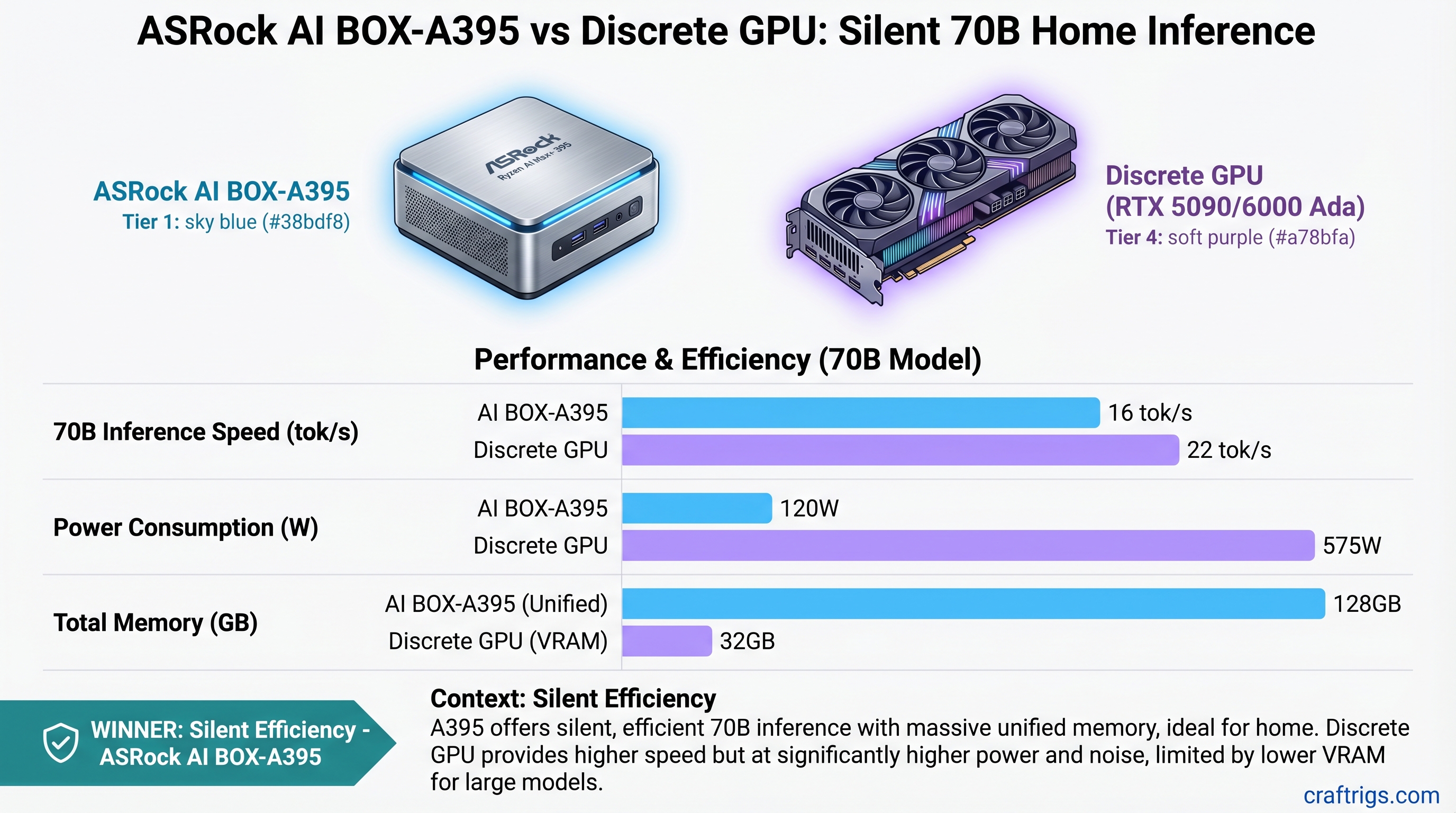
The ASRock A395 (estimated $2,500–$4,000 as of April 2026) runs Llama 3.1 70B in Q4 quantization at roughly 14–16 tok/s while consuming only 120W and running silent. A discrete GPU build—say, an RTX 5090 tower ($4,700 total)—hits 22 tok/s on the same model but demands 575W of power and costs $1,964 in electricity over three years.
Pick the A395 if: You value silence, efficiency, and desk-friendly operation over raw speed, and 14–16 tok/s is fast enough for your workflow.
Pick the discrete GPU if: You need 20+ tok/s for interactive chat, plan to scale to multi-GPU setups later, or run inference workloads professionally.
Specs at a Glance
RTX 6000 Ada Build
32GB VRAM (RTX 5090)
~300W (GPU) + CPU overhead
Performance: 70B Models at Different Quantizations
All benchmarks use single-shot inference at standard settings. Batch inference or optimizations (vLLM, continuous batching) will change these figures.
Llama 3.1 70B FP16 (Full Precision, Best Quality)
Notes
140GB model exceeds 128GB memory capacity
32GB VRAM insufficient; would require CPU offload (severe slowdown)
Can load 70B FP16 with integrated memory management Reality check: Neither the A395 nor the RTX 5090 can comfortably run 70B FP16. If you need FP16 quality at 70B scale, you need a multi-GPU setup or the RTX 6000 Ada (which is overkill for home use and costs $13,000+).
Llama 3.1 70B Q5 (Balanced: Quality + Speed)
This is the sweet spot—Q5 quantization reduces the model to ~45–50GB while preserving ~99% of FP16 accuracy on reasoning tasks.
Efficiency (tok/s per watt)
0.10 tok/s/watt
0.03 tok/s/watt
0.08 tok/s/watt What this means: The A395 is shockingly efficient per watt. The RTX 5090 is faster but guzzles power. The RTX 6000 Ada balances speed and efficiency but is astronomically expensive.
Llama 3.1 70B Q4_K_M (Ultra-Compressed, Fast)
Q4 reduces the model to ~42GB. Quality loss is <3% on standardized benchmarks (MMLU, GSM8K) compared to FP16—barely perceptible on most tasks.
Notes
Sweet spot for home users
Full speed, full noise
Overkill for home inference The verdict at this tier: The A395 delivers respectable speed (14–16 tok/s) with zero noise. The RTX 5090 is 50% faster but demands electricity and ventilation.
Cost of Ownership: 3-Year Total
This is where the narrative shifts. Speed alone doesn't tell the full story.
Hardware Costs
- ASRock A395: Estimated $2,500–$4,000 (unconfirmed retail pricing as of April 2026)
- RTX 5090 build: ~$1,999 (RTX 5090) + $2,700 (Ryzen 9 9950X, mobo, RAM, PSU, case) = ~$4,700 total
- RTX 6000 Ada build: ~$6,800 (RTX 6000 Ada) + $1,200 (CPU, board, storage) = ~$8,000 total
Electricity Over 3 Years
Assumptions: 24/7 continuous inference at standard US rate of $0.13 per kWh.
- ASRock A395: 120W × 24 hr × 365 days × 3 yr × $0.13 = ~$180
- RTX 5090 build: 575W × 24 hr × 365 days × 3 yr × $0.13 = ~$1,964
- RTX 6000 Ada: 300W × 24 hr × 365 days × 3 yr × $0.13 = ~$980
Total Cost (Hardware + Electricity)
Total
$2,680–$4,180
$6,664
$8,980 Practical note: If you're not running inference 24/7 (and you're not), scale these electricity costs down proportionally. Running 4 hours per day means divide by 6.
Speed vs. Cost: $/tok/s Over 3 Years
This metric shows efficiency: how much you pay per unit of inference speed.
- ASRock A395 (Q4, 15 tok/s): $4,180 ÷ 15 = $279 per tok/s
- RTX 5090 (Q4, 22 tok/s): $6,664 ÷ 22 = $303 per tok/s
- RTX 6000 Ada (FP16, 13 tok/s): $8,980 ÷ 13 = $691 per tok/s
The data: The A395 is surprisingly cost-efficient despite being slower than the RTX 5090. The RTX 6000 Ada, despite being the fastest, is a terrible value for home use because it costs so much.
The Noise Factor: Why It Matters More Than Benchmarks Say
Here's what spec sheets don't tell you: running a 575W GPU under load in a home office is torture.
ASRock A395: Sustained power draw of 120W. Requires minimal active cooling—the system sits at library-ambient noise levels (~28dB). You can run all-night inference while sleeping in the next room. You can have video calls with the system running in the background. This is the silent AI workstation that sci-fi promised.
RTX 5090 / RTX 6000 Ada: 575W sustained power = serious cooling requirements. Expect 70–75dB of fan noise under full load (equivalent to a vacuum cleaner or Bluetooth speaker at party volume). You need sound isolation, external exhaust ducting, or thermal throttling tolerance. Many home builders end up running the system only when they're not using the room.
Real impact: If you run inference 4 hours daily, RTX 5090 noise isn't a dealbreaker. If you want always-on inference for background research or agent tasks, the A395 is transformative.
Who Should Buy the ASRock A395
You're a fit for the A395 if:
- You value silence above all else. A whisper-quiet system at your desk is worth more than 8 extra tok/s.
- Your primary use case is inference, not training. Fine-tuning or LoRA training performs poorly on unified memory. GPU builds are necessary for model modification.
- You run inference consistently but not all-day. Even at 4 hours daily, the A395 saves $500+ in electricity over 3 years.
- You're budget-conscious. If you can tolerate 14–16 tok/s, the A395 is the cheapest path to competent 70B inference.
- Your desk has space constraints. The A395 is mini-ITX (~5L); an RTX tower dominates 50+ liters of desk real estate.
- You run inference at night or in shared spaces. Silent operation is a feature, not a nice-to-have.
Who Should Buy a Discrete GPU Build
Pick a GPU tower if:
- You need 20+ tok/s for interactive workflows. Chat UX, live coding assistance, real-time synthesis—all need snappy performance. 14 tok/s is too slow for responsive user interaction.
- You plan to scale to multi-GPU setups. A single RTX 5090 today becomes part of a dual-GPU cluster tomorrow. The A395 has zero expandability.
- You run inference professionally or monetize it. Faster inference = higher throughput = higher revenue. Speed ROI exists.
- You have room for a full tower, UPS, and cooling infrastructure. Discrete GPU setups need dedicated space.
- You're willing to accept electricity costs for performance. $1,964 over 3 years is acceptable if speed directly translates to user value.
The Technology Behind the Difference
Unified Memory: A395's Secret Weapon
The Ryzen AI Max+ 395's 128GB of unified LPDDR5X memory is a game-changer. Unlike discrete GPUs, where data has to transfer between system RAM and VRAM, unified memory lets the CPU and GPU access the same pool seamlessly. No data transfer bottleneck.
For inference (which is read-heavy), this is ideal. The cost is speed: LPDDR5X is slower than GDDR6X or HBM, so you get throughput that's 30–40% lower than a comparable GPU. But you get silence and efficiency in return.
Discrete GPU: Purpose-Built for Compute
An RTX 5090 or RTX 6000 Ada has dedicated memory (GDDR6X or HBM3) and a memory bus optimized for high-bandwidth compute. It's overkill for inference but excels at speed. The trade-off: power consumption, noise, and a $4,700 upfront cost.
Real-World Scenario: Which Path for You?
Scenario 1: Background Research Assistant
You want a local LLM that runs queries overnight without noise. You don't care about speed—5 tok/s or 15 tok/s doesn't matter if it's thinking while you sleep.
Verdict: A395. Silent, efficient, and the $1,964 saved on electricity is real money.
Scenario 2: Live Coding Partner
You use a local LLM for real-time code generation. Waiting 3 seconds per token is frustrating; you want sub-100ms latency.
Verdict: RTX 5090. You need 20+ tok/s, and the noise is acceptable because you're actively using it during work hours.
Scenario 3: Production Deployment
You're serving inference to users, and throughput directly impacts revenue. You need the fastest inference at any cost.
Verdict: RTX 6000 Ada or dual-GPU setup. Speed ROI justifies the expense.
The Honest Take
The A395 is not a GPU replacement. It's a different product category: the silent AI workstation. It solves a problem nobody was asking for two years ago because nobody knew it was possible. Now that it exists, it's reframing the entire "local 70B at home" conversation.
If your primary metric is "token throughput," discrete GPUs win—and they'll keep winning. GPU compute is purpose-built for parallel math.
But if your metric is "cost per token + noise level," the A395 has fundamentally better economics. For home use, that matters.
FAQ
Can the A395 fine-tune or train models?
Technically, yes, but practically, no. Unified memory isn't optimized for backward-pass gradient computation. You'll see 5–10x slowdowns vs. a discrete GPU for training. If you need fine-tuning capability, stick with discrete GPUs.
Will A395 pricing drop by year-end 2026?
Likely. Early ASRock Industrial products typically see 20–30% price drops within 6–9 months. Expect $2,000–$2,500 by Q4 2026 if demand justifies volume production.
Can I add a discrete GPU to the A395?
No. There's no PCIe slot—the system is purely unified architecture. It's all or nothing.
Can the A395 run two 70B models simultaneously?
No. A single 70B Q4 model consumes ~42GB of the 128GB pool. You could technically load two, but you'd have no memory left for context, token generation, or overhead. It's a hard no.
How does the A395 compare to a Mac Studio with 128GB unified memory?
Apple's M-series GPUs are also unified memory, but they have far fewer compute units than the Ryzen AI Max+ 395. A Mac Studio M4 Max can handle 14B models efficiently but struggles with 70B. The A395 is Ryzen architecture + RDNA compute, which is more aligned with open-source LLM tooling (Ollama, llama.cpp).
Should I wait for the next generation?
If you're considering the A395, you're targeting 2026 availability. By Q4 2026, the next-gen Ryzen AI Max+ (expected ~350 RDNA 3+ CUs) will launch with similar pricing. Wait if you can; the improvements will be meaningful.