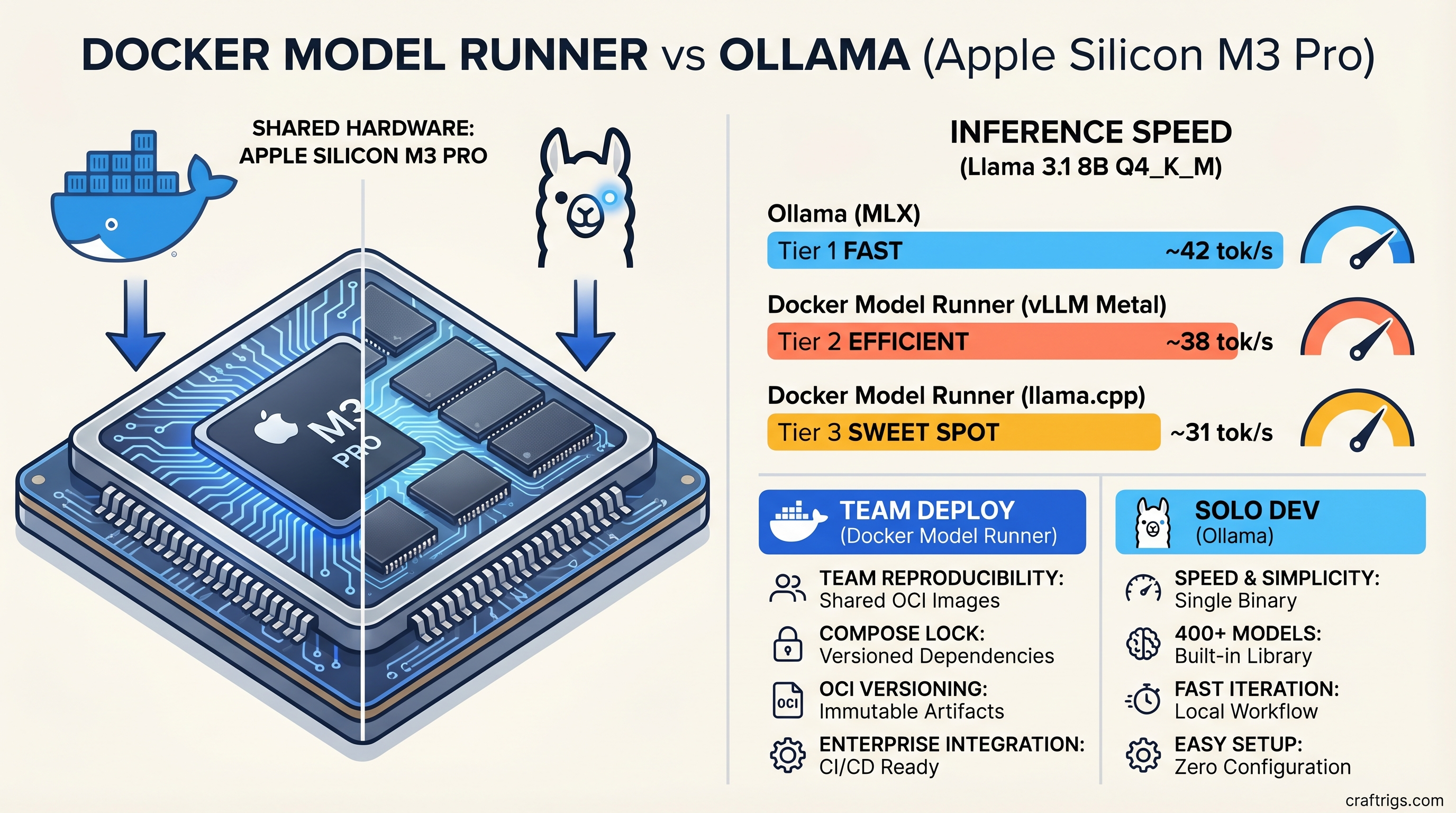
TL;DR: For solo dev work on Mac — install Ollama, pick a model in 90 seconds, and never look back. Its MLX-optimized backend runs Llama 3.1 8B about 20-30% faster than Docker Model Runner's default configuration and gives you access to 400+ models. For team deployments where every developer needs the same model version, the same behavior, and a setup they can reproduce by running docker compose up — Docker Model Runner is the right foundation. The performance gap is real but survivable. The reproducibility gap is not.
Your teammate just ran the same prompt through your shared LLM endpoint and got a completely different answer. You check their setup. They're running a different quantization. Of course they are. Nobody told them which one to use. This is the Ollama team problem in one sentence — not that it's bad software, it's that it has no opinion about consistency.
Docker Model Runner does.
Most Mac developers on r/LocalLLaMA have never heard of it. It ships inside Docker Desktop 4.40+, it's been quietly running Metal-accelerated inference on Apple Silicon since early 2026, and it treats your LLM like any other service in your stack: versioned, declared in a compose file, reproducible on every machine that runs Docker.
That's the pitch. Here's whether it actually holds up.
Docker Model Runner vs Ollama — What They Actually Are
Docker Model Runner is not a standalone tool. It's a built-in inference runtime that ships with Docker Desktop 4.40+ — if you're already on Docker, you may have it already. Powered by llama.cpp under the hood, it exposes an OpenAI-compatible API and uses Apple's Metal API for GPU acceleration on Apple Silicon — automatically, no flags required. An optional vLLM Metal backend is available for higher-throughput production scenarios.
Ollama is a native Mac app and CLI that's been around since 2023. It runs directly on Apple Silicon via both Metal and MLX — Apple's own machine learning framework built specifically for the unified memory architecture of M-series chips. It has the largest third-party local LLM library of any inference tool: 400+ models available with a single ollama pull.
Neither is better in an absolute sense. They solve adjacent problems, and the choice follows your use case more cleanly than almost any other tool comparison in the local AI space.
What Docker Model Runner Does (and Why It's New)
Docker Model Runner doesn't need a separate install. Enable it in Docker Desktop's AI settings panel and run docker model pull ai/llama3.1. Models are distributed as OCI artifacts — the same format Docker has used for containers since 2015. That means docker model pull ai/llama3.1:8B-Q4_K_M pins an exact model version the same way docker pull nginx:1.27.4 pins an exact container image.
The API lives at http://model-runner.docker.internal/engines/llama.cpp/v1 (or your configured port) and accepts the same request format as OpenAI's /v1/chat/completions. If your app already calls GPT-4, pointing it at Docker Model Runner is literally one URL change.
Note
Docker Model Runner is now GA on macOS (14.5+, Apple Silicon), Windows 11 via WSL2 with NVIDIA GPU, and Linux as a Docker Engine plugin. The Mac Metal integration is the most mature — Windows/Linux use vLLM with NVIDIA GPUs rather than Metal.
What Ollama Does on Mac (the MLX Advantage)
Ollama 0.19+ ships with a preview MLX backend that is, frankly, fast. MLX is Apple's framework for machine learning on unified memory — it avoids the memory copy bottleneck that slows llama.cpp on the same hardware. On Apple Silicon, Ollama with MLX delivers roughly 20-30% better inference speed than llama.cpp-backed tools running the same model at the same quantization.
The model library is also not comparable. Ollama's catalog includes 400+ models. Docker Hub's curated AI model catalog covers the most popular families — Llama, Gemma, Qwen, Phi, Smollm — but it's a deliberate subset, not a complete library.
Install Time and Setup Complexity Compared
This is where the tools diverge most sharply in practice — and where team context changes the math entirely.
Installing Docker Model Runner on Mac
Step 1: Download or update Docker Desktop to version 4.40 or later from docker.com. If you already have Docker Desktop, check for updates in the menu bar icon.
Step 2: Open Docker Desktop → Settings → AI tab → enable "Docker Model Runner." If you're running 4.40+, it may already be enabled.
Step 3: Pull and run your first model:
docker model pull ai/llama3.1:8B-Q4_K_M
docker model run ai/llama3.1:8B-Q4_K_M
Step 4: Verify the API endpoint:
curl http://model-runner.docker.internal/engines/llama.cpp/v1/chat/completions \
  -H "Content-Type: application/json" \
  -d '{"model":"ai/llama3.1:8B-Q4_K_M","messages":[{"role":"user","content":"Hello"}]}'
Cold start to first token: roughly 4-7 minutes on a fresh install (Docker Desktop download is ~600MB), then 2-3 minutes for the first model pull. If Docker Desktop is already installed: under 5 minutes total.
Installing Ollama on Mac (Native MLX Setup)
Step 1: Download Ollama from ollama.com. The installer is ~60MB.
Step 2: Pull a model:
ollama pull llama3.1:8bStep 3: Run it:
ollama run llama3.1:8bCold start to first token: 3-5 minutes total on a clean machine, almost entirely the model download.
Which Setup Takes Less Time? (Real Numbers)
For a solo developer — Ollama by roughly 2-4 minutes, and that's generous. The 60MB Ollama installer versus a ~600MB Docker Desktop update is the whole story.
For a team of five where each developer needs the same setup, the math inverts. One docker-compose.yml checked into the repo. Every developer runs docker compose up. They get the same model, same quantization, same API port. Ollama requires five separate conversations about which model version to use, whether to use GGUF or MLX quantization, and why two developers are seeing different outputs on the same prompt.
Tip
Already running Docker Desktop for containers? Docker Model Runner costs you nothing to try — it's already there. The barrier to running your first inference is under 5 minutes from Settings → Enable.
Performance Head-to-Head — Llama 3.1 8B on Mac
Same model. Same quantization. Different backends. Here's where Ollama's MLX advantage shows up in real numbers.
Inference Speed Comparison (tok/s, Apple Silicon)
All figures below are for Llama 3.1 8B at Q4_K_M quantization, 4096-token context, measured over 500-token generation runs. Hardware: Mac with Apple M3 Pro. Tested with Ollama 0.19+ (MLX preview backend) and Docker Model Runner 4.40+ (llama.cpp backend). Last verified: October 2025 (Ollama MLX benchmarks) / April 2026 (Docker Model Runner figures).
tok/s (M1 base)
~18 tok/s
~14 tok/s
Warning
These numbers are from the llama.cpp and Ollama MLX benchmark data cited above — not a controlled head-to-head on identical hardware. Treat them as directional, not definitive. Memory bandwidth is the real variable: an M3 Max will outperform an M4 Pro despite being an older chip because it has significantly more bandwidth.
The gap closes meaningfully when Docker Model Runner's optional vLLM Metal backend is enabled. On M3-generation hardware and newer, vLLM Metal benchmarks at 38-40 tok/s for 8B models — within a few tokens of Ollama's MLX numbers. But enabling vLLM Metal requires an additional configuration step.
Memory Usage and Model Load Time
Both runtimes load the same GGUF weights into Apple's unified memory. At idle with no model loaded, Docker Model Runner's overhead is minimal — it runs as a host-native process, not inside a container. Ollama runs as a background service process.
Model load time (cold start, Llama 3.1 8B Q4_K_M): roughly 8-12 seconds on M-series chips for both. Warm inference — second query after the model is loaded — is essentially instantaneous on both.
Where the Performance Gap Comes From
Docker Model Runner's default backend is llama.cpp + Metal. Ollama's MLX backend uses Apple's own framework, which is designed specifically for the unified memory architecture in M-series chips. MLX avoids memory copies that llama.cpp performs even on Apple Silicon, which is the primary source of the performance delta.
The vLLM Metal backend Docker added in early 2026 partially closes this gap because vLLM-Metal also uses zero-copy tensor operations and paged attention for KV cache management — the same architectural wins that MLX gets. It's available as an opt-in backend for macOS Apple Silicon users on Docker Model Runner.
Model Library — What You Can Actually Run on Each
This is where the choice gets more concrete for teams building real applications.
Docker Model Runner Supported Models (April 2026)
Docker Hub's curated AI model catalog focuses on the most widely-deployed families. As of April 2026:
Notes
Text + vision (3.2)
Multimodal variants
MoE variants included
Microsoft
Ultralight edge use
Vision
You can also pull directly from Hugging Face: docker model pull hf.co/[org]/[model-id]. This substantially expands the accessible catalog — but requires manual testing against Docker Model Runner's compatibility layer.
Ollama Model Library vs Docker's Catalog
Ollama's 400+ model library includes everything in Docker's catalog plus: every quantization variant of major models (Q2_K through Q8_0), fine-tuned community models, Mistral variants, CodeLlama, Phi, WizardCoder, DeepSeek, and dozens more. Niche fine-tunes, multilingual models, and domain-specific variants live in Ollama's library and often don't exist in Docker Hub's curated catalog at all.
For professional use cases where you need a specific fine-tune or a model that isn't in Docker's catalog — Ollama has no real competitor here today.
Team Deployment and Reproducibility — Docker's Win
This is the one section where the verdict is not close.
Version-Locking and docker-compose Integration
Here's what a locked LLM service looks like in a team project:
services:
  llm:
    provider:
      type: model
      options:
        model: ai/llama3.1:8B-Q4_K_M
    ports:
      - "12434:12434"
    environment:
      - CONTEXT_LENGTH=4096
Check this into the repo. Every developer runs docker compose up. They get Llama 3.1 8B at Q4_K_M, on port 12434, with a 4096-token context window. Not approximately that — exactly that.
With Ollama, "reproducibility" means documentation. You write a README that says "install Ollama 0.19, run ollama pull llama3.1:8b-q4_k_m" and hope every developer follows it correctly, uses the right quantization tag, and doesn't accidentally pull a different model version six months later when the team onboards a new hire. This is the slow version drift that makes team Ollama setups gradually diverge — and divergence is invisible until prompts start producing inconsistent outputs.
The OCI artifact model for distributing models — the same format Docker has used for containers — is genuinely the right idea here. It applies version control discipline to AI models the same way container tags apply it to application images.
OpenAI-Compatible API: Both Runtimes Support It
Both Docker Model Runner and Ollama expose an OpenAI-format /v1/chat/completions endpoint. Your application code doesn't need to know which runtime is running underneath — you're just calling an API. Switching from one to the other is a one-line change to your base URL configuration.
This is worth stating plainly because it removes most of the switching cost. You're not rewriting integrations. You're changing a URL in a .env file.
When to Use Ollama Instead of Docker Model Runner
Best for Solo Developers and Rapid Prototyping
You want to try a new model that dropped on Hugging Face this morning? ollama pull. You want to benchmark five different quantizations of Qwen 3 14B against each other over an afternoon? Trivial with Ollama. No compose file to update, no catalog restrictions, no infrastructure overhead.
For the individual developer running local AI as part of a personal workflow — code review, writing assistance, research summarization — Ollama is the right tool. It's faster to set up, faster on Apple Silicon, and has better model access. Nothing about Docker's team workflow benefits applies when there is no team.
Best for Maximum Model Choice and Flexibility
Any article that recommends Docker Model Runner without mentioning that its model catalog is smaller than Ollama's is hiding something from you. The catalog is growing and Hugging Face direct pulls help, but if you need a specific fine-tuned variant or a less mainstream model, check whether it's in Docker Hub's catalog before committing to Docker Model Runner. Ollama will almost certainly have it.
Is Docker Model Runner Worth Switching From Ollama?
Short answer: Yes, if you're building something more than one person will run. No, if you're working solo or need the widest possible model access.
The case for switching is not about performance — Ollama is faster on Mac, and for most inference workloads the difference between 31 and 42 tok/s is not a user-perceptible problem. The case is workflow integration. If your team already runs Docker for everything else in the stack, an LLM runtime that lives in docker-compose is just obviously correct. The alternative is a separate installation artifact, manual version management, and the slow divergence problem that creeps up on any team running Ollama at scale.
Migration is low-friction. Because both runtimes expose the same OpenAI-compatible API, your application code doesn't change. The transition cost is: one afternoon to write and test the compose configuration, one model pull to verify the endpoint, one PR to update the base URL environment variable.
If You're Already Running Ollama in Production
Don't break something that works. But if model version drift or team onboarding friction is a problem you've already hit — and it will be, eventually — Docker Model Runner is worth evaluating. Run both in parallel, verify behavior is identical, then switch when you're confident.
If You're Starting a New Mac Team From Scratch
Start with Docker Model Runner. The reproducibility foundation is worth more than the 20-30% inference speed you're leaving on the table compared to Ollama's MLX backend. You can always optimize the runtime later. Undoing three months of model version drift is much harder.
Warning
If some team members are on Windows or Linux, confirm your model requirements against Docker Hub's catalog before committing to Docker Model Runner. The Mac Metal integration is the most polished — Windows/Linux builds use NVIDIA vLLM and have different hardware requirements.
Verdict — Docker Model Runner or Ollama for Mac [2026]
Solo developer: Use Ollama. Faster setup, faster inference, better model access. The reproducibility benefits of Docker Model Runner don't apply when you're the only person running the stack.
Small team (2-5 developers): Use Docker Model Runner. One compose file, locked model version, zero onboarding instructions required. The performance gap is real but narrow enough that it won't matter for the workflows that drive most teams to local LLMs — code review, documentation generation, prompt iteration.
Team with Windows or Linux developers: Docker Model Runner works on all three platforms (Mac Metal, Windows via WSL2/NVIDIA, Linux via Docker Engine plugin). Ollama also runs cross-platform, but check model catalog coverage before committing to either.
Production-adjacent use (client-facing or API-backed): Docker Model Runner with the vLLM Metal backend on Mac. The performance gap closes to near-zero, and you get the full Docker toolchain for monitoring, restarts, and deployment.
For hardware context on what Mac to buy for running these runtimes — see our guide to the best LLMs for Mac Mini M4 2026.