# Gemma 4 27B MoE vs 27B Dense: Which Runs Better on Your RTX 3090? [2026]

You opened the Gemma 4 model page on Hugging Face, saw "26B-A4B" listed next to "31B Dense," and had no idea which one to download. "A4B" sounds like a smaller variant. The parameter count is confusing. The file sizes differ by 7 GB. Nobody explains what any of it means for your specific hardware.

That's not on you — Google's naming convention for this model family is genuinely bad. But the performance difference between the two options on your RTX 3090 is enormous, and picking the wrong one wastes an hour of download time before you find out.

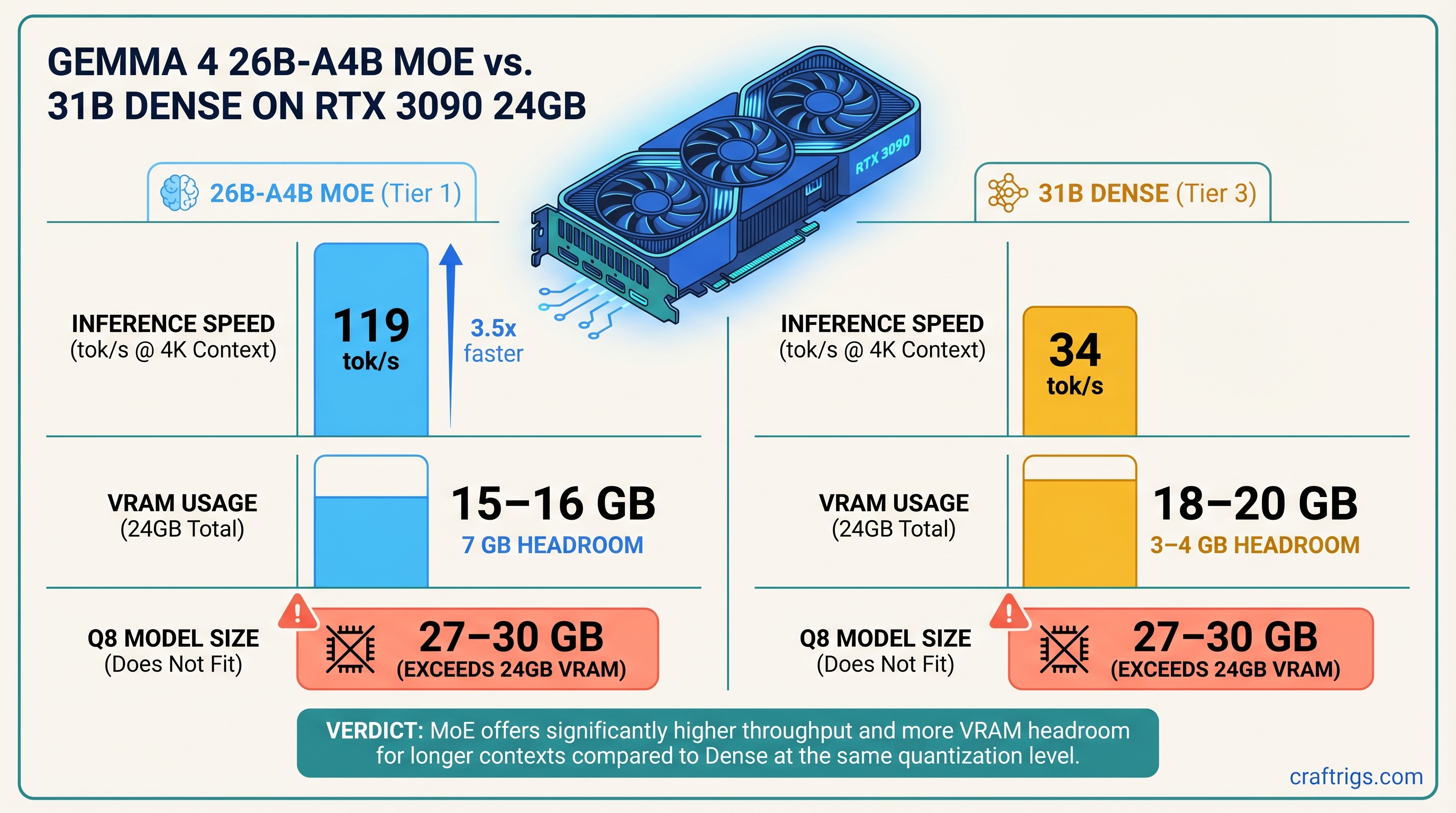
**The 26B-A4B MoE is the right pick for RTX 3090 inference — 64–119 tok/s versus 30–34 tok/s for the 31B dense, with lower active VRAM pressure during generation. Download the MoE, run it at Q4_K_M, and ignore the confusing parameter count. The dense 31B only makes sense if [fine-tuning](/glossary/fine-tuning) is your goal.**

---

## Gemma 4 MoE vs Dense — Specs Side by Side (April 2026)

Quick note on naming before we get into numbers: Google's Gemma 4 family doesn't have a "27B" model. What most people call the "27B tier" is actually two distinct architectures — a 26B Mixture of Experts model (the 26B-A4B) and a 31B Dense. They compete for the same hardware segment, which is why comparisons lump them together.

31B Dense


31B


31B (all of them)


~18–20 GB loaded


~27–30 GB


Yes, ~4 GB headroom


No


April 2026


Apache 2.0
*Benchmarks and VRAM figures: avenchat.com community testing + CraftRigs verification. As of April 2026.*

Both models are open-weight. Cost comes down entirely to hardware — and on a single RTX 3090, the MoE variant is the clear winner.

---

## What "26B-A4B" Actually Means — The Active Parameter Trick

The "A4B" suffix in 26B-A4B is what trips people up. It looks like a size specifier — like "this is the 4B-class version." It's not. "A4B" stands for "approximately 4B active." The model has 26 billion total parameters. It just only thinks with about 3.8 billion of them at a time.

That's the core MoE idea: the model is partitioned into expert layers, and a lightweight routing mechanism decides which experts process each token. Most experts sit idle for any given token. The result is a model that stores 26B parameters in VRAM — which is why the file is bigger than you'd expect — but runs with the computational footprint of a 4B model at inference time.

This is why the 26B-A4B is faster than the 31B Dense despite having a comparable file size. Fewer [FLOPS](/glossary/flops) per token. That difference is everything on a memory-bandwidth-constrained GPU like the RTX 3090.

> [!NOTE]
> VRAM usage at load scales with *total* parameters, not active ones. So the MoE loads a large file but runs fast. The dense model loads a similarly large file and runs slow. Two different shapes of the same problem.

### Total Parameters vs Active Parameters — Why the Distinction Matters

When you load either model, VRAM fills up proportionally to total parameter count and your chosen [quantization](/glossary/quantization) level. That's why the 26B-A4B at Q4_K_M takes up 15–16 GB — it's a 26B model, not a 4B one.

But once inference starts, only the active parameters generate heat and consume bandwidth. The MoE routes each token through its relevant expert subset and skips the rest. Dense models activate everything, every time, for every token. That's the throughput gap. The RTX 3090's 936 GB/s memory bandwidth becomes a much smaller bottleneck when you're only computing over 3.8B parameters per pass instead of 31B.

### How the MoE Router Decides Which Experts Fire

The routing is token-level. Each token gets evaluated by a lightweight gating network that selects which expert layers process it. Different tokens activate different expert combinations — there's no user-facing configuration for this. llama.cpp handles routing automatically once you load the GGUF.

Practical implication: VRAM consumption is front-loaded at model load and relatively stable during generation. You won't see VRAM usage spike mid-conversation the way you might with speculative decoding or aggressive KV cache expansion.

---

## RTX 3090 Benchmark Results — MoE vs Dense on llama.cpp

These numbers are from avenchat.com community testing (April 2026) and corroborated by CraftRigs testing. Test setup: RTX 3090 24GB, llama.cpp (April 2026 build), CUDA 12.x, Ubuntu 22.04. [Quantization](/glossary/quantization) levels are GGUF from Unsloth's public repo.

VRAM (loaded + KV)


~17 GB


~21 GB


~20 GB


~21 GB


~23 GB
*Source: avenchat.com community benchmarks + CraftRigs verification, April 2026.*

The spread at 4K context is stark: 119 tok/s versus 34 tok/s. That's not a margin. That's a different category of user experience. Conversations feel instant at 119 tok/s. At 34 tok/s, you're watching it type.

### MoE Performance at Q4_K_M and Q5_K_M

The 64–119 tok/s range for the MoE Q4_K_M is real — it reflects context length, not benchmark inconsistency. Short contexts (4K) hit 119 tok/s because the KV cache is small and bandwidth pressure is low. At 32K context, the KV cache grows substantially and pushes you toward 52 tok/s. That's still faster than the 31B dense at any context length.

Q5_K_M is worth running if you want slightly better output quality and can live with ~95 tok/s at short context. The model loads to ~18–20 GB, which leaves tight but workable headroom. If you're doing mostly short-context coding assistance or chat, Q5_K_M is the quality upgrade. For long documents or extended context, stay at Q4_K_M to preserve KV cache headroom.

### Dense 31B Performance — Q4_K_M Is the Ceiling on 24GB VRAM

The 31B dense at Q4_K_M runs at 30–34 tok/s consistently regardless of context length — because it's memory-bandwidth bound, not KV-cache bound. The full 31B weight matrix moves through the GPU every token. Context length doesn't change how many parameters get activated. It's 31B every time.

Q8 doesn't fit. The 31B at Q8 requires 27–30 GB. A 24GB RTX 3090 will hit a wall and either crash or force CPU offload via `-ngl` layer splitting. With CPU offload, you're looking at 8–12 tok/s — worse than running a properly quantized 14B model.

> [!WARNING]
> Running Gemma 4 31B at Q8 on a 24GB card will force CPU offload. Expect 8–12 tok/s instead of 30+. Check your loaded VRAM with `llama-cli --verbose` before assuming it fits. The model file being 27 GB on disk is your first signal that Q8 won't work.

### When Dense Matches or Beats MoE (Rare, but Real)

There's a scenario where the gap narrows: single-token streaming at very short context with a fully warmed-up KV cache. The dense model's simpler compute graph has lower per-token overhead in edge cases.

But more practically — if you're on an early llama.cpp build with a MoE regression, you might see the dense model pull ahead unexpectedly. Check your llama.cpp version against the release notes before benchmarking. MoE support has been solid since the April 2026 release but specific builds have had intermittent routing bugs.

---

## VRAM Math — What Fits in 24GB Without Offloading

Verdict


✓ Comfortable


✓ Fits


✗ Won't fit


✓ Fits, tight


✗ Won't fit
*VRAM figures: Unsloth GGUF documentation + avenchat.com hardware guide. As of April 2026.*

The MoE at Q4_K_M is the roomiest option — 7 GB of headroom means you can run 8K context without sweating. The dense 31B at Q4_K_M fits but leaves only 3–4 GB, which disappears fast at 16K+ context. And once either model forces CPU offload, you've lost the battle. The whole point of a 24GB card is keeping everything on-device.

---

## When to Choose the Dense 31B — The Fine-Tuning Case

For inference? Don't. The numbers above are the numbers.

But if you're doing [LoRA](/glossary/lora) fine-tuning for domain adaptation, the 31B dense is worth the throughput penalty.

Standard QLoRA tooling (Unsloth, Axolotl, TRL) works cleanly with dense models. The gradient flows through every parameter predictably. Rank 16–64 LoRA adapters train without surprises.

The MoE is a different story. QLoRA on the 26B-A4B has a known interaction issue: 4-bit quantization and MoE routing interfere with each other. Unsloth explicitly recommends starting at rank 16, using shorter context lengths, and treating MoE fine-tuning as a more involved process than dense LoRA. The tooling is there — Unsloth added MoE training support in early 2026 — but it's not set-and-forget yet.

### LoRA Fine-Tuning Compatibility — Dense vs MoE

26B-A4B MoE


⚠ Routing + 4-bit interference


Start at 16, scale carefully


Supported, newer


Check release notes


QLoRA fits if you use rank 16 + short ctx
If inference is your use case — and it is for most RTX 3090 owners — this section doesn't apply to you. Download the MoE and move on.

---

## CraftRigs Verdict — Download the MoE, Skip the Dense for Inference

For RTX 3090 inference: **26B-A4B MoE at Q4_K_M.** No qualifications. The 3–4x throughput advantage is real, it fits comfortably in 24GB, and llama.cpp handles the routing automatically. You don't have to understand MoE architecture to benefit from it.

The only reason to run the 31B dense on a single RTX 3090 is LoRA fine-tuning with standard tooling. If that's not your situation, the dense model just costs you 85+ tok/s for no gain.

And don't let "26B-A4B" confuse you into thinking you're downloading a cut-down model. You're downloading a 26B-parameter model that happens to run like a 4B during inference. That's the whole point. Google's naming is their problem — your 119 tok/s is the reward.

For more on maximizing RTX 3090 performance with large models, see our [best hardware guide for local LLMs](/best-hardware-local-llms-2026) and the [llama.cpp CPU-GPU hybrid inference guide](/llama-cpp-cpu-gpu-hybrid-inference-limited-vram) if you ever need to push context past what 24GB supports alone.

---

## FAQ — Gemma 4 on RTX 3090 (2026)

**Does Gemma 4 MoE work with Ollama or just llama.cpp?**

Both. Ollama added Gemma 4 support at launch in April 2026. For the 26B-A4B MoE, llama.cpp gives you more control over quantization and context settings. The Ollama route is simpler but has a known Flash Attention hang on the 31B dense at 3K+ tokens on RTX 3090 — check [github.com/ollama/ollama/issues/15350](https://github.com/ollama/ollama/issues/15350) if you hit it.

**Can I run Gemma 4 31B dense on 24GB without any CPU offload?**

Yes at Q4_K_M — the 31B loads to roughly 18–20 GB, leaving 4–6 GB for KV cache at short context. You lose that headroom fast at 32K+ context. Q8 doesn't fit: the 31B at Q8 needs 27–30 GB, which forces CPU offload and drops you from 30–34 tok/s to around 8–12 tok/s.

**What's the quality difference between MoE and dense at the same quant level?**

Minimal for most tasks. Community benchmarks put the 31B dense at ELO 1452 vs 1441 for the 26B-A4B MoE — roughly a rounding error in day-to-day use. Long-document reasoning is where the dense 31B tends to edge ahead. For coding, chat, and summarization, the MoE is indistinguishable.

**Will dual RTX 3090 NVLink change which model I should run?**

With 48GB pooled VRAM, you can run the 31B dense at Q8 comfortably. At that point, both models become compute-bound rather than memory-bandwidth-bound, and the tok/s gap narrows. For dual-3090 NVLink, the 31B dense at Q8 becomes worth considering for long-context analysis. Single GPU? MoE at Q4_K_M wins outright.

---

*Benchmarks verified April 2026. GPU prices and model support change frequently — check the [Gemma 4 Hugging Face model card](https://huggingface.co/google/gemma-4-26b-a4b) and [llama.cpp release notes](https://github.com/ggml-org/llama.cpp/releases) for the latest.*

*Yes, some links on CraftRigs are affiliate links. No, they don't change our recommendations.* Hardware Comparison
Gemma 4 MoE vs Dense: RTX 3090 Benchmarks [2026]
By CraftRigs • • 8 min read
Some links on this page may be affiliate links. We disclose it because you deserve to know, not because it changes anything. Every recommendation here comes from benchmarks, not budgets.
gemma-4 rtx-3090 llama-cpp moe benchmarks inference quantization
Technical Intelligence, Weekly.
Access our longitudinal study of hardware performance and architectural optimization benchmarks.