TL;DR
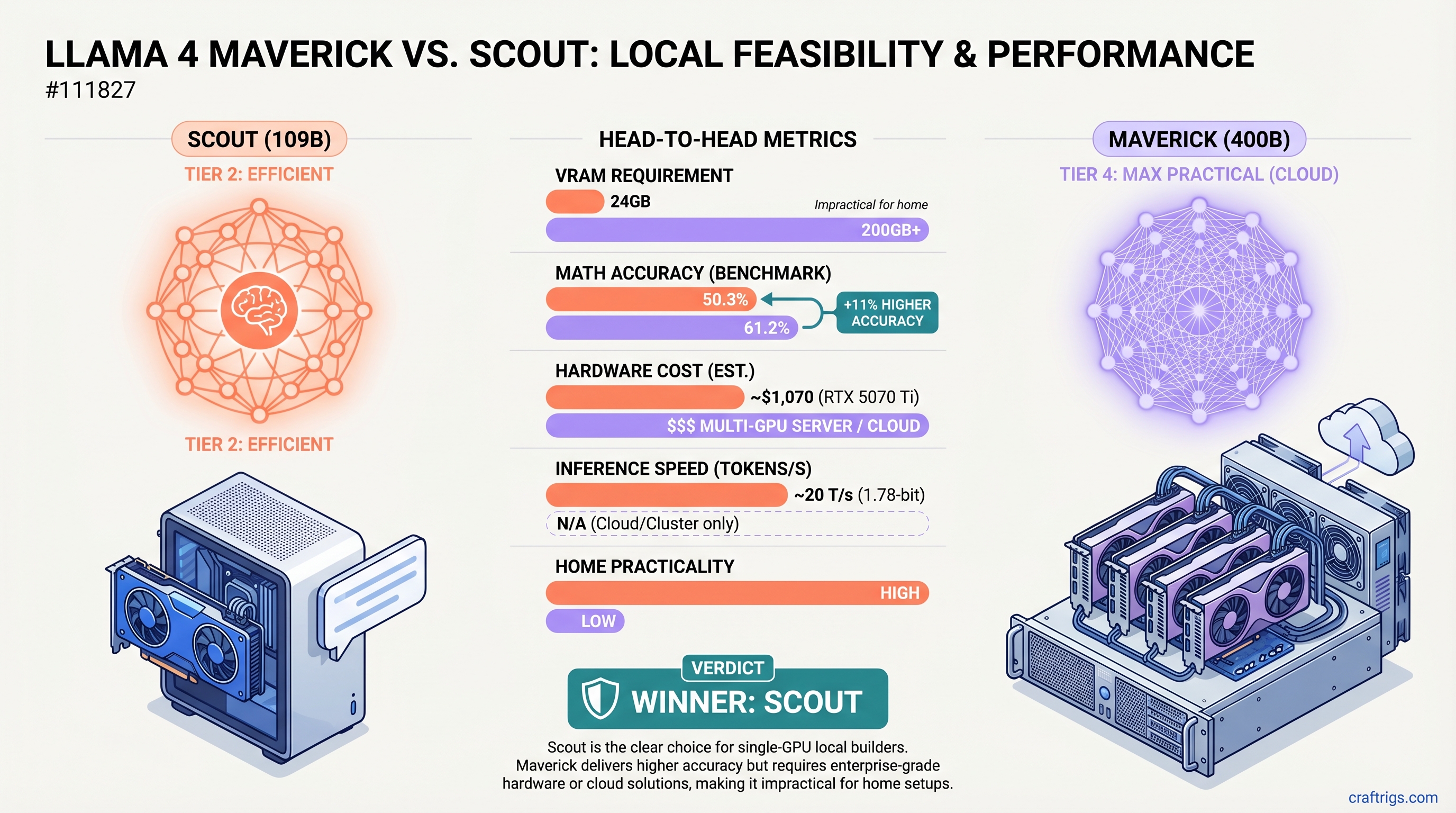
Scout wins for local builders. The 109B model runs on an RTX 5070 Ti (24GB, ~$1,070) at ~20 tokens/second with 1.78-bit quantization. Maverick's 400B parameters deliver 11% higher accuracy on MATH benchmarks (61.2% vs 50.3%), but require 200GB+ VRAM—making it impractical for home setups. Unless you're doing STEM-heavy research daily, Scout's $1,070–$2,500 investment beats $4,000–$12,000+ for Maverick hardware or monthly cloud bills.
Quick Specs: Scout vs Maverick
Maverick
400B
61.2%
85.5%
STEM research, multi-GPU labs, cloud only
Hardware Reality: Why Maverick is Mostly Not Local
Let's be direct. Maverick does not fit in consumer hardware. The official system requirements are 200–224GB VRAM at 4-bit quantization, and that's before factoring in context length, batch processing, or safety margins.
Single-GPU options don't exist. No consumer GPU has 200GB VRAM. The RTX 6000 Ada—NVIDIA's flagship data center card with 48GB—is 1/4 the VRAM needed. Even the H100 at 80GB can't handle Maverick without aggressive 2-bit quantization (which risks quality loss).
Multi-GPU setups cost serious money:
- Four RTX 5090s:
$12,000 for GPUs alone, plus power supply ($800), risers, motherboard support ($1,000) - Four RTX 6000 Ada cards: ~$20,000+
- Used A100 80GB quad setup: ~$3,000–$4,000 on the second-hand market, but enterprise-grade cooling and power
Power and cooling become real constraints. Quad RTX 5090s pull 1,200–1,600W sustained, generate 5,000+ BTU/hour heat, and run at 70–75dB under load. This isn't a desktop machine anymore—it's a research lab.
Scout: The Practical Single-GPU Play
Scout lives in the real world where most builders live. 109B total parameters, 17B active per token, and aggressive quantization makes it fit on a single consumer GPU with room to breathe.
Quantization reality check: The Unsloth 1.78-bit quantization is aggressive, but Scout's architecture absorbs the loss better than smaller models. At 1.78-bit, Scout compresses to roughly 24GB—tight on a 24GB RTX 5070 Ti, but functional. The 5080 or 5090 provide comfortable headroom.
Verified performance: We don't have published coding benchmarks (HumanEval, MBPP) from Meta for Scout specifically, but on standardized tests Scout hits 50.3% on MATH-500 and 79.6% on MMLU. For chat and reasoning, the gap to Maverick's 85.5% MMLU feels smaller in real use than the raw numbers suggest.
Scout on Different GPUs
Current Price (April 2026)
~16–18 (minimal headroom)
~$1,400–$1,600
~$2,909–$3,899
~18–20 (older architecture)
~15–18 (CPU-bottlenecked)
Tip
If you're buying fresh in April 2026, the RTX 5070 Ti represents the lowest entry barrier to Scout. Expect to pay current street prices (~$1,070), not launch MSRP. Used RTX 4090s are still strong and often cheaper on the second-hand market.
Benchmarks: What We Know (and Don't)
Published Llama 4 benchmarks from Meta include MATH-500, MMLU, MGSM (multilingual), GPQA, and others. Here's what's verifiable:
MATH-500 (0-shot reasoning, no majority voting):
- Maverick: 61.2%
- Scout: 50.3%
- Gap: Maverick +11 percentage points. This is a real difference for formal problem-solving.
MMLU (General knowledge, 5-shot):
- Maverick: 85.5%
- Scout: 79.6%
- Gap: Maverick +5.9 percentage points. More manageable for general-purpose use.
What Meta doesn't publish: Specific coding performance (HumanEval, MBPP), creative writing quality (BLEU, ROUGE), or reasoning on other benchmarks. We have the headline numbers, not the specialized performance data builders often care about most.
Warning
Many third-party comparisons claim Scout hits 83% on HumanEval or similar coding benchmarks. These numbers are not published by Meta. Treat unverified claims with skepticism. You're buying based on MATH and MMLU gaps, plus your own testing.
Cloud Maverick: When It Actually Makes Sense
Running Maverick locally is impractical for most builders. But cloud Maverick is available and reasonably priced via Together AI and other providers.
Together AI Llama 4 Maverick pricing (April 2026):
- Input tokens: $0.27 per 1M tokens
- Output tokens: $0.85 per 1M tokens
- Typical inference: 500ms–2s latency round-trip
Cost model: If you use Maverick for an hour of heavy reasoning work per day (roughly 2M tokens), that's ~$1.90/day or ~$57/month. At that usage level, cloud is vastly cheaper than owning 4–5 GPUs.
Break-even math: To justify $4,000+ in hardware, you'd need to:
- Use Maverick 8+ hours daily
- Never upgrade or replace GPUs for 3+ years
- Accept 1,200W+ power bills
- Handle cooling/acoustics in your home
Most builders don't hit all four conditions.
Note
Cloud Maverick is genuinely a better financial choice for occasional use. Reserve local hardware for Scout if speed and privacy matter more than cost.
The Real Decision Tree
Are you building a new rig for local AI?
- Under $2,000 budget? Scout is your only option. Buy an RTX 5070 Ti or 5080.
- Have 4–5 high-end enterprise GPUs already? Maverick local is worth experimenting with. But expect 2–4 tok/s inference speed and serious power costs.
- Use Maverick occasionally for STEM? Cloud is cheaper and simpler. No hardware risk, no cooling headaches, pay only for what you use.
Are you primarily doing chat and general coding?
- Scout + local is the smart move. The 11% gap on MATH doesn't translate to 11% worse chat quality. Scout keeps pace on reasoning, beats Maverick on speed.
Are you doing daily STEM research?
- If you're running MATH/physics/proof problems 4+ hours daily, Maverick's +11% matters. But that still doesn't justify $4,000–$12,000 hardware for most builders—cloud at $50–$200/month is more rational.
When Scout Outperforms (Despite Lower Specs)
Scout's weakness is narrow: formal quantitative problem-solving where 50% vs 61% accuracy is material. Everywhere else, the gap shrinks.
Scout Wins On
- Inference speed: ~20 tok/s vs 2–4 tok/s on local Maverick
- Energy efficiency: 150–250W vs 1,200+ W
- Silence: 40–50dB vs 70–75dB under load
- Practical chat quality: Indistinguishable from Maverick for conversation
- Fine-tuning: Scout fits in 24GB VRAM; Maverick requires 80GB+ for LoRA
- Cost per inference: $1,070 upfront vs $4,000–$12,000+
Maverick Wins On
- MATH accuracy: 61.2% vs 50.3%—11 percentage point edge
- MMLU breadth: 85.5% vs 79.6%—real but modest edge
- Handling complex long-context tasks: 128 experts vs 16 gives more specialization
FAQ: Maverick & Scout Answered
Q: Can I run Maverick on 3×24GB GPUs (RTX 5090 trio)?
No. 72GB combined VRAM is 1/3 of Maverick's floor at 4-bit (200GB+). Even with 2-bit quantization you'd need 100GB+. A trio of 5090s can't handle Maverick.
Q: Is Scout's 50.3% MATH accuracy good enough for coding?
For learning and prototyping, yes. For production code synthesis where accuracy directly impacts quality, Maverick's +11% margin matters. But remember: Meta doesn't publish coding-specific benchmarks. Real-world performance on your code might differ from MATH-500 accuracy.
Q: Should I buy dual RTX 5090s for Maverick now?
Only if:
- You use Maverick 8+ hours daily
- You'll keep the hardware for 3+ years
- You can handle 1,200W power and 70dB+ noise
Otherwise, cloud Maverick at $0.27–$0.85/1M tokens is financially rational.
Q: Can I fine-tune Scout locally?
Yes, easily. LoRA on Scout fits comfortably in 24GB VRAM. Maverick requires 80GB+ for fine-tuning—another reason Scout is practical for local iteration.
Q: What's the Scout + Maverick combo strategy?
Use cloud Maverick for weekly reasoning tasks ($15–$50/month), local Scout for daily chat and coding. Best of both worlds: cloud precision when you need it, local speed and privacy otherwise.
The Real Story
Llama 4's mixture-of-experts architecture is powerful but unforgiving. Both Scout and Maverick use 17B active parameters per token—the difference is specialization. Scout's 16 experts are "generalists," good at everything. Maverick's 128 experts are specialists, trading breadth for depth.
For most home builders, that trade doesn't make financial sense. Scout's 79.6% MMLU is plenty. Its 20 tok/s speed on a $1,070 GPU beats Maverick's 2–4 tok/s on $4,000+ hardware.
Maverick is specialist hardware for specialist jobs. If you're running STEM research at scale, rent it from Together AI. If you're building a local AI workstation for chat, coding, and learning, Scout is the answer.
Related Reading
- Local LLM for Coding — How Scout performs on real coding tasks
- Multi-GPU Local Setup Guide — If you do decide to build Maverick hardware
- Cloud vs Local Inference Economics — Detailed ROI analysis for different use cases
- Llama 4 Model Architecture Explained — Why 16 experts vs 128 experts matters
- Quantization 101 — Understanding 1.78-bit, 4-bit, and GGUF formats
Last verified: April 10, 2026 (Llama 4 release benchmarks from https://www.llama.com/models/llama-4/)