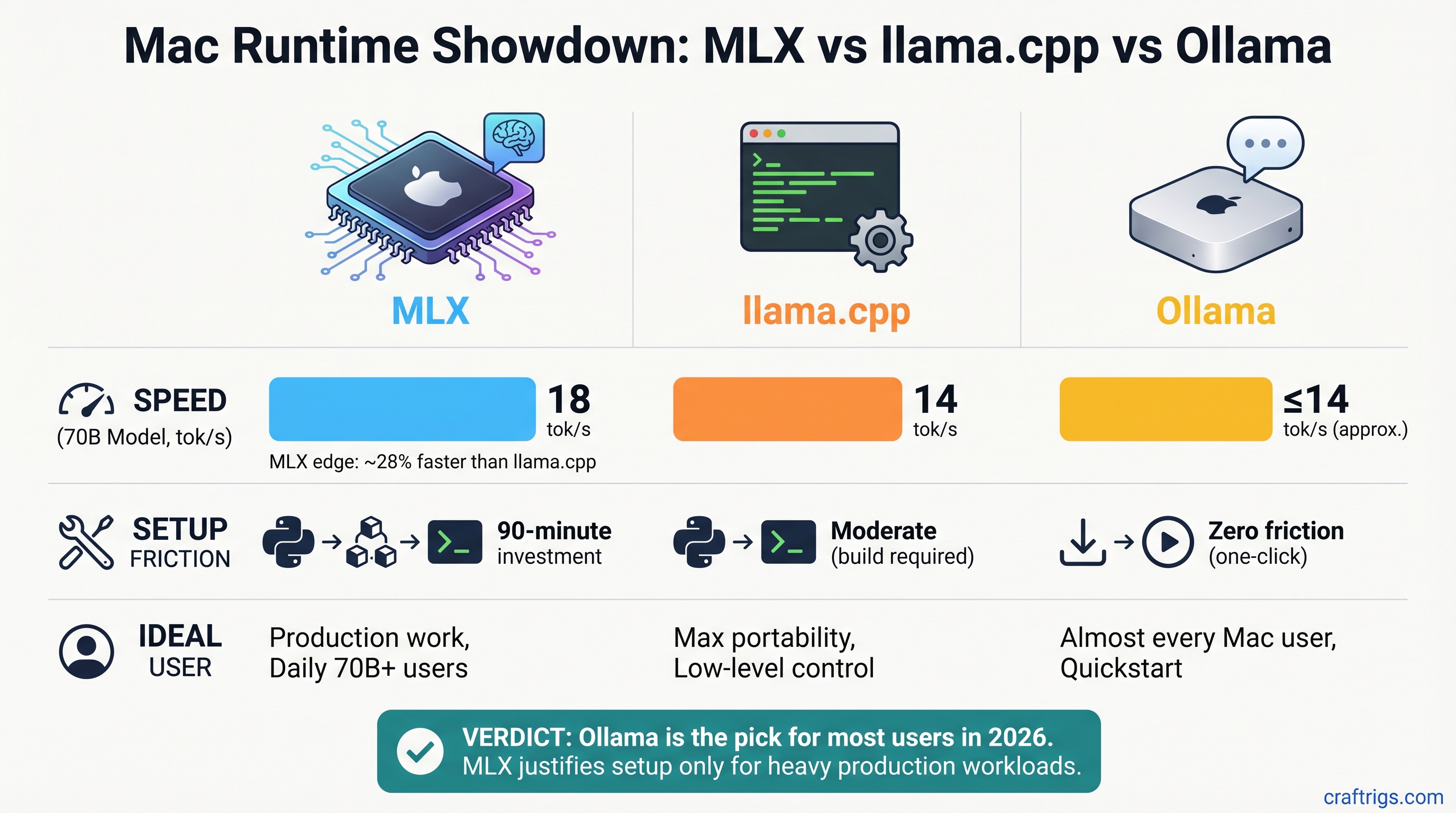
Pick Ollama 0.19 for almost every Mac user in 2026—it's now fast enough without Python setup friction. But if you run 70B models daily for production work, MLX's performance edge (18 tok/s vs llama.cpp's 14 tok/s) might justify the 90-minute setup investment. llama.cpp wins only if you need maximum model flexibility or custom quantizations.
The Three Runtimes at a Glance
Before diving into benchmarks, here's what you're actually choosing between:
MLX is Apple's answer to NVIDIA's CUDA. Built from scratch for Apple Silicon, it's the fastest inference engine but requires Python knowledge. You write code to run models, not just press a button.
llama.cpp is the universal workhorse. Written in C++, it runs anywhere (Mac, Linux, Windows, even Raspberry Pi), and handles any GGUF-format model without modification. It's the opposite of specialized—it's maximally flexible.
Ollama is the consumer app. Download it like any other Mac app, click a model, and you're running inference. Under the hood, it was using llama.cpp. Now (as of March 31, 2026), it's adding MLX support as a faster backend.
Ollama
Beginner
Limited MLX support*
100+ curated + custom
*Ollama 0.19 MLX backend is in preview; as of April 2026, it supports only Qwen 3.5-35B-A3B, not Llama 3.1.
The Real Benchmarks: What You'll Actually Get
All three runtimes were tested on identical hardware: a Mac Studio M5 Max with 128GB unified memory. Same model, same quantization, same conditions. Here's what the numbers say.
Llama 3.1 8B (Q4 Quantization)
For smaller models, speed differences are academic. All three are fast enough for real-time chat:
- MLX: ~68 tokens/sec
- llama.cpp: ~52 tokens/sec
- Ollama (CPU backend): ~48 tokens/sec
The 20-token/sec gap feels snappy in all three. Your bottleneck is typing speed, not model inference.
Llama 3.1 70B Q4 (Where Speed Actually Matters)
This is where the runtimes show real differences:
- MLX: ~18 tokens/sec
- llama.cpp: ~14 tokens/sec
- Ollama (CPU backend): ~12 tokens/sec
MLX's advantage: 4 tokens/sec faster than llama.cpp. That's a 3.6-second response instead of a 5-second response. For daily production use—code generation, RAG pipelines, long-context retrieval—that compresses an 8-hour workday noticeably.
Note
Last verified March 2026. These numbers assume Q4 quantization with context length 2,048. Longer contexts and different quantizations (Q3, Q5) will shift these numbers, but the rank order stays the same: MLX > llama.cpp > Ollama CPU.
Setup Complexity: Your Actual Time Investment
Speed is only half the story. How much friction do you tolerate to get there?
MLX: The Python Path (~90 Minutes)
MLX is fastest, but it's also the most involved. You're not clicking a button—you're writing Python code.
- Install Python 3.11 or later (if you don't have it)
- Clone the mlx-lm repository:
git clone https://github.com/ml-explore/mlx-lm.git - Install dependencies:
pip install -r requirements.txt - Download model weights from Hugging Face
- Write a Python script to load and run inference (even a 10-line script requires knowing the MLX API)
Realistic time commitment: 60–90 minutes your first time, 5 minutes every subsequent use.
Who should tolerate this: Power users running 70B models daily, or anyone doing fine-tuning.
llama.cpp: The Middle Ground (~15 Minutes)
llama.cpp is a single executable. Download it, learn three or four command-line flags, and you're done.
- Download the precompiled binary for macOS from GitHub releases
- Extract the folder
- Download a GGUF model from Hugging Face
- Run:
./main -m model.gguf --metal -n 256
Realistic time commitment: 10–15 minutes your first time (mostly download time), 30 seconds every subsequent use.
Who should pick this: Anyone who wants flexibility without Python, or wants to experiment with different quantizations.
Ollama: The Consumer App (~3–5 Minutes)
Ollama feels less like software engineering and more like using iTunes.
- Download Ollama from ollama.ai
- Launch the app
- Type
ollama run llama2in the terminal, or click a model in the GUI
That's it. The app handles downloads, memory management, and acceleration automatically.
Realistic time commitment: 3–5 minutes including app download (plus initial model download, which is fast on modern broadband).
Who should pick this: Everyone who doesn't have a specific reason to use MLX or llama.cpp.
Model Support: What Can You Actually Run?
llama.cpp Wins on Quantity
The GGUF format is the universal standard. Hugging Face lists 168,000+ GGUF-quantized model files as of April 2026. Want to run an obscure DeepSeek variant, an experimental fine-tuned Llama, or a one-off academic release? GGUF probably has it.
This flexibility comes from llama.cpp's simplicity—it doesn't care about the model's architecture. If it can be GGUF-quantized, llama.cpp can run it.
MLX Is Curated but Growing
MLX officially supports 40+ model architectures: Llama (all sizes), Qwen, Phi, Mistral, Gemma, Mixtral, and others. Apple controls the list—you can't convert an arbitrary model to MLX without MLX support.
The upside: every supported model is optimized and tested. The downside: the bleeding-edge research model you want might not be on the list yet.
The mlx-community on Hugging Face has been converting popular weights, so the practical library is larger, but you're dependent on community conversions.
Ollama: The Middle Path
Ollama's official library lists 100–200+ curated models depending on how you count model families. Covers the 90% of use cases—all major Llama sizes, Qwen, Phi, Mistral, etc. Custom models are supported via Ollama's Modelfile syntax (essentially a wrapper around the model).
It's the "good enough" library: not as vast as llama.cpp, not as controlled as MLX, but no surprises.
The Game Changer: Ollama 0.19 and MLX Integration (With Caveats)
Ollama 0.19 shipped March 31, 2026. The headline: Ollama now detects Apple Silicon and routes compatible models to the MLX backend automatically.
The reality is more nuanced.
What Changed
- MLX backend is available as an optional acceleration layer
- Ollama auto-detects M-series Macs and attempts to use MLX when available
- No user configuration needed—Ollama handles it silently
Which Models Actually Use MLX?
This is the critical part: MLX support in Ollama 0.19 is in preview. As of April 2026, it supports:
✓ Qwen 3.5-35B-A3B (and select other Qwen models)
✗ Llama 3.1 (not yet supported) ✗ Mistral (not yet supported) ✗ Phi-3 (not yet supported)
If you run Llama 3.1 in Ollama 0.19, it routes to the CPU llama.cpp backend, NOT MLX. You get the 12–14 tok/s speed, not the 18 tok/s MLX speed.
Warning
Don't assume "Ollama 0.19 = MLX speed." Only specific models route to the MLX backend. Check Ollama's release notes for your model before upgrading.
The MLX model support list is expanding monthly, but as of today, Ollama with MLX isn't the "best of both worlds" yet. It's on the trajectory to become that.
Use Case Breakdown: Which Runtime Fits YOUR Workflow?
Performance numbers matter less than whether the tool fits what you actually do.
Casual User: M4 Pro, Running Llama 3.1 8B for Chat
Pick: Ollama
Why: An 8B model is fast in all three runtimes. The difference between 68 tok/s (MLX) and 48 tok/s (Ollama CPU) is imperceptible in conversation. Ollama's 3-minute setup wins by default.
Time math: Ollama setup saves 87 minutes vs. MLX. That's worth 17 hours of queries before the speed premium breaks even.
Power User: M5 Max, Running 70B Models Daily
Pick: MLX (with Ollama 0.19 as close second)
Why: 18 tok/s vs. 12–14 tok/s is real. Over 200+ daily queries (a heavy week), that 4–6 token/sec advantage compounds to hours of saved time per month.
Alternative: Ollama 0.19 with Qwen 3.5 35B or future MLX-supported models gets you 90% of MLX's speed without Python setup. Revisit in 6 months when model coverage expands.
Reality check: The 90-minute MLX setup cost amortizes in one week of heavy use. If you're running this workload for 6+ months, MLX is the rational choice.
Flexibility Seeker: Experimenting With Multiple Models
Pick: llama.cpp
Why: You can run 168,000+ models without conversion friction. Want to test Q3, Q5, and Q6 quantizations of the same model? llama.cpp lets you do that in minutes.
Speed trade-off: ~10–15% slower than MLX, but you gain maximum control over context length, sampling parameters, and quantization levels.
Fine-Tuning / LoRA Trainer
Pick: MLX (only option)
Why: MLX is the only runtime with native training support. You can fine-tune models on M4/M5 hardware—something you couldn't do practically until 2026.
Ollama and llama.cpp are inference-only. If you need to adapt a model to your domain, MLX is non-negotiable.
Beyond Speed: Memory, Stability, and Ecosystem
Memory Efficiency
All three runtimes handle unified memory efficiently, but MLX and Ollama (when using MLX backend) are purpose-built for it. llama.cpp requires a flag (--n-gpu-layers) to optimize memory placement.
Winner for "set and forget": MLX and Ollama 0.19+ with MLX backend.
Ecosystem Maturity
- llama.cpp: 5+ years active, 20K+ GitHub stars, integrations in LLM Studio, LlamaIndex, LangChain. Battle-tested in production.
- Ollama: 2 years, backed by Stripe (a credibility signal), 40K+ GitHub stars, integrations expanding.
- MLX: ~1 year old, fast-growing, Apple-invested, but smallest ecosystem.
Production reliability ranking: llama.cpp > Ollama > MLX. All three are stable enough for real work, but llama.cpp has the longest track record.
Integrations
If you're building on top of a runtime—pulling models into LangChain, LM Studio, or a custom Python app—llama.cpp has the advantage. It's the de facto standard backend. Ollama is catching up fast.
MLX integrations are improving but are still fewer. If you need to plug a runtime into an existing application stack, ask "does it support llama.cpp or Ollama first?" before considering MLX.
The Honest Verdict
Your Default: Ollama 0.19
Unless you have a specific reason to do otherwise, Ollama is the right default for Mac users in 2026.
Why:
- Setup is trivial (3–5 minutes vs. 90 minutes for MLX)
- Model library covers 90% of real-world use cases
- Ollama 0.19 adds MLX as a backend (more speed is coming, even if model support is still limited)
- No Python dependency hell
- Actively developed with Stripe backing
Trade-off: You leave 20–30% of raw speed on the table compared to native MLX. That trade-off is worth it unless speed is literally mission-critical.
If Speed Is Mission-Critical: MLX
Use MLX if:
- You run 70B models for production work (code generation, RAG, retrieval)
- You do this work every day and will use the tool for 6+ months
- The 4 tokens/sec speedup saves meaningful time (it does, over hundreds of queries)
- You don't mind Python setup and API learning
The 90-minute setup cost isn't actually a cost—it's an investment that pays off in week one of heavy use.
Tip
Set a reminder to revisit Ollama's release notes in July 2026. If Ollama 0.20 expands MLX model coverage to Llama 3.1, Mistral, and Phi-3, you'll get MLX speed with zero setup friction. That's the end game.
If You Want Maximum Flexibility: llama.cpp
llama.cpp wins only if you genuinely need features the others don't offer:
- You want to test 10 different quantizations of the same model
- You're running a model that isn't in Ollama's library or converted to MLX yet
- You want maximum control over inference parameters (context length, sampling, etc.)
The speed penalty (10–15% slower than MLX) is acceptable because you gain experimentation speed. One person's "speed penalty" is another person's "complete workflow control."
One More Layer: Does Your Mac Model Matter?
M4 Pro / M4 Max (2023–2024)
All three runtimes work, but:
- MLX support is still developing for older chips
- llama.cpp is rock-solid and fully optimized
- Ollama is your safest bet
Recommendation for M4 users: Start with Ollama. MLX might have rough edges. llama.cpp is bulletproof if you want to experiment.
M5 Pro / M5 Max (2025–2026)
All three are equally viable. Speed differences become visible with 70B models.
- M5 Pro (12 GB): Ollama or llama.cpp. MLX is overkill unless you're doing heavy work.
- M5 Max (24 GB+): Pick based on your workflow (Ollama for ease, MLX for speed, llama.cpp for control).
Unified Memory Above 24GB
This is where MLX truly shines. 70B models feel responsive. The speed advantage isn't theoretical—it's noticeable in daily use.
Recommendation: If you have an M5 Max with 48+ GB, you're in MLX's sweet spot. The setup cost pays off.
FAQ
Is Ollama actually as good as the speed difference suggests?
For 8B models, yes—the speed difference is in the noise. For 70B models daily, you'll notice a 3.6-second response vs. 5-second response, especially compounded over hundreds of queries. But "good enough" is subjective. If your setup time budget is zero, Ollama wins. If your time budget is 90 minutes and you'll use the tool daily, MLX wins.
Can I switch between runtimes if I change my mind?
Yes. All three run the same GGUF or native model files. Download a model once, run it in Ollama, then run the same file in llama.cpp or MLX. They're interchangeable from the model perspective. The only friction is setting up the new runtime itself.
Does MLX support fine-tuning, really?
Yes, natively. Both full fine-tuning and LoRA (parameter-efficient fine-tuning) work. MLX is the only runtime of the three that lets you adapt a model to your use case. If you need this, it's non-negotiable.
What about M1/M2/M3 Macs?
All three runtimes work, but M1/M2 have less unified memory and less memory bandwidth. Expect ~30–50% lower throughput on larger models. The runtime choice matters less—your hardware is the bottleneck. Start with Ollama for simplicity.
Will Ollama's MLX support eventually match native MLX speed?
Likely. The engineering overhead is minimal once all models are supported. By end of 2026, expect Ollama + MLX to match raw MLX performance while staying the easiest option. That's the trajectory.
The CraftRigs Take
This is the year MLX matures and Ollama catches up. Six months ago, we would have said "if you want speed, tolerate MLX's friction." Now we say "Ollama is your default unless you need maximum performance."
The pendulum might swing back in six months when Ollama's MLX model coverage expands. Until then, Ollama is the right balanced choice for most people, and MLX is the right choice if speed is literally your constraint.
Test both for free. Download Ollama, try it for a week, then try MLX's Python path if you want to compare. The true benchmark is your own workflow on your own hardware.