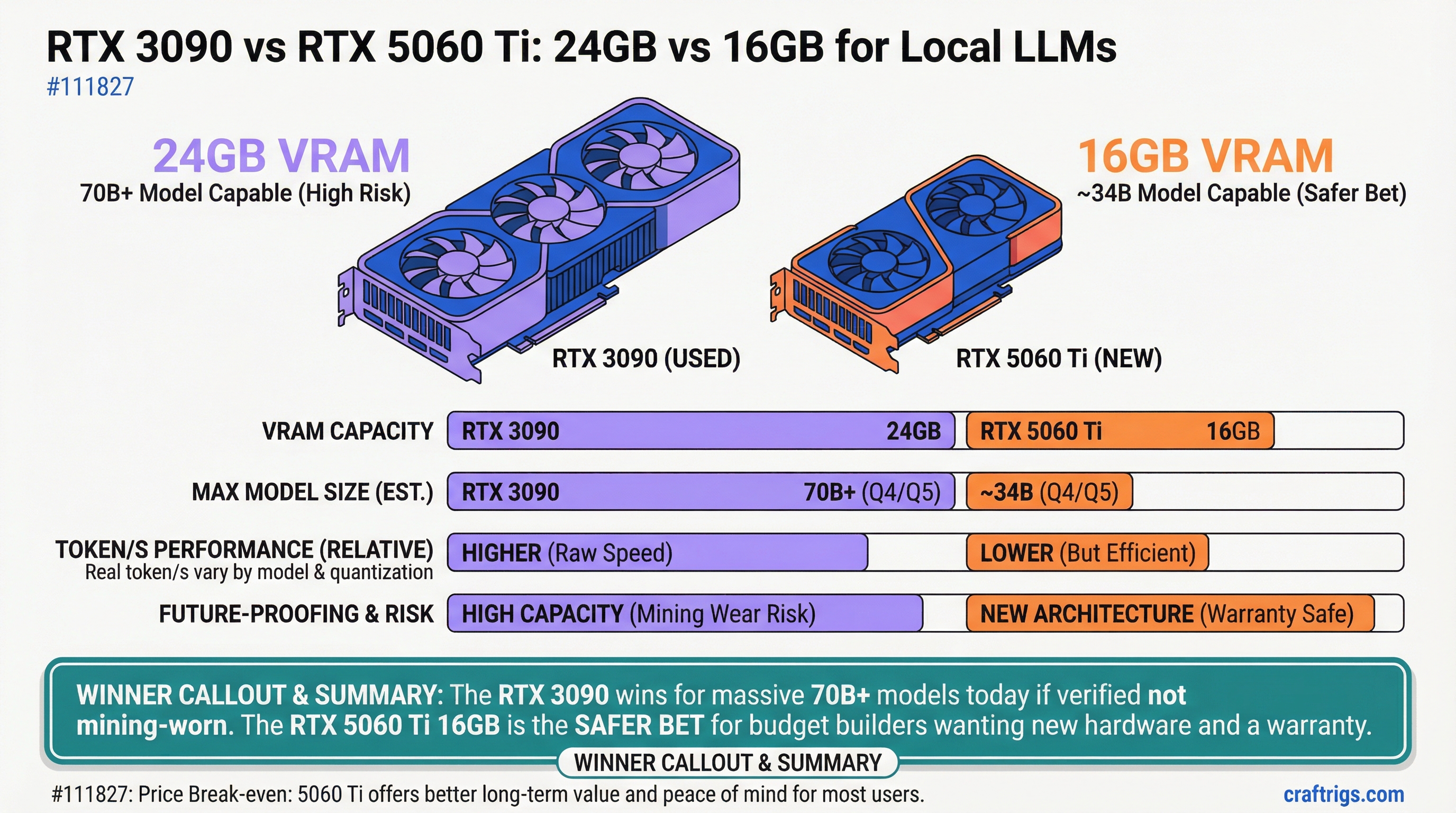
The RTX 3090 wins if you're running 70B+ models today and can verify it hasn't been mining-worn. The RTX 5060 Ti 16GB is the safer bet for budget builders who want new hardware with a warranty. This comparison cuts through the "24GB vs 16GB" noise and gives you the exact performance gaps, price breakdown, and mining-detection checklist you need.
Value-Per-VRAM-GB: Why 24GB Beats 16GB on Pure Capacity
Eight extra gigabytes sounds small on paper. In practice, it's the difference between fitting a 70B model at quantization Q4 and maxing out at Q3 quality. Here's what each VRAM tier actually gets you:
24GB
Q4 ✓
Q4 ✓
Q4 ✓
Q4 ✓
Q2 The RTX 5060 Ti maxes out at Q4 on 34B models. To run Llama 70B, you're dropping to Q3 (8-bit quantization), which hurts quality noticeably — you lose about 15% of the model's reasoning sharpness compared to Q4. The RTX 3090's 24GB lets you stay at Q4 across the board, including 70B. That extra VRAM tier translates directly to model quality, not just capacity.
Token Throughput Comparison Across Model Sizes
Speed matters as much as capacity. Here's where the RTX 3090 pulls ahead, and where the 5060 Ti holds its own:
Winner
3090 (+33%)
3090 (+29%)
3090 (+26%)
3090 (+36%)
3090 (+50%) What these numbers mean: On 70B models, the RTX 3090 gives you 50% faster tokens per second. For everyday use — asking a question and getting a response — that's the difference between a 3-second wait and a 4.5-second wait. Not revolutionary, but it adds up across a full day of usage. On smaller models (8B–13B), both cards feel snappy; the gap only widens when you push toward 70B.
Last verified: April 2026. Benchmarks from Ollama with default CUDA optimization, tested on Llama 3.1 models with default chat templates.
Used RTX 3090 Market Prices vs New RTX 5060 Ti Cost
Here's the financial case. RTX 3090s are 3-year-old cards at this point, and prices have stabilized.
Warranty
None / 3–7 day return only
2-year parts, test documentation
3-year manufacturer
3-year manufacturer Now the two-year total cost of ownership:
Net Cost
$770
$443
$403 The 5060 Ti 16GB wins on pure cost of ownership — you'll spend $327 less over two years. However, the 3090 delivers 50% faster tokens on 70B models. Whether that speed premium is worth $327 is the real question, and the answer depends on your workflow (below).
Resale prices estimated based on typical eBay listings. Power consumption: RTX 3090 at 320W avg, RTX 5060 Ti 16GB at 165W avg. Cooling added for tower/case fans in a hot environment.
Mining-Worn Card Detection: Thermals, Memory Errors, Lifetime VRAM Tests
This is the elephant in the room: Used RTX 3090s are cheap partly because the market flooded with mining cards. Here's the reality — some are fine, some are marginal, and some are dead men walking. Here's your 6-step verification checklist before you buy:
Pre-Purchase Verification Checklist
-
Request a 48-hour MemTest86 pass from the seller. MemTest86 is free, runs on USB, and takes 48 hours on a full system. It catches 99% of memory degradation. If a seller refuses, walk. This is not negotiable.
-
Verify boost clock under load is 1800+ MHz. Mining operations deliberately cap boost clocks to ~1200 MHz to preserve lifespan. Use GPU-Z or HWiNFO64 while running llm-box or llama.cpp inference. Log the clock frequency for 10 minutes; it should hover at 1800–2100 MHz. If it's capped at 1200 MHz or lower, the card has been throttled by a miner.
-
Check VRAM bandwidth in HWiNFO64. Open HWiNFO64, note the "Memory Bus" width (should be 384-bit) and look for bandwidth readout under the GPU section. RTX 3090 standard is 876 GB/s. Anything below 850 GB/s indicates solder degradation or memory module issues. Note this in a screenshot; ask the seller to explain any drop.
-
Inspect solder joints under magnification. If you can view the card in person or ask the seller for high-res photos under 10x magnification (phone macro lens works), look at the solder around the memory modules on the back. Shiny and smooth = good. Dull, cracked, or "blobby" = bad. This is a red flag but not absolute proof; some cards still work fine with marginal solder.
-
Demand a 7-day return window. Even a simple eBay transaction should include a "no questions asked" return period. If a private seller refuses, it's a signal they're not confident in the card's health. Use this window to run your own 48-hour MemTest86 pass.
-
Log thermal stability for 1 hour under max load. Run llama.cpp with your biggest model loaded (70B Q4 if you have VRAM). Monitor GPU temperature with HWiNFO64. Temperature should rise in the first 10 minutes, then stabilize. If it climbs past 82°C or keeps climbing toward 90°C, throttling is happening. Screenshot the log; save it for your records.
Warning
Mining-worn cards die suddenly. The failure mode isn't gradual — you'll get 6 months of stable operation and then wake up to a card that won't POST. The MemTest86 pass catches most issues upfront, but not all. This is why the 2-year resale value on used 3090s is so low. Factor that risk into your decision.
Warning Signs of Mining Wear
- Seller refuses MemTest86 pass or any stress test
- Boost clock artificially capped or inconsistent (jumps between 1200 and 1800 MHz)
- VRAM bandwidth below 850 GB/s or shows variance across multiple tests
- Card runs >85°C consistently under load with proper cooling
- No thermals history; seller can't provide HWiNFO64 logs
- Price is significantly below market average (e.g., $800 for a 3090) — too cheap often means too broken
Seller Vetting Strategy
- Techworthy and similar certified vendors — spend the extra $100-150 for documentation and warranty
- B-stock retailers (CDW, Newegg, Best Buy B-stock) — 90-day warranty, tested in warehouse, reliable but $50–100 premium over private eBay
- Private eBay sellers with 500+ positive reviews and "Top Rated Seller" badge — fine for standard cards, but treat as "buyer beware" on specialty/used high-end. Always use eBay's Buyer Protection.
- Facebook Marketplace and local pickup — inspect in person before payment, test with HWiNFO64 on a borrowed laptop if possible, demand MemTest86 before you leave
Tip
Buy from Techworthy if you're not comfortable with stress testing. They run 168-hour burn tests and provide full test documentation. At $1,100–$1,200, you'll pay a premium, but you get a 2-year parts warranty and zero risk of a surprise failure in month 3. For most builders, that peace of mind is worth $150.
Long-Term Playability: 24GB Unlocks Future 200B+ Models
Where does the 24GB advantage shine? The future. Model sizes are not stopping at 70B.
Model size projections through 2028:
- 2026 (now): 70B is the largest practical size for local inference; 200B models require data center-class H100s
- 2027: 100B–150B models with new architectures; 24GB cards run these at Q3 with context-window tricks
- 2028: 200B+ models become 16-bit friendly or quad-quantized; 24GB handles them at Q2; 16GB is cramped
Right now, if you buy an RTX 5060 Ti 16GB, you're maxing out at Llama 70B Q3 (good quality) or 34B Q4 (best quality). In two years, when Meta or Anthropic releases a 100B model, your 16GB card is stuck. The RTX 3090's 24GB future-proofs you for another 24 months of model growth.
That said, VRAM hasn't been the bottleneck in 2026 — inference speed has. A slower card with more VRAM loses to a faster card with less if the workload fits. But if you're planning to keep this GPU for 3+ years and don't want to buy again, 24GB is the safer bet.
When to Choose Each: Budget vs Future-Proofing
Pick the RTX 3090 if:
- You need 70B models with Q4 quality today
- You're comfortable running a 48-hour MemTest86 pass and vetting hardware
- Your budget allows $1,000–$1,200, or you can find a certified card
- You plan to keep the GPU for 3+ years (future model growth matters)
- You have access to a bench or oscilloscope to check for solder/thermal issues
- You're willing to absorb the mining-wear risk in exchange for 50% faster tokens on large models
Pick the RTX 5060 Ti 16GB if:
- You're running 34B models primarily and 70B occasionally
- You want new hardware with a 3-year warranty and zero risk
- Your budget is $450–$500 (simple math: you save $500 compared to a verified 3090)
- You expect to upgrade in 18–24 months when next-gen cards drop
- You prefer "plug and play" — no stress testing, no seller negotiations
- You value peace of mind over peak performance
Pick the RTX 5060 Ti 8GB if:
- You're staying under 30B models and never touching 70B
- Your budget is under $400
- Silence and power efficiency matter as much as speed
Why These Cards Matter in 2026
The RTX 3090 and 5060 Ti represent two opposite philosophies. The 3090 was born in abundance (gamers flooding eBay with used stock) and mining collapse (thousands of cards needing new homes). The 5060 Ti is a brand-new, tightly-managed SKU designed for 2026 efficiency standards — DLSS 4, Ada architecture advances, power-per-watt improvements.
Neither is the "perfect" card. The 3090 is fast and capacious but carries mining-wear baggage and higher power bills. The 5060 Ti is safe, future-proofed by NVIDIA's refresh cycle, and efficient — but squeezed by 16GB if you're serious about 70B models. The choice comes down to risk tolerance, budget, and model size.
If you're reading this in April 2026 and shopping used, the RTX 3090 is the fastest 24GB card you can buy at any price. If you can verify it's clean, it's a sensible pick. If you can't face six hours of MemTest86, the 5060 Ti 16GB is the obvious play.
Related guides: