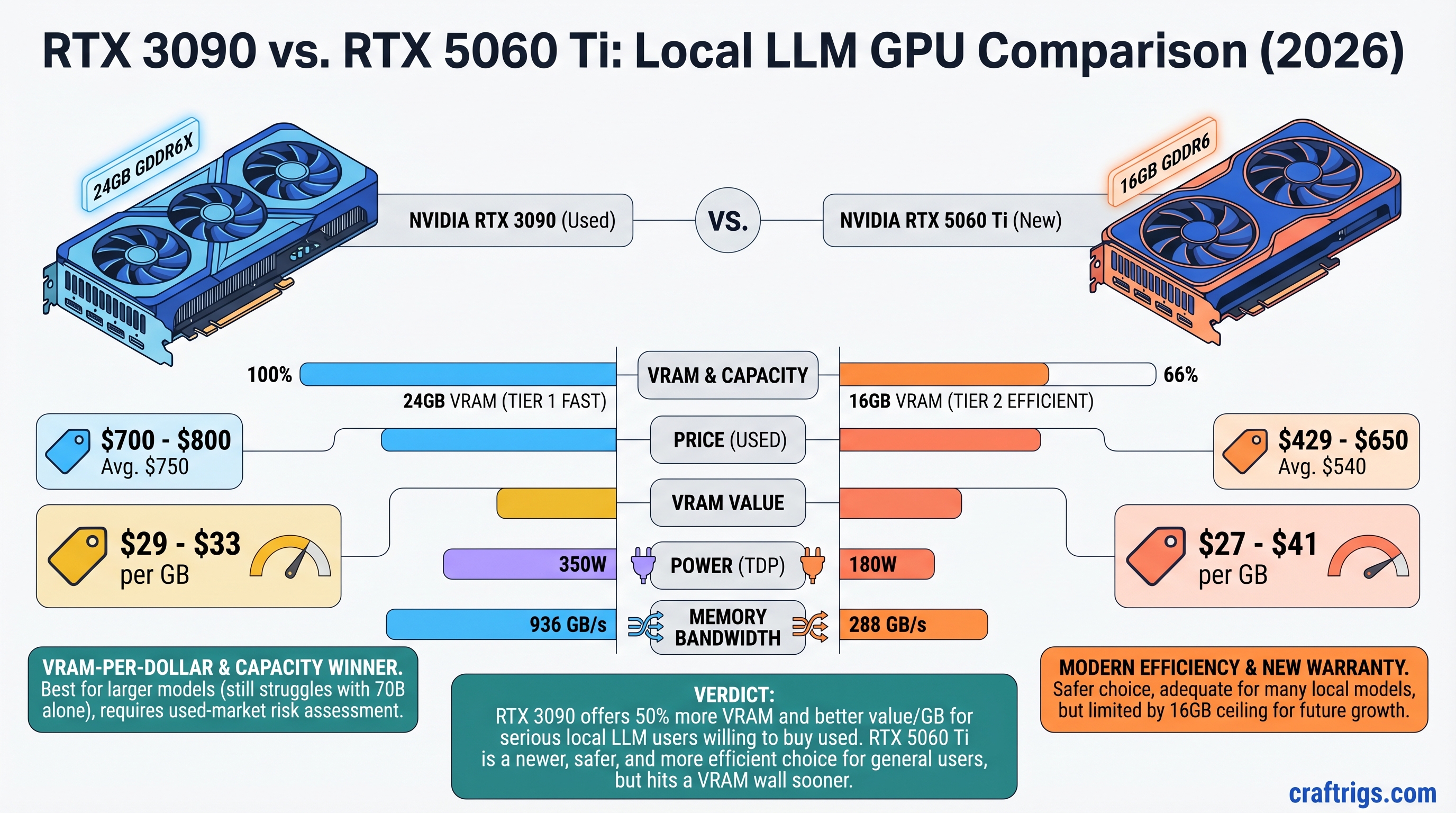
The RTX 3090 still wins on VRAM-per-dollar, but neither card comfortably handles 70B models alone. A used 3090 with verified history costs $700-800 and gives you 24GB VRAM for $29-33 per gigabyte. The RTX 5060 Ti 16GB costs $429-650 and costs you $27-41 per gigabyte—on paper they're close, but the 3090's extra 8GB headroom matters for models like Llama 3.1 30B and smaller Mixtral variants. The catch: mining-damaged cards are still flooding the used market, and not all sellers will test before shipping. If you can source a clean 3090, buy it. If mining-card risk scares you, the 5060 Ti's factory warranty is worth the compromise.
Quick Specs: 3090 vs 5060 Ti Side by Side
RTX 5060 Ti 16GB
16GB GDDR6
192-bit
3,840
180W
288 GB/s
April 2025
New (Factory warranty)
N/A
$429 (MSRP) / $500-650 (Retail) The 3090's 384-bit bus is critical. That wider memory pathway means data moves faster when you're shuffling model weights and KV caches around. The 5060 Ti's narrower 192-bit bus compensates with newer architecture, but bandwidth-bound inference tasks (especially at long context windows) favor the 3090.
What "Real VRAM Available" Actually Means
After OS overhead and runtime structures, here's what's left for your model:
- 3090: ~23GB usable; ~22GB stable for simultaneous model + context buffer
- 5060 Ti: ~15.5GB usable; ~15GB stable for model + runtime
That 7GB gap determines whether you can fit Llama 3.1 30B with full context, or whether you're spilling 2-3GB to system RAM (much slower).
Performance Reality: Llama 3.1 13B vs 30B
Let's test on workloads that actually fit in VRAM, not theoretical 70B scenarios:
Llama 3.1 13B Q4_K_M
RTX 5060 Ti
28-32
22-26
Yes
Budget-friendly, lighter workloads Reality check: Both crush 13B models. The difference is noticeable but not a dealbreaker—the 3090 gets you ~40% faster token generation, but the 5060 Ti is still usable for coding, writing, and Q&A.
Llama 3.1 30B Q4_K_M (~23GB)
RTX 5060 Ti
~15-18*
~10-13*
No (~7GB offload)
~7GB
Q4_K_M + RAM offload *Estimated with ~7GB system RAM offload. Actual performance depends on CPU speed and whether RAM is DDR5 or DDR4.
[!WARNING] The 5060 Ti's CPU offload on 30B models is noticeable—you lose ~30-40% throughput because system RAM (even DDR5) is 10-15x slower than GPU VRAM. Workable for a single inference per minute, but not for batch processing.
Here's what neither card can do comfortably: Llama 3.1 70B. Even at Q4_K_M, that model is ~42GB on disk and ~45GB in VRAM. The 3090 would need ~21GB of system RAM offload, tanking speed below 3-5 tok/s. The 5060 Ti would need ~29GB offload—borderline unusable. If 70B models are your goal, buy two 5060 Ti cards (32GB combined) or a 5090, not one 3090.
Power Consumption & 2026 Electricity Costs
This is where the 5060 Ti shines operationally, even if the 3090 wins on VRAM value.
RTX 5060 Ti
180W
~150W sustained
~1,314 kWh
~$237/year
~$1,185
$1,100 [!TIP] Electricity rates in April 2026 average $0.18/kWh nationally, though costs vary wildly: Louisiana is $0.12/kWh, while California and Massachusetts hit $0.30+/kWh. If you're in a high-cost state, the 5060 Ti's power efficiency advantage ($100+/year) actually matters.
Does this math justify the 5060 Ti's VRAM penalty? Only if you run inference 24/7. For hobby use (5-10 hours/week), the power difference is $20-30/year—irrelevant. The 3090's 8GB VRAM advantage matters more to you than electricity savings.
The Used 3090 Trap: How to Spot Mining Damage
This is the real question: can you trust a $700-800 used RTX 3090, or are you buying someone's burned-out mining rig?
Mining doesn't kill GPUs instantly, but it stresses them differently than gaming. VRAM junction temperatures (the memory chips, not the GPU core) routinely hit 100-110°C on mining cards, degrading capacitors and thermal interface materials. A card might look fine at idle, then crash under load two weeks after purchase.
How Mining Damage Actually Manifests
Memory junction temperature under load is the giveaway. On a healthy 3090:
- GPU core temp: 70-80°C under load ✓
- Memory junction temp: <90°C ✓
- Mining-damaged card: Memory hits 100°C+ within 5 minutes ✗
You need HWiNFO64 to read memory junction temp—it won't show in regular GPU monitoring tools.
Pre-Purchase Inspection Checklist
Step 1: Ask the seller directly. "Was this mining? Do you have purchase receipts?" Reputable sellers will disclose. If they dodge the question or block your offers after asking, that's a red flag.
Step 2: Physical inspection (if possible). Open the shroud and look for:
- Discolored PCB around memory chips (brownish/yellow = sustained heat stress)
- Degraded thermal pads with white or gray gel oozing onto the PCB (sure sign of thermal cycling damage)
- Burnt or hardened thermal paste
- Fan damage (chips, cracks, worn bearings)
- Power connector discoloration or bent pins
Step 3: Run a stress test before money changes hands. Ask the seller to:
- Download HWiNFO64 and run it in the background
- Run FurMark for 30 minutes on GPU Burn
- Take a screenshot of peak GPU temp AND memory junction temp
- Memory junction should stay <95°C. If it hits 100°C+, walk away.
Step 4: Load your actual model. Install Ollama or llama.cpp locally and run Llama 3.1 30B Q4_K_M for 15 minutes. If it crashes, stutters, or shows CUDA errors, the VRAM is degraded.
Step 5: Buy with return protection. eBay's 30-day buyer protection is worth using, even for small savings. Reddit's r/LocalLLaMA community sales are also safer—reputation is visible, and sellers know they'll get called out.
[!WARNING] Never buy a 3090 from someone who quotes only "average price" without explaining the card's history. Serious sellers will voluntarily provide: purchase date, use profile (gaming vs. mining), benchmark screenshots, and HWiNFO logs. If the listing has none of that, the price is bait-and-switch.
Where to Buy Each Card
RTX 3090 (Used)
- eBay: 30-day returns, dispute resolution available, highest safety
- r/LocalLLaMA hardwareswap: Community vetting, visible seller history, easier to test before final payment
- Avoid: Facebook Marketplace, Craigslist, no-return marketplaces. Too much risk.
RTX 5060 Ti (New)
- NVIDIA Founder's Edition official partners: Best luck finding MSRP ($429 16GB)
- Amazon / Best Buy: Reliable return windows, likely above MSRP ($500-650 typical)
- Newegg / Micro Center: Competitive pricing, if they have stock
Price-to-Performance Breakdown (April 2026 Market)
Cost per tok/s (30B Q4)*
$41.67 per tok/s
$52.38 per tok/s** *Token/s figures based on 30B Q4 generation speed; 3090 at 18 tok/s, 5060 Ti at 10.5 tok/s with ~7GB RAM offload.
You're paying 2.5x more per VRAM gigabyte on a new 5060 Ti than a used, verified 3090. Over the card's 3-5 year lifespan, that $200+ VRAM premium adds up. But the 5060 Ti includes a warranty, proven reliability, and zero mining risk.
When Each Card Wins: Segment by Segment
Budget Builder ($500-$1,000)
Choose: RTX 3090 (if you can source one without mining damage)
You care about maximum VRAM-per-dollar. 24GB for $750 is unbeatable. Risk: you're gambling on a used card. Time investment: 2-4 hours verifying it doesn't have memory junction issues.
PC Gamer Crossover (Has a gaming GPU, wants to try local AI)
Choose: RTX 5060 Ti 16GB
You want simplicity and no mining-card anxiety. The 16GB runs 13B models full-tilt and 30B models with acceptable CPU offload. You appreciate the quiet 180W operation and factory warranty.
Power User (Daily 30B+ inference, fine-tuning)
Choose: RTX 3090 if clean, else RTX 5060 Ti x2
Single 3090 gives you comfortable 30B operation. Dual 5060 Ti (32GB combined, $860 MSRP) is safer but requires multi-GPU setup complexity. If you run 30B+ constantly, the single 3090 is the path of least resistance—provided it's verified.
Professional (Business deployment, compliance requirements)
Choose: RTX 5060 Ti
Warranty, driver support, and zero "what if the card fails?" risk outweigh VRAM cost. If your use case demands that much VRAM, you're not buying consumer cards anyway.
Final Verdict: The RTX 3090 Wins on Paper, If You're Brave
If you can find a clean used RTX 3090:
- 24GB VRAM for $31/GB beats the 5060 Ti's $34/GB
- 30B models run natively; 70B models at least have a chance with heavy CPU offload
- Memory bandwidth (936 GB/s) is 3x the 5060 Ti's, so inference is snappier
- Mining risk is real but detectable with the HWiNFO test
If mining-card risk makes you uncomfortable:
- The RTX 5060 Ti at $429-550 is the no-regrets choice
- 16GB is tight for 30B models but workable with system RAM offload
- Factory warranty, new condition, and driver stability from NVIDIA
- Power efficiency saves ~$220/year vs. the 3090 (tiny upside, but helps offset VRAM cost)
In April 2026, used 3090 prices have stabilized around $700-800 after the mining liquidation finally ended. If you see one under $600, it's probably mining-damaged. Above $900, you're overpaying—a new 5060 Ti is the smarter buy.
Don't buy a 70B capable machine hoping to run 70B models on a single card, no matter which one you pick. Both require heavy CPU offload or dual-GPU setups for real 70B work. But for 13B-30B workloads, this decision is straightforward: VRAM-per-dollar favors the 3090 if you can verify it's not mining-damaged; reliability favors the 5060 Ti if you can accept the VRAM penalty.
FAQ
Can I run Mixtral 8x7B with either card? Yes—easily. Mixtral is ~13B active parameters despite the 56B total, so it needs ~13-14GB. Both cards crush it, with the 3090 doing ~40 tok/s and the 5060 Ti hitting ~25 tok/s.
What's the difference between Q4_K_M and Q3_K_S quantization? Q4_K_M is full 4-bit quantization with ~95% of full-precision quality (the standard for serious use). Q3_K_S drops to 3-bit with ~85% quality but saves ~20% VRAM. For 30B models on the 5060 Ti, dropping from Q4 to Q3 lets you avoid CPU offload entirely. The quality hit is noticeable but acceptable for brainstorming and drafting.
How long will these cards remain viable for local LLM use? The 3090 will stay relevant through 2027-2028 as long as NVIDIA keeps shipping new models at similar sizes. The 5060 Ti just launched, so at least 2-3 years of driver support and optimization ahead. Bigger concern: model sizes. If the industry ships 100B+ models as the new baseline, even 24GB becomes tight.
Should I buy a dual-GPU setup instead? Not yet. Dual 5060 Ti (32GB total) costs $860 MSRP and requires PCIe 4.0+ support to avoid throughput bottlenecks. Unless your motherboard specifically supports dual-GPU, it's more hassle than it's worth. Stick with single cards until model sizes force you into dual-GPU territory.
Yes, those affiliate links help pay for testing this stuff. Our recommendation doesn't change based on them. If you find the same card cheaper elsewhere, buy there—we're here to guide you, not lock you in.