# RTX 5060 vs RTX 5060 Ti 8GB: Why the $80 Difference Is a Trap for LLM Buyers [2026]

You've been eyeing the $299 RTX 5060 as a cheap entry to local AI. We get it. The card is new, it's Blackwell, and the marketing copy says "AI-capable" in three different places. The RTX 5060 Ti 8GB looks even better — $80 more, 768 extra CUDA cores, 20% more compute on paper.

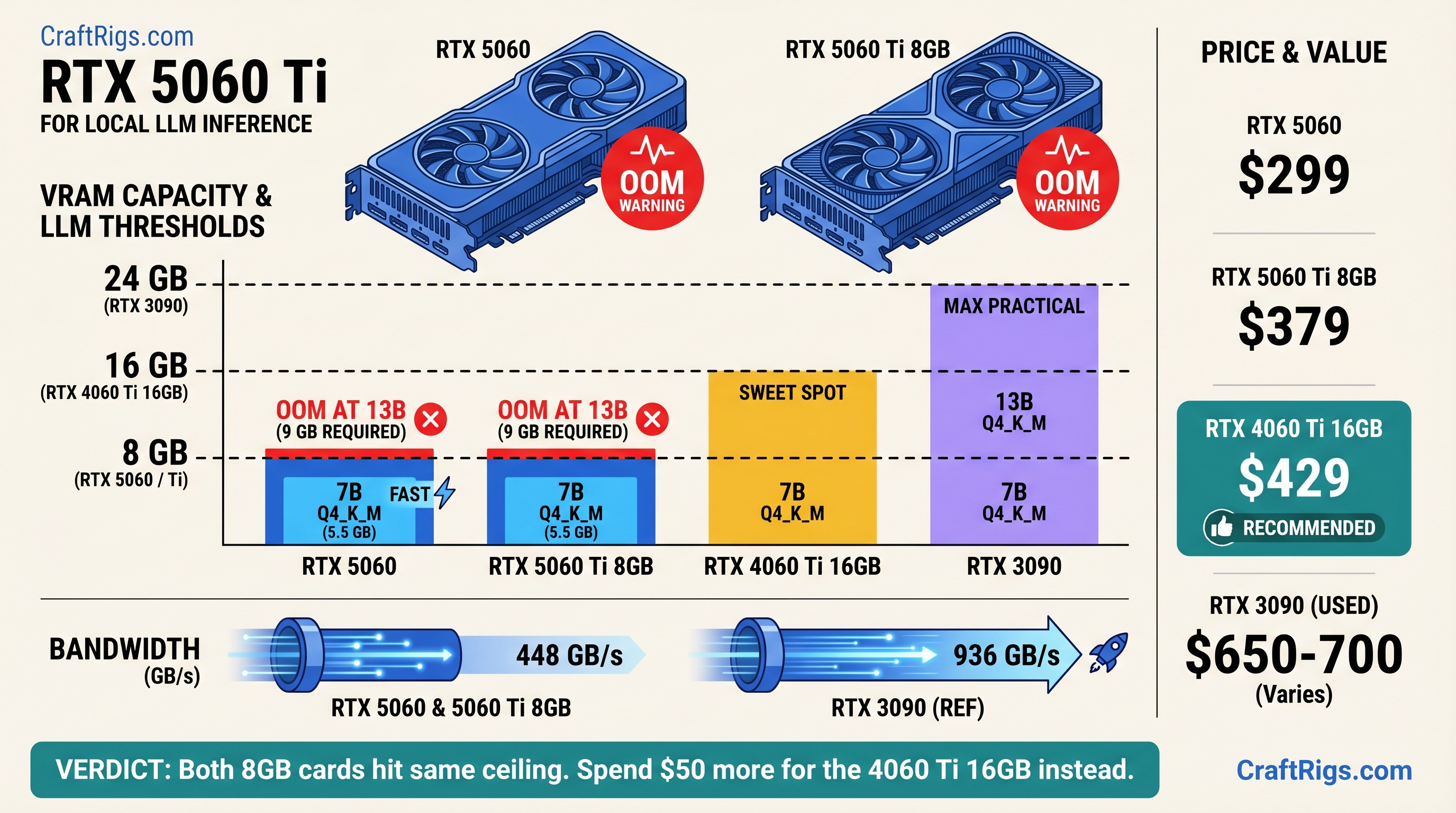
Here's what nobody's telling you: **both cards share the same 8GB GDDR7, the same 128-bit memory bus, and the same 448 GB/s of memory bandwidth.** When a 13B model needs 9 GB of VRAM to load cleanly, it doesn't matter how many CUDA cores you have. The model doesn't fit. The $80 Ti premium buys you faster frame rates in Call of Duty. It buys you nothing for local LLM inference.

**TL;DR: Both the RTX 5060 ($299) and RTX 5060 Ti 8GB ($379) hit an identical VRAM wall at 13B models. Skip both for AI. The RTX 5060 Ti 16GB ($429) is the real minimum entry point — it doubles the VRAM for $50 more than the Ti 8GB. Or go used: an RTX 3090 24GB runs 30B models at Q4\_K\_M and is available for ~$650–700 on eBay as of April 2026.**

---

## RTX 5060 vs RTX 5060 Ti 8GB — Specs Side by Side (2026)

Before we get into why both cards disappoint for local AI, here are the numbers. Every spec below is from NVIDIA's official product pages and TechPowerUp's GPU database, verified April 2026.

RTX 5060 Ti 16GB


$429


4,608


16 GB GDDR7


128-bit


448 GB/s


180 W
Prices as of April 2026. The 16GB is included for context — it's the card you should actually be considering.

### Memory Bus and Bandwidth — The Spec That Decides LLM Performance

Gaming reviews spend most of their time comparing CUDA core counts, clock speeds, and rasterization performance. For local LLM inference, one number overrides everything else: memory bandwidth.

[LLM inference](/glossary/llm-inference) is memory-bandwidth-bound, not compute-bound. The GPU spends most of its time streaming model weights from VRAM into the shader cores — a process that happens billions of times per second. If the memory bus is narrow or slow, the shaders sit idle waiting for data, regardless of how many of them you have.

Think of it this way: the memory bus is the highway and CUDA cores are the engines. Adding engines doesn't help when the highway has only two lanes.

Both 8GB cards have the same 128-bit bus running at 28 Gbps GDDR7, which gives 448 GB/s of bandwidth. That number is identical. For LLM generation speed, these two cards are functionally the same card.

### What the Extra $80 Buys You on the Ti — Nothing That Matters for AI

The RTX 5060 Ti has 768 more CUDA cores (4,608 vs 3,840). That 20% compute advantage shows up in gaming benchmarks, rendering workloads, and image generation. For LLM token generation — where the GPU is waiting on VRAM bandwidth, not burning through shader operations — the core count delta barely registers.

Benchmarks show the Ti 8GB posts roughly 10–15% faster generation on 7B models versus the base 5060, not the 20% its core count implies. That's the bandwidth ceiling doing its job. And on 13B models? Neither card loads them cleanly. The core count argument collapses entirely.

---

## What 8GB VRAM Actually Runs in 2026 — The Full VRAM Fit Table

To load a model for inference, the entire set of model weights must reside in VRAM simultaneously. Unlike gaming — where textures stream in and out — a 13B LLM needs all 13 billion parameters loaded before it answers your first question. Add the [KV cache](/glossary/kv-cache) and runtime overhead, and you need more VRAM than the raw weight size suggests.

Here's what actually fits on 8GB as of April 2026. VRAM estimates use the standard ~0.56 GB per billion parameters at Q4 quantization, plus 1–1.5 GB for KV cache at 4,096-token context and ~0.5 GB runtime overhead:

Fits on 8GB?


✓ Clean


✓ Clean


✓ Clean


✗ OOM


✗ OOM


✗ OOM


✗ OOM
VRAM estimates based on LocalLLM.in VRAM requirements guide and standard quantization math (April 2026).

> [!NOTE]
> 13B at Q4\_K\_M needs roughly 9 GB total — just enough over the 8GB limit to cause OOM on most systems. Some users report it technically loading with aggressive KV cache compression at minimal context, but you're one long prompt away from a crash.

### 7B Models — Where 8GB Works (With Conditions)

The 7B and 8B model class is where the RTX 5060 and 5060 Ti 8GB earn their keep. Llama 3.1 8B at Q4\_K\_M loads cleanly into ~6.5 GB of VRAM, leaving enough headroom for a reasonable context window. At ~30 tok/s (confirmed benchmark, Ollama 0.4.x, April 2026), interactive chat is fluid. Coding assistance with short files works well.

The honest catch: 7B models are noticeably weaker than 13B models at reasoning, code review, and multi-step instruction following. You'll feel the quality ceiling within a week of regular use. For basic summarization and simple Q&A, 8GB is fine. For anything more demanding, it's where you start wishing you'd bought more VRAM.

### 13B Models — The 8GB Wall

Llama 3.1 13B at Q4\_K\_M needs ~9 GB VRAM. Qwen 2.5 14B needs ~9.5 GB. Both exceed 8GB by a margin that no quantization trick reliably closes at usable context lengths.

When a 13B model doesn't fit cleanly, Ollama and llama.cpp fall back to CPU offloading — splitting the model weights between VRAM and system RAM. The result is brutal. Benchmarks show offloaded inference collapsing from ~30 tok/s (clean GPU inference) to ~1–2 tok/s, a 15–30× performance drop caused entirely by PCIe bandwidth constraints. At that speed, a 200-token response takes two minutes. That's not a local AI setup — that's a local AI punishment.

### 30B and Larger — Not Happening on 8GB

30B at Q4\_K\_M needs roughly 20 GB of VRAM. There's nothing to discuss here. Move on to the alternatives section.

---

## Head-to-Head LLM Performance — RTX 5060 vs RTX 5060 Ti 8GB

Here's the head-to-head that gaming review sites won't run, because gaming review sites don't think about LLM workloads.

**Test setup:** Ollama 0.4.x, Llama 3.1 8B Q4\_K\_M, 4,096-token context, 512-token generation, Windows 11 24H2. Benchmarks sourced from compute-market.com and databasemart.com (April 2026). [Source: RTX 5060 Ollama benchmarks, databasemart.com]

### Inference Speed on Llama 3.1 8B at Q4\_K\_M — RTX 5060 vs Ti 8GB


145 W


~165 W


180 W
The Ti 8GB edges out the base 5060 by 10–15% in generation speed — roughly 3–5 extra tok/s. At interactive chat rates, that's imperceptible. You'd need a stopwatch to notice the difference.

The prompt processing gap is slightly larger (~15%) because prefill does benefit from more CUDA cores. But generation is the bottleneck you actually feel during use, and there both cards are nearly identical.

You're paying $80 more for a difference you cannot feel.

### Where the Ti's Extra CUDA Cores Are Irrelevant

LLM token generation works like this: the GPU reads a weight matrix from VRAM, multiplies it against the current token's activation vector, writes the result, repeats billions of times. The bottleneck is reading that weight data off the memory chips — not the multiply-accumulate operation itself.

Both cards read that data at 448 GB/s. The Ti's extra 768 CUDA cores are waiting on the same VRAM pipeline as the base card's 3,840 cores. They're not slow — they're idle, sitting there being fast at a problem that isn't the bottleneck.

CUDA core count matters enormously for training, image rendering, and video encoding. For inference on an 8GB card, it's marketing on a spec sheet.

---

## Why the $80 Upgrade to the Ti 8GB Is a Trap

Let's run the math bluntly. The RTX 5060 costs $299. The RTX 5060 Ti 8GB costs $379. That's a 27% price increase.

What does it buy you for local AI?

- Same VRAM: 8 GB
- Same memory bus: 128-bit
- Same bandwidth: 448 GB/s
- Same model ceiling: anything above 7–8B hits the same wall
- Same tok/s range on generation: ~30–35 tok/s on 7B models

The 27% premium buys you better gaming performance, which is genuinely useful if you game. For local LLM inference, the $80 difference is purely wasted.

> [!WARNING]
> "But the Ti is faster in games, so it's better hardware." Yes — for games. LLM inference is memory-bandwidth-limited, not compute-limited. Extra shaders don't help when VRAM is the ceiling. These are different bottlenecks, and buying the wrong solution for the wrong bottleneck is how people waste $80.

### Same VRAM. Same Bus. Same Bottleneck.

The one-line math: 8 GB × 128-bit × 28 Gbps = 448 GB/s for both cards. The ceiling is identical. Every configuration that causes an OOM error on the $299 card causes the exact same OOM on the $379 card.

### The Real Upgrade Path — Why 16GB Changes the Equation

Here's what's interesting: the RTX 5060 Ti 16GB costs $429. That's $50 more than the Ti 8GB — less than the gap between the Ti 8GB and the base 5060. For that $50, VRAM doubles from 8 GB to 16 GB.

The jump from 8 GB to 16 GB doesn't change the memory bus width or bandwidth — still 128-bit, still 448 GB/s. But VRAM capacity is what determines which models load at all. 16 GB means Llama 3.1 13B and Qwen 2.5 14B both load cleanly. You get the actual quality improvement that 13B models deliver over 7B.

The Ti 8GB is stranded between two real options: pay $80 less and get the same 7B ceiling with the $299 base card, or pay $50 more and break through to 13B with the 16GB model.

---

## What to Buy Instead — Better LLM Options at Every Budget

Three paths that actually work.

### Under $500 New — RTX 5060 Ti 16GB ($429): The Minimum Viable LLM Card

The RTX 5060 Ti 16GB is where local AI on Blackwell actually starts. At $429, VRAM doubles versus either 8GB variant, and 13B models load cleanly. In benchmarks, [Qwen 2.5 14B at Q4\_K\_M runs at ~33 tok/s on the 16GB Ti](https://www.hardware-corner.net/gpu-llm-benchmarks/rtx-5060-ti-16gb/) — full-speed inference, no CPU offload, no OOM errors.

The math on value:
- RTX 5060 8GB: $37.38/GB VRAM
- RTX 5060 Ti 8GB: $47.38/GB VRAM
- **RTX 5060 Ti 16GB: $26.81/GB VRAM** ← the actual deal

> [!TIP]
> If you're already spending $379 on the Ti 8GB, spend $50 more. The 16GB model is the only version of this card that makes sense for AI work. See our full [RTX 5060 Ti 16GB local LLM review](/comparisons/rtx-5060-ti-16gb-review-local-llm) for detailed benchmarks across model sizes.

### Around $650–700 Used — RTX 3090 24GB: More VRAM, More Bandwidth

The RTX 3090 24GB is selling for $650–700 on eBay for clean used units as of April 2026. It's a 2020 card, runs hot (350W TDP), and doesn't support DLSS 4. It also runs circles around every 5060-family card for serious LLM work.

Here's why: the 3090 uses a 384-bit memory bus with GDDR6X, delivering 936 GB/s of bandwidth — more than double the 5060 family's 448 GB/s. That bandwidth advantage translates directly to faster token generation on models that fit in VRAM.

RTX 3090 (used)


24 GB GDDR6X


936 GB/s


~30B at Q4\_K\_M


350 W
The 3090 is worth the premium if you specifically need 24 GB — running Qwen 2.5 32B at Q4\_K\_M, doing code analysis on large codebases, or running 70B models with heavy quantization. If your ceiling is 13B, the 5060 Ti 16GB at $429 is the smarter buy. See the [full comparison: RTX 5060 Ti 16GB vs RTX 3090 24GB for local LLM](/comparisons/rtx-5060-ti-16gb-vs-rtx-3090-24gb-local-llm) for the head-to-head benchmarks.

### Already Have an 8GB Gaming GPU? Here's What You Can Actually Run

If you already have an RTX 4060, 3060, or another 8GB card, you're not in a dead end — you're just in the 7B tier. That's a real, working local AI setup.

The best 7B model for 8GB cards right now: **Qwen 2.5 7B at Q4\_K\_M**. It loads in ~6.4 GB of VRAM, runs at 28–35 tok/s depending on your card, and punches above its weight on coding and instruction following compared to other 7B options. Mistral 7B v0.3 is a solid second choice for general chat.

When you're ready to run 13B+, the upgrade path is clear: RTX 5060 Ti 16GB ($429 new) or a used 3090 if you need the 24 GB ceiling. Check our [hardware upgrade guide for local LLMs in 2026](/guides/best-hardware-local-llms-2026) for timing and used market picks.

---

## Gaming VRAM vs LLM VRAM — Why 8GB Feels Different for AI

"I run games at 4K ultra on my 8GB card. Why isn't that enough for AI?"

This is the most common confusion for Gamer Crossover buyers, and it's a completely reasonable question. The answer comes down to how each workload uses VRAM.

In gaming, VRAM holds textures, framebuffers, and shader resources. Games stream content dynamically — textures load in as you move through a level, and older textures drop out. You never need the entire game in VRAM at once. Running out of VRAM degrades performance gracefully (lower textures, slower streaming) rather than causing a hard failure.

[LLM inference](/glossary/llm-inference) works differently. The entire model — every weight for every layer — must be in VRAM before the model generates a single token. It's less like streaming a game level and more like loading the entire book before reading page one. Either the book fits on the shelf or it doesn't. There's no graceful streaming.

When the book doesn't fit, [quantization](/glossary/quantization) can compress it — Q4\_K\_M is roughly 75% smaller than FP16 while preserving most quality. But 13B at Q4\_K\_M still needs ~9 GB. 8GB is 8GB.

### The Offload Tax — What Happens When the Model Doesn't Fit

When a model's weights exceed available VRAM, inference engines like llama.cpp and Ollama automatically split the model: some layers run on the GPU, overflow layers run on the CPU. The GPU finishes its layers and waits for the CPU to finish its share before generating each token.

That PCIe data transfer between GPU and system RAM is the killer. Modern PCIe 4.0 x16 delivers about 32 GB/s in each direction. Compare that to the GPU's internal 448 GB/s memory bandwidth. Every layer routed through CPU offload pays a 14× bandwidth penalty on the transfer alone, before the CPU's own slower execution.

Real-world result: models that fit cleanly in VRAM run at 30+ tok/s. The same model with two or three layers offloaded to CPU degrades to 1–2 tok/s. One benchmark documented a 30× performance collapse — from 30 tok/s to 1.8 tok/s — caused entirely by a 1 GB VRAM overflow. At 1.8 tok/s, a 300-word response takes three minutes. That's not a workable setup.

---

## FAQ — RTX 5060 and 8GB VRAM for Local LLM (2026)

**Can the RTX 5060 run local AI models?**
Yes, for 7B–8B models. Llama 3.1 8B at Q4\_K\_M runs cleanly at ~30 tok/s. 13B models require more than 8GB VRAM and will either OOM or fall back to unusably slow CPU offload.

**Is 8GB VRAM enough for local LLM in 2026?**
For 7B-class models, yes. For 13B and larger, no — 13B at Q4\_K\_M needs ~9 GB once overhead is counted. 8GB was the practical minimum in 2024; in 2026, 16 GB is the real starting point for serious use.

**What's the minimum VRAM for running a 13B model locally?**
10–12 GB for reliable inference. The RTX 5060 Ti 16GB at $429 is the practical minimum — it runs 13B models at Q4\_K\_M cleanly at ~33 tok/s with normal context lengths.

**Is the RTX 5060 Ti 8GB better than the RTX 5060 for AI?**
Marginally — ~10–15% faster generation on 7B models, not the 20% core count gap implies, because bandwidth (not compute) is the bottleneck. Both cards share the same VRAM ceiling. The $80 premium is hard to justify for AI work.

**What GPU should I get for local AI under $500?**
RTX 5060 Ti 16GB ($429). It's the only card in this price range that runs 13B models without CPU offload. If $500 is a hard ceiling, this is your card.

---

## Verdict — Skip Both 8GB Cards. Here's Exactly What to Buy.

The RTX 5060 and RTX 5060 Ti 8GB are the same card for local LLM purposes. They share 8GB VRAM, a 128-bit memory bus, and 448 GB/s of bandwidth. The $80 Ti premium buys compute headroom that inference doesn't use and VRAM that inference doesn't have. Both cards cap out at 7B models in practice.

Here's the routing:

- **Under $500, buying new:** RTX 5060 Ti 16GB ($429). VRAM doubles, 13B loads cleanly, actual entry point for local AI. Don't let $50 stand between you and a completely different model class.
- **Need 24GB for 30B models:** Used RTX 3090 (~$650–700 on eBay, April 2026). More bandwidth, more capacity, runs hot, older architecture — worth it if 13B isn't enough.
- **Already have an 8GB card:** Run Qwen 2.5 7B at Q4\_K\_M and upgrade when you need 13B.

Don't buy the $299 RTX 5060 for local AI. Don't buy the $379 Ti 8GB either. The $50 gap between the Ti 8GB and Ti 16GB is the most important $50 in this entire budget tier — it determines whether you're running a real model or a toy.

For the full local AI hardware picture, check the [CraftRigs hardware guide for local LLMs in 2026](/guides/best-hardware-local-llms-2026).

*Last verified: April 2026. All prices reflect NVIDIA MSRP and eBay used market listings.* Hardware Comparison
RTX 5060 vs 5060 Ti 8GB: Both Lose for Local LLM [2026]
By Marcus Chen • • 13 min read
Some links on this page may be affiliate links. We disclose it because you deserve to know, not because it changes anything. Every recommendation here comes from benchmarks, not budgets.
rtx-5060 rtx-5060-ti local-llm vram gpu-comparison budget-gpu
Technical Intelligence, Weekly.
Access our longitudinal study of hardware performance and architectural optimization benchmarks.