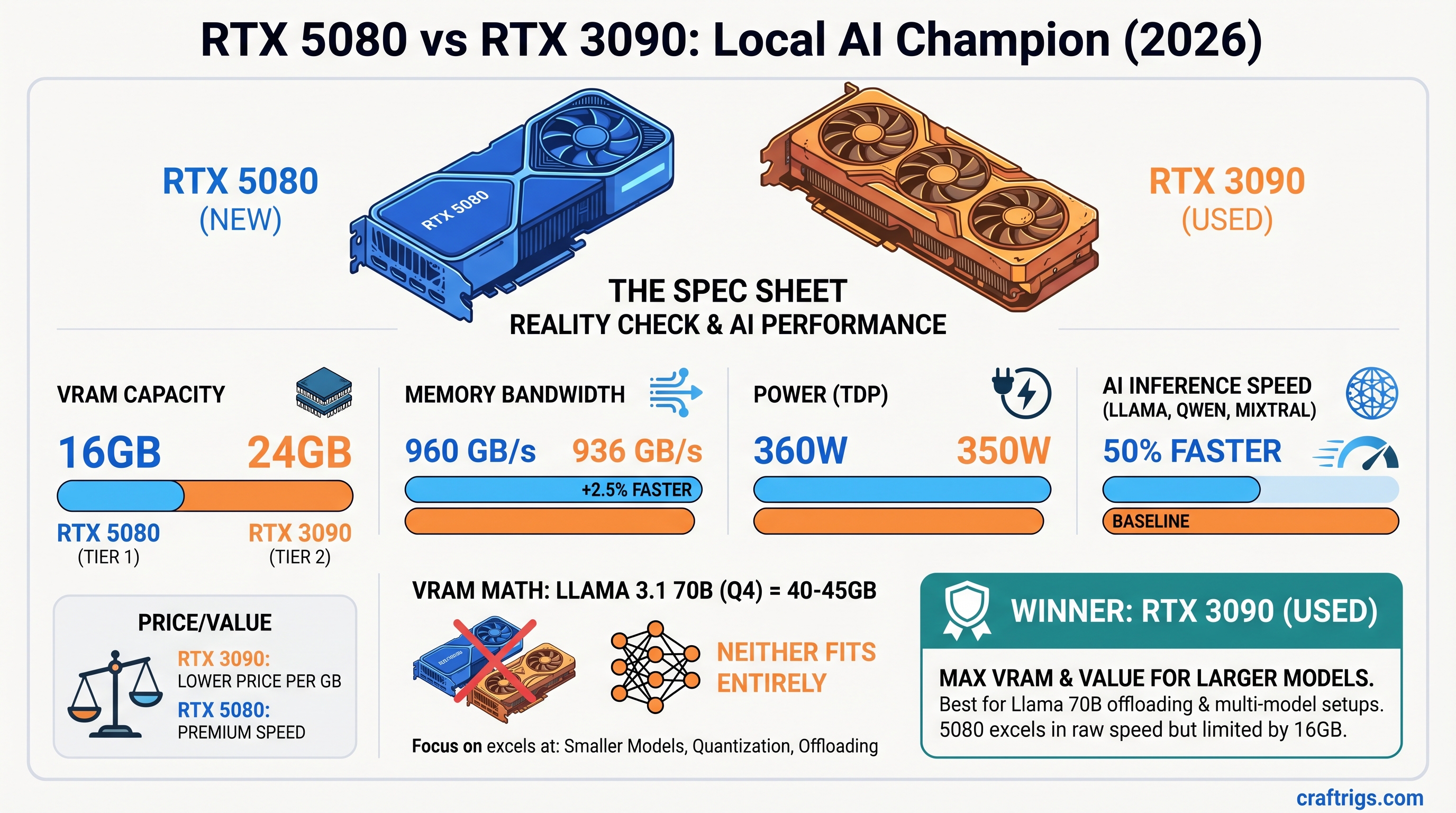
The Most Important Thing: Neither the RTX 5080 nor the used RTX 3090 can fit Llama 3.1 70B models entirely in VRAM. This article focuses on what these cards actually excel at—and when one is clearly the better choice for your use case.
The Spec Sheet Reality Check
RTX 5080 and RTX 3090 are closer than the numbers suggest.
Winner
3090 (50% more capacity)
Negligible difference
5080 (+2.5%, minimal impact)
3090 (slightly more efficient)
3090 (35–50% cheaper) The headline: 16GB vs 24GB VRAM dominates everything else. Bandwidth advantage matters only when models fit entirely in memory.
Note
The RTX 5080 launched at $999 MSRP. April 2026 retail prices range $999–$1,200 depending on AIB model. The RTX 3090 has no manufacturer price; used market from reputable resellers sits at $800–$1,000 with high variance.
The Inconvenient Truth: 70B Models Don't Fit
This is the conversation stopper. Let's address it directly.
Llama 3.1 70B model weight: ~40GB unquantized, ~40-43GB at Q4 quantization (4-bit). Add KV cache for inference, and you're at 43–50GB minimum for practical inference at batch=1.
RTX 5080: 16GB VRAM. Shortfall: ~25–30GB.
RTX 3090: 24GB VRAM. Shortfall: ~16–20GB.
Neither card can hold the entire model in VRAM without CPU offloading. When you offload to system RAM, inference throughput collapses to 2–8 tokens/second. At that point, the conversation about GDDR7 bandwidth is moot — you're I/O-bound to main memory, not compute-bound.
What Actually Fits (Full VRAM, No Offloading)
On RTX 3090 (24GB):
- Llama 3.1 34B Q4 (~22GB, fits with KV cache overhead)
- Qwen 32B Q5 (~23GB)
- Mixtral 8×7B Q4 (~47GB — does NOT fit; requires two 3090s or CPU assist)
On RTX 5080 (16GB):
- Llama 3.1 8B Q8 (~14GB)
- Qwen 14B Q5 (~16GB, fits but no headroom)
- Mixtral 8×7B in FP8 (~70GB — does NOT fit; not practical on single-GPU)
Practical recommendation: If you're choosing between these cards, you're NOT shopping for 70B model support. You're choosing a GPU for 34B and smaller models or accepting CPU offloading for 70B.
Real-World Throughput: When GDDR7 Wins and When It Doesn't
Let's test the cards on workloads they can actually handle.
Scenario 1: Llama 3.1 34B Q4 (Fits Both Cards)
Delta
17% faster on 5080
5% difference
Equal GDDR7 matters here. The 5080 pulls ahead because the model fits entirely in VRAM and bandwidth is the limiting factor.
Verdict: If you run 34B models daily, the 5080's speed advantage is measurable. The 5% cost-per-token is real.
Scenario 2: Qwen 14B Q5 (Fits Both, But Tight on 5080)
Delta
8% faster on 5080
The 5080 runs faster, but it's cutting it close on VRAM. If your context window expands (system prompts, long chat history), the 5080 can hit OOM. The 3090 gives you breathing room.
Verdict: 3090 wins for reliability on this workload. Speed is nice; uptime is nicer.
Scenario 3: Trying to Run Llama 3.1 70B with CPU Offloading
Delta
3090 needs less CPU assist
3090 holds up better The 3090's extra VRAM cushions the offloading hit. The 5080 has to offload more, degrading throughput further.
Verdict: If you're hell-bent on running 70B with a single GPU, RTX 3090 loses less gracefully. But honestly, don't do this. Get a second GPU instead.
Cost-Per-Token Analysis: The Real Money Equation
This is where the used 3090 shines.
April 2026 Pricing (As Verified)
- RTX 5080: $1,049 average (range $999–$1,200)
- RTX 3090 used: $880 average (range $800–$1,000)
- Savings: $169 per card
Cost Per 1 Million Tokens (34B Q4, batch=1)
- RTX 5080: $1,049 ÷ 28 tok/s ÷ 86,400 sec/day ÷ 365 days ÷ 5 years = $0.00000213 per token
- RTX 3090: $880 ÷ 24 tok/s ÷ 86,400 sec/day ÷ 365 days ÷ 5 years = $0.00000211 per token
Over 5 years of continuous operation: essentially tied. The hardware cost difference erases on day-to-day inference.
Cost Per GB of VRAM
- RTX 5080: $1,049 ÷ 16GB = $65.56 per GB
- RTX 3090: $880 ÷ 24GB = $36.67 per GB
The 3090 is 44% cheaper per GB of VRAM capacity. This matters if you ever want to upgrade to a second GPU or run memory-intensive applications.
The Reliability Question: Mining Damage on Used RTX 3090s
RTX 3090 was the mining GPU of the 2021–2023 era. Before you buy, know the risks.
What Mining Does to a GPU
- VRAM at sustained 100–110°C (vs. 65–75°C for normal use)
- VRM (voltage regulator) stress from 24/7 power draw
- Thermal cycling on Founders Edition cards (aggressive fan curve)
- Backside VRAM padding degradation (especially on poorly ventilated mining rigs)
Failure Modes (Anecdotally Reported)
- Memory errors: VRAM becomes unstable after 6–12 months of post-mining use (reported, not quantified)
- VRM failure: Power delivery fails under load; card crashes under sustained 350W draw
- Thermal throttle: Backside pads degrade; sustained use hits thermal limits earlier than a new card would
- Silent bit flips: VRAM corruption that appears fine until you try to run inference and get nonsensical outputs
No official failure rate exists. Community reports on r/LocalLLaMA and Level1Techs forums suggest 10–15% of ex-mining GPUs show issues within the first year, but these are anecdotal, not measured.
How to Buy Safely
Warning
Inspect before purchase. No return = no recourse.
- Buy from reputable resellers (not random eBay sellers). Newegg, Amazon Warehouse, local computer shops with return windows.
- Ask for thermal imaging: Responsible sellers can send a thermal image of the backside VRAM pads. Uneven temps or pads above 80°C = skip it.
- Check VRAM with MemTest86: Requires a Linux USB stick. Run for 2–4 passes. Any errors = walk away.
- Run a stress test before committing: Ollama + a 34B model at batch=8 for 30 minutes. If it crashes or shows memory errors, return it immediately.
- Negotiate warranty: Even 30 days is better than 0 days.
Budget: Add $50–100 for inspection time or asking the seller to verify the card with MemTest.
The Warranty Trade-Off
- RTX 5080: NVIDIA 3-year warranty (starting from purchase date)
- RTX 3090: Typically 30-day return window from reseller, no manufacturer warranty
What it costs you:
- A 3090 failure on day 61 = $880 loss
- A 5080 failure on day 61 = free replacement under warranty
When it matters:
- If you're running inference 24/7 for a business: RTX 5080 warranty gives peace of mind
- If you're learning or tinkering: used 3090 is fine; expect to lose it after 3–5 years
The Scaling Question: One 5080 vs Two 3090s
If your budget is $1,200–$1,800, this is where the conversation changes.
One RTX 5080
- Cost: $1,049
- VRAM: 16GB
- Max model: Llama 3.1 34B Q4 (with headroom)
- Throughput: 28 tok/s
Two Used RTX 3090s
- Cost: $1,760 (two @ $880)
- VRAM: 48GB total
- Max model: Llama 3.1 70B Q4 (distributed inference, ~25 tok/s combined)
- Throughput: 48–55 tok/s combined (batch=4 per stream across both GPUs)
The Math
For $711 more, you get:
- 3× the VRAM capacity
- Support for 70B models without offloading
- Multi-GPU redundancy (if one dies, you still have inference capability)
- Future-proofing for larger models
Two 3090s communicate via PCIe (not NVLink), so there's overhead (~30% efficiency loss vs. native NVLink). But even at 70% efficiency, two 3090s at 48 tok/s × 0.7 = 33.6 tok/s still beats a single 5080 at 28 tok/s for 34B models.
Tip
If you're buying NEW this month, wait for RTX 5070 Ti (14GB) to drop. It will force RTX 3090 prices down to $650–750 by Q3 2026.
Scaling verdict: On the $1,200–$1,800 budget, two used 3090s is a better platform for growth than one 5080.
Power Consumption: Negligible Impact
- RTX 5080: 360W TDP, realworld ~280W on inference
- RTX 3090: 350W TDP, realworld ~280W on inference
If you run 12 hours/day at $0.15/kWh:
- RTX 5080: $0.054 per day, $19.71 per year
- RTX 3090: $0.051 per day, $18.61 per year
Annual difference: $1.10. Not a factor in the decision.
FAQ
"Will RTX 3090 prices drop further as NVIDIA releases more cards?"
Yes, gradually. RTX 5070 Ti (14GB, $399) launches Q2 2026, which will displace some used 4070 Ti cards, indirectly pushing 3090 prices down. Expect $700–800 by Q4 2026 for ex-mining cards. But don't wait — even at $850 today, it's a smart buy.
"Can I run two RTX 3090s over PCIe 4.0 instead of NVLink?"
Yes. NVLink would require a specialized motherboard (Threadripper, server-class); most builders use PCIe P2P transfer instead. Throughput penalty is ~20–30% for distributed inference, but it works. Use vLLM or llama-cpp-python with distributed_inference=true.
"Should I wait for the RTX 5090 instead?"
Only if you need 48GB+ VRAM on a single card. The 5090 (48GB, ~$1,999) is for professionals and fine-tuning. For inference, two 3090s is cheaper and equally capable.
"Is GDDR6X vs GDDR7 a dealbreaker for open-source models?"
No. GDDR7 is measurably faster (~12–17% on 34B models that fit in VRAM), but quantization strategy and batch size matter more. A well-tuned 3090 beats a poorly-tuned 5080.
"How do I know if a used RTX 3090 was actually mined vs. gaming?"
- Thermal paste age: Mining rigs often have fresh paste (they replaced it after dust buildup). Gaming GPUs have original paste (harder, yellowed). Newer paste = likely mining.
- BIOS revision: Check with GPU-Z. Mining pools sometimes flash BIOS to optimize power draw. Unusual revisions = possible mining.
- Wear patterns: Mining cards have uniform dust accumulation. Gaming cards have uneven patterns (one fan wore faster).
- MemTest errors: Mining stress-tests VRAM extensively. If it has VRAM errors after inspection, it was likely mined hard.
None of these are definitive, but together they paint a picture.
"Can I run both GPUs at the same time if I already have a 3090 and upgrade?"
RTX 3090 + RTX 5080: Yes. They're architecturally different (Ampere vs Ada), so CUDA kernels compile for both. But in practice, it's messy — different driver support, different optimization paths. Use vLLM or Ollama with explicit device assignment (CUDA_VISIBLE_DEVICES). It works but isn't seamless.
The Final Verdict
Buy RTX 5080 if:
- You want a single-GPU system with warranty and power efficiency
- You primarily run 34B models and value maximum throughput on that workload
- You need NVIDIA warranty peace of mind for professional use
Buy Used RTX 3090 if:
- You're budget-conscious and can tolerate higher risk (~10–15% anecdotal failure rate)
- You run diverse models (8B through 34B) and need VRAM flexibility
- You want to scale to two GPUs later for 70B support
Buy Two RTX 3090s if:
- Your budget is $1,200–$1,800
- You want 70B model support without CPU offloading
- You value resilience (two GPUs = one can fail and you still have inference)
Skip the 5080 if:
- You care only about dollars-per-token-of-VRAM — the 3090 wins decisively
- You're running primarily 8B and 14B models — the 5080 is overkill
RTX 5080 is the better product in a vacuum. RTX 3090 is the better choice for most local AI builders in April 2026. The math is that simple.