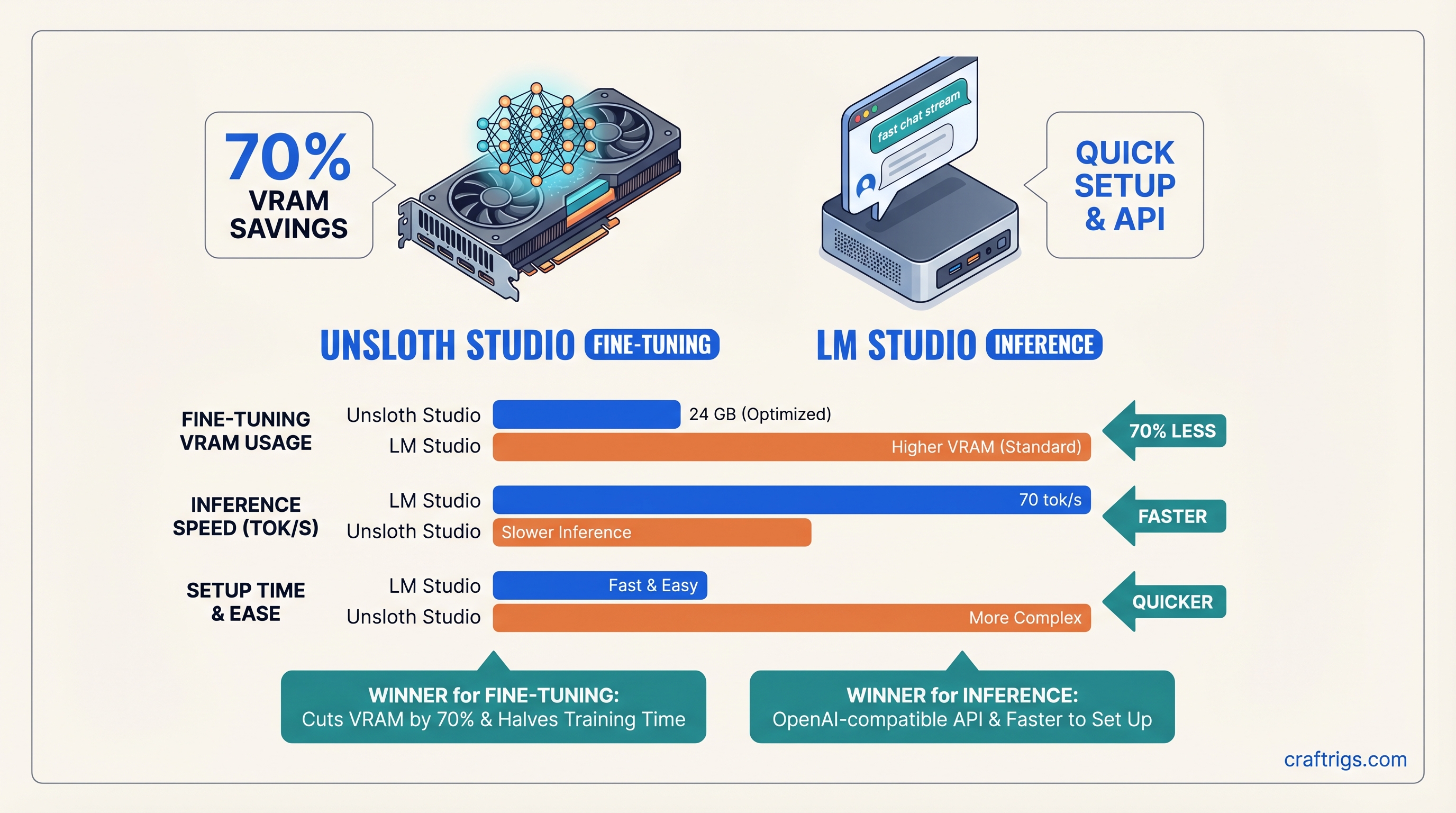
TL;DR: If you're fine-tuning models, Unsloth Studio cuts VRAM usage by 70% and training time in half — pick this. If you're running inference (most people), LM Studio is faster to set up, has an OpenAI-compatible API, and doesn't waste VRAM on training optimizations — pick this. They're not competitors; they're for different jobs. Pick the one that matches your actual workflow.
The Confusion That Wastes Hours
Both tools have "local LLM" in their marketing. Both have GUIs. Both work on NVIDIA and Apple Silicon. So naturally, everyone asks: "Which one should I install?"
The answer that annoys people: both. But not because they overlap — because they do completely different things.
LM Studio is the viewer. Unsloth Studio is the factory. You don't compare a printing press to a printer.
And yet every week, someone builds a rig, installs LM Studio expecting fine-tuning, or grabs Unsloth for inference and gets confused when there's no chat interface. Wrong tool = wasted time, wasted VRAM, frustrated builder.
This article kills that confusion. Here's exactly what each tool does, when to use it, and whether you actually need both.
Quick Comparison: Unsloth Studio vs LM Studio
LM Studio
Run inference / chat
Free, open-source
10 minutes
28-32 GB (Q4 quantization)
55-70 tok/s on RTX 4090
Yes (/v1/chat/completions)
The thing everyone gets wrong: these aren't alternatives. You potentially use Unsloth first (to train), then LM Studio second (to run it). Not one or the other.
Unsloth Studio: When You're Actually Fine-Tuning
Unsloth Studio landed March 17, 2026. It's a no-code GUI for something that used to require Python knowledge and careful VRAM management: fine-tuning your own models.
Here's what it does: you bring data (PDF, CSV, JSON), you pick a base model (Llama 3.1, Mistral, Gemma 4, DeepSeek, or 500+ others), you click train, and Unsloth's specialized GPU kernels (written in Triton) do the math.
The VRAM savings are the headline. With standard PyTorch + Hugging Face Trainer, fine-tuning Llama 3.1 70B in 4-bit quantization (QLoRA) takes 48+ GB on a single GPU. That's not happening on a $1,500 GPU.
With Unsloth, the same job takes 20-24 GB. Still not cheap, but suddenly possible on a high-end consumer card like the RTX 4090 or RTX 5080. And it trains 2x faster while you're at it.
The VRAM reduction comes from hand-optimized attention and gradient computation kernels—not a trick, actual engineering. Unsloth doesn't approximate; it computes the exact same gradients, just faster and leaner.
VRAM Reality Check: Unsloth Fine-Tuning
Don't trust marketing numbers. Here's what builders report in the wild (as of April 2026):
- Llama 3.1 8B, LoRA 16-bit — 16-20 GB VRAM (full precision LoRA, not the budget approach)
- Llama 3.1 8B, QLoRA 4-bit — 8-12 GB VRAM (batch size 1-2, gradient checkpointing on)
- Llama 3.1 70B, QLoRA 4-bit — 20-24 GB VRAM (Unsloth optimized, batch size 1-2)
- Llama 3.1 70B, QLoRA 4-bit — 48+ GB VRAM (standard PyTorch + PEFT, no Unsloth)
The gap is real but narrow: Unsloth saves you ~50-60% on 70B QLoRA, not the 70% headline on all use cases. For smaller models or full-parameter training, the savings shrink.
Training Speed: The Second Win
Unsloth cuts training time by ~2x. On an RTX 4090 with 5,000 samples and Llama 3.1 70B QLoRA:
- With Unsloth: ~12-14 hours (estimated from published benchmarks)
- Without Unsloth: ~24-28 hours
The speedup compounds if you're iterating. Run 5 experiments? You save 50-70 hours of GPU time. That's the real ROI for Unsloth — not just that it fits, but that it doesn't waste your time waiting.
The Honest Downside: Steeper Setup
Unsloth Studio's GUI is clean, but it assumes you understand LoRA, quantization, and training hyperparameters. The defaults are solid, but changing batch size, learning rate, or adapter rank requires knowing what they do.
If you've fine-tuned a model before, Unsloth Studio takes 30 minutes to set up and run. If you're new to fine-tuning, budget 2 hours for reading (docs + YouTube tutorials) before your first training job succeeds.
Also: there's no model browser in Unsloth Studio. You upload your data, you paste a Hugging Face model ID, you hit train. If you want to compare models or see what's available, you're poking around Hugging Face manually or using the command line.
LM Studio: When You're Running Inference
LM Studio is the opposite problem solved. It's a desktop app that wraps llama.cpp (the fastest open-source inference engine) and adds what matters to humans: a model browser, a chat interface, local API endpoints, and performance monitoring.
You download LM Studio (Windows, Mac, Linux), you click "Models," you type "Llama 3.1 8B," you hit download, and 2 minutes later you're chatting with a working local AI. No terminal, no config files, no "what do I do with this GGUF file."
The Real Strength: OpenAI-Compatible API
Here's why LM Studio wins at inference: it exposes /v1/chat/completions and /v1/completions endpoints. You can call it from any OpenAI client library:
from openai import OpenAI

client = OpenAI(base_url="http://localhost:1234/v1", api_key="not-needed")
response = client.chat.completions.create(
  model="any-local-model-loaded",
  messages=[{"role": "user", "content": "What is VRAM?"}]
)
That's huge for testing. You build an app against the OpenAI API in development using LM Studio's local server, then point to the real API in production. Same code, same client library. Zero migration pain.
Ollama also does this, but Ollama has no GUI and no model browser — you're using CLI commands or API calls. LM Studio gives you the GUI and the API.
Inference Speed: What to Expect
On an RTX 5070 Ti (16 GB VRAM) with Llama 3.1 14B (Q4_K_M quantization):
- 35-45 tokens/second (as of April 2026, depending on prompt structure and batch settings)
On an RTX 4090 with the same model:
- 55-70 tokens/second
These numbers assume the inference engine is bottlenecked on GPU compute, not system RAM or thermal throttling. Real-world speeds vary. Some prompts generate faster; others with large context windows slow down.
The VRAM footprint? Llama 3.1 14B at Q4_K_M takes about 10-11 GB on the GPU. If you're running it standalone, you need 12-16 GB total (leaving headroom for the OS and other apps).
Setup: 10 Minutes, No Thinking
Download the installer → Click next → Launch the app → Click "Download model" → Pick Llama 3.1 8B Q4_K_M → Wait 5 minutes → Chat.
That's it. No CUDA install (LM Studio bundles it), no Python environment, no config files to edit. It's a consumer app, not a developer tool.
First-time users who skip reading docs still succeed. Power users who want to tweak quantization, context length, or sampling parameters have advanced settings buried in the UI.
The Use-Case Matrix: Stop Guessing
Why
Fastest setup, easiest experience
Only real option for training
Built-in; Unsloth doesn't expose endpoints
Full control, optimized for training
Only way 70B training fits in budget
Q4 quantization + 8B or 14B models work fine
Unsloth to train, LM Studio to serve Don't overthink this. If you're not fine-tuning, don't touch Unsloth Studio. If you're only training and never running inference, Unsloth + the llama.cpp command line works; you don't need LM Studio's GUI.
Head-to-Head: Setup & First Run
LM Studio
- Download installer from lmstudio.ai (150 MB)
- Run installer (1 minute)
- Launch app, click "Browse models"
- Search "Llama 3.1 8B," click the 4-bit quantized version (Q4_K_M)
- Wait for download (~4 GB, ~5 minutes on fiber)
- Click "Chat" tab
- Type a prompt
Total time: 10 minutes. From zero to working local AI.
Unsloth Studio
- Clone the Unsloth GitHub repo
- Set up a Python environment (3.10+) and install dependencies (~5 minutes)
- Verify CUDA is installed and working (
nvidia-smi) - Prepare your training data (CSV, JSONL, or TXT)
- Launch the web UI
- Pick a model from Hugging Face
- Set training hyperparameters
- Click train
Total time: 30-45 minutes. And that assumes your GPU drivers are already solid.
Common Pitfalls (and How to Avoid Them)
Unsloth Studio Mistakes
Setting up without enough VRAM. You'll hit an OOM error mid-training after 3 hours of compute, lose your progress, and swear at the screen. Rule: test on small batch sizes (batch size 1, gradient accumulation 4) first. Train for one epoch on 100 samples to confirm it fits in VRAM before running the full job.
Not understanding LoRA vs. QLoRA. LoRA trains low-rank adapters on the full precision weights (expensive). QLoRA trains them on 4-bit quantized weights (cheap). If the UI defaults to "LoRA," switch it to "QLoRA" if you're tight on VRAM.
Forgetting to export the trained model. You finish training, close the app, and realize you saved a LoRA adapter, not a runnable model. Always export to GGUF or safetensors before closing Unsloth.
LM Studio Mistakes
Trying to fine-tune in LM Studio. It can't. You're wasting time clicking around looking for training options that don't exist.
Loading 70B models on 8GB VRAM. You'll get 0.1 tokens/second and regret every decision that led here. Stick to Q4-quantized 8B or 14B models on cards under 12GB VRAM.
Assuming all quantization levels are the same speed. Q8 (8-bit) is slower than Q4 (4-bit), but quality is higher. Q3 is faster than Q4 but noticeably stupider. Test different quantization levels for your specific model and hardware.
The Honest Comparison: When Each Tool Wins
Unsloth Studio Wins When:
- You're fine-tuning. Period. It's the cleanest GUI for this job.
- You have a 70B model + a tight VRAM budget. QLoRA with Unsloth is your only play.
- You're iterating on LoRA ranks or quantization. Train 5 experiments, pick the best one. Unsloth's 2x speed saves you days of compute time.
- You're a researcher publishing results. Unsloth's reproducibility and the ability to document VRAM exactly is valuable for academic work.
LM Studio Wins When:
- You're doing inference. Easiest setup, cleanest experience.
- You need an OpenAI-compatible API. Point your app at
localhost:1234instead ofapi.openai.com. Development becomes friction-free. - You're new to local AI. LM Studio's "just works" approach beats Unsloth's steeper learning curve.
- You want to test 20 models fast. LM Studio's built-in browser and one-click switching beats manually managing GGUF files.
Why You Might Need Both
Scenario: You have a 70B research model you want to fine-tune on your company's proprietary data.
- Use Unsloth Studio to fine-tune it: load the 70B base model, upload your CSV, train a LoRA adapter (18 hours on an RTX 4090). Export as GGUF.
- Use LM Studio to run it: import the GGUF, expose it via OpenAI API, let your team call it from Slack, Discord, or internal apps.
Total disk: 100 GB for the base model + 5 GB for Unsloth dependencies + 5 GB for LM Studio. Install time: 2 hours. Then it just works.
Or, simpler scenario: you're exploring LoRA fine-tuning and want a quick inference GUI for testing. Unsloth for training, LM Studio for seeing results immediately without CLI commands.
Final Verdict
Stop thinking of these as competitors. Unsloth Studio and LM Studio solve sequential problems in a single workflow:
- Fine-tune with Unsloth → export your trained model
- Run it with LM Studio → serve it, chat with it, expose an API
If you only do inference (90% of local AI builders), LM Studio alone. If you only fine-tune (researchers, specialists), Unsloth alone + a separate inference tool (llama.cpp, Ollama, vLLM). If you do both, install both and stop worrying about picking the "right" one.
The right tool isn't the one with better marketing. It's the one that matches your actual workflow. For most people, that's LM Studio. For people building custom models, that's Unsloth. For power users doing both, it's both.
FAQ
Should I switch from Ollama to LM Studio?
No. Ollama is reliable, lightweight, and fast. LM Studio is easier if you want a GUI and don't like the command line. If you're happy with Ollama, stay there. If you prefer point-and-click, LM Studio's 10-minute setup won't hurt.
Can I export an Unsloth fine-tuned model and run it in Ollama?
Yes. Export from Unsloth as GGUF, then ollama create mymodel -f Modelfile pointing to the GGUF. Ollama, LM Studio, and llama.cpp all read the same GGUF format.
Is Unsloth Studio safe? Does it phone home?
Unsloth is open-source; the code is public on GitHub. It doesn't phone home. Your data stays on your machine. The usual cautious-with-any-online-installer rules apply, but Unsloth's security posture is solid.
Why does LM Studio feel slower than Ollama sometimes?
LM Studio wraps llama.cpp (same engine as Ollama) but adds a GUI layer. The inference engine is identical. If LM Studio feels slower, it's usually because stats monitoring or the UI refresh is eating a bit of CPU. Disable stats in settings if you're chasing pure speed.
What if I only have 8GB VRAM?
LM Studio only. Run Llama 3.1 8B Q4_K_M, which uses about 6-8 GB and leaves headroom for the OS. Unsloth fine-tuning isn't viable at 8GB unless you're training 1B models.