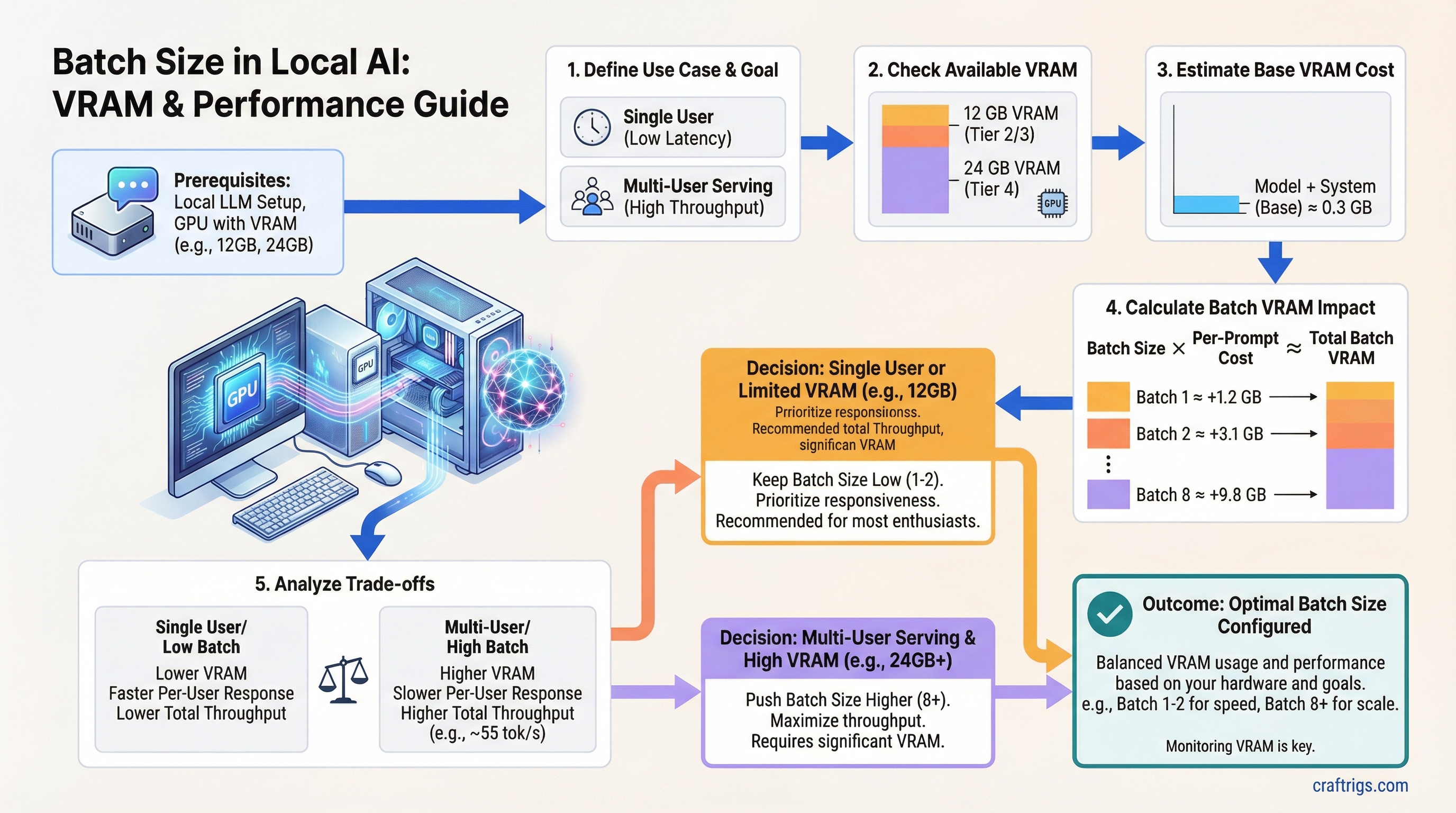
TL;DR — Batch size controls how many prompts your GPU handles simultaneously. Higher batch = more total throughput but more VRAM and slower responses per user. Single-user on a $1,200 rig? Keep it at 1-2. Only push past 8 if you have 24 GB+ VRAM and are actually serving multiple users.
What Is Batch Size in Local AI Inference?
Batch size is the number of prompts your GPU processes simultaneously in a single forward pass.
At batch size 1, your GPU takes one request, runs it through the model, returns the output, then picks up the next one. At batch size 8, it's handling eight requests in parallel — stacking them together as a single matrix multiply operation. Each request gets its own KV cache allocation, but the model weights execute once for all of them.
Think of it like a restaurant kitchen. Batch size 1 is a cook plating one dish at a time. Batch size 8 is finishing eight dishes simultaneously. The kitchen throughput goes up — but you need a bigger kitchen to handle it, and any individual table waits longer.
In local AI terms: the "bigger kitchen" is VRAM, and "individual tables waiting longer" is per-user response speed.
Why Batch Size Matters for Your Build
Most setup guides set batch size to 1 and move on without explaining what it does. If you're running a home server for yourself and two family members, you're leaving real performance on the table. If you blindly crank it to 16 on a 12 GB GPU, you'll hit an out-of-memory error mid-conversation.
The relationship is straightforward: doubling batch size roughly doubles total throughput across all users, doubles KV cache VRAM consumption, and cuts per-user response speed roughly in half.
Here's what that looks like on real hardware — an RTX 4070 (12 GB GDDR6X) running Mistral 7B Q4_K_M in Ollama 0.3.x:
Notes
Ideal single-user
Good for 2-3 users
0.3 GB headroom — unstable Batch 8 technically runs on 12 GB, but with 0.3 GB headroom it crashes under real load. Don't go there.
How Batch Size Hits Per-User Latency
At batch 1 on an RTX 4070, Mistral 7B Q4 delivers around 55 tok/s. That's fast — responses come out faster than most people read. Comfortable, instant-feeling.
At batch 4, each user gets roughly 21 tok/s. Still usable — you'll notice a slight delay on long outputs, but it's not painful.
At batch 8 on a 12 GB card, per-user drops below 12 tok/s. That starts to feel laggy. The total throughput number looks great on paper; the actual experience is worse for everyone.
How Batch Size Hits Total VRAM
The model weights load once regardless of batch size. Mistral 7B Q4_K_M sits at about 4.5 GB loaded — that number doesn't change whether you're running batch 1 or batch 16.
What grows is the KV cache. Each active request needs its own allocation proportional to context length. For Mistral 7B at FP16 KV cache with 4K context, that's roughly 0.5 GB per request. At batch 4 with 2K context, you're looking at about 3.1 GB of KV cache on top of the model weights.
The math on an RTX 3060 (12 GB): approximately 5 GB for weights and overhead, leaving about 6 GB for KV cache. At 4K context, safe ceiling is batch 4. At 2K context, you can push to batch 8 — but you're close to the edge.
Warning
If you push batch size to the edge of your VRAM, Ollama won't gracefully degrade — it crashes mid-generation. Leave at least 1-2 GB headroom above your peak expected usage.
How Batch Size Works Under the Hood
The GPU processes all items in a batch through a single parallelized matrix multiply. The per-item compute cost drops as batch size grows because the fixed overhead — loading weights, scheduling work — gets amortized across more requests. This is why GPU utilization looks higher at larger batch sizes and why benchmarks run at batch 32-512 on server hardware.
The binding constraint is always the KV cache. Each active request needs its own key-value attention cache proportional to how much context it's holding. This is what fills your VRAM, not the model weights.
There are two main batching approaches you'll encounter:
Static Batching (llama.cpp default)
The server waits until the batch is full before processing. Simpler to implement, but it introduces latency spikes when requests have different lengths — a short request waits for a long one to finish before the batch executes.
This is what most llama.cpp-based frontends use by default, including LM Studio and many Ollama builds. For single-user setups it's fine. For multi-user home servers, it creates uneven response times.
Continuous Batching (vLLM, newer Ollama)
Inserts new requests into the batch as slots free up, rather than waiting for the full batch to complete. Dramatically better for multi-user scenarios — if one conversation finishes, another starts filling that slot immediately.
vLLM implements this with PagedAttention, which manages KV cache in fixed-size blocks rather than allocating contiguously. More complex under the hood, but better hardware utilization on GPUs with VRAM headroom — RTX 4090 builds, dual-GPU setups.
Dynamic Batching with Tensor Parallelism
For $4,500+ builds with dual RTX 4090 or RTX 6000 Ada: the batch gets split across GPUs. This is the only path to batch 16-32+ without hitting memory limits. Relevant if you're building a small office inference server — overkill for home use.
The "Higher Batch = Always Better" Myth
This idea comes from cloud provider LLM benchmarks. Those benchmarks run on A100s and H100s with 80 GB HBM at batch sizes of 256 or 512. The numbers look impressive. They have nothing to do with your RTX 4070.
Here's what actually happens when you apply that advice to a consumer GPU:
Higher batch improves total throughput, not per-user throughput. If you're the only user, batch 4 doesn't make your experience faster. It just means your GPU could theoretically handle four people at once — at the cost of each person getting slower responses.
GPU utilization graphs can mislead you. An 80% utilization reading doesn't mean the GPU is starved for work and needs a bigger batch to feed it. High utilization can reflect KV cache memory traffic, not compute throughput. Don't chase utilization numbers as a proxy for optimization.
"Set batch_size = 512 for maximum performance" is benchmark advice. On a 12 GB consumer card, batch 512 with any real model triggers OOM in seconds. The advice isn't wrong for an A100 — it's just completely inapplicable to your hardware.
Note
The benchmarks that cloud providers publish for LLM throughput are run at batch sizes and VRAM amounts that no consumer GPU can match. Treat them as reference numbers for the model, not targets for your rig.
Batch Size in Practice — RTX 4070 Serving Mistral 7B Q4_K_M
Real test configuration: RTX 4070 (12 GB GDDR6X), 32 GB DDR5 system RAM, Ollama 0.3.x with llama.cpp backend.
Batch 1 with 4K context: 55 tok/s decode speed, 1.2 GB KV cache, model loads in 3.5 seconds. This is the ideal single-user daily driver configuration. You get full GPU bandwidth, fast responses, and plenty of context headroom.
Batch 4 with 2K context: 85 tok/s total throughput, 21 tok/s per user, 3.1 GB KV cache. This works well for two or three concurrent family members. Response speed is still comfortable for most users — noticeable but not painful.
Batch 8 with 2K context: 9.8 GB total VRAM, 0.3 GB headroom. Technically fits, but crashes under real load. Not recommended on 12 GB cards.
To set this in Ollama, use the --num-parallel flag:
OLLAMA_NUM_PARALLEL=4 ollama serveMonitor VRAM in real time while you test:
watch -n 1 nvidia-smiStart at --num-parallel 1, bump to 2 once you have a second user, and watch the VRAM counter before committing to batch 4.
Tip
If your VRAM headroom drops below 1 GB during generation, step back to a lower batch size or reduce context length. The crash risk isn't worth the marginal throughput gain.
Batch Size Targets by Budget Tier
Users
Single user only
2-3 concurrent
Small team server $1,200 tier: The RTX 3060 12 GB and RTX 4060 8 GB are single-user cards, full stop. Batch 1 maximizes your response speed. Batch 2 is fine if two people occasionally overlap, but don't treat these as home server GPUs.
$2,000 tier: The RTX 4070 Ti's 16 GB unlocks batch 4 at full 4K-8K context without sweating the VRAM math. The RTX 4070 Super at 12 GB operates the same as the 3060 for multi-user purposes — batch 2-3 at reduced context.
$4,500+ tier: The RTX 4090's 24 GB gives you real headroom for batch 8-16 with continuous batching. This is the first tier where running a small team inference server makes practical sense without GPU offload compromises.
Related Concepts
Understanding batch size fully means knowing what feeds into it:
- VRAM — the hard ceiling. Batch size can never push your KV cache beyond available VRAM.
- Context length — directly multiplies KV cache cost per batch slot. Longer context at the same batch = more VRAM consumed.
- Quantization — lower bit depth shrinks the model, freeing VRAM for larger batches. Running Q4_K_M instead of Q8 can open up an extra batch slot or two on 12 GB cards.
- Inference throughput — the tok/s metric batch size is trying to maximize. Track both total tok/s and per-user tok/s separately — they move in opposite directions as batch grows.