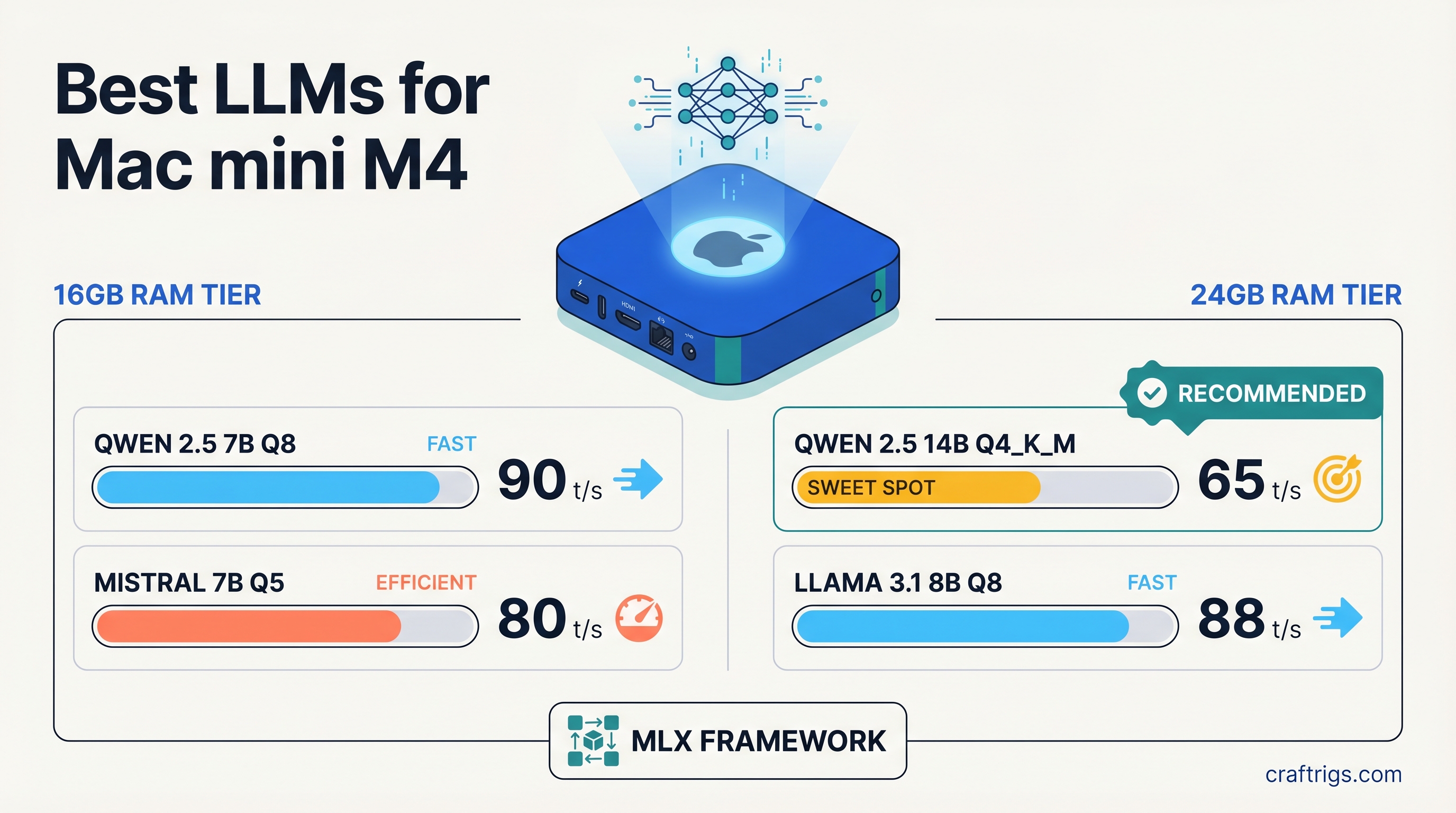
TL;DR: For the 16GB Mac mini M4, go with Qwen 2.5 7B or Llama 3.1 8B at Q4_K_M — both run at 25-30 tok/s with headroom to spare. For the 24GB model, Qwen 2.5 14B and Phi-4 14B are the clear upgrades, running cleanly at 18-22 tok/s without memory pressure. Use MLX for best performance, Ollama if you want the easiest setup.
Mac mini M4 Specs Context
The Mac mini M4 uses Apple's M4 chip with 10-core GPU and either 16GB or 24GB of unified memory. The key spec for local LLM inference is memory bandwidth: approximately 120 GB/s.
That number matters because LLM inference speed is almost entirely determined by how fast you can move model weights through memory. On a discrete GPU, this is VRAM bandwidth. On Apple Silicon, the CPU and GPU share the same memory pool at that 120 GB/s rate — no separate VRAM, no bottleneck from CPU-to-GPU transfers.
The practical result: the Mac mini M4 punches above its weight for local inference. A 7B model at Q4_K_M quantization runs at around 25-30 tokens per second, which is comfortable for interactive chat. A 13B or 14B model runs at 15-22 tokens per second depending on quantization and context length.
What the M4 base chip cannot change is total memory capacity. 16GB is 16GB. 24GB is 24GB. Model selection starts here.
Mac mini M4 16GB: What Fits and What Works
Memory Math
A 7B model at Q4_K_M quantization uses roughly 5-6GB of storage. Loaded in memory with KV cache for a typical context window, plan on 6-7GB active use. That leaves 9-10GB free for the OS, the inference engine, and KV cache growth at longer contexts.
A 13B model at Q4_K_M uses about 8.5-9GB base. With KV cache, you're working in the 10-12GB range for moderate context lengths. It fits on 16GB, but the margins are tighter — very long conversations or large context inputs will push memory pressure up.
A 14B model at Q4_K_M is roughly 9-10GB base. On 16GB it's technically possible but you'll see memory pressure at contexts above ~4K tokens. Stick to 7B-13B on the 16GB model.
Top Model Picks for Mac mini M4 16GB
Qwen 2.5 7B Instruct (Q4_K_M)
The strongest 7B model available right now for general instruction following and coding. Small enough to leave comfortable memory headroom, fast enough for real-time chat. Available via Ollama (ollama pull qwen2.5:7b) or as an MLX model from Hugging Face. Expect 25-30 tok/s on M4.
Llama 3.1 8B Instruct (Q4_K_M) Meta's 8B instruct model is the baseline everyone benchmarks against. Excellent tool-calling support, strong instruction following, widely supported by every inference stack. Slightly larger than Qwen 2.5 7B so memory use is marginally higher, but still very comfortable on 16GB. Speed: 25-28 tok/s.
Phi-3.5 Mini 3.8B Instruct (Q4_K_M) Microsoft's 3.8B model is the speed pick. At under 3GB loaded, it leaves most of your 16GB free and runs noticeably faster than 7B models — closer to 40+ tok/s on M4. Quality is below Llama 3.1 8B for complex reasoning, but for quick lookups, summarization, or code completions, the speed advantage is real.
Mistral 7B v0.3 Instruct (Q4_K_M) A reliable fallback with strong instruction following and broad ecosystem support. Not quite the top choice for coding or reasoning in 2026 given how strong Qwen 2.5 has become, but excellent for creative writing, general Q&A, and as a lightweight workhorse. 25-28 tok/s on M4.
Performance Summary: 16GB Models
Speed, quick tasks
General use, coding
Instruction following
Creative, Q&A
Heavier reasoning The 13B is included because it does fit on 16GB at typical context lengths — just expect less headroom and slower speeds than the 7B/8B models.
Mac mini M4 24GB: What Opens Up
The 24GB model is not a modest upgrade — it meaningfully changes which model tier you can run comfortably. The 8GB difference is enough to move from "13B is tight" to "14B runs clean."
Memory Math
A 14B model at Q4_K_M uses 9-10GB base. On 24GB, that leaves 14GB for OS overhead, KV cache, and context growth. You can run long conversations and larger context windows without hitting memory pressure.
A 20B model at Q4_K_M would use roughly 13-14GB — technically fits on 24GB but leaves very little headroom for KV cache. Not recommended for regular use.
A 32B model would need around 20-22GB base plus KV cache. That's too large for 24GB. Don't attempt it.
Top Model Picks for Mac mini M4 24GB
Qwen 2.5 14B Instruct (Q4_K_M)
The standout pick for 24GB. Qwen 2.5 14B is a significant step up in reasoning quality, coding ability, and instruction following compared to 7B models — and it fits with room to breathe at 18-22 tok/s. If you're buying the 24GB Mac mini specifically for better LLM performance, this is the primary reason. Available via Ollama (ollama pull qwen2.5:14b) and MLX.
Phi-4 14B (Q4_K_M) Microsoft's Phi-4 is a strong 14B model that punches well above its weight on reasoning and STEM tasks. Similar memory footprint to Qwen 2.5 14B, similar speed at M4 memory bandwidth. If you do a lot of analytical work or structured reasoning, Phi-4 is worth benchmarking against Qwen 2.5 14B for your specific use cases. Expect 18-22 tok/s.
Llama 3.1 13B Instruct (Q4_K_M) On 24GB, the 13B fits without any memory pressure and runs at a comfortable 18-20 tok/s. The reason to pick this over the 14B models is ecosystem maturity — Llama 3.1 has the widest support across tools, integrations, and fine-tunes. If you're building something that depends on model ecosystem breadth, start here.
Performance Summary: 24GB Models
Broad compatibility
General use, coding
Reasoning, STEM
MLX vs llama.cpp on Mac mini M4
You have two serious inference options on Apple Silicon. Both work well. Here's the practical difference.
MLX is Apple's own machine learning framework, designed from the ground up for M-series chips. It uses the unified memory architecture efficiently and is optimized for the Neural Engine and GPU cores on M4. In practice, MLX runs 10-20% faster than llama.cpp's Metal backend for most models. The downside: you need MLX-quantized model versions, which are available for popular models but not everything. Use mlx-lm from Hugging Face for command-line inference, or LM Studio which uses MLX under the hood.
llama.cpp with Metal backend has wider model format compatibility (GGUF is universal), better ecosystem support, and is the engine behind Ollama. If you're starting from scratch and want the easiest setup, Ollama with ollama pull <model> gets you running in minutes. The tokens/sec numbers in this article are roughly achievable with either backend — you'll see the top end of those ranges with MLX and the middle-to-lower end with llama.cpp Metal.
Recommendation: Start with Ollama for ease of use. If you want to push performance, install mlx-lm and pull the MLX versions of your preferred models from Hugging Face. The 10-20% speed difference is noticeable on a 14B model where every token counts.
What Not to Try on the Mac mini M4 Base
70B models are out. Llama 3.3 70B, Qwen 2.5 72B, Mixtral 8x7B — any model in this weight class needs 40-50GB of memory at practical quantization levels. The base M4 tops out at 24GB. Even at aggressive quantization (Q2_K), a 70B model won't fit comfortably and will produce degraded outputs anyway. If 70B is your target, you need at minimum a Mac Studio M4 Max (64GB) or a Mac Studio M4 Ultra (192GB). On the GPU side, you need at least two RTX 3090s (48GB combined) or a single RTX 6000 Ada (48GB).
32B models are also out for 24GB. A 32B model at Q4_K_M requires roughly 20-22GB base, with very little room for KV cache. You'll get OOM errors or severely limited context windows. Skip it.
Don't try running multiple models simultaneously on 16GB. If you're using Ollama with multiple models loaded, Ollama will keep models in memory by default. On 16GB, having two 7B models loaded simultaneously eats your headroom. Set OLLAMA_MAX_LOADED_MODELS=1 in your environment or manage this in LM Studio's settings.
Getting Started
If you're using Ollama (easiest path):
# Install Ollama from ollama.com, then:

# 16GB Mac mini M4
ollama pull qwen2.5:7b       # Best all-rounder
ollama pull llama3.1:8b      # Broad compatibility
ollama pull phi3.5           # Speed pick

# 24GB Mac mini M4
ollama pull qwen2.5:14b      # Top pick for 24GB
ollama pull llama3.1:13b     # Ecosystem breadth
For MLX via command line:
pip install mlx-lm

# Pull and run a model
mlx_lm.generate --model mlx-community/Qwen2.5-7B-Instruct-4bit \
  --prompt "Explain transformer attention in one paragraph"
The Mac mini M4 is a legitimate local LLM machine for the 7B-14B tier. It won't replace a GPU rig with 48GB VRAM for heavy workloads, but for daily use — coding assistance, document Q&A, private chat — it's quiet, power-efficient, and fast enough to feel real-time. Pick the model tier that matches your RAM and use MLX if you want every token you can get.