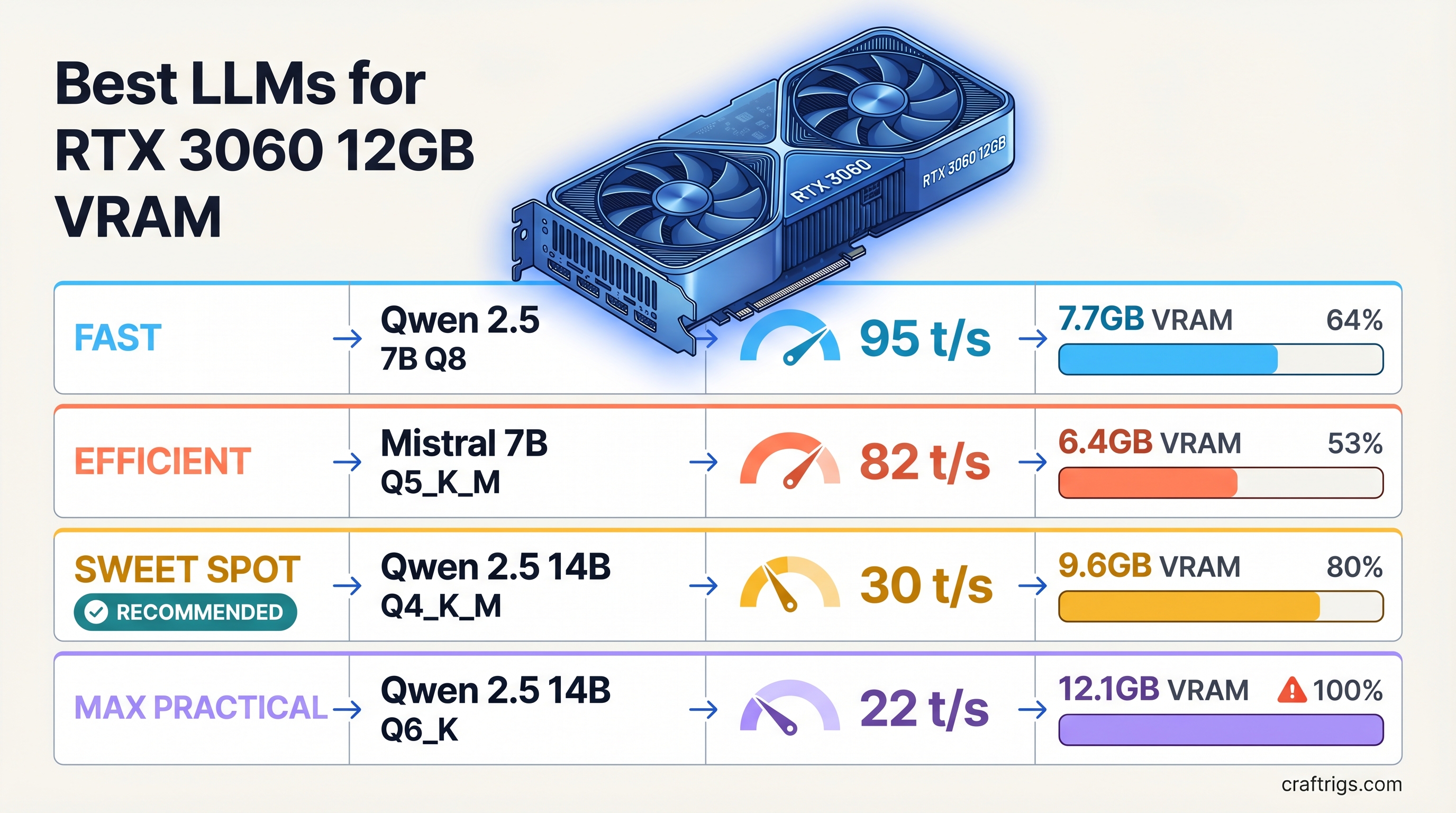
TL;DR: The RTX 3060 12GB is a legitimate local LLM card in 2026 — not a compromise. At 12GB VRAM, you can run 14B parameter models at full GPU speed. The best picks: Qwen 2.5 14B Q4_K_M (general reasoning, ~30 tok/s), Qwen 2.5 Coder 14B Q4_K_M (coding), Llama 3.1 8B Q4_K_M (speed-first at ~45 tok/s), and Mistral 7B Q4_K_M (lightweight fallback). Avoid 32B and above — partial CPU offload tanks speed below 8 tok/s.
What Fits in 12GB VRAM
Before picking models, know your budget. At Q4_K_M quantization — the standard quality-size tradeoff for GGUF inference — here's what fits on 12GB:
Notes
7-8 GB headroom for KV cache
Llama 3.1 8B, solid headroom
3-4 GB left for KV cache
2-3 GB left, fine at 8K ctx
Weights fill VRAM, almost no KV headroom
CPU offload tanks speed to ~5-8 tok/s
Not practical on this card The practical ceiling for the RTX 3060 12GB is 14B. That's where you get full GPU inference speed with enough VRAM margin to handle real context lengths. The 20B tier is technically possible but produces a degraded experience at anything beyond short prompts. 32B and above are not worth attempting — that's a different card's job.
RTX 3060 12GB Specs That Matter
- VRAM: 12 GB GDDR6
- Memory bandwidth: 360 GB/s
- Architecture: Ampere (GA106)
- CUDA cores: 3,584
The 360 GB/s bandwidth figure is what determines inference speed for fully GPU-loaded models. Higher bandwidth = faster token generation. The RTX 3060 12GB is slower per-token than an RTX 3090 (936 GB/s) or 4090 (1,008 GB/s), but at the 7B-14B tier you're still getting genuinely usable speeds — 28-48 tok/s depending on model size.
Best Models by Use Case
General Chat and Reasoning: Qwen 2.5 14B Q4_K_M
Qwen 2.5 14B is the sweet-spot model for this card in 2026. At Q4_K_M quantization it uses roughly 8.5-9GB of VRAM, leaving 3GB of headroom for the KV cache. At 8K context that headroom holds comfortably. At 32K context, KV cache starts consuming the remainder — stay below 16K for reliable operation.
Performance: ~28-32 tokens per second on the RTX 3060 12GB.
Qwen 2.5 14B significantly outperforms older 13B models (Llama 2 13B, Mistral 13B) on reasoning, instruction following, and multilingual tasks. It's a genuine step up from 7B without requiring 24GB VRAM. For general-purpose chat and document analysis, this is the first model to load on this card.
Pull it in Ollama: ollama pull qwen2.5:14b
Coding: Qwen 2.5 Coder 14B or DeepSeek Coder 7B
Qwen 2.5 Coder 14B Q4_K_M occupies the same VRAM footprint as the base model (~9GB) and is purpose-tuned for code generation, debugging, and explanation. It consistently outperforms DeepSeek Coder 7B on complex multi-file tasks, and unlike 33B coding models, it fits entirely in VRAM.
For lighter coding or if you want to maximize speed during iteration, DeepSeek Coder 7B Q4_K_M at ~4.5GB is the alternative. It runs at closer to 45 tok/s and leaves plenty of headroom. Good for autocomplete-style workflows where speed matters more than depth.
Pull: ollama pull qwen2.5-coder:14b or ollama pull deepseek-coder:7b
Speed-First: Llama 3.1 8B Q4_K_M
When response latency matters more than capability depth — agents, rapid iteration, interactive back-and-forth — the Llama 3.1 8B Q4_K_M is the pick. At ~5GB VRAM, it leaves 7GB of headroom and runs at 42-48 tokens per second on the RTX 3060 12GB.
Llama 3.1 8B is a noticeably stronger model than earlier 7B generations. The instruction-tuned variant handles tool-use patterns and structured output well. For anything where you need fast, capable responses and aren't hitting the ceiling of 8B reasoning, this is the daily driver.
Pull: ollama pull llama3.1:8b
Mistral 7B Q4_K_M (~4.4GB) is an alternative in the same tier. Slightly lower benchmark scores than Llama 3.1 8B in 2026, but still good for constrained or specialized prompting tasks.
Long Context Work: Be Careful at 14B
Running 14B models at extended context windows requires careful VRAM management. The KV cache grows proportionally with context length:
- At 4K context: ~0.5-1 GB KV cache — fine
- At 8K context: ~1-1.5 GB KV cache — fine
- At 16K context: ~2.5-3 GB KV cache — workable but tight
- At 32K context: ~5-6 GB KV cache — exceeds available headroom at 14B
For long-document summarization or extended conversations, drop to 8B. Llama 3.1 8B with 32K context fits comfortably. Alternatively, use --ctx-size 8192 explicitly in llama.cpp to cap context and prevent out-of-memory crashes.
Setup: llama.cpp vs Ollama vs LM Studio
All three tools run GGUF models via the same underlying inference engine. The differences are in workflow and control.
Ollama
The fastest path from zero to running. Install, ollama pull <model>, done. Ollama handles CUDA detection automatically and offloads layers to GPU without manual configuration. It runs as a local server with an OpenAI-compatible API endpoint, so it integrates cleanly with tools like Open WebUI, Continue (VS Code plugin), and most LLM frontends.
Slight overhead vs raw llama.cpp — typically 2-3% slower on tok/s in benchmarks. For most users, not a factor.
Use it if: You want the easiest setup and plan to use the API endpoint.
llama.cpp
The reference implementation. Maximum control over every parameter: context size, batch size, thread count, GPU layer count. On an RTX 3060 12GB with a 14B model, setting -ngl 99 (all layers on GPU) and -c 8192 (8K context) gives you full GPU inference with explicit context management.
Slightly faster than Ollama in direct benchmarks. The CLI workflow can feel rough if you're not comfortable with flags, but the llama.cpp server mode (llama-server) gives you the same API compatibility as Ollama.
Use it if: You want maximum performance and don't mind terminal-based setup.
LM Studio
A graphical model manager that downloads, manages, and runs GGUF models through a GUI. It uses the same inference backend and performs comparably to Ollama. The UI makes it easy to browse models from Hugging Face, adjust sampling parameters, and run multi-turn conversations without any terminal work.
Use it if: You want a graphical interface and manage multiple models regularly.
What NOT to Run on This Card
32B Models (Even Quantized)
A 32B Q4_K_M model weighs ~19GB. That's 7GB over this card's VRAM. When the model overflows, inference engines push the excess layers to system RAM and run them on CPU. With 7GB offloaded on a typical desktop CPU, you're looking at 5-8 tokens per second — a painful drop from the 30+ tok/s you'd get with a 14B model that fits.
The math is straightforward: if a 32B model on this card gives you 6 tok/s and a 14B model gives you 30 tok/s, the 14B model closes more real-world reasoning tasks per hour, because you can iterate five times faster.
If 32B capability is a hard requirement, the right move is a different GPU — the RTX 3090 24GB or RTX 4090 24GB.
70B Models
Same problem, larger scale. 70B Q4_K_M needs ~40GB. Most of the model runs on CPU. Expect 2-4 tok/s. Not useful for any interactive workflow.
Mixture-of-Experts Models (Large Variants)
Models like Mixtral 8x7B have ~47B total parameters, even though only ~13B are active per token. The full 47B weight still needs to reside in memory for routing. At Q4_K_M, that's ~26GB — well over 12GB. Small MoE variants (Mixtral 8x2B or similar) fit, but the main Mixtral lineup does not.
The Bottom Line
The RTX 3060 12GB is a capable local LLM card at the 7B-14B tier. You're not fighting for VRAM — 14B models fit cleanly and run at real-time interactive speeds. The 20B tier is technically possible but practically limited by KV cache headroom. Anything above 20B is a CPU offload situation and not worth the speed hit.
For 2026, Qwen 2.5 14B Q4_K_M is the model to start with on this card. It represents the best reasoning performance that fits in 12GB at comfortable context lengths. Add Llama 3.1 8B for fast-response tasks and Qwen 2.5 Coder 14B for code work, and you have a complete local AI stack that runs entirely on GPU, no offloading required.