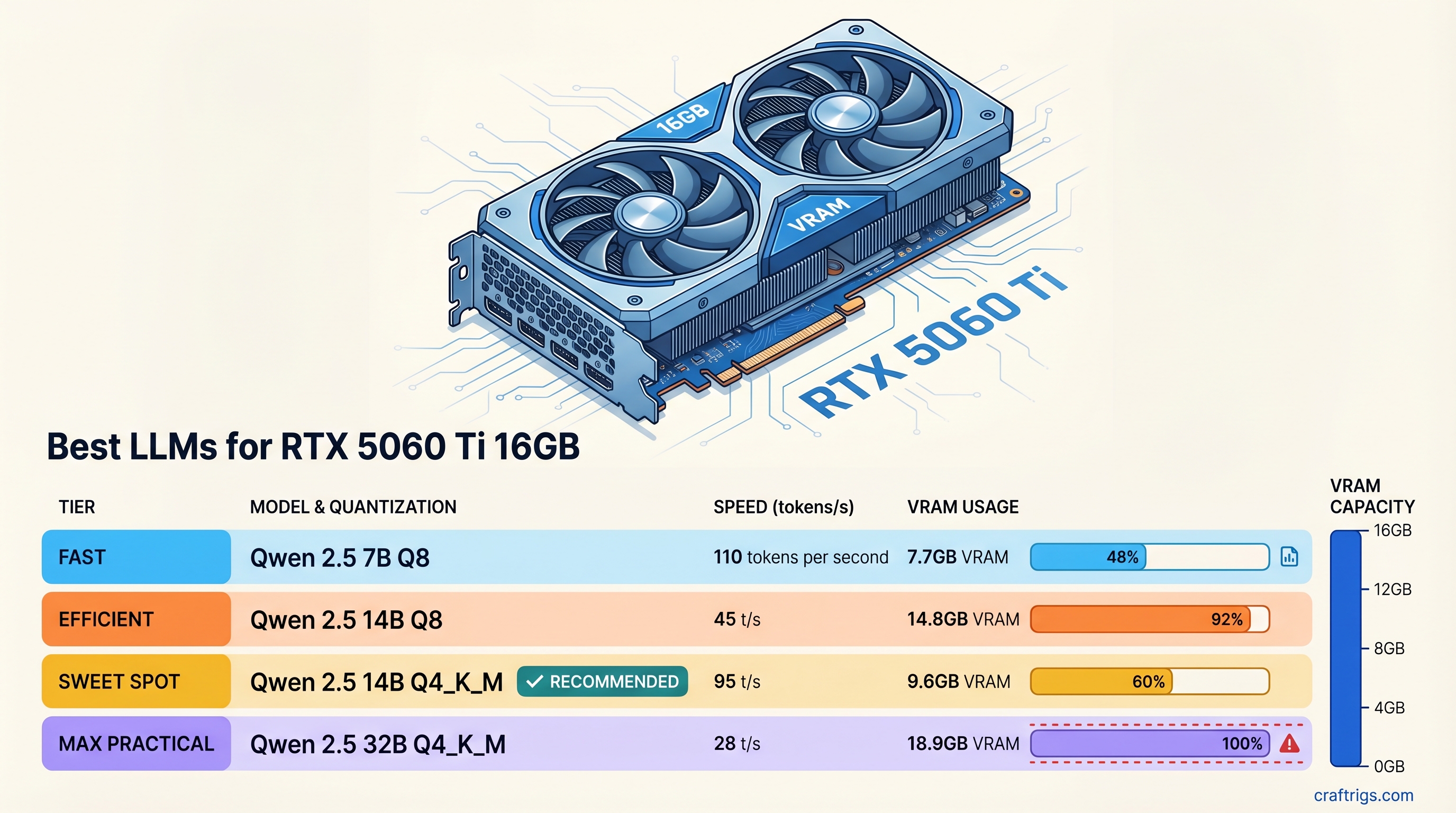
TL;DR: The RTX 5060 Ti 16GB is a capable local LLM card. Here are the top picks before diving into the details:
- Qwen 2.5 14B Q4_K_M — best all-around (~31 tok/s, fits with headroom to spare)
- Llama 3.1 8B Q4_K_M — fastest option at ~58 tok/s, great for latency-sensitive workflows
- Qwen 2.5 Coder 14B Q4_K_M — best for everyday coding tasks
- Qwen3-30B Q3_K_XL — the ambitious pick if you want 30B-class quality (~15-18 tok/s, tight fit)
RTX 5060 Ti 16GB Specs That Actually Matter for LLMs
Most GPU specs don't matter much for LLM inference. The ones that do:
- Memory bandwidth: 448 GB/s — this is the primary driver of tokens per second on models that are fully loaded into VRAM. Higher bandwidth = faster generation.
- VRAM: 16GB GDDR7 — determines which models fit entirely on-card. Offloading layers to system RAM drops speed by 60-80%, so fitting your model fully in VRAM is the goal.
- Architecture: Blackwell (GB206) — NVIDIA's 5000-series architecture. Brings improved sparsity support and slightly better matrix math efficiency vs Ada Lovelace (4000-series).
- CUDA cores: 4,608 — relevant for fine-tuning and batch inference, less so for single-user generation.
- TDP: 180W — reasonable for a workstation GPU. A 650W PSU covers everything.
- Street price: ~$549
The bandwidth number is what separates the 5060 Ti from older cards. At 448 GB/s, it's dramatically ahead of the RTX 3060 12GB (360 GB/s) and meaningfully faster than the RTX 4060 Ti 16GB (288 GB/s). The key difference from the 3060 12GB: you gain bandwidth and GDDR7 speed, but lose 4GB of VRAM for the same model ceiling. See the full RTX 5060 vs RTX 3060 12GB comparison if you're deciding between them.
VRAM Fit Table: What Loads Fully at Q4_K_M
"Fits" means the model loads entirely on-GPU with enough headroom left for a reasonable context window (~2K-4K tokens). Numbers reflect Q4_K_M quantization unless noted.
Notes
Loads with 11GB to spare
Llama 3.1 8B, Mistral 8B
Comfortable, 7.5GB headroom
Qwen 2.5 14B, Phi-4 14B — 7GB headroom
4GB headroom — a class the 3060 12GB can't fit
Community-confirmed; keep ctx short
Needs 4GB more than available
Multi-GPU only The headline upgrade over the RTX 3060 12GB: the 20B class. Models like Mistral 22B and Qwen 2.5 20B require 12-13GB at Q4, which is right at or over the 3060 12GB's limit. The 5060 Ti 16GB handles them cleanly with headroom remaining.
Tokens/Sec Benchmark Table
All benchmarks use llama.cpp with full GPU offload (no CPU layers). Prompt processing (prefill) speed is consistently higher; these are generation (decode) speeds for a single user.
Tokens/Sec
~58 tok/s
~80+ tok/s
~31-35 tok/s
~31 tok/s
~18 tok/s
~31 tok/s
~20 tok/s
~15-18 tok/s Reading speed context: 4-5 tok/s feels comfortable to read. Anything over 20 tok/s feels snappy. 50+ tok/s feels instant — you're waiting on yourself, not the GPU.
Best Models by Use Case
General Reasoning: Qwen 2.5 14B Q4_K_M
Qwen 2.5 14B is the default recommendation for this card. At ~31 tok/s, it feels fast. It uses about 9GB of VRAM, leaving 7GB free for context — enough for 16K+ token conversations with the right settings. On reasoning, instruction-following, and analysis benchmarks, it competes with models in the 32B-70B range, especially on multilingual tasks.
If you want near-lossless quality and have the patience for 18 tok/s, the Q8 variant at ~15.5GB fits as well. Worth considering if you're doing analytical work where response quality matters more than speed.
Get it: ollama pull qwen2.5:14b
Coding: Qwen 2.5 Coder 14B or Qwen3-Coder-30B
Qwen 2.5 Coder 14B is the practical daily-driver coding pick. Same VRAM footprint as the base model (~9GB), same ~31 tok/s, but fine-tuned on 5.5 trillion tokens of code. Python, JavaScript, TypeScript, Go, Rust — it handles them all well. If you're using Continue.dev or Aider for local AI coding assistance, this is the model to load.
Qwen3-Coder-30B at Q3_K_XL is the ambitious option. At ~14-15GB it fits on the 5060 Ti 16GB — but barely. Community users confirm it loads with partial-offload configurations, delivering 15-18 tok/s. That's slower than the 14B, but you get a meaningfully stronger model for complex codebases, multi-file context, and architecture-level questions. Keep context windows under 4K tokens to stay within your memory budget.
# Qwen 2.5 Coder 14B (recommended)
ollama pull qwen2.5-coder:14b

# Run with extended context
ollama run qwen2.5-coder:14b --num-ctx 8192
Speed: Llama 3.1 8B Q4_K_M or Phi-3.5 Mini
Llama 3.1 8B at Q4_K_M delivers ~58 tok/s on the 5060 Ti 16GB. That's faster than your eyes can comfortably read. For real-time chat, quick summarization, and autocomplete-style workflows where latency matters more than raw quality, this is your model.
Phi-3.5 Mini (3.8B) runs even faster — over 80 tok/s — and is surprisingly capable for its size on reasoning tasks. It's a good choice for edge-case applications: long-running scripts, parallel inference, or systems that need fast responses at scale.
Neither 8B model competes with Qwen 2.5 14B on hard reasoning tasks. But for speed-sensitive workflows where 7B/8B quality is acceptable, the 5060 Ti 16GB gets out of their way entirely.
Ambitious: 30B MoE with Aggressive Quantization
The 5060 Ti 16GB puts 30B-class models within reach if you're willing to accept Q3 quantization and constrained context. Qwen3-30B (and similar MoE architectures) at Q3_K_XL fit in 14-15GB according to community benchmarks on 16GB cards.
The tradeoffs: Q3 quantization means measurable quality degradation compared to Q4 or Q8, and 15-18 tok/s is noticeably slower than the 14B options. But for tasks where you want the strongest local model available — complex multi-step reasoning, longer document analysis, challenging code review — the 30B class is a genuine step up.
If you go this route, use llama.cpp directly rather than Ollama, and set context length explicitly to avoid OOM errors:
./llama-cli -m qwen3-30b-q3_k_xl.gguf \
  -ngl 99 \
  --ctx-size 2048 \
  --threads 8
RTX 5060 Ti 16GB vs RTX 3060 12GB
This is the most relevant comparison for anyone upgrading from the most popular budget LLM card.
RTX 3060 12GB
360 GB/s
12 GB
~$250 used
~25 tok/s
~15 tok/s
No — barely fits, OOM risk
The speed difference is real: the 5060 Ti is roughly 25% faster on the same models. The 448 GB/s vs 360 GB/s bandwidth gap is the full explanation. Tokens per second on fully-offloaded models scales almost linearly with bandwidth.
The VRAM difference matters less if you're running 7B-14B models — both cards fit them. But the 20B class that the 3060 12GB can't cleanly run (Mistral 22B, Qwen 2.5 20B) becomes practical on the 5060 Ti. That's a real model quality upgrade, not just a speed bump.
Is the upgrade worth it? At $549 new vs $250 used, you're paying about $300 extra for 2x speed and access to 20B models. If you're actively using local LLMs daily, that's a reasonable investment. If you're just getting started, the RTX 3060 12GB used is still one of the best entry points.
Setup: Ollama or llama.cpp?
Use Ollama for most users. It handles model downloads, GPU detection, and API serving automatically. The NVIDIA Blackwell architecture is well-supported in Ollama as of 2026. Setup is three commands:
# Install Ollama
curl -fsSL https://ollama.com/install.sh | sh

# Pull and run your model
ollama pull qwen2.5:14b
ollama run qwen2.5:14b
Ollama also exposes an OpenAI-compatible API at localhost:11434 — compatible with any tool that supports OpenAI endpoints.
Use llama.cpp directly when you need:
- Fine-grained control over quantization variants (loading specific GGUF files from HuggingFace)
- Explicit KV cache settings (
--cache-type-k q8_0to save VRAM for longer context) - Custom context length without Ollama's modelfile abstraction
- Testing edge cases like the 30B Q3 fits described above
For everyday chat and coding assistance, Ollama's overhead is negligible on modern hardware. The raw llama.cpp vs Ollama speed difference on the 5060 Ti 16GB is typically under 5% for generation speed.
LM Studio is a third option for those who prefer a GUI. It uses llama.cpp under the hood and has solid support for the 5000-series cards. Slower to update than Ollama for new model architectures, but the interface is easier to navigate for beginners.
The RTX 5060 Ti 16GB is a well-positioned local LLM card for 2026. It runs the 14B class fast, opens up the 20B class that 12GB cards can't reliably handle, and pushes 30B territory within reach for users willing to work with tighter constraints. For a guide on what every VRAM tier unlocks, see our complete VRAM guide. For GPU comparisons across every budget, see our GPU rankings.