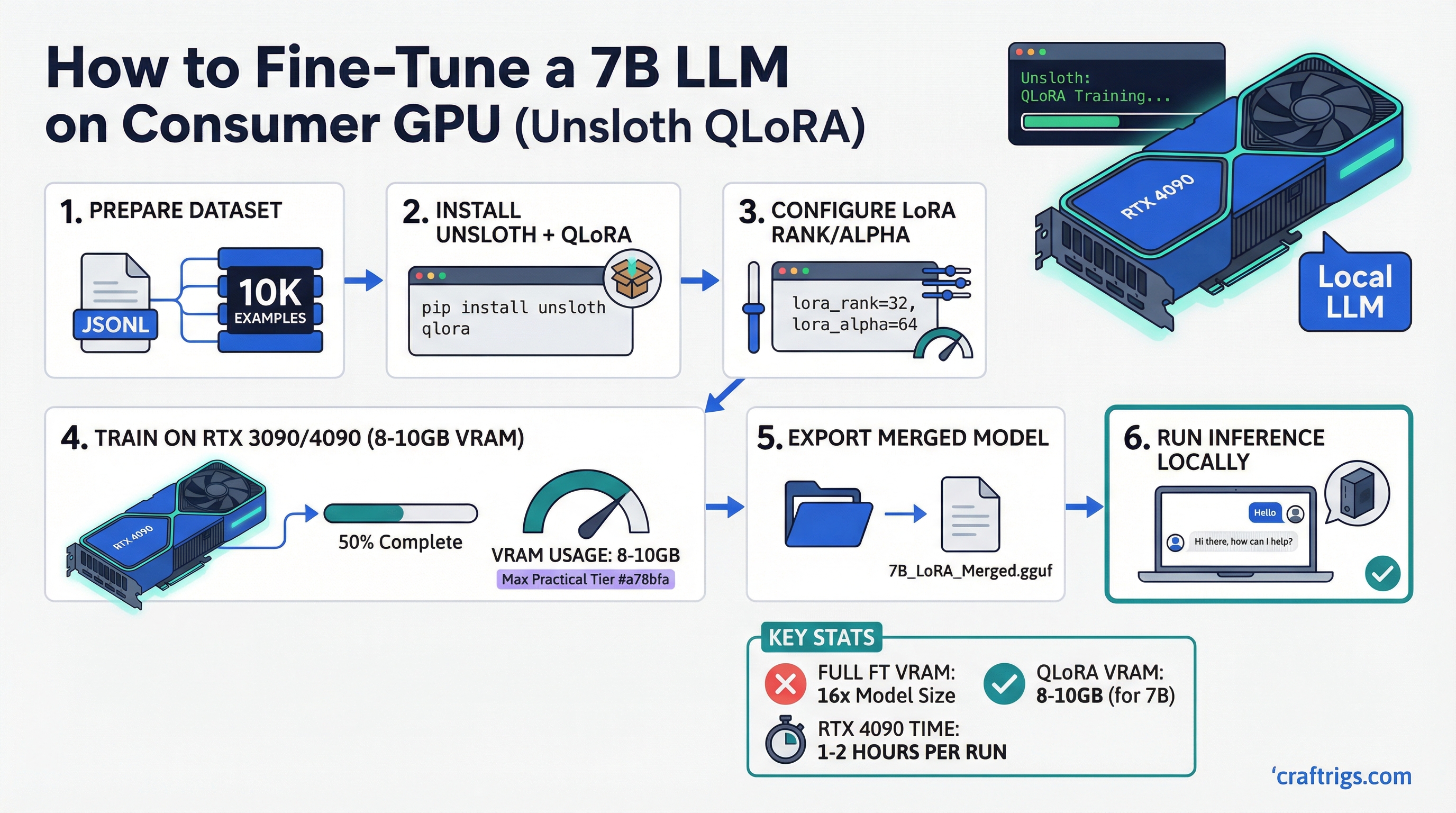
The standard narrative is that fine-tuning large language models requires expensive cloud infrastructure. That was true in 2022. Today, with QLoRA and Unsloth, you can fine-tune a 7B model on an RTX 4090 in your home office on a dataset of a few thousand examples in under an hour.
The key insight most people miss: inference and fine-tuning have completely different VRAM profiles. A 7B model at Q4_K_M needs roughly 4–5GB to run — for a breakdown of inference VRAM requirements, see our how much VRAM do you need guide. Fine-tuning that same model requires 4–6x more memory because you are storing not just weights but gradients, optimizer states, and activations simultaneously. LoRA and QLoRA solve this by making the fine-tuning problem much smaller.
This guide covers what you actually need, what to expect, and how to get started.
Quick Summary
- Fine-tuning needs 3–4x more VRAM than inference — full fine-tuning of 7B requires 80GB+; QLoRA with Unsloth reduces this to 8–10GB
- Sweet spot hardware: RTX 4090 24GB (handles 13B); RTX 3090 24GB (value pick); RTX 4080 Super 16GB (7B only)
- Unsloth advantage: 30–50% less VRAM than standard QLoRA implementations, 2x faster training through kernel optimizations
Why Full Fine-Tuning Is Impractical on Consumer Hardware
To understand why LoRA matters, you need to understand what full fine-tuning requires.
During fine-tuning, the GPU must hold in VRAM simultaneously:
- Model weights (in training precision, typically BF16/FP16): ~14GB for 7B
- Gradients (same size as weights): ~14GB
- Optimizer states (AdamW stores two momentum terms per parameter): ~28GB
- Activations (intermediate layer outputs for backprop): variable, ~5–15GB
Total for full fine-tuning of a 7B model: 60–70GB minimum. That is more than two RTX 4090s combined.
Even with mixed-precision training and gradient checkpointing, full fine-tuning of 7B models requires 40GB+ VRAM. Consumer hardware cannot do it.
How LoRA Shrinks the Problem
LoRA (Low-Rank Adaptation) does not train all model parameters. Instead, it inserts small trainable matrices alongside frozen base model weights. These adapters are tiny — typically 1–10% of total model parameters — which means:
- You only compute gradients for the adapter parameters
- Optimizer states are only tracked for adapter parameters
- Base model weights stay completely frozen
For a 7B model with a LoRA rank of 16, you might be training roughly 40–80 million adapter parameters instead of 7 billion. The gradient and optimizer memory drops by more than 99%.
QLoRA takes this further: the frozen base weights are quantized to 4-bit (using NF4 format), which cuts base model memory from ~14GB to ~4GB. Combined with LoRA adapters in BF16, total VRAM for a 7B model fine-tune drops to approximately 8–12GB.
What Unsloth Adds on Top of QLoRA
Standard QLoRA implementations (Hugging Face PEFT) are already much better than full fine-tuning. Unsloth makes them faster and lighter:
- Custom CUDA kernels for attention and cross-entropy that are both faster and use less memory
- Gradient checkpointing improvements that reduce activation memory with less speed penalty
- Flash Attention 2 integration by default
- Memory-efficient backward passes through custom triton kernels
In practice: Unsloth QLoRA uses approximately 30–50% less VRAM than standard PEFT QLoRA for the same configuration, and trains roughly 2x faster. For consumer GPU users, that VRAM savings is the difference between fitting a training run and not.
VRAM Requirements With Unsloth QLoRA
These figures assume:
- Sequence length: 2,048 tokens
- Batch size: 2 (per GPU)
- Gradient accumulation: 4 steps
- LoRA rank: 16
Min GPU
RTX 3080 10GB (tight) or RTX 4060 Ti 16GB (comfortable)
RTX 4060 Ti 16GB (tight) or RTX 3090 24GB
RTX 3090/4090 24GB (too small — use gradient checkpointing + smaller batch)
Dual RTX 4090 minimum For 34B models, even with Unsloth, a single 24GB consumer GPU struggles. You need aggressive gradient checkpointing, batch size 1, and short sequence lengths — which dramatically slows training. 70B fine-tuning is possible on dual 4090s with DeepSpeed ZeRO-3, but this is getting into multi-GPU territory.
The consumer GPU sweet spots for fine-tuning are 7B and 13B models. That covers the most useful models in practice.
GPU Recommendations
RTX 4090 24GB — The Recommended Card
The RTX 4090 is the single best consumer GPU for fine-tuning because it combines the maximum consumer VRAM (24GB) with the fastest BF16 FLOPS available. Fine-tuning involves BF16 math on adapter weights even though base model weights are in INT4 — so tensor core performance matters.
With Unsloth on an RTX 4090:
- 7B models: comfortable at batch size 4–8, sequence length 2048
- 13B models: comfortable at batch size 2–4
- Training a 7B model on 10,000 examples: approximately 20–40 minutes
Current new price: approximately $1,800–2,000.
RTX 3090 24GB — Best Value Pick
Same 24GB VRAM as the 4090, slower BF16 compute (no Ada Lovelace tensor cores). Training times are roughly 1.5–2x longer than the 4090, but every fine-tuning job the 4090 can handle, the 3090 can also handle — just slower.
Used price: approximately $700–800. For fine-tuning workloads specifically, the dollar-per-VRAM-GB ratio is hard to beat.
RTX 4080 Super 16GB — 7B Fine-Tuning Only
The 4080 Super has fast Ada tensor cores but only 16GB VRAM. This means:
- 7B fine-tuning: comfortable at standard settings
- 13B fine-tuning: requires tight settings (batch size 1, sequence length 1024), prone to OOM
If your workload is purely 7B fine-tuning and inference, the 4080 Super is excellent. If you expect to fine-tune 13B models or want headroom, pay for the 4090 or find a used 3090.
RTX 4060 Ti 16GB — Budget Option
Same 16GB as the 4080 Super but significantly slower (fewer CUDA cores and lower memory bandwidth). Training runs take 2–3x longer than the 4090. Works for 7B fine-tuning with patience. Not recommended as a primary fine-tuning card if you have other options.
What About AMD GPUs?
ROCm support in Unsloth is in progress but not stable as of early 2026. If you are on Linux and willing to deal with occasional compatibility issues, RX 7900 XTX 24GB may work for fine-tuning — but the standard recommendation for serious fine-tuning work is NVIDIA for compatibility with CUDA-dependent optimizations.
Installing Unsloth
Prerequisites
- NVIDIA GPU with CUDA 12.1+ (RTX 3000 series or newer)
- Python 3.10+
- PyTorch 2.1+
Install Steps
# Create a virtual environment
python -m venv unsloth-env
source unsloth-env/bin/activate  # Linux/Mac
# unsloth-env\Scripts\activate  # Windows

# Install Unsloth with CUDA 12.1
pip install "unsloth[colab-new] @ git+https://github.com/unslothai/unsloth.git"
pip install --no-deps trl peft accelerate bitsandbytes

# Verify installation
python -c "import unsloth; print(unsloth.__version__)"
For a persistent install, the official Unsloth docs recommend using conda:
conda create --name unsloth_env python=3.11 pytorch-cuda=12.1 pytorch cudatoolkit xformers -c pytorch -c nvidia -c xformers -y
conda activate unsloth_env
pip install "unsloth[colab-new] @ git+https://github.com/unslothai/unsloth.git"
Minimal Fine-Tuning Script
from unsloth import FastLanguageModel
from trl import SFTTrainer
from transformers import TrainingArguments
from datasets import load_dataset

# Load base model in 4-bit
model, tokenizer = FastLanguageModel.from_pretrained(
    model_name="unsloth/Meta-Llama-3.1-8B-Instruct",
    max_seq_length=2048,
    load_in_4bit=True,
)

# Add LoRA adapters
model = FastLanguageModel.get_peft_model(
    model,
    r=16,                    # LoRA rank — higher = more params = better but more VRAM
    target_modules=["q_proj", "k_proj", "v_proj", "o_proj",
                    "gate_proj", "up_proj", "down_proj"],
    lora_alpha=16,
    lora_dropout=0,
    bias="none",
    use_gradient_checkpointing="unsloth",
)

# Load your dataset
dataset = load_dataset("json", data_files="your_data.jsonl", split="train")

# Train
trainer = SFTTrainer(
    model=model,
    tokenizer=tokenizer,
    train_dataset=dataset,
    dataset_text_field="text",
    max_seq_length=2048,
    args=TrainingArguments(
        per_device_train_batch_size=2,
        gradient_accumulation_steps=4,
        num_train_epochs=1,
        learning_rate=2e-4,
        fp16=False,
        bf16=True,             # Use BF16 on Ampere/Ada GPUs
        logging_steps=1,
        output_dir="outputs",
    ),
)

trainer.train()

# Save adapter
model.save_pretrained("lora_model")
This script runs on a single GPU with no distributed training setup.
What About RTX 50 Series (Blackwell)?
RTX 50 series GPUs (RTX 5090, 5080, etc.) bring FP4 training capability and significantly improved tensor core throughput for BF16. Unsloth support for Blackwell is actively being developed. Early reports suggest RTX 5090's 32GB VRAM makes it the new sweet spot for 13B fine-tuning, with meaningful speed improvements over the 4090.
If you are buying a card specifically for fine-tuning in 2026, the RTX 5090 at 32GB is worth waiting for if your budget allows — otherwise the RTX 3090 used market remains the best value.
Merging Adapters and Exporting for Inference
After training, the LoRA adapter is a small set of files (typically 100–400MB for a 7B fine-tune). To use it for inference, you can either:
- Load base model + adapter separately (works in Ollama, llama.cpp, most inference tools)
- Merge adapter into base model (creates a single complete model file)
For merging with Unsloth:
model.save_pretrained_merged("merged_model", tokenizer, save_method="merged_16bit")The merged model can then be quantized with llama.cpp's convert_hf_to_gguf.py for use in Ollama or any GGUF-compatible inference tool. This means your fine-tuned model runs with the same efficiency as any quantized GGUF — on the same hardware used for inference. For understanding which quantization format to use after export, see our GGUF vs GPTQ vs AWQ vs EXL2 guide.