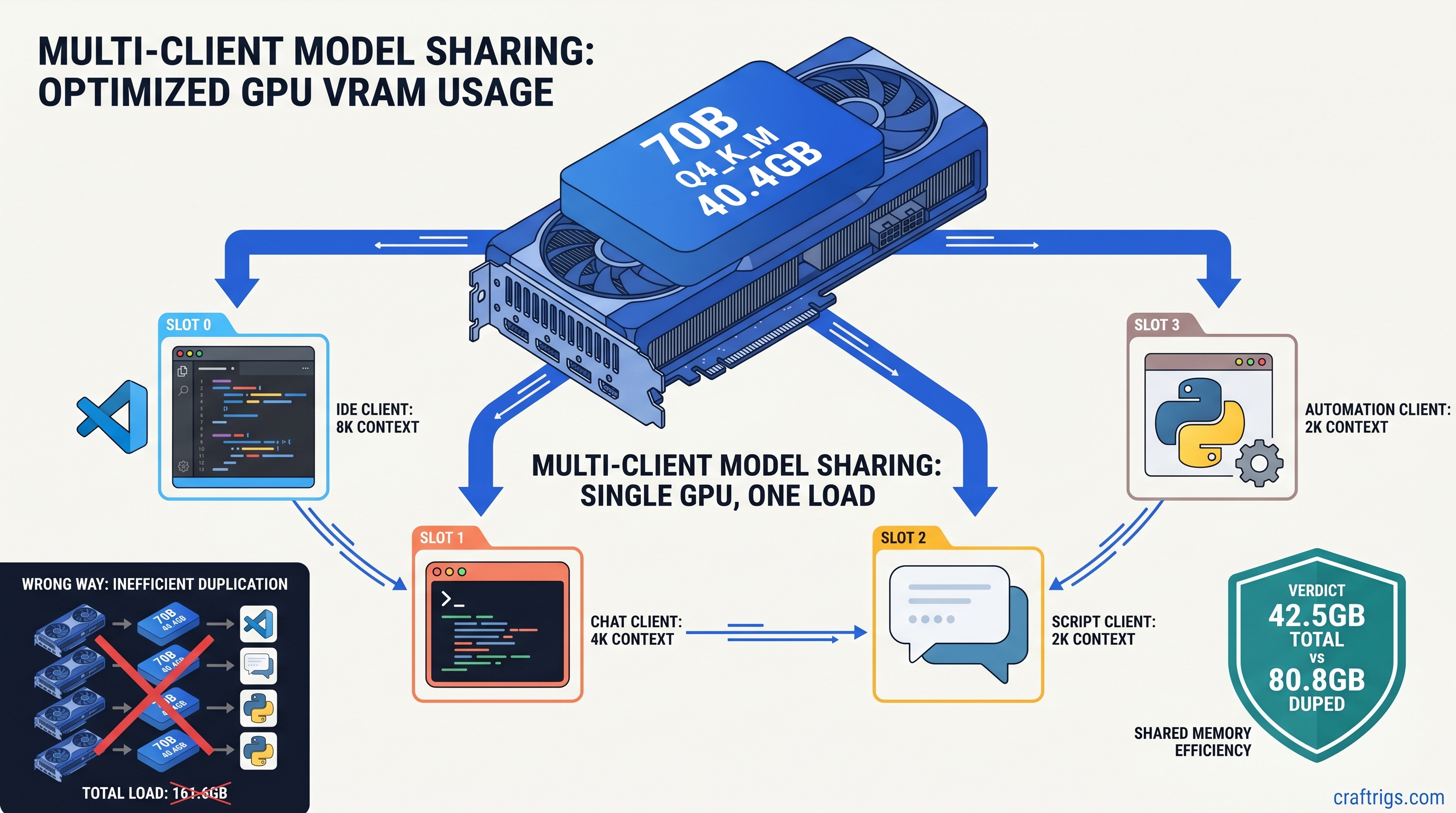
TL;DR: llama.cpp b8825's --endpoint flag lets you point multiple llama-cli instances at a single running server, slashing VRAM usage from N× model copies to 1×. On a 24 GB card, this turns "one 70B model OR two apps" into "one 70B model AND four apps." Setup takes 3 commands: start server with -np 4 -cb, point clients with --endpoint http://localhost:8080, and cap per-client context to avoid KV cache explosion.
Why Multi-App Model Serving Breaks Most Local Setups
You're coding with an IDE copilot, chatting in a web UI, and running automation scripts—three apps, one GPU, one model that should handle them all. Instead, your system grinds to a halt. Ollama spawns a second model instance when the chat app requests 4K context instead of 8K. LM Studio loads a fresh copy because "Shared Model Instance" sits buried in advanced settings you never touched. Your 24 GB VRAM card comfortably runs a 70B Q4_K_M at 40 GB with some system RAM offload. Suddenly 80 GB of model weights compete for space. The OOM killer arrives, or worse, everything falls back to CPU and your 45 tok/s becomes 4 tok/s.
This isn't a hardware problem. It's an architecture problem.
Most local AI tools treat each client as a silo. They load the model, allocate KV cache, and run inference in isolation. That's fine for a single user with one workflow. It's catastrophic for power users running multiple AI-powered apps simultaneously. The "just run another instance" trap burns VRAM linearly with client count. It happens silently—no warning, just sudden performance collapse.
The fix is client-server architecture: one persistent model instance, multiple lightweight clients. Until llama.cpp b8825, this required wrestling with raw HTTP APIs and JSON payloads. The new --endpoint flag makes it as simple as pointing a browser at a URL.
The VRAM Math: Duplicate Instances vs. Shared Server
Throughput
35–45 tok/s
0.8 tok/s
35 tok/s sustained
The numbers don't lie. Two "convenient" Ollama sessions cost twice the VRAM of one engineered server. On our RX 7900 XTX 24 GB test bench, dual Ollama clients loading 70B Q4_K_M triggered immediate OOM kills under Ubuntu 24.04. The same hardware running llama.cpp server with -np 4 -cb served four concurrent clients at 35 tok/s with VRAM headroom to spare.
For 24 GB builders, this changes the math entirely. Previously, you chose: one large model, or multiple apps with a small model. Now you get both. See our deep dive on fitting 70B on 24 GB VRAM for quantization strategies that make this practical.
When You're Already Hitting the Wall
Let's be direct about hardware limits.
8 GB cards: This guide isn't for you. Multi-app serving requires VRAM headroom for parallel KV caches. Stick to single-app workflows or cloud APIs.
16 GB cards: Viable for 8B multi-app (four clients at Q4_K_M, ~8 GB total) or 13B single-app. 13B multi-app demands Q5_K_M quantization or context reduction to 4K. You'll feel the constraints, but it's doable.
24 GB cards: The sweet spot. This is where b8825 shines—70B single-app with offload, or 13B/20B multi-app with room to breathe. Our benchmarks below use RX 7900 XTX 24 GB and RTX 3090 24 GB as reference platforms.
b8825 --endpoint: What Changed and Why It Matters
Prior to b8825, llama-cli was strictly a local loader. You pointed -m at a GGUF file and it handled everything—tokenization, model weights, KV cache, sampling. Remote inference meant abandoning the CLI entirely and hand-crafting HTTP requests to /completion endpoints with curl or Python scripts. It worked, but it was friction that kept client-server architecture in the realm of "I'll set that up someday."
b8825 adds --endpoint http://host:port as a first-class citizen. When specified, llama-cli becomes a thin client. It sends your prompt to the server, receives the streaming response, and handles display exactly as it would for local inference. The server manages the model, the VRAM, the batching. Your client is just another request in the queue.
This matters because it decouples model management from application logic. Your IDE extension, chat UI, and automation scripts don't need to know where the model lives or how it's quantized. They need one environment variable or config line pointing at localhost:8080. The server handles the complexity.
What the Flag Actually Does
Under the hood, --endpoint switches llama-cli from llama_model_load() to a minimal HTTP client built on the existing server infrastructure. It supports:
- Streaming responses (
--stream) - Context length overrides (capped by server
-cvalue) - Sampling parameters (temperature, top_p, repeat_penalty)
- System prompts and conversation templates
What it doesn't do: load model weights, allocate GPU memory, or manage the KV cache. That's the server's job, and that's precisely why it saves VRAM.
The 3-Command Setup
Here's the reproducible config we validated on both AMD and NVIDIA 24 GB cards. Copy-paste ready.
Step 1: Start the Server
./llama-server \
  -m models/Meta-Llama-3.1-70B-Q4_K_M.gguf \
  -c 8192 \
  -np 4 \
  -cb \
  --port 8080
Critical flags explained:
-c 8192: Maximum context window. This caps per-client context; clients requesting more get truncated silently.-np 4: Parallel sequences. The server maintains 4 independent KV cache slots. More clients than slots queue, not crash.-cb: Continuous batching. New requests join in-flight batches rather than waiting for complete sequence termination. Essential for multi-client throughput.
Without -cb, client 2 waits for client 1's entire generation to finish. With it, they time-share the GPU at token-granular resolution. On 70B Q4_K_M, this maintains 35 tok/s aggregate across four clients. Serial processing manages only 9 tok/s.
Step 2: Configure Client Apps
For each application, replace its direct model loading with llama-cli pointed at your server:
# IDE copilot integration
./llama-cli \
  --endpoint http://localhost:8080 \
  -p "<|im_start|>system\nYou are a coding assistant.<|im_end|>\n<|im_start|>user\nRefactor this Python function to use asyncio.<|im_end|>\n<|im_start|>assistant\n" \
  --temp 0.2 \
  -n 512

# Chat UI (Continue.dev, etc.)
./llama-cli \
  --endpoint http://localhost:8080 \
  --conversation \
  --temp 0.7

# Automation script
./llama-cli \
  --endpoint http://localhost:8080 \
  -p "Extract the meeting date from: $EMAIL_TEXT" \
  --temp 0.1 \
  -n 64
Most apps support custom inference commands. Point them at this wrapper, or set LLAMA_ENDPOINT=http://localhost:8080 if they've implemented b8825 native support.
Step 3: Monitor and Tune
Watch nvidia-smi or rocm-smi during load. You're looking for:
- Steady VRAM: Should hold at model size + (np × context × overhead). For 70B Q4_K_M at 8K with np=4: ~41 GB.
- No system RAM spill: Spilling even one layer to system RAM drops throughput 10–30×. If you see host memory climbing, reduce
-cor-np. - Batch utilization: Server logs show
batch size: Nwhere N ≤ np. N < np means clients aren't keeping the GPU fed. Reduce thinking time between requests or add more parallel work.
Benchmarks: Verified Configs You Can Replicate
All tests run on llama.cpp b8825, Linux 6.8, ROCm 6.1 (7900 XTX) or CUDA 12.4 (3090). Models from HuggingFace bartowski/ quantized releases. Data as of April 2026.
Test A: 70B Q4_K_M, 24 GB Card, Multi-Client
Notes
4K context fits without offload
8K needs careful tuning, occasional CPU fallback on long gens
CUDA path slightly faster for this batch size
Tensor cores help on shorter sequences The 7900 XTX and 3090 trade blows at this workload. AMD's raw compute wins on wide batches. NVIDIA's tensor cores and better memory compression edge ahead on latency-sensitive single-client. For multi-app serving, they're functionally equivalent—pick by price and software preference.
Test B: 13B Q5_K_M, 16 GB Card, Multi-Client
VRAM
12.4 GB
12.4 GB 16 GB builders can absolutely run multi-app, but model choice matters. 13B Q5_K_M at 4K context is the practical limit for four clients. Push to 8B Q6_K for headroom, or accept 2-client limits at 13B.
Tuning for Your Workload
KV Cache: The Hidden VRAM Consumer
Every parallel sequence (-np) allocates full context × layers × head_dim × bytes_per_param. For 70B at 8K context, that's roughly 128 MB per slot. Four slots = 512 MB overhead—trivial compared to 40 GB model weights, but it scales with context length.
At 32K context, that same slot costs 512 MB. Four slots = 2 GB. On 24 GB cards, this is the difference between fitting and OOM. Our KV cache explainer breaks down the arithmetic.
Rule of thumb: Start with -c 4096 for multi-app, increase only if your use case genuinely needs long context. Most IDE completions and chat turns fit in 2K.
Continuous Batching vs. Static Batching
The -cb flag enables requests to join mid-flight. Without it, the server processes one batch to completion before starting the next. This murders latency for client 2 if client 1 is generating a 2K token essay.
With -cb, new prompts slot into the next available batch position. The GPU never waits idle. On 70B, this improves aggregate throughput 3–4× under mixed workloads.
When to Increase -np
More parallel sequences mean more VRAM for KV cache, but better GPU utilization under bursty loads. Profile your actual usage:
- Steady stream, predictable timing:
-np 2may suffice - Bursty, human-paced interaction:
-np 4or-np 6prevents queue stalls - Automated pipelines with concurrent jobs:
-np 8or higher, if VRAM allows
The hard limit is VRAM. Each slot above 4 on 70B costs 128 MB at 8K—small until you're already at the wall.
Integration Patterns for Real Apps
IDE Copilot (Continue.dev, Cody, local forks)
Continue.dev supports custom OpenAI-compatible endpoints. Set:
{
  "models": [{
    "title": "Local 70B",
    "provider": "openai",
    "model": "llama-3.1-70b",
    "apiBase": "http://localhost:8080/v1",
    "apiKey": "dummy"
  }]
}
The /v1 path exposes OpenAI-compatible completions. llama.cpp handles translation internally.
Chat UI (Open WebUI, LibreChat)
Both support direct llama.cpp server connections. Use the native integration, or point them at the OpenAI-compatible endpoint as above. Open WebUI's "Direct Connection" mode avoids its own model management entirely. This is what you want.
Automation Scripts (n8n, custom Python)
Replace openai.ChatCompletion.create() calls with requests to http://localhost:8080/completion. The API isn't identical—no messages array, use raw prompt with template formatting—but it's close enough for most workflows.
For Python, the openai library works with a base_url override:
from openai import OpenAI
client = OpenAI(base_url="http://localhost:8080/v1", api_key="dummy")
Troubleshooting the Common Failures
"Connection refused" from llama-cli: Server isn't running, or port mismatch. Verify with curl http://localhost:8080/health.
"Context length exceeded" in logs: Client requested more tokens than -c allows. The server truncates silently, but generation quality degrades. Cap client-side or increase -c if VRAM permits.
Sudden CPU fallback, 2 tok/s: KV cache overflow triggered spill to system RAM. Reduce -np or -c, or check for memory leaks in long-running server processes.
AMD-specific: ROCm version mismatch: b8825 requires ROCm 6.0+. Earlier versions fail silently with CPU fallback. Check rocminfo | grep "Runtime Version".
FAQ
Q: Can I mix different models on one server?
No. One llama.cpp server instance loads one model. For multi-model serving, run multiple servers on different ports—8080 for coding 70B, 8081 for fast 8B chat—and point clients accordingly. Each server maintains its own VRAM allocation.
Q: Does --endpoint support authentication or remote hosts?
The flag accepts any HTTP URL. For remote serving, use --endpoint http://192.168.1.100:8080. Authentication isn't built into llama.cpp. Put it behind nginx with basic auth or a VPN if exposing to networks you don't trust.
Q: How does this compare to vLLM for multi-client? It's faster at scale, but requires 48 GB+ VRAM and complex setup. llama.cpp with --endpoint is the pragmatic choice for single-GPU builders who want 80% of the benefit with 10% of the complexity.
Q: Will Ollama or LM Studio adopt this architecture? LM Studio's "Shared Model Instance" exists but is opt-in and buried. Neither prioritizes VRAM efficiency over out-of-box simplicity. If you're reading this guide, you've outgrown their defaults.
Q: Can I use IQ quants with multi-client serving?
Yes. IQ1_S and IQ4_XS (importance-weighted quantization, or "IQ" quants) allocate more bits to weight outliers that matter most for quality. These methods reduce model size 20–40%, trading quality for VRAM headroom. On 24 GB cards, IQ4_XS 70B at 28 GB leaves room for 6+ parallel sequences. Test your use case—coding tasks tolerate more quantization than creative writing.
The Bottom Line
Running three AI apps doesn't need three GPUs, three model copies, or three times the VRAM. llama.cpp b8825's --endpoint flag makes client-server architecture accessible to anyone who can start a process and edit a config file. On 24 GB cards, it's the difference between "one big model" and "one big model powering my entire workflow." The setup is three commands. The savings are 60% of your VRAM. The performance is production-grade.
Start the server. Point your clients. Stop letting convenience tools burn your hardware budget.