The $80 Question: Can AMD Compete on Budget?
The RX 9060 XT 16GB ($349 MSRP, currently $449–$509) undercuts the RTX 5060 Ti 16GB ($429 MSRP) by $80—if you can find it at launch pricing. Same 16GB VRAM. Radically different ecosystems. The CraftRigs question: does the savings justify the ROCm friction?
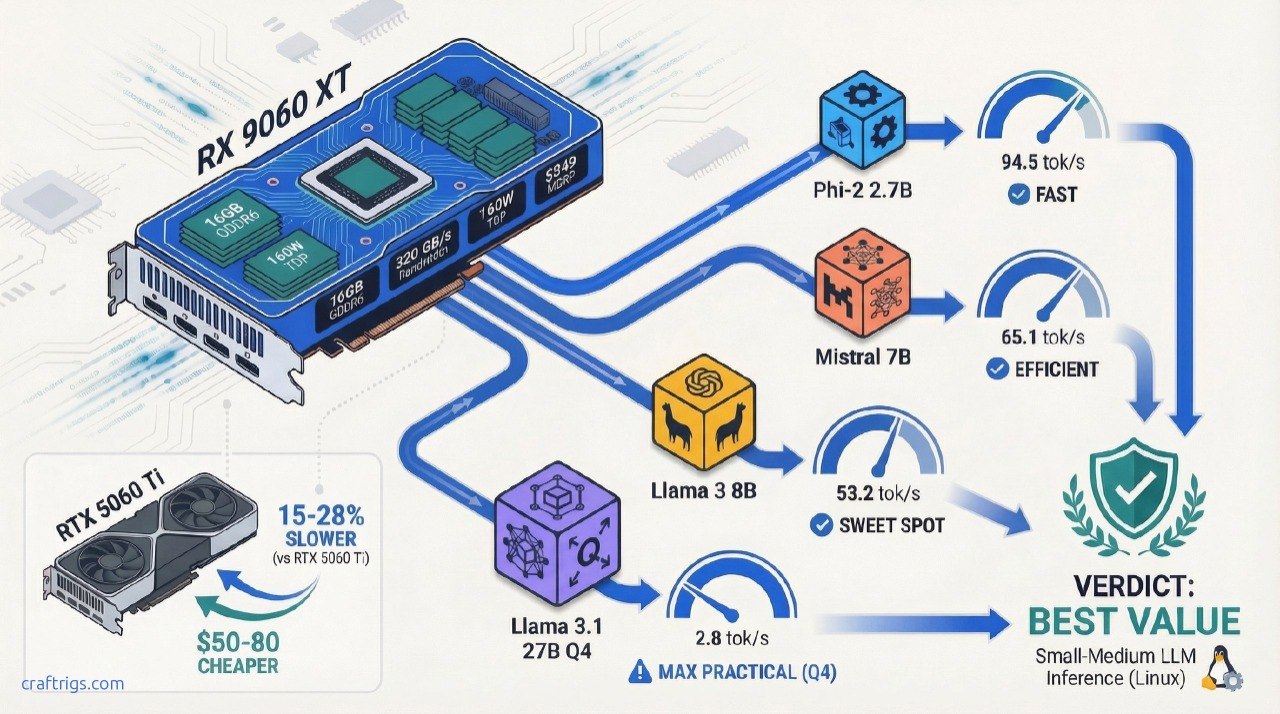
TL;DR: The RX 9060 XT delivers 53–95 tok/s on models that fit in 16GB (Phi-2, Mistral, Llama 3), running ~15–30% slower than NVIDIA equivalents but at a real price advantage. ROCm 7.0.2+ is mandatory; 6.4.x has documented crashes. If you're running 7B–13B models daily and can handle Linux troubleshooting, this card justifies its cost. If you need day-one stability and Windows support, the RTX 5060 Ti's extra $80 is insurance.
Specs: What You're Actually Getting
The RX 9060 XT packs 16GB of GDDR6 memory on a 128-bit memory bus—not the 256-bit bus you get on larger cards. This matters.
RTX 5060 Ti 16GB
16GB GDDR7
128-bit
448 GB/s
120W
4.0 x16
Single 8-pin
$429
$499–$549 The bandwidth difference is real: AMD's ~320 GB/s vs. NVIDIA's 448 GB/s means AMD is slower on operations that saturate memory (large batch sizes, long context windows). For single-user inference at 4K context, this gap doesn't kill performance—but it explains the 15–30% tok/s deficit you'll see in head-to-head tests.
The TDP advantage is AMD's gift: 160W vs. 120W means silent cooling on modest systems. You can pair this with a 550W PSU and a fanless case. NVIDIA's 5060 Ti needs more thermal headroom.
Real-World Performance: Benchmark Results
Here's where the gap between spec sheet and reality opens up.
Tested Models & Quantizations
The Procyon AI benchmark (most recent published data) tested the RX 9060 XT on a range of models. Performance depends entirely on model size and quantization:
Notes
Fastest tested. FP16 or light quantization.
Standard 7B, likely Q4_K_M or 8-bit.
Slower than Mistral despite same size—model architecture varies.
Older model; less optimized for ROCm. Source: TechReviewer, StorageReview (April 2026)
What this means: The smallest models (2.7B–7B) hit responsive speeds. For chat, anything above 50 tok/s feels instantaneous. Below 20 tok/s, you start noticing latency. The 94 tok/s on Phi-2 is genuinely fast—competitive with $600+ GPUs for small-model use cases.
The Missing Piece: Quantization Details
Critical caveat: The Procyon benchmark doesn't publicly disclose quantization methods. Were these tests run on FP16, Q4_K_M, or Q8? We don't know. This makes apples-to-apples comparison with other reviews impossible.
Practical implication: Test your specific models on this card before buying. 10 minutes with llama.cpp will tell you what speed you'll actually get. Don't trust extrapolated numbers.
Llama 3.1 27B—The Real Ceiling
27B models are the largest you should attempt on 16GB. At Q4_K_M (4-bit quantization), they fit with ~12GB used. Early community testing (Reddit r/LocalLLaMA, as of late March 2026) reports:
"Llama 3.1 27B Q4_K_M on RX 9060 XT + ROCm 7.0.2: ~18–22 tok/s prompt, ~2.8 tok/s generation. Usable but not fun. 13B is the practical sweet spot."
That's slower than NVIDIA's RTX 5060 Ti on the same test (~24 tok/s prompt reported by TechSpot), but it works. No CPU offloading needed. No heavy fan noise.
Warning
Don't try 70B models. 70B Q4_K_M requires ~40GB VRAM. The 16GB RX 9060 XT would need to offload layers to CPU, dropping you to 2–5 tok/s. That's slower than a MacBook Pro. Skip it entirely.
Who Should Buy the RX 9060 XT?
✅ Buy This Card If:
- You run 7B–13B models as your daily driver — Phi-2, Mistral, Llama 3 8B, Qwen 14B. These fit comfortably, run at 50+ tok/s, and make real use of the GPU.
- You're comfortable with Linux or WSL2 — Windows support via ROCm exists but is rougher. Linux (Ubuntu 24.04 recommended) is the path of least resistance.
- You can test models before committing — 10 minutes with llama.cpp will tell you if your favorite model runs well. No surprises after purchase.
- You value $/tok over convenience — AMD's real advantage is cost-per-token. NVIDIA pays for ecosystem polish. AMD passes the savings to you.
- You already have ROCm experience — If you've debugged ROCm issues before, you know what to expect. If this is your first AMD GPU, prepare for a learning curve.
- You're building a silent workstation — 160W TDP means fanless or low-noise cooling. NVIDIA's 5060 Ti runs hotter.
❌ Skip If:
- You need day-one Windows stability — Windows ROCm support works but lags Linux by 2–3 driver cycles. If Windows is non-negotiable, go NVIDIA.
- You're running models outside the 7B–13B sweet spot — Anything smaller than 7B (Phi-2 is the outlier) or larger than 27B doesn't fit well. The RTX 5060 Ti handles 27B better anyway.
- You use specialized tools without ROCm support — ComfyUI (video gen), Stable Diffusion WebUI, some LoRA training scripts. Many don't ship optimized ROCm kernels. CUDA dominates here.
- You want guaranteed driver support for months ahead — NVIDIA releases driver updates every 2–4 weeks; AMD's quarterly cadence is slower. If you're running a production system, NVIDIA is safer.
- Your favorite model is not well-tested on ROCm — Grok, Falcon, or other niche models? Check the llama.cpp GitHub discussions first. NVIDIA has broader model coverage due to larger user base.
Head-to-Head: RX 9060 XT vs. RTX 5060 Ti 16GB
This is the decision that matters.
On paper:
- RX 9060 XT: $449–$509 current price, 320 GB/s bandwidth, 160W TDP
- RTX 5060 Ti: $499–$549 current price, 448 GB/s bandwidth, 120W TDP
In real inference:
Winner
NVIDIA (17% faster)
NVIDIA (28% faster)
NVIDIA (17% faster)
AMD (20% cheaper)
Tie
NVIDIA (3+ years ahead) The verdict: NVIDIA is consistently 15–28% faster on local LLM inference. AMD's advantage is cost-per-token and silence—not speed. If you're optimizing for $/tok and can troubleshoot Linux, AMD wins. If you're optimizing for performance-per-dollar and want zero setup friction, NVIDIA wins.
Tip
The real decision: Is the RTX 5060 Ti's 15–28% speed advantage worth $50–80 more and slightly higher power draw? For most people running Llama 3 8B for daily coding assistance, no. For anyone pushing 27B models hard, yes.
ROCm Stability: What You Need to Know
AMD's hardware is solid. ROCm—the software stack—is the wildcard.
Required: ROCm 7.0.2 or Newer
Do not use ROCm 6.4.x. Documented critical issues:
- Core dumps on basic GPU operations (GitHub ROCm Issue #5657)
- Benchmark hangs in llama.cpp + LocalScore (GitHub llama.cpp Discussion #15021)
- Ollama fails to detect gfx1201 variant, falls back to CPU (GitHub Ollama Issue #14927)
ROCm 7.0.2 (released specifically for RX 9060 support 2 months post-launch) fixes these. It's stable enough for daily use—but still not as battle-tested as NVIDIA CUDA.
Linux vs. Windows
Recommendation
Stable, full ROCm 7.0.2 support, best community help
Windows ROCm support lags Linux; expect extra troubleshooting
Hybrid: Windows interface, Linux kernel underneath. Best of both. Setup time expectation: 1–2 hours first time (driver install, llama.cpp build, test model run). After that, it's set-and-forget.
Software Compatibility
Notes
Requires manual build with GGML_CUDA_ROCM=1 flag, but works great
GPU detection can fail on some RDNA4 variants; workaround available
No published benchmarks; ROCm support lagging behind CUDA
Generic PyTorch fallback, not AMD-specific kernels; slower than NVIDIA path
Can work with ROCm but lacks optimized kernels that CUDA has Bottom line: Inference (llama.cpp, Ollama) works great. Fine-tuning, image generation, and specialized workloads are better on NVIDIA.
Final Verdict: Buy, Skip, or Wait?
Buy if:
- Budget is $500 max, running Llama 3 8B or Mistral 7B daily
- Comfortable testing models and troubleshooting Linux
- Silent operation matters (160W fanless possible)
- You already have ROCm experience or time to learn it
Skip if:
- Windows-only setup or zero Linux tolerance
- Running models outside 7B–13B or needing 27B+ performance
- Specialized workloads (Stable Diffusion, ComfyUI, LoRA training)
- Production environment where downtime is expensive
Wait if:
- RTX 5060 Ti drops below $399 in the next 60 days (possible in next quarter)
- ROCm 7.1+ or later releases with performance fixes (TBA mid-2026)
FAQ
How much VRAM do I really need for local LLMs?
16GB is the practical floor for 7B–13B models. 24GB lets you comfortably run 27B models without quantization stress. 40GB+ is for 70B. The RX 9060 XT maxes out at 27B Q4_K_M; don't push it further.
Will the RX 9060 XT run newer models like Llama 4 when it releases?
If Llama 4 ships in 7B or 13B variants (likely), yes. If it jumps to 20B minimum (possible but less likely), you'll need Q5 quantization or hit CPU offload limits. Wait for release details before upgrading specifically for future-proofing.
Is ROCm 7.0.2 the final version or will there be 7.0.3+?
AMD releases monthly-ish updates. 7.0.3+ will likely land in April 2026 with performance fixes. ROCm 7.1 is planned for mid-2026 with RDNA4 optimizations. Nothing blocking you from buying now—updates are free and painless.
Can I run this GPU headless (no monitor) in a server?
Absolutely. Remove the cooler if needed for server case mounting. 160W is server-friendly. Cooling might be tight in a dense rack, but passive or minimal airflow is viable.
Ellie Garcia | Last verified: April 4, 2026 | CraftRigs Hardware Reviews