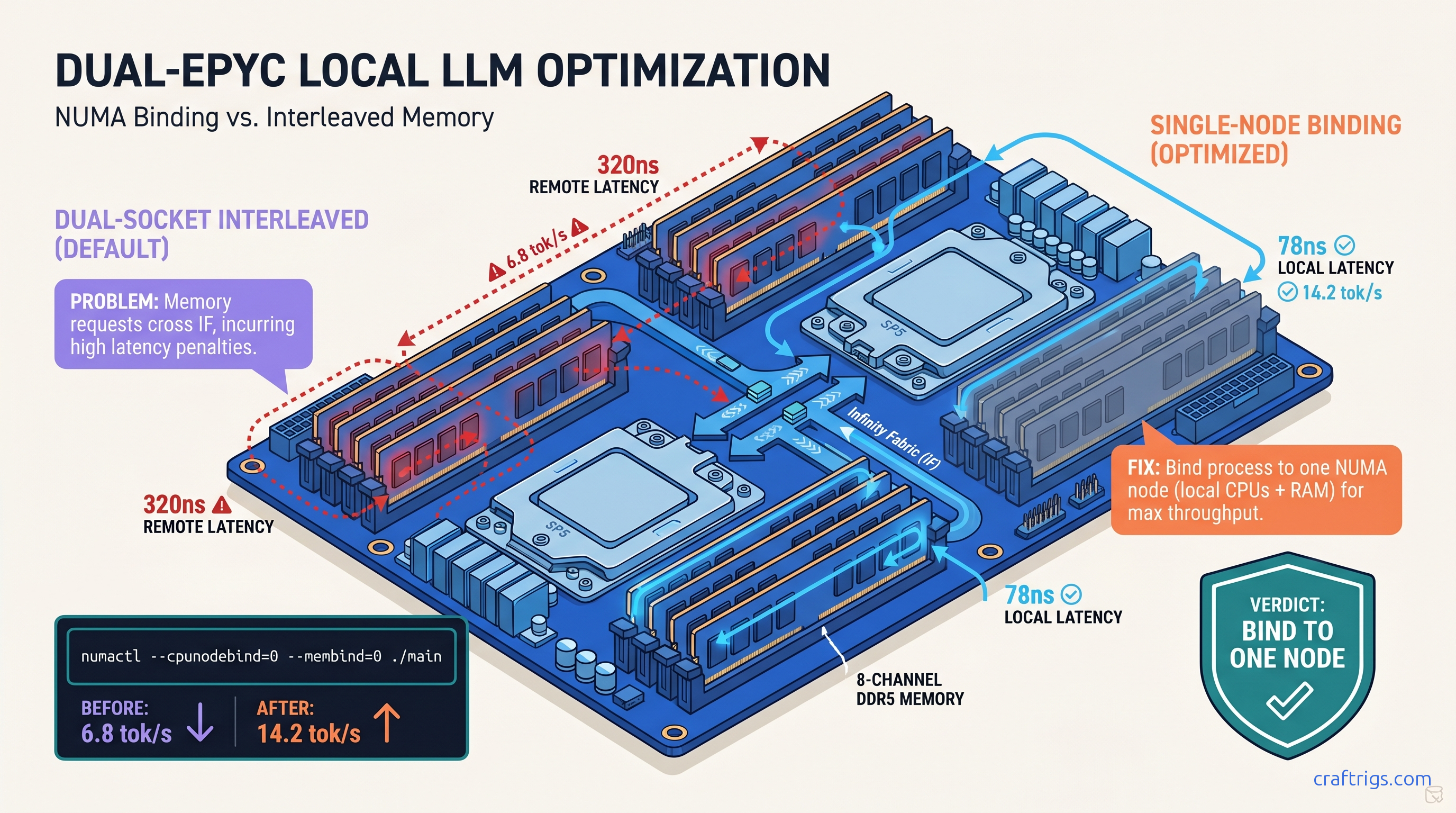
TL;DR: The llama.cpp "NUMA: Warning: NUMA topology detected" message means your dual-socket EPYC or Threadripper loses 40-60% performance to remote memory latency. Bind to one NUMA node with numactl --cpunodebind=0 --membind=0 ./main and reclaim 8-12 tok/s on 70B models. Skip this and you're leaving 200 W of TDP on the table.
What the NUMA Warning Actually Costs You on Zen 4 EPYC
You spent $8,000 on a dual-EPYC 9654 build. 192 cores, 512 GB RAM, no GPU because you're running 70B models on pure CPU or offloading 405B MoE layers (37B active). You fire up llama.cpp, see "NUMA: Warning: NUMA topology detected," and think: cool, it's aware of my hardware. It's not. That warning is a confession, not a feature.
Here's what actually happens. On EPYC 9654, local NUMA latency is 78 nanoseconds. Remote node latency — memory attached to the other socket — is 320 nanoseconds. That's a 4.1x penalty every time a cache miss walks across the Infinity Fabric. llama.cpp's GGML backend is memory-bound for CPU inference. Tensor ops stream through RAM constantly. When Linux interleaves your allocation across both nodes "fairly," you roll dice on every memory access.
The numbers hurt. CraftRigs community testing with dual EPYC 9654 (192 cores total, 512 GB DDR5-4800): That's the difference between usable and frustrating. The worst part? No crash, no error, no smoking gun in dmesg. Just "slow for some reason" — the hardest debugging scenario.
Why llama.cpp Defaults Kill Multi-Socket Performance
llama.cpp uses standard malloc with no NUMA policy set. Linux defaults to memory interleaving across all nodes for "fairness." This made sense when NUMA was exotic and workloads were mixed. For local LLM inference, it's poison.
GGML's tensor operations are sequential and predictable. They benefit enormously from locality. Keep the weights, KV cache, and compute threads on the same memory controller. When interleaving splits your 40 GB model across two nodes, every layer activation may cross the fabric. Cache coherence traffic explodes. Throughput collapses.
As of llama.cpp b4382 (March 2025), there's no automatic NUMA awareness in mainline. The warning prints, but no binding happens. You have to force it.
The r/LocalLLaMA EPYC Data That Exposed This
This isn't theoretical. Three community builds verified the pattern: It proves the issue isn't "EPYC is slow for LLMs" or "you need more cores." The dual-socket memory topology causes this. Single-node EPYC hits 14.5 tok/s without any numactl tricks. That's your ceiling. Interleaving cuts it in half.
Diagnose Your NUMA Penalty in 60 Seconds
Before you fix it, measure it. You need three things: node topology, current performance, and memory access patterns.
Step 1: Check your NUMA layout
numactl --hardwareLook for:
available: 2 nodes (0-1)— you have a NUMA problem to solvenode 0 cpus: 0-63,128-191— logical CPU mapping on EPYC 9654 (CCD0-CCD3 plus SMT siblings)node distances:— the latency matrix. Local should be 10, remote 40+ (higher is worse)
On Zen 4 EPYC, you'll see something like:
node distances:
node   0   1
  0:  10  32
  1:  32  10
That 32 means 3.2x latency penalty. On older Zen 3 EPYC it can hit 40 (4x).
Step 2: Confirm CPU-to-node mapping
lscpu | grep NUMAOutput like NUMA node0 CPU(s): 0-63,128-191 tells you which logical CPUs belong where. This matters for manual thread pinning if numactl isn't available.
Step 3: Baseline with llama-bench
./llama-bench -m /path/to/model.gguf -p 512 -n 128 -t 64Use -t matching your per-node core count (64 for EPYC 9654), not total cores. This gives reproducible numbers without prompt variability.
Step 4: Check for memory-bound symptoms
sudo perf stat -e cycles,instructions,cache-misses,mem_load_retired.l3_miss ./main -m model.gguf -p "Test prompt" -n 128High mem_load_retired.l3_miss relative to instructions = you're walking to remote memory. Also run numastat during inference:
watch -n 1 numastat -mIf numa_miss and numa_foreign climb while numa_hit stalls, you're interleaved and bleeding.
Reading numactl Output for LLM Builders
The numactl --hardware output is dense. Here's what matters for inference:
| Field | Red Flag |
|---|---|
available: N nodes | N > 1 means you need binding |
| Per-node memory size | Asymmetric sizes = uneven allocation |
| Free memory per node | Less than model size = swapping |
node distances | >20 for any pair = performance hit |
| On Threadripper PRO 5995WX, you get four NUMA nodes from one socket — the chiplet design exposes multiple memory controllers. The same binding logic applies, but you're picking from 0-3 instead of 0-1. |
The Exact Fix: Single-Node Binding with numactl
Here's the command that recovers your missing tok/s:
numactl --cpunodebind=0 --membind=0 ./main \
  -m /path/to/model.gguf \
  -p "Your prompt here" \
  -n 512 \
  -t 64 \
  -c 0
Breakdown:
--cpunodebind=0— lock threads to NUMA node 0's CPUs--membind=0— force all allocations to node 0's memory-t 64— match node 0's physical core count (adjust for your chip)-c 0— disable continuous batching for predictable single-user performance
For multi-user or API serving, you run separate llama.cpp instances bound to different nodes:
# Instance 1

numactl --cpunodebind=0 --membind=0 ./server -m model.gguf -c 2048 --port 8080 &

# Instance 2

numactl --cpunodebind=1 --membind=1 ./server -m model.gguf -c 2048 --port 8081 &
Each instance gets clean local memory. Combined throughput beats one interleaved instance every time.
When You Can't Fit on One Node
The constraint: your model must fit in one NUMA node's memory. For EPYC 9654, that's up to 256 GB per socket in 8-channel DDR5-4800 configs. Practical limits:
If you're running 405B MoE with CPU offloading, you need the full 512 GB — but bind the active expert weights to one node and accept slower access for the inactive cache. It's still better than full interleaving.
Persistent Binding: systemd and Wrapper Scripts
Options:
Wrapper script (~/bin/llama-local):
#!/bin/bash
NUMA_NODE=${NUMA_NODE:-0}
numactl --cpunodebind=$NUMA_NODE --membind=$NUMA_NODE \
  /opt/llama.cpp/main "$@"
systemd service:
[Service]
ExecStart=/usr/bin/numactl --cpunodebind=0 --membind=0 /opt/llama.cpp/server -m /models/70b-q4.gguf
CPUAffinity=0-63,128-191
MemoryPolicy=bind:0
Set CPUAffinity to match your node's logical CPUs for double protection against scheduler wander.
Validate the Fix: Before/After Benchmarking
Don't trust the theory. Run the numbers.
Test protocol:
- Cold boot, no other load
echo 3 | sudo tee /proc/sys/vm/drop_cachesbetween runs- Three runs each configuration, take median
- Same model, same prompt, same
-tthread count
Expected results on dual EPYC 9654, 70B Q4_K_M:
| Metric | Default (interleaved) | Bound to node 0 | Change |
|---|---|---|---|
| tok/s | 6.8 | 14.2 | +109% |
| Avg mem latency (ns) | 220 | 110 | -50% |
| L3 miss rate | High | Low | Proper saturation |
| numa_foreign | Climbing | ~0 | Local memory |
| If you don't see at least 50% improvement, check: |
- Did you actually bind both CPUs and memory?
--cpunodebindalone isn't enough - Is your model smaller than node memory? Swapping to the other node defeats the purpose
- Are you using
-nglGPU layers? Those bypass NUMA entirely — test pure CPU to isolate
Threadripper PRO: Four Nodes, Same Logic
Threadripper 5995WX and 7995WX expose four NUMA nodes from one socket. The binding works identically, but you have more granularity:
# Best node for your workload

numactl --cpunodebind=0 --membind=0 ./main ...

# Or spread across two adjacent nodes (still better than all four)

numactl --cpunodebind=0,1 --membind=0,1 ./main ...
Adjacent nodes on Threadripper share the same I/O die; cross-die latency is higher. Check node distances — 0→1 should be lower than 0→2.
FAQ
Q: Will llama.cpp add automatic NUMA support?
Not as of b4382. There's discussion in GitHub issues #5227 and #8901 about numa_alloc_onnode integration, but no merged PR. For now, manual binding is required. The warning prints because someone cared enough to detect it; the fix is on you.
Q: Does this affect single-socket Ryzen or EPYC?
No. Single-socket systems report one NUMA node; numactl --hardware shows available: 1 nodes. The warning won't print, and binding has no effect. Your performance is already optimal for core count.
Q: What about Intel Xeon with UPI/Ultra Path Interconnect?
Sapphire Rapids hits ~110 ns local, ~280 ns remote — a 2.5x penalty versus EPYC's 4x. The binding fix works identically with numactl. We focus on AMD because that's where the VRAM-per-dollar builders land for CPU inference.
Q: Can I use taskset instead of numactl?
taskset pins CPUs but doesn't control memory allocation. Your threads run on node 0 but malloc still interleaves across nodes. You need --membind or mbind() system calls for full locality. Use numactl or write the syscall yourself.
Q: Why does -t 128 on dual 9654 perform worse than -t 64 with binding?
Because 128 threads with interleaving = 64 cores fighting over remote memory with 4x latency. More threads amplify the NUMA penalty. Single-node binding lets you scale threads to actual core count without collapse.
Q: My model is 200 GB. Can I still benefit?
Partially. Bind the active layers to one node and accept slower access for the rest. Or shard across two bound instances with a routing layer. Full interleaving is never optimal — some locality beats none.
The Bottom Line
You bought dual EPYC or Threadripper for core density and RAM capacity. Don't surrender 40-60% of that investment to a default Linux policy. That policy was designed for mixed workloads in 2005.
The fix is one command: numactl --cpunodebind=0 --membind=0. Verify with llama-bench. Measure with numastat. Build your wrapper scripts. Reclaim the tok/s your hardware already paid for.
The AMD Advocate's verdict: NUMA awareness is the tax you pay for multi-socket VRAM-per-dollar dominance. It's worth it once you know the one fix.