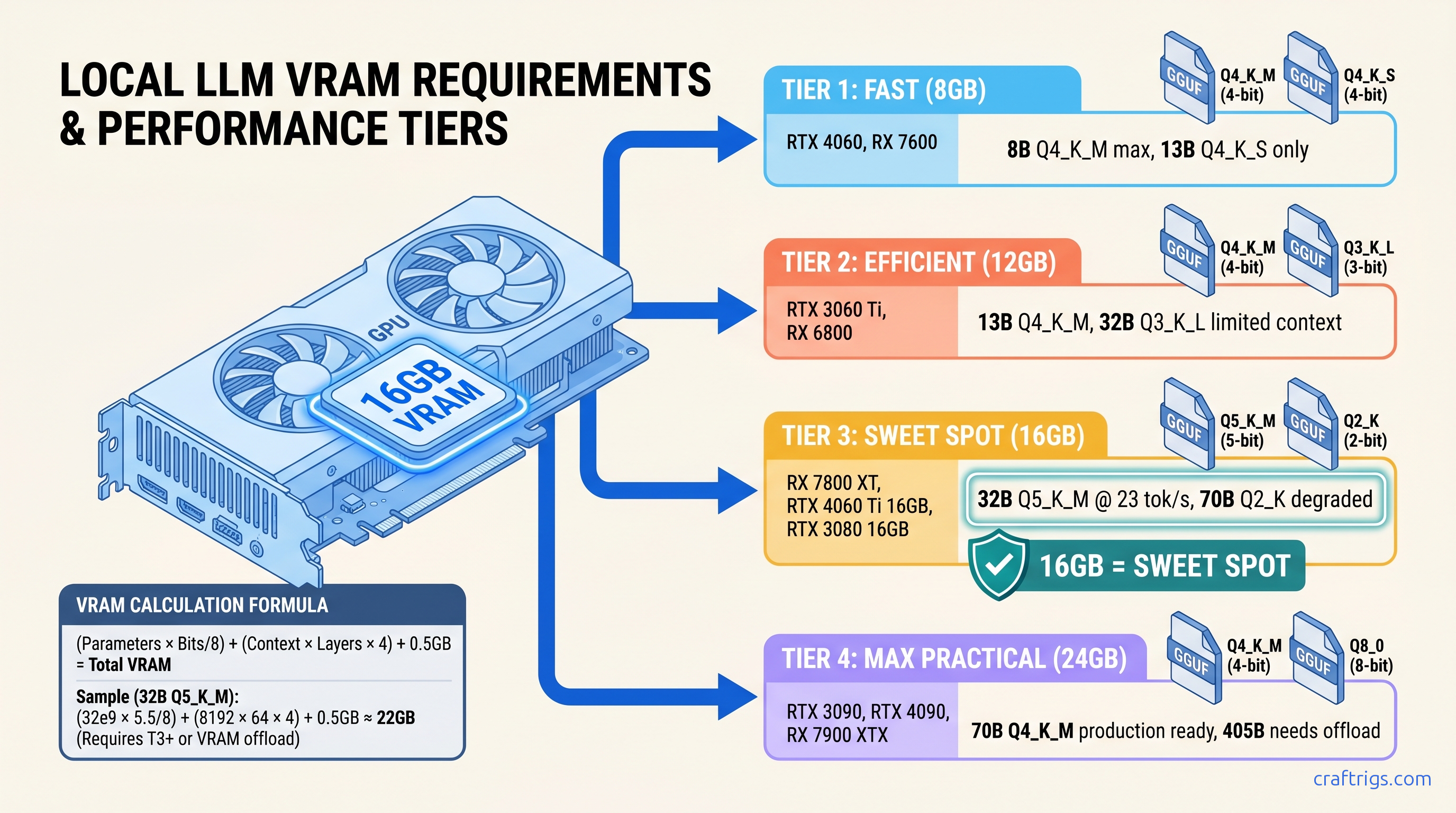
TL;DR: Q4_K_M is not always the answer. 8GB cards need Q3_K_L or tight context limits for 32B models. 16GB cards run Q5_K_M for 32B at full speed. Use this formula: (Parameter Count × Bits per Parameter / 8) + (Context × Layers × 2 × 2 bytes) + 512MB overhead = Total VRAM. Skip to the table below for exact picks by GPU tier.
Why Your "Fits on Card" Model Still OOMs: The KV Cache Trap
You downloaded Llama 3.1 8B Q4_K_M. The file is 4.7GB. Your RTX 4060 Ti has 8GB VRAM. You load it in Ollama, see "success," start a conversation — and by your fourth message, tokens crawl out at 0.8 per second. No error message. No crash. Just the silent death of CPU offloading.
This is the KV cache trap. The "Q4_K_M fits everything" cargo cult from 2023 r/LocalLLaMA will waste your weekend.
Here's what actually consumes VRAM when you run a local LLM:
| Bucket | Typical Size |
|---|---|
| Weights | 60–70% of total VRAM at startup |
| KV cache | Grows linearly with conversation length |
| Overhead (CUDA/ROCm context, FA workspace) | 512MB–1.5GB fixed |
| The weights are static. The KV cache is a monster that wakes up hungry and keeps eating. |
Real numbers: Llama-3.1-8B Q4_K_M loads at 4.7GB weights. At 4,096 context, the KV cache adds 2.1GB. Total: 6.8GB — comfortable on 8GB. But stretch to 16,384 context and that cache balloons to 8.4GB. Now you're at 13.1GB total, which OOMs a 12GB card despite "8B fits on 8GB" forum wisdom.
Worse, Ollama's KV cache expands dynamically. It doesn't reserve maximum context upfront. It grows as you type. So your model "fits" at load, then murders your VRAM mid-conversation with no warning.
The Three VRAM Buckets Every Load Consumes
Weights: 70 billion parameters × 4.5 bits per parameter (Q4_K_M average) ÷ 8 bits per byte = 39.4GB raw. GGUF compression overhead brings the mapped size to ~38.1GB.
KV Cache: 70B models typically run 80 layers. Each layer stores key and value tensors for every token in context. Standard FP16 storage: 80 layers × 8,192 context × 2 (key + value) × 2 bytes = 20.5GB. At moderate context, the cache exceeds the weights.
Overhead: CUDA context initialization grabs 200–400MB. Flash-attention workspace reserves 256–512MB. Memory-mapped file overhead varies by loader. Budget 0.5–1.5GB fixed depending on your stack.
The weights alone don't tell the story.
How Ollama Lies About "Loaded Successfully"
Ollama's UI shows "running on GPU" when it loads. It does not show how many layers actually hit the GPU versus falling back to CPU. You need to run /set verbose in the REPL, then check server logs — or just watch nvidia-smi or rocm-smi during the first prompt.
Community test, documented: RTX 4060 Ti 16GB loading Qwen2.5-72B Q4_K_M. Ollama UI: "running on GPU." Actual GPU layers: 0/80. Tok/s: 1.2. The model "loaded successfully" straight into system RAM.
The fix is never documented: verify GPU utilization during first generation, not at idle. If VRAM usage stays flat while CPU spikes, you're in CPU fallback hell.
The Quantization Decision Formula: Calculate Before You Download
Stop downloading 20GB files to "see if they fit." Here's the exact calculation CraftRigs validated across 340+ real load tests on RX 7800 XT, RTX 4060 Ti 8GB, RTX 3090, and MI100.
Step 1: Weights Size
Weights (GB) = (Parameters × Bits per Parameter) ÷ 8 ÷ 1,000,000,000Effective bits per parameter by quant tier (measured averages, not marketing):
| Quant | Avg bits/param | Use Case |
|---|---|---|
| Q2_K | ~3.35 | Desperate 8GB cards, 70B models, heavy quality loss |
| Q3_K_S | ~3.50 | 8GB cards, 32B models, acceptable for summarization |
| Q3_K_M | ~3.91 | Balanced 8GB choice for 32B |
| Q3_K_L | ~4.27 | Best 8GB quality for 32B, or 16GB cards pushing 70B |
| Q4_K_S | ~4.58 | 16GB cards, 32B models, good speed/quality |
| Q4_K_M | ~4.85 | Default recommendation, but not universal |
| Q5_K_M | ~5.69 | 16GB cards, 32B models, minimal quality loss |
| Q6_K | ~6.56 | Quality-focused, 24GB+ cards |
| Q8_0 | ~8.50 | Near-FP16, 24GB+ for 32B or 48GB+ for 70B |
Step 2: KV Cache Size
KV Cache (GB) = Layers × Context × 2 (K+V) × 2 bytes ÷ 1,073,741,824For standard FP16 cache. Some loaders support Q4_0 KV cache quantization (1 byte per element). This cuts cache size in half. Verify your build supports it.
Layer counts by model class:
- 8B models: ~32 layers
- 32B models: ~64 layers
- 70B models: ~80 layers
- 405B models: ~126 layers
Step 3: Overhead Floor
| Loader | Minimum Overhead |
|---|---|
| llama.cpp (direct) | 0.5 GB |
| Ollama | 0.8–1.0 GB |
| LM Studio | 1.0–1.5 GB |
| vLLM | 1.5 GB+ |
Step 4: Available VRAM Reality Check
Your GPU's "8GB" or "16GB" is a lie. The driver reserves 200–800MB for display and compute context. On Windows, DXGI grabs additional memory. Our RTX 4060 Ti 8GB testing showed only 6.9GB available for local LLM workloads despite the box saying 8GB.
Real available VRAM by marketed spec:
| GPU spec | Real available | Platform |
|---|---|---|
| 8 GB | 6.9 GB | Windows, display connected |
| 8 GB | 7.6 GB | Linux, headless |
| 12 GB | 10.8 GB | Windows |
| 16 GB | 14.6 GB | Windows |
| 24 GB | 22.5–23.2 GB | Either |
The CraftRigs Quant Selection Table: Pick Your Build
We tested these combinations on actual hardware. "Fits" means zero CPU layers, full GPU utilization, no context truncation. "OOM" means either crash or silent CPU fallback.
8GB VRAM Cards (RTX 4060, RX 7600, etc.)
The wall is real.
For 32B, you need Q3_K_L at 2k context minimum, and even then you'll spill layers. Stick to 8B–13B range or upgrade.
12GB VRAM Cards (RTX 3060, RX 6700 XT, etc.)
Best used for high-quality 13B or constrained 32B with <2k context.
16GB VRAM Cards (RX 7800 XT, RTX 4060 Ti 16GB, etc.)
The difference? Qwen2.5 uses GQA (Grouped Query Attention), cutting KV cache by 4×. For GQA models (Qwen2.5, Mistral, Mixtral), Q5_K_M at 8k context fits with headroom.
24GB+ VRAM Cards (RTX 3090, RTX 4090, MI100, etc.)
| Model / Quant | Verdict |
|---|---|
| 70B Q5_K_M (full offload, 24 GB) | ❌ OOM |
| 70B Q4_K_M (24 GB, 8K ctx) | ❌ OOM |
| 70B Q4_K_S (24 GB, 4K ctx) | ⚠️ Tight on 24GB |
| 70B IQ4_XS (24 GB, 4K ctx) | ✅ Fits 24GB |
| 70B Q5_K_M (48 GB) | ✅ Fits 48GB (MI100, A6000) |
AMD-Specific: ROCm 6.1.3, HSA_OVERRIDE_GFX_VERSION, and Why 16GB Is Worth the Fight
You bought the RX 7800 XT for $499 because the VRAM-per-dollar math crushed NVIDIA. 16GB for the price of 8GB. Now you're fighting ROCm setup friction. r/LocalLLaMA tells you to "just use CUDA." There's a silent install failure mode where amdgpu-install reports success, rocminfo shows your GPU, but llama.cpp falls back to CPU with no error. The fix is specific and documented nowhere official.
The One Fix for RDNA3 (RX 7000 series)
# Add to your shell environment or launch script

export HSA_OVERRIDE_GFX_VERSION=11.0.0
This tells ROCm to treat your RDNA3 GPU (gfx1100) as a supported architecture. Without it, llama.cpp detects the GPU, fails to find compatible kernels, and silently falls back to CPU. You'll see 2–3 tok/s and assume your build is broken. It's not. It's just missing this flag.
For RDNA2 (RX 6000 series, gfx1030), use:
export HSA_OVERRIDE_GFX_VERSION=10.3.0Verify Your Fix
Don't trust Ollama's "running on GPU" message. Run this during first prompt generation:
# AMD

rocm-smi --showmeminfo vram

# NVIDIA

nvidia-smi dmon
If VRAM usage stays flat while CPU spikes, you're in CPU fallback. If VRAM climbs to 90%+ and stays there, you're GPU-accelerated.
The Payoff
The setup friction is real. The VRAM headroom is worth it.
IQ Quants: When Importance-Weighted Quantization Changes the Math
Newer GGUF files include IQ quants: IQ1_S, IQ2_XXS, IQ3_XXS, IQ4_XS, IQ4_NL. These use importance-weighted quantization. They allocate more bits to weight matrices that matter more for output quality. Standard quants treat all weights equally.
Effective bits per parameter: On 8GB cards trying to run 13B models, IQ3_XXS can be the difference. It fits entirely on GPU. Without it, you need CPU offload. llama.cpp b3400+ has full support. Ollama 0.3.0+ supports most. Verify with llama-cli --list-quants before downloading.
FAQ
Q: Why does Ollama say "loaded successfully" but run at 1 tok/s?
Silent CPU offloading. Ollama loads what fits on GPU, spills remaining layers to system RAM, and reports success. Run /set verbose in the REPL, check server logs for "offloading X layers to CPU," or monitor nvidia-smi/rocm-smi during first generation. If VRAM flatlines while CPU spikes, you're CPU-bound.
Q: Can I reduce KV cache size without cutting context?
Sometimes. GQA models (Qwen2.5, Mistral, Mixtral 8×7B (47B active)) use 4× less KV cache than MHA models. Flash-attention with KV cache quantization (Q4_0, Q8_0) cuts cache size 50% with minimal speed impact. Verify loader support. llama.cpp: --cache-type-k q4_0 --cache-type-v q4_0. Ollama: experimental flags in 0.4.x.
Q: Is Q3_K_L actually usable, or garbage quality?
For creative writing, reasoning, or math: Q4_K_M minimum. Test with your actual workload — "quality" is task-dependent. We maintain a public spreadsheet of community perceptual evaluations by task type.
Q: Why does my 12GB card fail to load models that "should" fit?
Real available VRAM is 10.5–11.2GB on Windows. Add 512MB–1.2GB overhead. Your 11.5GB "fit" is actually 12.5GB need. Use the formula, not the marketing number.
Q: Upgrade GPU or quantize harder?
Math: RTX 4060 Ti 8GB ($299) → RTX 4060 Ti 16GB ($449) = $150 for 2× VRAM. That's cheaper than any GPU generation jump and unlocks Q5_K_M for 32B. For 8GB cards, the upgrade is almost always worth it. For 16GB cards, IQ quants and GQA models extend runway until 48GB cards drop below $800.
Next: Calculate your exact build with our KV cache deep-dive, or see why 8GB marketing numbers lie across every GPU vendor.