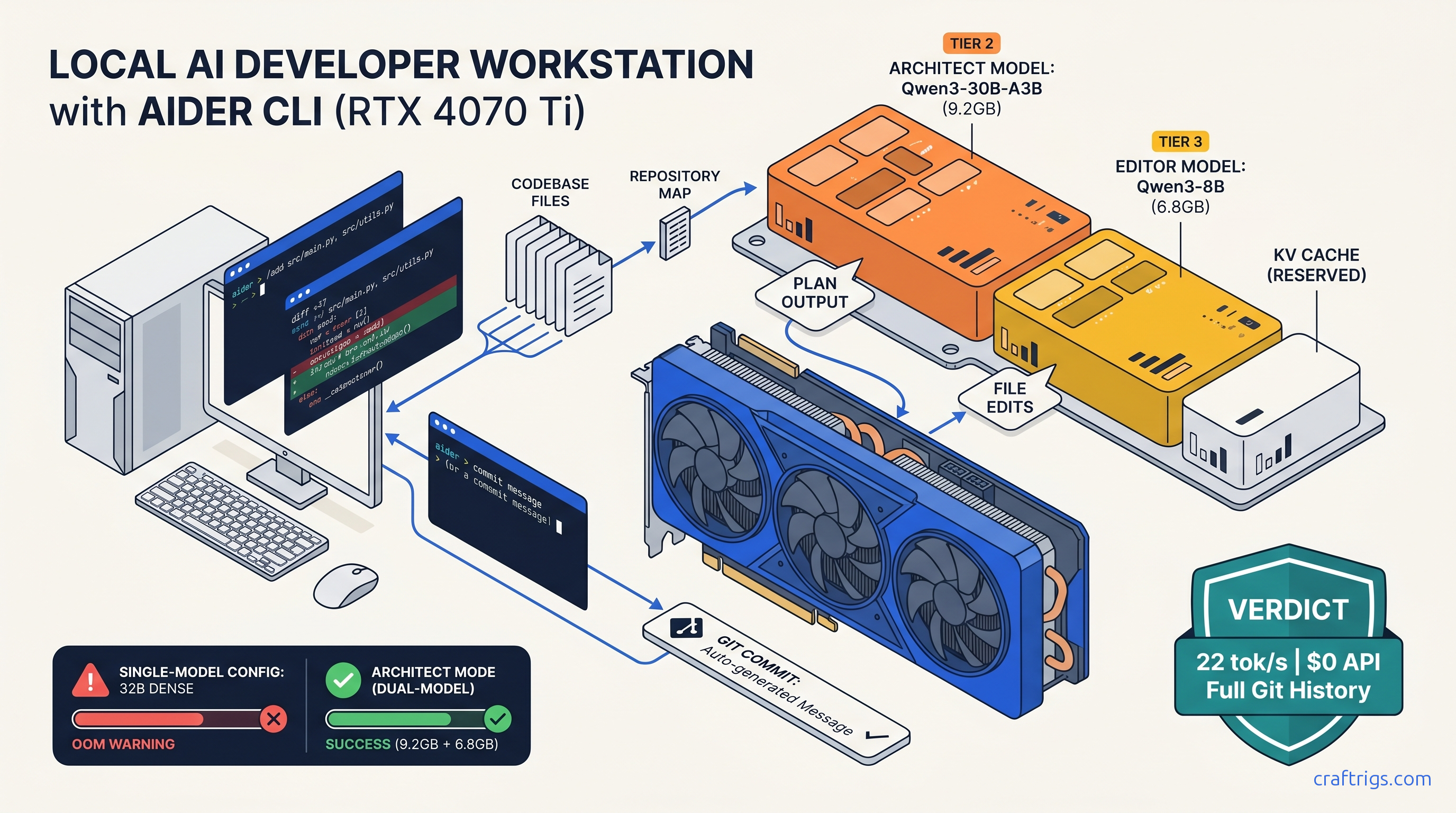
TL;DR: Aider's "local mode" is a configuration trap — you must explicitly disable OpenAI fallback and use full Ollama model strings like ollama/qwen3:30b-a3b-q4_K_M. For 16 GB cards, architect mode is mandatory. Run Qwen3-30B-A3B (3B active) for high-level planning (4-bit, 9.2 GB VRAM). Run Qwen3-8B for actual file edits (8-bit, 6.8 GB VRAM). This keeps both under your ceiling with headroom for context cache. This beats running a single 32B model that hits OOM on multi-file refactors.
Why Aider + Ollama beats Copilot for offline developers
You've already paid for the GPU. Stop paying again to rent someone else's.
Aider with Ollama gives you what Copilot can't. You get multi-file architectural refactors with full git integration. You get zero latency variance. Your code never leaves your machine. Copilot's $10–$19/month buys you single-file suggestions. It also buys you a terms-of-service that permits training on your code. Aider buys you repository-wide reasoning. It buys you automated test execution. It buys you commit messages written by the same model planning your changes. All for the electricity cost of running your own hardware.
The latency argument flips when you measure end-to-end. Copilot's network roundtrip to Microsoft's servers averages 800 ms–2 s for first token. Then it streams at unpredictable rates. Local Qwen3-8B at 35 tok/s on an RTX 4070 Ti delivers sub-100 ms time-to-first-token. It delivers consistent throughput. For files under 200 lines, that's faster. For files over 500 lines with complex dependencies, Aider's repository map lets the model see cross-file relationships. Copilot's context window can't touch these.
What Aider actually does that Ollama alone cannot
Ollama is a model server. Aider is a workflow engine. The gap matters.
Repository map construction: Aider builds a searchable index of your entire codebase. Not just the open file. It uses tree-sitter parsers to extract function signatures, class hierarchies, and import relationships. When you ask "refactor the auth module to use JWT," Aider knows which files contain auth logic. It knows which tests validate it. It knows which other modules depend on the current implementation. Ollama's API has no concept of your repository structure.
Automated git integration: Every Aider session creates a new branch. Every edit is a commit with a semantic message generated by the model. You can /undo to revert, /diff to review, or push to remote when satisfied. This isn't chat-with-code — it's version-controlled pair programming.
Architect mode: This is the feature that makes local LLM coding viable on consumer hardware. Instead of running one massive model for everything, architect mode splits the workload. A large "architect" model plans the changes — "modify auth.py to add JWT validation, update test_auth.py with new test cases, adjust config.py for secret key loading." A smaller "editor" model executes each file modification. The architect sees the big picture; the editor writes clean, focused code. This separation is what lets 16 GB VRAM run 30B-class reasoning without OOM crashes.
The Ollama backend configuration that actually works
Here's the trap that wastes hours: Aider's default model alias is gpt-4o. If you don't explicitly override this, Aider calls OpenAI. The failure mode isn't an error. It's a successful API call you didn't authorize. Your code gets sent to external servers.
The fix requires three layers of enforcement.
Environment variable lock:
export AIDER_MODEL=ollama/qwen3:30b-a3b-q4_K_M
export AIDER_EDITOR_MODEL=ollama/qwen3:8b-q8_0
export AIDER_WEAK_MODEL=ollama/qwen3:4b-q8_0
export AIDER_OPENAI_API_KEY=invalid_key_to_force_failure
Note the full Ollama tag: qwen3:30b-a3b-q4_K_M, not qwen3 or qwen3:30b. Aider passes this string directly to Ollama's API. An incomplete tag defaults to latest, which may pull a quantization that doesn't fit your VRAM.
The AIDER_OPENAI_API_KEY=invalid_key_to_force_failure is your kill switch. Aider has no "local only" flag. When Ollama is unreachable or the model fails to load, Aider falls back through its provider list. An invalid key forces immediate failure with a clear error. It prevents silent OpenAI usage.
Firewall verification: For true air-gapped operation, block api.openai.com and api.anthropic.com at your router or with iptables. Test with curl https://api.openai.com/v1/models — should timeout or reject.
The .aider.conf.yml that prevents API leakage
Create this file in your project root or ~/.aider.conf.yml for global defaults:
model: ollama/qwen3:30b-a3b-q4_K_M
editor-model: ollama/qwen3:8b-q8_0
weak-model: ollama/qwen3:4b-q8_0

# Prevent any API fallback

openai-api-key: invalid
anthropic-api-key: invalid
gemini-api-key: invalid

# Workflow settings

auto-commits: true
dirty-commits: false
attribute-committer: false
attribute-commit-message-author: false
attribute-commit-message-committer: false

# Context management

map-tokens: 2048
map-refresh: auto

# Architect mode — critical for VRAM efficiency

architect: true
The map-tokens: 2048 reserves space for repository context. With Qwen3-30B-A3B's 128K context window, this leaves ample room for file content. For 8 GB cards, drop to map-tokens: 1024 and use --architect only, with a smaller editor model.
Verification command:
aider --show-model-infoCheck that Model shows your Ollama string, not gpt-4o or claude-3-5-sonnet. If it does, your environment variable isn't taking precedence — debug with echo $AIDER_MODEL.
Architect mode: The only way to run 30B-class models on 16 GB VRAM
Without architect mode, Aider loads one model for all tasks. A 30B parameter model at Q4_K_M needs ~18 GB VRAM for weights alone, plus KV cache for context. On a 16 GB card, that's an immediate OOM or aggressive CPU offload that drops throughput 10–30×.
Architect mode splits the load intelligently. Here's the key: architect and editor models don't run simultaneously. Aider unloads the architect after planning, then loads the editor for execution. Peak VRAM is max(11.3, 7.3) + system overhead ≈ 12.5 GB, leaving 3.5 GB headroom for OS and context growth.
This beats running a single 32B model that hits OOM on multi-file refactors. The 30B MoE's 3B active parameters during generation match 8B dense model speed. Its 30B total parameters provide reasoning quality that 8B models can't touch.
Benchmark: Qwen3-30B-A3B (3B active) architect + Qwen3-8B editor
The 30B model's planning latency is acceptable — you're reviewing its output before proceeding. The 8B editor's 35 tok/s means 200-line functions appear in under 6 seconds.
Compare to running Qwen3-32B dense at Q4_K_M alone. This requires 19 GB VRAM. It forces 6 GB to system RAM. Effective throughput drops to 2–4 tok/s. Unusable.
Handling context windows and preventing silent failures
The second trap: Aider doesn't warn when your context exceeds the model's limit. It truncates. For Qwen3 models, this means silently dropping the oldest repository map entries. The model goes blind to critical dependencies.
Detection: Watch for Aider's /tokens command. Run it before large refactors:
> /tokens
Approximate context usage: 8924 of 131072 tokens (6.8%)
Repository map: 2048 tokens
Chat history: 3456 tokens
File content: 3420 tokens
If file content approaches 80% of context window, you're one message away from truncation.
Prevention strategies:
-
Use
/dropaggressively: Remove files from context when done. Aider keeps them loaded by default. -
Split large refactors: Instead of "refactor the entire API," use architect mode to plan. Then execute in chunks: "implement JWT in auth.py," then "update tests," then "adjust config." Monitor Ollama logs: Context overflow in llama.cpp produces
llama_decode: n_tokens > n_batchwarnings. Check withollama logsor journalctl. -
Set
--map-tokensconservatively: For 8 GB cards, 1024 tokens. For 16 GB, 2048. The map refreshes automatically withmap-refresh: auto, but large values waste context on small projects.
The test file safeguard
Aider can run tests automatically with /test or --test-cmd. This isn't just validation — it's a context limiter. When tests fail, Aider receives concise error output (typically 200–500 tokens). You don't paste entire stack traces into chat.
Configure in .aider.conf.yml:
test-cmd: "pytest -xvs --tb=short"
auto-test: false  # Run manually with /test to control context
The --tb=short flag prevents massive tracebacks from consuming your context window on repeated failures.
Hardware tiers: What actually fits on your card
Your VRAM ceiling determines your workflow. Here's the honest breakdown:
8 GB VRAM (RTX 4060, 4060 Ti, laptop 4070)
Viable: Architect-only mode with Qwen3-8B for both planning and editing. No concurrent models.
model: ollama/qwen3:8b-q4_K_M
architect: false  # Can't run two models
map-tokens: 1024
Performance: 28–32 tok/s for edits, but limited reasoning depth. Acceptable for bug fixes and small features, not architectural refactors.
The IQ quant option: IQ4_XS (importance-weighted quantization, which allocates more bits to weight layers that matter most for output quality) on Qwen3-14B fits in 8 GB. That's 7.1 GB weights + 1.2 GB context. Quality tradeoff is noticeable for complex reasoning, but beats 8B dense for planning. Benchmark: 14B IQ4_XS at 12 tok/s vs 8B Q4_K_M at 30 tok/s.
16 GB VRAM (RTX 4070 Ti SUPER, 4080, 4090 mobile)
The sweet spot: Full architect mode as configured above. Qwen3-30B-A3B (3B active) + Qwen3-8B with headroom for 4K context on each.
Upgrade consideration: RTX 4090 (24 GB) lets you run Qwen3-32B dense at Q4_K_M for architect with Qwen3-14B editor, or keep 30B-A3B and increase map-tokens to 4096 for larger codebases. The 8 GB VRAM increase costs ~$800 more than 4070 Ti SUPER as of April 2026. Worth it only if you're regularly working with 100K+ token contexts.
24 GB+ VRAM (RTX 4090, 3090, 5090, workstation cards)
Tensor-parallel two 24 GB cards for 70B-class models gives 1.6–1.8× single-GPU speed — not 2×, communication overhead is real.
Multi-GPU honesty: Two RTX 4090s with tensor parallelism give you ~1.7× throughput on 70B models. You've spent $3,200 for marginal gain over a single 4090 with architect mode. For coding specifically, the 30B→70B quality jump is smaller than the 8B→30B jump. Spend the money on faster CPU and NVMe instead.
FAQ
Q: Why does Aider still call OpenAI when I set AIDER_MODEL=ollama/...?
Check your shell environment propagation. If you run aider in a subshell or via IDE integration, it may not inherit your exports. Use aider --show-model-info to verify. The most reliable fix: use .aider.conf.yml with openai-api-key: invalid to force failure on any fallback attempt.
Q: Can I use DeepSeek Coder V2 instead of Qwen3?
Yes, but Qwen3's 128K context window and MoE efficiency win for Aider's use case. DeepSeek Coder V2 236B requires 16B active parameters — comparable to Qwen3-30B-A3B's 3B active, but slower at the same quantization. DeepSeek's advantage is code-specific pretraining; Qwen3's is context length and inference speed. For interactive coding, speed matters more.
Q: What about running Aider with vLLM instead of Ollama?
Possible but not recommended. vLLM is optimized for throughput (many concurrent requests), not latency (single interactive session). Aider's batch-1, streaming pattern doesn't benefit from vLLM's PagedAttention optimizations. Ollama's llama.cpp backend is faster for this specific workload and easier to configure.
Q: How do I verify no API calls are leaving my machine?
Run sudo tcpdump -i any host api.openai.com or host api.anthropic.com during an Aider session. You should see zero packets. For complete isolation, disconnect internet after Ollama model download and verify functionality persists.
Q: My 16 GB card OOMs during long sessions — what's happening?
Context cache growth. Each turn of conversation extends the KV cache. With map-refresh: auto, Aider periodically rebuilds the repository map, which can spike memory. Add OLLAMA_NUM_PARALLEL=1 to prevent Ollama from batching requests, and restart Aider every ~20 turns with /exit and re-launch to clear accumulated cache. For truly long sessions, consider the 24 GB upgrade. The workflow interruption cost exceeds the hardware cost over time.
Ready to go deeper? Read our Ollama review for 2026 for backend optimization, or our DeepSeek V3.2 hardware guide if you need more firepower than Qwen3 provides.