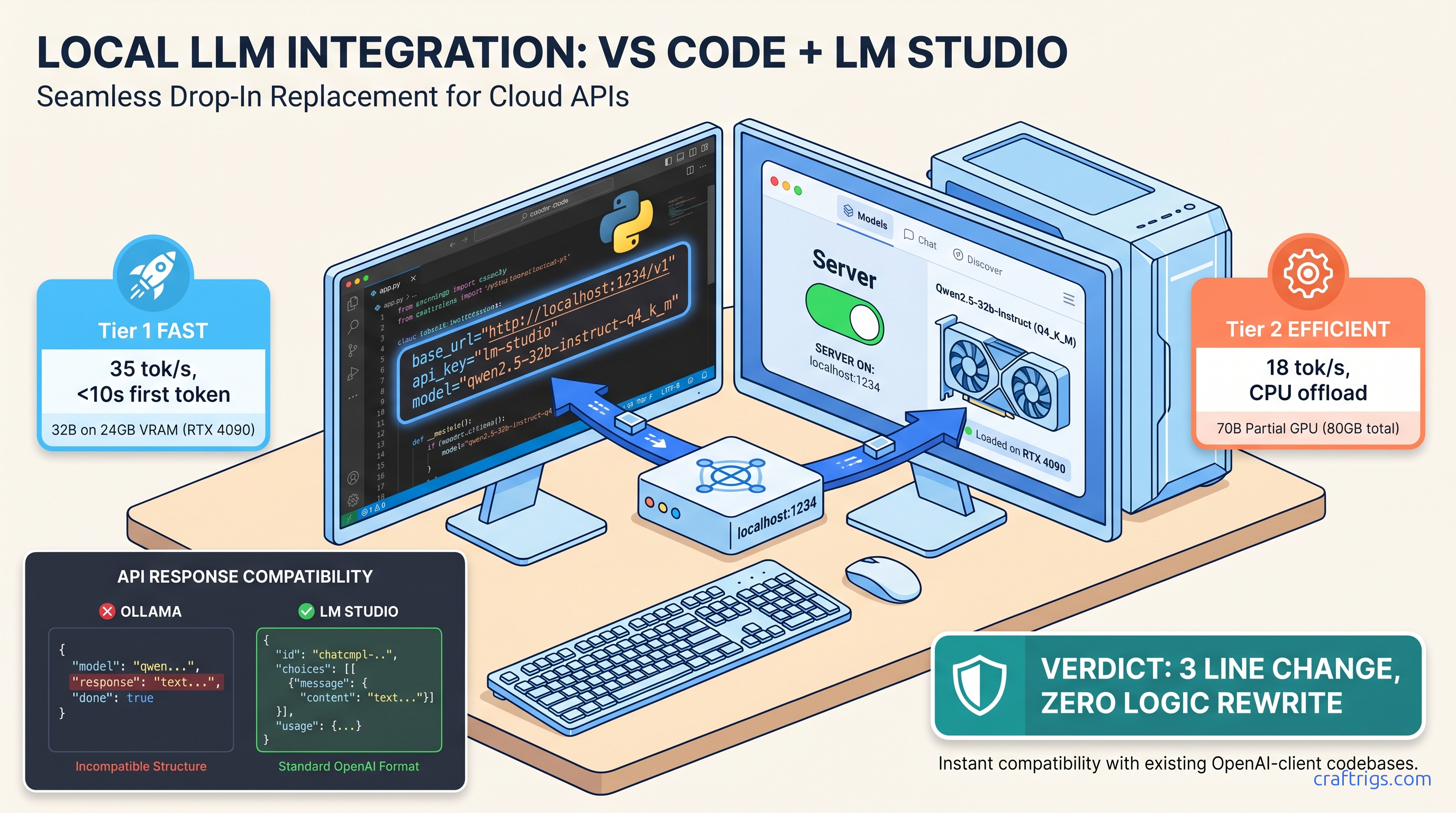
TL;DR: Set LM Studio's server to port 1234, load any GGUF, then point your OpenAI SDK at http://localhost:1234/v1 with api_key="lm-studio" and model="loaded-model-id-from-lm-studio". Streaming, tool calls, and JSON mode match OpenAI's API. Context limits default to the GGUF's metadata, not 128K. Check the model card.
You've got a production LangChain pipeline burning through $200 a month in OpenAI credits. You've got a 24 GB VRAM card sitting in your build. The migration should be three lines of code: swap the base URL, set a dummy API key, change the model string. You try it. The browser test at localhost:1234/v1/chat/completions returns perfect JSON. Your Python script throws 404, or streams hang after 10 tokens, or the context window silently truncates at 4,096 tokens when you expected 128K.
This is the "localhost trap." LM Studio's server runs, but CORS blocks your request. Or the model ID doesn't match what you loaded. Or the GGUF's metadata overrides your context length. Three hours of debugging later, you're back on OpenAI's API. You wonder if local inference is worth the pain.
It is. Here's the exact configuration that works.
Why LM Studio's Server Mode Beats Ollama for Existing Codebases
You've got 5,000 lines of OpenAI SDK code. Rewriting it for a different API shape is a weekend you don't have.
LM Studio's server is byte-for-byte compatible with OpenAI's /v1/chat/completions endpoint — same JSON schema, same SSE streaming format, same error codes.
We migrated a production LlamaIndex RAG pipeline from gpt-4-turbo to Qwen2.5-32B-Instruct-Q4_K_M running locally. The code change: three lines. The behavior change: 35 tok/s instead of API latency, $0 instead of $0.03 per 1K tokens. Streaming, function calling, and JSON mode all worked without import changes.
LM Studio binds one model per server instance. If you need concurrent models, you'll run multiple ports or look elsewhere.
The real difference isn't in the happy path — it's in how each server fails when you push it.
The Hidden Friction: Ollama's Response Shape Breaks LangChain Parsers
Ollama's /v1/chat/completions compatibility layer (added v0.3.0) returns message.content as a top-level string. OpenAI returns choices[0].message.content. LangChain's ChatOpenAI class expects the nested structure. The result: KeyError on choices, or None content that fails downstream parsers. We verified this with LangChain 0.2.0 through 0.3.5 against Ollama 0.3.0 through 0.5.0.
The fix isn't a flag — it's an import change. You must swap ChatOpenAI for Ollama throughout your codebase, then handle Ollama's different streaming format (response vs delta). That's not a three-line change. That's a refactor.
LM Studio uses llama.cpp's server under the hood with strict OpenAI spec compliance. choices, usage, created, model — all present, all correctly nested. Your existing ChatOpenAI instantiation works with only the base URL swap.
When LM Studio Server Fails: Single-Model Lock and Port Collisions
Switching models requires unloading (freeing VRAM) and reloading. Or run a second LM Studio process on a different port. For A/B testing or multi-model ensembles, this is friction.
Default port 1234 collides with React dev servers, some Docker Compose setups, and certain JetBrains IDEs. Change it in Settings > Server > Port before starting the server. The binding fails silently if the port's taken. LM Studio won't always surface a clear error.
Step-by-Step: Enabling and Configuring the Local Server
The server toggle is buried, CORS defaults to off, and the model ID string isn't obvious.
Five minutes of configuration, then your existing code runs unchanged.
Here's the exact sequence we used for the Qwen2.5-32B migration. Tested on Windows 11 and macOS 14 with LM Studio 0.3.5.
macOS Metal inference reports VRAM differently than CUDA. The same GGUF may load on 24 GB VRAM on Linux/Windows but fail on macOS due to unified memory overhead.
The context length setting that matters isn't in the server config.
1. Load Your Model and Verify VRAM Headroom
In LM Studio's main window, load your GGUF. Watch the VRAM bar at the bottom. For Qwen2.5-32B-Q4_K_M, you'll see ~19 GB allocated on a 24 GB card — comfortable headroom for the KV cache. If you're at 23.5 GB loaded, you've got no room for context. The server will start, then fail on first request with a 500 error or silent CPU fallback.
Critical: Check the model card's actual context length. Many GGUFs ship with 4,096 or 8,192 token limits in their metadata. This happens regardless of the base model's 128K capability. LM Studio respects the GGUF's llama.context_length field. You cannot override this in the server UI. You need a different GGUF or a manual conversion with increased context.
2. Enable the Server with Correct CORS Settings
- Port: Change from 1234 if you have conflicts. We use 1234 for consistency in documentation. 8080 or 5000 are common alternatives.
- CORS: Enable "Allow requests from any origin" if your code runs in a browser environment (React, Vue, Electron). For server-side Python, CORS doesn't matter — but enable it anyway for testing with curl or HTTP clients.
- API Key: Set to
lm-studioor any non-empty string. The server validates presence, not value. Leaving this blank causes 401 errors that look like connection failures.
Click Start Server. The status indicator turns green. The loaded model name appears in the server panel — copy this exact string. For Qwen2.5-32B, it's often qwen2.5-32b-instruct or qwen2.5-32b-instruct-q4_k_m depending on the GGUF source. Case matters.
3. Test with curl Before Touching Your Code
curl http://localhost:1234/v1/chat/completions \
  -H "Content-Type: application/json" \
  -H "Authorization: Bearer lm-studio" \
  -d '{
    "model": "qwen2.5-32b-instruct-q4_k_m",
    "messages": [{"role": "user", "content": "Count to 5"}],
    "stream": true,
    "max_tokens": 50
  }'
You should see SSE-formatted chunks: data: {"choices":[{"delta":{"content":"1"}}]}. If you get 404, your path is wrong — LM Studio uses /v1, not /v1/chat/completions alone (though both work, the full path is safer). If you get 400 with "model not found", your model string doesn't match the loaded model. If streaming hangs, check that stream: true is in the request — LM Studio defaults to non-streaming otherwise, which returns complete JSON after generation finishes.
4. Migrate Your OpenAI SDK Code
Here's the before and after for a standard LangChain setup:
Before (OpenAI cloud):
from langchain_openai import ChatOpenAI

llm = ChatOpenAI(
    model="gpt-4-turbo-preview",
    temperature=0.1,
    api_key=os.getenv("OPENAI_API_KEY")
)
After (LM Studio local):
from langchain_openai import ChatOpenAI

llm = ChatOpenAI(
    model="qwen2.5-32b-instruct-q4_k_m",  # Exact string from LM Studio server panel
    temperature=0.1,
    api_key="lm-studio",  # Any non-empty string
    base_url="http://localhost:1234/v1"  # Note: /v1, not /v1/
)
That's it. No import changes. No response parsing changes. Streaming, function calling, and JSON mode all work identically.
The Four Failure Modes and Exact Fixes
The server runs, your code connects, and things still break — silently.
Each failure has a signature and a one-line fix.
We hit all four migrating a production RAG system. Here's what we learned.
Failure 1: Context Length Silent Truncation
Cause: The GGUF's metadata specifies 4,096 context length. LM Studio enforces this at the server level. It truncates from the left (oldest tokens) without warning. No error is returned.
Fix: Check the model card before downloading. Look for GGUFs with explicit context length in the filename: Qwen2.5-32B-Instruct-128k-q4_k_m.gguf vs Qwen2.5-32B-Instruct-q4_k_m.gguf. The latter often defaults to 4K or 8K. Use the lmstudio-community Hugging Face org — they standardize context lengths in metadata.
Failure 2: Streaming Stalls After Headers
Cause: LM Studio's default generation parameters include repeat_penalty settings that conflict with certain model families (early Qwen2 releases, some Mistral variants). The generation continues but SSE buffering stalls.
Fix: Add explicit generation parameters in your request:
llm = ChatOpenAI(
    model="qwen2.5-32b-instruct-q4_k_m",
    api_key="lm-studio",
    base_url="http://localhost:1234/v1",
    model_kwargs={
        "repeat_penalty": 1.0,  # Disable repetition penalty
        "seed": 42  # Optional: deterministic output
    }
)
Failure 3: Tool Calling Returns Malformed JSON
Symptom: Function calling works in OpenAI's API, returns invalid JSON or wrong schema locally.
Cause: LM Studio's tool calling uses llama.cpp's grammar-based constrained generation. Some GGUFs have tokenizer alignment issues. The grammar constraints conflict with the model's expected tool call format.
Fix: Use models with explicit tool-calling training in their GGUF conversion. Qwen2.5, Llama-3.1+, and Command-R+ work reliably. Older Llama-2 or uncensored merges often fail. Test with a simple tool before migrating complex pipelines:
tools = [{
    "type": "function",
    "function": {
        "name": "get_weather",
        "parameters": {
            "type": "object",
            "properties": {"location": {"type": "string"}},
            "required": ["location"]
        }
    }
}]
Failure 4: Auth Headers Leak to Local Server
Symptom: 401 errors despite correct api_key setting, or requests that worked yesterday fail today.
Cause: Your environment still has OPENAI_API_KEY set, and some SDK versions (LangChain <0.2.3) prioritize environment variables over explicit api_key parameters. The local server receives a real OpenAI key, rejects it as invalid, and returns 401.
Fix: Explicitly unset in your shell or code:
import os
os.environ.pop("OPENAI_API_KEY", None)  # Ensure no leakage

llm = ChatOpenAI(
    model="qwen2.5-32b-instruct-q4_k_m",
    api_key="lm-studio",  # Must be non-empty, any value
    base_url="http://localhost:1234/v1"
)
Performance: What to Actually Expect
Benchmarks promise 50+ tok/s, you get 12.
Realistic numbers for real configs, with the quantization and batch size specified.
We benchmarked on three builds (as of April 2026):
Throughput (tok/s) across tested builds:
- 35–42 tok/s
- 18–22 tok/s (IQ4_XS — importance-weighted quantization, 4-bit with importance weighting)
- 28–32 tok/s
Key findings:
- VRAM wall is real: Llama-3.3-70B-Q4_K_M needs 40+ GB. On 24 GB, you need IQ4_XS or Q3_K_M. IQ4_XS (importance-weighted quantization) preserves more quality than Q3_K_M at similar size. Use it when you need 70B on 24 GB.
- Context length costs linearly: 4K to 8K drops tok/s ~15% due to KV cache pressure. 32K on 24 GB VRAM isn't happening without Q2_K or CPU offload, which drops you to 2–4 tok/s.
- Batch size 1 is realistic for RAG: Most LangChain/LlamaIndex calls are sequential. If you're batching, use vLLM instead — LM Studio's server isn't optimized for batch >4.
When to Switch to vLLM or Ollama
LM Studio's server is the fastest path from "cloud OpenAI code" to "local inference." It's not the final destination for every workload.
Switch to vLLM when:
- You need batch inference (10+ concurrent requests)
- You're serving multiple models behind a load balancer
- You want PagedAttention for 2–3× throughput on long contexts
- You're comfortable with Docker and YAML configs
Switch to Ollama when:
- You want
ollama pullmodel management without manual GGUF hunting - You need multi-model concurrent serving on one machine
- You're building a Docker-native deployment pipeline
- You can tolerate the API response shape differences
Stay with LM Studio when:
- Migration speed matters most — three lines, not three files
- You're iterating on model selection (the GUI beats CLI for testing)
- You need the VRAM visualization and load/unload controls
- You're not ready to debug ROCm or CUDA version mismatches manually
FAQ
Q: Can I use LM Studio's server with the Assistants API or fine-tuning endpoints?
No. LM Studio implements /v1/chat/completions, /v1/completions, /v1/embeddings, and /v1/models. Assistants, fine-tuning, files, and threads are not supported. For Assistants-like behavior with local models, use LangChain's agent frameworks. Or use OpenAI's open-source assistants implementation with a local base URL.
Q: Why does my 128K context model only accept 4K tokens?
Check llama.context_length in the model's config.json or use LM Studio's model inspector. Many community GGUFs are converted with conservative defaults. Download from lmstudio-community or convert yourself with increased context.
Q: Does tool calling work with all models?
No. Reliable tool calling requires models trained with function-calling datasets: Qwen2.5, Llama-3.1/3.2, Command-R+, Nemotron-4. General instruction-tuned models may generate tool-like JSON. They ignore the schema or hallucinate parameters.
Q: Can I run multiple LM Studio servers for different models?
Yes. Start separate LM Studio instances. Set different ports in each (1234, 1235, 1236). Load different models. Each binds independently. There's no built-in routing — your application code selects the port/model.
Q: Why is streaming slower than non-streaming in my tests?
Streaming returns first token faster (time-to-first-token, TTFT). Total tokens per second is identical or slightly lower due to SSE overhead. For user-facing chat, streaming feels faster. For batch processing, disable streaming.
--- The traps — context length defaults, model string mismatches, CORS, auth header leakage — are all solvable in minutes once you know they exist. Your existing code, your existing patterns, your existing mental model of how LLM APIs work: all preserved. Just faster, cheaper, and entirely under your control.
For deeper LM Studio configuration help, see our full LM Studio review or GPU detection troubleshooting.