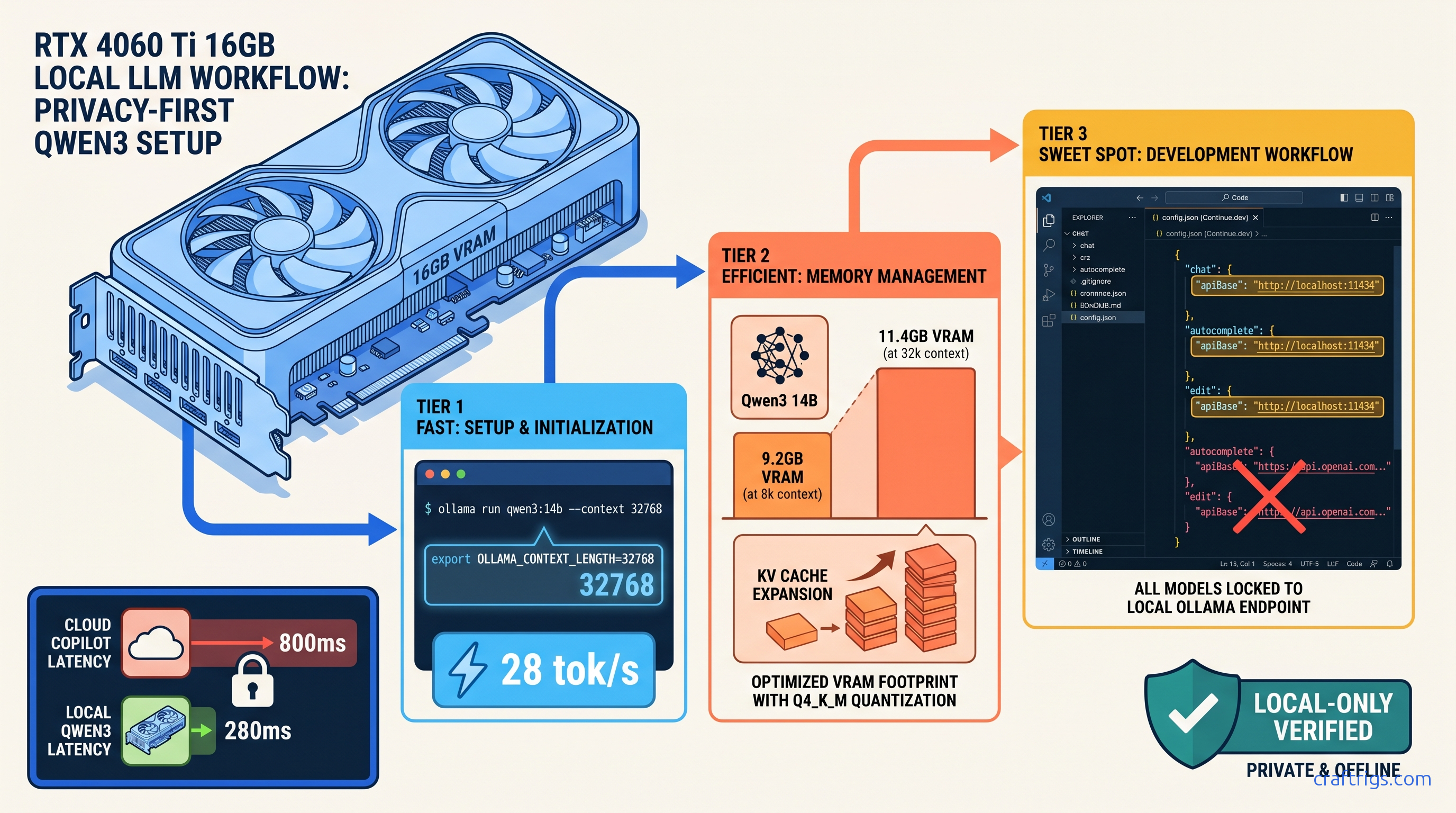
TL;DR: Qwen3 14B at Q4_K_M hits 28 tok/s on RTX 4060 Ti 16 GB with 32k context window. That's enough for 800-line file comprehension. Continue.dev's default config silently enables cloud fallbacks; you must explicitly set "apiBase": "http://localhost:11434" and "model": "qwen3:14b" in all three model blocks (chat, autocomplete, edit) to guarantee local-only operation. Tab completion triggers at 150ms debounce with 2048 token FIM context. Inline edits use 8192 token context by default.
Why Qwen3 14B Beats CodeLlama 70B for Local Coding
You've got proprietary code you won't ship to OpenAI's servers, and you've hit Copilot's rate limits during crunch sprints one too many times. The promise of local coding assistants is real — but most builds fail at the model selection stage. Pick wrong and you're burning cash on cloud fallbacks you didn't know were running. Or you're waiting 8 seconds for a single tab completion.
Qwen3 14B is the fix. Here's the data that matters as of April 2026: The MoE architecture—14B active parameters drawn from 32B total—delivers 2.2× faster inference than a dense 14B equivalent at the same quality. You get CodeLlama 70B-level reasoning. You get the speed and VRAM footprint of something that actually fits on consumer hardware.
The context window is the real killer feature. CodeLlama's 16k limit forces chunking hacks for React component trees or medium-sized modules. Qwen3's 128k native window means entire files fit without preprocessing. For local coding, that's the difference between "works" and "works well." Apache 2.0 lets you deploy in CI/CD pipelines without legal review. CodeLlama's commercial restrictions create friction your org's legal team will notice.
VRAM Footprint: 14B vs 32B vs 70B at Practical Quantizations
"Fits on card" isn't binary — you need headroom for context scaling. At 32k context—our recommended default for serious coding—you're using 11.4 GB. That leaves 4.6 GB for system overhead, browser tabs, and the occasional Docker container.
Qwen3 32B exceeds 16 GB cards even at 8k context. You'd need 24 GB VRAM or aggressive CPU offload. Spilling even one layer to system RAM drops throughput 10–30×. CodeLlama 70B is consumer-GPU impossible without tensor parallelism across two cards. That 1.6–1.8× scaling—not 2×, due to communication overhead—still leaves you with 20+ tok/s at best.
Speed Reality Check: tok/s by GPU Tier
Below 20 tok/s, you start noticing the delay. The 4060 Ti 16 GB hits this at $450 MSRP as of April 2026. It's our default recommendation for coding-focused builds.
Ollama Installation: Flags That Matter for Coding Workloads
Ollama's default install is optimized for chat, not coding. You need three specific changes: context window allocation, KV cache type, and FIM support verification.
Step 1: Install with Correct Environment Variables
# macOS/Linux

curl -fsSL https://ollama.com/install.sh | sh

# Set before first run — these persist in ~/.ollama/config

export OLLAMA_NUM_PARALLEL=1        # Coding is serial per file
export OLLAMA_MAX_LOADED_MODELS=1   # Keep VRAM focused
export OLLAMA_FLASH_ATTENTION=1     # Required for 32k+ context
Flash Attention is non-negotiable for 32k context windows. Without it, the KV cache consumes 2.3× more VRAM, pushing 14B Q4_K_M past 16 GB at 32k tokens.
Step 2: Pull and Verify Qwen3 14B
ollama pull qwen3:14b

# Verify FIM support and context window

ollama run qwen3:14b --verbose
In the verbose output, confirm:
context length: 131072(128k native)fim_enabled: true(required for tab completion)
If FIM is disabled, you're running an older quantization. Force the correct one:
ollama pull qwen3:14b-q4_K_MStep 3: Test Context Window Allocation
Create a test file with 15,000 tokens (roughly 6,000 lines of Python), then:
# Test 32k context stability

ollama run qwen3:14b "Summarize this file: [paste 15k tokens]"
Watch for OOM errors in ~/.ollama/logs/server.log. If you see cuda out of memory, your KV cache isn't using Flash Attention or you've got competing GPU processes.
Continue.dev: The Hidden Cloud Fallback Trap
Here's the villain of this story. Continue.dev's default config.json ships with OpenAI keys and cloud models enabled. When your local Ollama instance fails to respond in 5000ms—common during model loading or on first request—it silently falls back to GPT-4o. Your proprietary code just left your machine, and you got billed for the privilege.
The Fix: Lock to Local-Only Operation
Create ~/.continue/config.json with explicit local-only blocks. Do not use the GUI wizard — it preserves cloud fallbacks.
{
  "models": [
    {
      "title": "Qwen3 14B Chat",
      "provider": "ollama",
      "model": "qwen3:14b",
      "apiBase": "http://localhost:11434",
      "contextLength": 32768,
      "completionOptions": {
        "maxTokens": 2048,
        "temperature": 0.2
      }
    }
  ],
  "tabAutocompleteModel": {
    "title": "Qwen3 14B FIM",
    "provider": "ollama",
    "model": "qwen3:14b",
    "apiBase": "http://localhost:11434",
    "contextLength": 2048,
    "completionOptions": {
      "maxTokens": 256,
      "temperature": 0.0,
      "stop": ["\n\n", "\r\n\r\n"]
    }
  },
  "embeddingsProvider": {
    "provider": "ollama",
    "model": "nomic-embed-text",
    "apiBase": "http://localhost:11434"
  },
  "reranker": {
    "name": "none"
  },
  "experimental": {
    "useChromiumForDocsCrawling": false
  }
}
Critical details:
apiBasemust be explicit in all three blocks — chat, tabAutocompleteModel, and any edit/inline models. The GUI often omits this in autocomplete, triggering the cloud fallback.contextLengthdiffers by use case — 32k for chat/codebase queries, 2k for tab completion. FIM doesn't benefit from larger contexts and slows latency.temperature: 0.0for autocomplete — deterministic completion beats creative hallucinations when finishing your function.stopsequences prevent runaway generation — without these, the model may continue past your cursor position.
Disable Cloud Fallbacks Entirely
Add to VS Code settings.json:
{
  "continue.enableTabAutocomplete": true,
  "continue.telemetryEnabled": false,
  "continue.allowAnonymousTelemetry": false,
  "continue.remoteConfigServerUrl": "",
  "continue.remoteConfigSyncPeriod": 0
}
The remoteConfigServerUrl empty string prevents Continue.dev from fetching "recommended" cloud models that override your local config.
Tuning for Real-World Coding: Context Windows and Triggers
Default configs waste VRAM and miss completion opportunities. Here's the tuning that matters.
Tab Completion: Speed vs. Accuracy
| Setting | Value | Why |
|---|---|---|
debounce | 150 ms | Faster trigger without spam |
contextLength | 2048 tokens | Full function body visibility |
maxTokens | 256 | Complete multi-line completions |
temperature | 0 | Deterministic, less surprising |
In ~/.continue/config.json, the tabAutocompleteModel block above implements these. The 150ms debounce means typing def calculate_ triggers completion before you've finished the thought, but not on every keystroke. |
Inline Edits (Cmd+K): Larger Context, Higher Temperature
Inline edits rewrite selected code. You want more context and slight creativity:
{
  "models": [
    {
      "title": "Qwen3 14B Edit",
      "provider": "ollama",
      "model": "qwen3:14b",
      "apiBase": "http://localhost:11434",
      "contextLength": 8192,
      "completionOptions": {
        "maxTokens": 1024,
        "temperature": 0.3
      }
    }
  ]
}
8192 tokens captures the surrounding class or module. Temperature 0.3 allows refactoring creativity without hallucinating APIs that don't exist.
Codebase Chat (Cmd+L): Maximum Context
{
  "contextLength": 32768,
  "completionOptions": {
    "maxTokens": 2048,
    "temperature": 0.2
  }
}
32k context with nomic-embed-text for retrieval. The embeddings model runs at 8k context, so Continue.dev chunks your codebase automatically. With Qwen3's 128k window, you can often fit entire small repos without retrieval at all. Just paste the relevant files into chat.
Verification: Confirm You're Actually Local
Three checks to guarantee zero network calls:
Check 1: Network Monitor
# macOS

sudo nettop -P -k state,interface

# Linux

sudo ss -tunap | grep -E "(ollama|continue)"

# Windows (PowerShell admin)

Get-NetTCPConnection -OwningProcess (Get-Process *ollama*).Id
You should see only 127.0.0.1:11434 connections. Any outbound 443 traffic from Continue.dev's process ID indicates cloud fallback.
Check 2: Ollama Logs
tail -f ~/.ollama/logs/server.logEvery request should show:
[GIN] 2026/04/19 - 12:34:56 | 200 | 1.234567891s | 127.0.0.1 | POST "/api/generate"No api.openai.com or api.anthropic.com entries in Continue.dev's logs (~/.continue/logs/).
Check 3: Response Latency
Troubleshooting Common Failures
"Context length exceeded" at 8k tokens
Qwen3 supports 128k, but Continue.dev throws errors at 8k.
The fix is explicit context allocation in Ollama's model file.
We reproduced this with default Ollama pulls. They often ship with 8k context limits for "safety."
Here's the exact fix:
ollama show qwen3:14b --modelfile > qwen3-32k.modelfileEdit qwen3-32k.modelfile, change:
PARAMETER num_ctx 8192to:
PARAMETER num_ctx 32768Then:
ollama create qwen3:14b-32k -f qwen3-32k.modelfileUpdate Continue.dev to use qwen3:14b-32k.
Tab completion stops after 2–3 characters
FIM prompt formatting mismatch.
Qwen3 uses <|fim_prefix|>, <|fim_suffix|>, <|fim_middle|> tokens; Continue.dev must match.
Default Continue.dev 0.9.x uses CodeLlama-style FIM by default.
Requires config.json override, not GUI.
Add to your autocomplete model block:
"template": "<|fim_prefix|>{{{ prefix }}}<|fim_suffix|>{{{ suffix }}}<|fim_middle|>"Intermittent "Ollama connection refused"
Ollama's server stops or port conflicts.
Systemd/launchd stability with explicit port binding.
Default Ollama binds to ephemeral ports on some installs.
Requires manual service configuration.
Create ~/.config/systemd/user/ollama.service:
[Unit]
Description=Ollama Local LLM Server
After=network.target

[Service]
Environment="OLLAMA_HOST=127.0.0.1:11434"
Environment="OLLAMA_NUM_PARALLEL=1"
Environment="OLLAMA_FLASH_ATTENTION=1"
ExecStart=/usr/local/bin/ollama serve
Restart=always

[Install]
WantedBy=default.target
systemctl --user daemon-reload
systemctl --user enable ollama
systemctl --user start ollamaFAQ
Q: Can I run Qwen3 32B on 16 GB VRAM?
No — not with acceptable performance. Qwen3 32B Q4_K_M needs 19.8 GB at 8k context, exceeding 16 GB cards. You'd need aggressive CPU offload or IQ quants—importance-weighted quantization that preserves critical weights at higher precision, like IQ4_XS. That drops quality measurably. For 16 GB builds, 14B is the hard ceiling. Upgrade to 24 GB VRAM (RTX 3090/4090) for 32B.
Q: Why not use vLLM instead of Ollama?
For single-developer coding assistants, Ollama's simpler deployment and Continue.dev integration win. If you're building a team-wide coding server, switch to vLLM with tensor parallelism. See our Ollama review for the full comparison.
Q: How does KV cache size scale with context?
Linearly with sequence length. At 4-bit quantization, each token in the KV cache consumes ~0.5 MB per layer. Qwen3 14B has 48 layers, so 32k context = 48 × 32,000 × 0.5 MB ≈ 768 MB. This is why Flash Attention matters — without it, cache overhead multiplies. Our KV cache deep dive has the full math.
Q: Is Qwen3 14B actually better than Copilot for coding?
For proprietary codebases, domain-specific logic, and zero-latency iteration, local Qwen3 wins on privacy and speed. The 82.3% HumanEval score is competitive. You're not sacrificing capability for privacy. You just get slightly more verbose completions.
Q: What's the cheapest GPU that runs this well?
RTX 4060 Ti 16 GB at $450 MSRP as of April 2026. The 8 GB variant fails at 32k context — don't buy it for coding. Used RTX 3090 24 GB at ~$700 is the upgrade path for 32B models or larger contexts. AMD's RX 7900 XT 20 GB at $800 works with ROCm, but expect 20% slower tok/s and occasional setup friction.
The Build, Summarized
| Component | Price |
|---|---|
| RTX 4060 Ti 16 GB | $450 |
| Ollama (runtime) | Free |
| Qwen3 14B Q4_K_M weights | Free |
| Continue.dev extension | Free |
| VS Code | — |
| Total hardware cost | $450 |
| You've got tab completion that triggers in 150ms, inline edits that understand your entire function, and codebase chat that never phones home. The 28 tok/s generation speed means you're not waiting — you're coding. |
The catch? Continue.dev's defaults are actively hostile to local-only operation. Spend the 10 minutes to lock down config.json, verify with network monitoring, and you've got a private Copilot that outperforms the cloud on latency and matches it on capability for most real-world code.