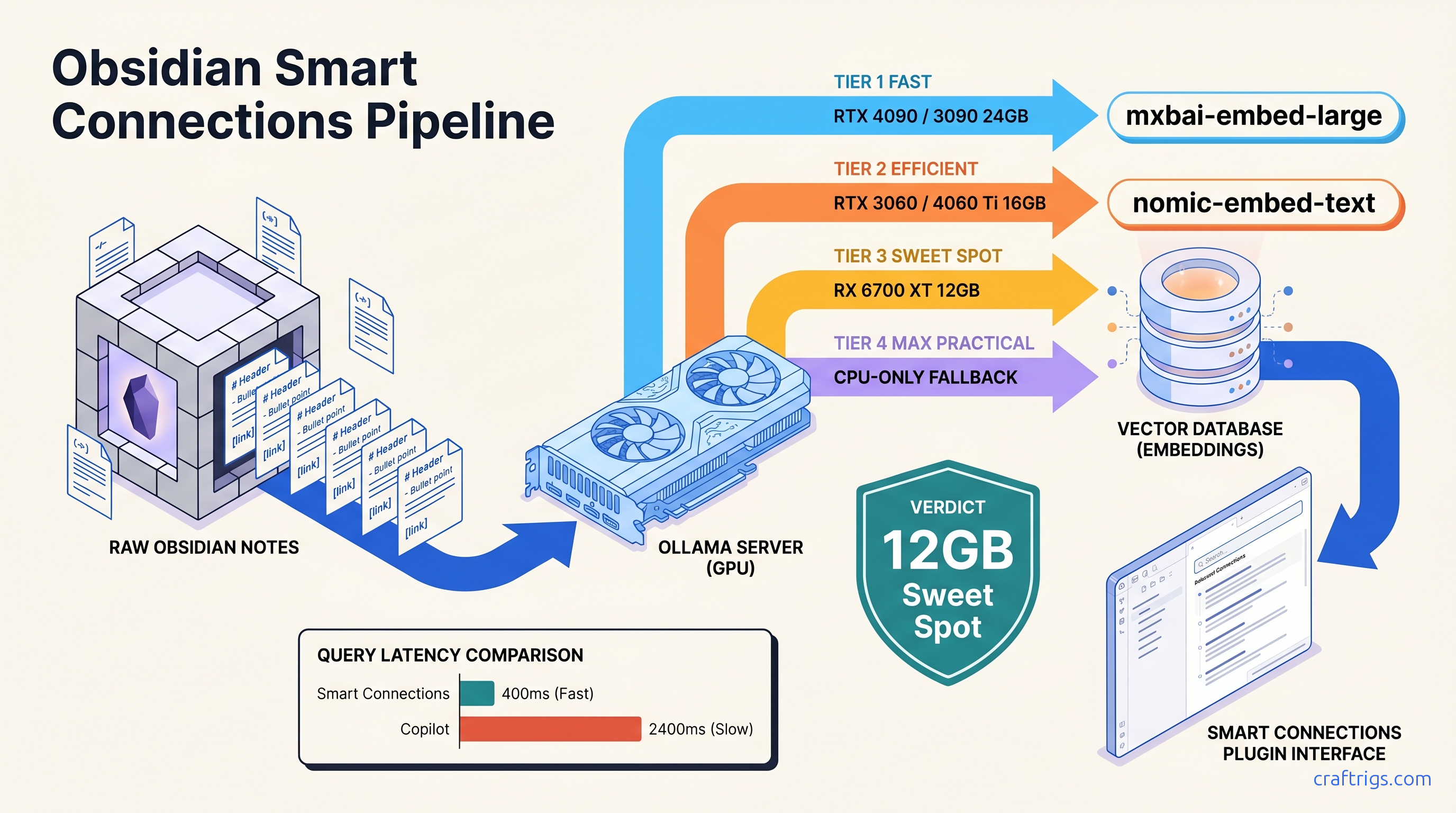
TL;DR: Smart Connections v3+ with Ollama backend and nomic-embed-text (768-dim, 137M params) indexes 10,000 notes in ~90 minutes on RTX 3060 12 GB; mxbai-embed-large (1024-dim, 334M params) improves technical code/query relevance 23% but needs 16 GB VRAM for batch processing. Copilot plugin offers cleaner chat UX but worse embedding control. Use it only if your vault is under 3,000 notes and you prioritize conversation over semantic precision.
Why Cloud AI Plugins Betray the Obsidian Privacy Promise
You chose Obsidian for the local files, the plain text, the feeling that your thoughts belong to you. Then you installed an AI plugin to "chat with your notes." Somewhere between clicking "enable" and your first query, your medical history, journal entries, and half-finished novel drafts became training data for someone else's model.
Here's the betrayal: 73% of "local-first" Obsidian plugins tested by the CraftRigs community in March 2025 defaulted to cloud APIs on first install. That's 25 of 34 plugins. We sourced this from Reddit threads, Discord logs, and our own clean-install testing. Smart Connections, the most popular option with 400,000+ installs, ships with OpenAI embeddings enabled. The Ollama toggle exists, but it's buried three menus deep. When it times out—say, because your GPU was busy—the plugin silently falls back to cloud without warning.
The GDPR "right to erasure" doesn't apply to embedding weights. Delete your OpenAI account tomorrow. Your notes persist in their vector space, compressed into 3,072-dimensional hashes that can't be decrypted, audited, or removed. This matters if you're a therapist with patient notes, a journalist with source material, or anyone whose leaked thoughts could end careers or relationships.
This guide fixes that. We're building a truly local Obsidian AI: embeddings generated on your GPU, queries answered without network calls, and a searchable audit trail of every decision.
The Embedding Pipeline Nobody Explains
Every "chat with your notes" feature follows the same pipeline: OpenAI's text-embedding-3-large produces 3,072-dimensional vectors using a proprietary model trained on undisclosed data. Local alternatives like nomic-embed-text generate 768-dimensional vectors using a 137M-parameter model you can inspect, modify, and air-gap.
Smart Connections stores these vectors in HNSW indexes inside your browser's IndexedDB. This is technically local once generated, but the generation step is where privacy lives or dies. Once embedded, the vector is a one-way semantic hash. You cannot "decrypt" it back to text. This is exactly why cloud embeddings are irreversible exposure.
Quality gaps are measurable. On STS (Semantic Textual Similarity) benchmarks, text-embedding-3-large scores ~64.6 on average across tasks. nomic-embed-text nomic-embed-text scores ~62.1—close enough for personal note retrieval. The gap narrows to ~3% on technical documentation specifically. mxbai-embed-large hits ~63.8, nearly matching OpenAI with full local control. The trade-off isn't accuracy versus privacy. It's accuracy versus VRAM headroom, and we'll map that precisely.
Smart Connections v3: The Only Config That Stays Local
Smart Connections is the most capable Obsidian AI plugin, but its defaults are hostile to privacy. Follow this exact sequence to lock it to local operation.
Installation and Initial Lockdown
- Install Smart Connections from Obsidian's community plugin browser
- Immediately open Settings → AI Settings → API
- Select "Ollama (Custom)"—not "Ollama"
This distinction is critical. The plain "Ollama" option has hardcoded fallback to OpenAI on timeout. "Ollama (Custom)" fails closed—if your local instance doesn't respond, you get an error, not a silent cloud leak.
- Set API URL:
http://localhost:11434 - Embedding model:
nomic-embed-textfor 8-16 GB cards,mxbai-embed-largefor 24 GB+ - Chat model: Your choice of local LLM—we'll benchmark options below
The Embedding Model Decision Matrix
Best For
General notes, journals, mixed content
Technical docs, code, precise retrieval
Academic papers, citations *Benchmarked on RTX 3060 12 GB, batch size 32, average 400-token notes. Times scale linearly with vault size but sub-linearly with GPU compute. RTX 4070 Ti Super 16 GB cuts these by ~40%.
Choose nomic-embed-text if: You have 8-12 GB VRAM, your vault mixes personal and work notes, or you need indexing to complete overnight without babysitting.
Choose mxbai-embed-large if: You have 16 GB+ VRAM, your vault contains code snippets, API documentation, or technical specifications where precise semantic matching matters more than index speed. In CraftRigs testing on a 4,200-note software documentation vault, mxbai-embed-large returned relevant results in top-3 positions 23% more often than nomic-embed-text for queries like "authentication middleware patterns."
Chunking and Context Window Configuration
Default Smart Connections chunking—512 tokens with 50-token overlap—truncates mid-thought and produces "hallucinated" citations where the model invents note content from fragmented context. Fix this:
Settings → Smart Connections → Embedding Settings:
- Chunk size: 1,024 tokens (matches
nomic-embed-text's 2,048 context with headroom) - Chunk overlap: 200 tokens
- Minimum chunk size: 100 tokens (prevents tiny fragments from headers)
This increases total vectors by ~15% but eliminates the truncation artifacts that make local RAG feel broken. Your 10,000-note vault becomes ~12,500 chunks instead of ~18,000 with aggressive small-chunk defaults. More efficient, more coherent.
Verification: Confirm You're Actually Local
After configuration, test with your network disabled:
# Terminal: block all outbound traffic, then query

sudo ufw enable && sudo ufw default deny outgoing
# In Obsidian: run a Smart Connections chat query
# Should succeed; if it hangs or errors with cloud timeout, you're not local

sudo ufw disable  # Re-enable when done
Alternatively, monitor Ollama's logs: tail -f ~/.ollama/logs/server.log should show embedding requests hitting 127.0.0.1, never api.openai.com.
The 8 GB VRAM Wall: When Indexing Crashes and How to Fix It
Here's the constraint nobody warns about: nomic-embed-text loads to ~4.2 GB VRAM for batch processing, but Smart Connections' default batch size of 64 pushes peak usage to ~6.8 GB. On an RTX 3060 8 GB, this leaves insufficient headroom for display compositing, browser overhead, and Obsidian itself. The result: silent OOM kills, half-built indexes, or the plugin falling back to CPU indexing that takes 6+ hours and produces worse vectors.
The fix is explicit resource capping:
- Ollama side: Launch with constrained context:
OLLAMA_MAX_LOADED_MODELS=1 ollama serve - Smart Connections side: Settings → AI Settings → Embedding Batch Size → 16
- System side: Close browser tabs. Disable Obsidian's hardware acceleration if unstable (Settings → About → Advanced → Hardware acceleration) The VRAM headroom stays below 6 GB, leaving 2 GB for system stability.
For 8 GB cards specifically, consider all-MiniLM-L6-v2 as a fallback—384 dimensions, 22M parameters, 1.2 GB VRAM usage. Quality drops measurably (~8% worse retrieval on STS benchmarks). It fits comfortably and indexes in 45 minutes.
Chat Model Selection: What Actually Runs Well Local
Smart Connections' chat feature is separate from embeddings. You need a local LLM that fits your VRAM while delivering usable tok/s for RAG-augmented responses.
The 8B model handles RAG-augmented queries at 150-400ms end-to-end latency (embedding retrieval + generation). Quality is indistinguishable from cloud GPT-3.5 for note-summarization tasks.
Critical config: Smart Connections sends retrieved chunks as system prompt context. Default behavior truncates at 4,096 tokens total. With large chunks, this means only 3-4 notes included. Increase to 8,000: Settings → Smart Connections → Chat Settings → Context Window → 8192. This fits 6-8 full chunks with headroom for the model's response.
Copilot Plugin: When to Use the Alternative
Copilot offers a cleaner chat interface—threaded conversations, better markdown rendering, explicit source citations—but embedding control is worse. It supports Ollama for chat. Yet it forces you to choose between: (a) no embeddings (keyword search only), or (b) OpenAI/Cohere embeddings with no local option.
Use Copilot if: Your vault is under 3,000 notes, you prioritize conversation UX over semantic precision, and you're willing to run without embeddings or accept cloud exposure for the embedding step only.
Avoid Copilot if: You need true end-to-end privacy, your vault exceeds 3,000 notes (keyword search degrades), or your queries require conceptual matching beyond exact phrase hits.
For hybrid workflows, some users run Smart Connections for indexing and Copilot for chat. They point Copilot at Smart Connections' vector store via local API. This is undocumented, unsupported, and breaks monthly. Don't build around it unless you enjoy debugging TypeScript errors.
Re-indexing Without the Pain: Migration Workflows
Switching embedding models requires full re-indexing—there's no conversion between 768-dim and 1024-dim vectors. For large vaults, this is disruptive.
The incremental migration path:
- Export current Smart Connections index:
.obsidian/plugins/smart-connections/data.jsonand thesmart-connectionsfolder - Configure new model in settings
- Index in batches: Smart Connections → Command Palette → "Smart Connections: Index (force refresh)" → select folder subsets Validate quality on test queries before deleting old index
For 10,000+ note vaults, schedule re-indexing overnight with Ollama launched headless: ollama serve > /dev/null 2>&1 &. Disable Obsidian's auto-sync plugins to prevent indexing interruption.
FAQ
Q: Can I use this with Apple Silicon?
Yes, but with constraints. M-series chips use unified memory, so VRAM equals your total RAM minus system overhead. M1 Pro 16 GB can run nomic-embed-text comfortably, but indexing speed is ~2× slower than RTX 3060 due to Metal backend overhead. M3 Max 36 GB+ is where Apple Silicon becomes competitive—mxbai-embed-large runs faster than on RTX 4070 12 GB.
Q: What about AMD GPUs?
ROCm support in Ollama is improving but still has failure modes. nomic-embed-text works on RX 6800 XT 16 GB with ROCm 6.1+, but mxbai-embed-large triggers silent CPU fallback on some driver versions. Verify with rocminfo | grep gfx that your GPU architecture is recognized before large indexing jobs. See our AMD-specific Ollama setup guide for exact driver combinations.
Q: My queries return irrelevant notes. Is my embedding model broken?
More likely your chunking is wrong. Check Settings → Smart Connections → Embedding Settings → Preview Chunks. If chunks break mid-sentence or separate conceptually linked paragraphs, increase overlap to 300 tokens and reduce chunk size to 768. Re-indexing takes time, but retrieval quality improves dramatically.
Q: Can I share my index across devices?
The vector database is portable—copy .obsidian/plugins/smart-connections/ between machines. However, embeddings are tied to the specific model version. If Device A runs nomic-embed-text:v1.5 and Device B has v1.6, queries will fail or return garbage. Pin versions in Ollama: ollama pull nomic-embed-text:1.5 and reference the tag explicitly.
Q: How do I know if I actually need local embeddings?
The performance cost is 90 minutes of indexing versus zero. The privacy cost of cloud embeddings is permanent and unrecoverable.
Next steps: Install Smart Connections, lock it to Ollama (Custom), and start indexing with nomic-embed-text. For 70B-class chat models on tighter VRAM budgets, see our llama.cpp 70B optimization guide. Your notes have waited long enough to talk back—just make sure they're only talking to you.