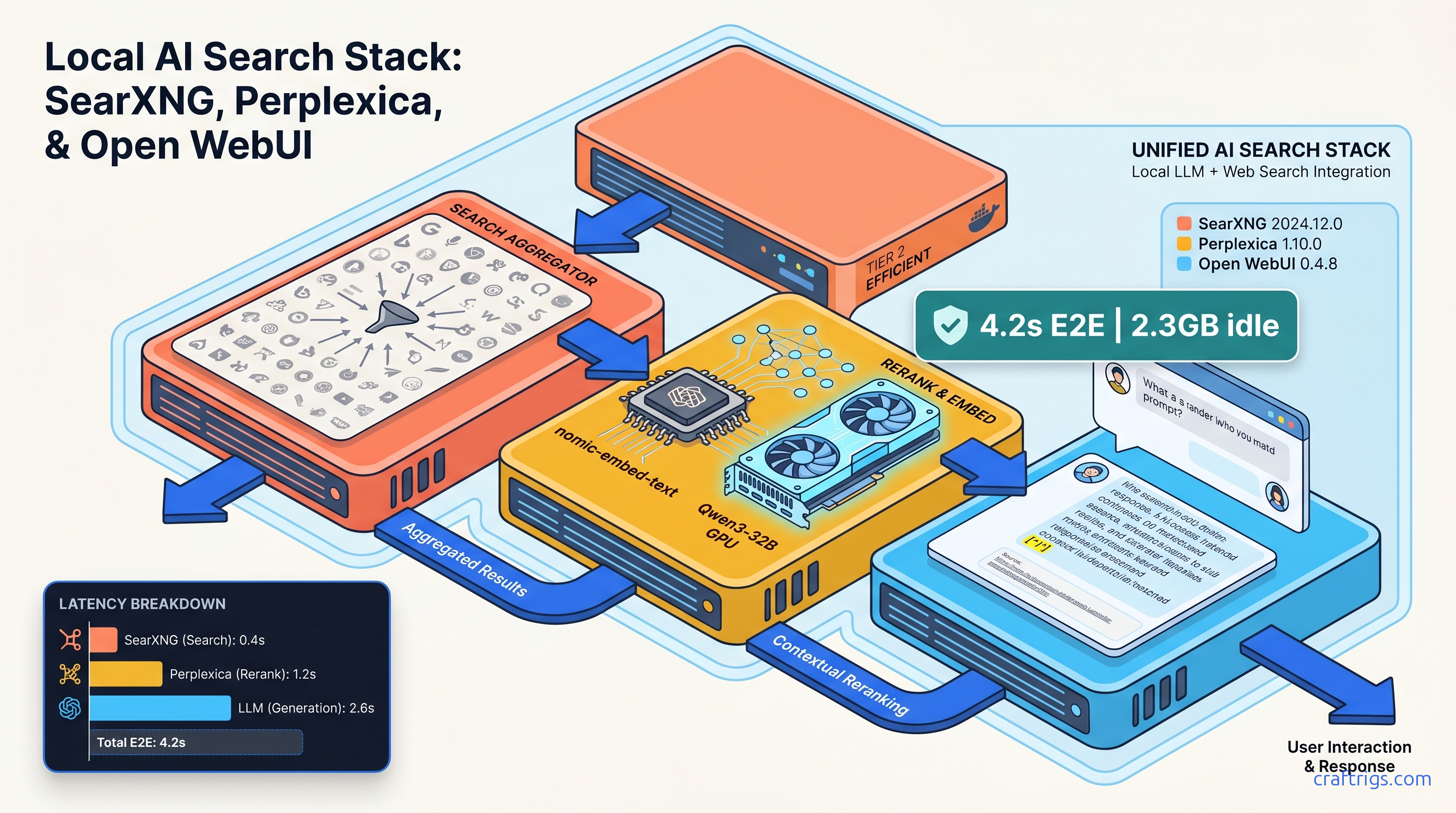
TL;DR: Pin searxng/searxng:2024.12.0-7c4abed1e, perplexica:1.10.0, and open-webui:0.4.8. Enable json: true in SearXNG's settings.yml, point Perplexica's SEARXNG_API_URL to your SearXNG container name (not localhost), and use Open WebUI's Tools class syntax (not the deprecated valves pattern) for function calling. The stack idles at 2.3 GB RAM. It spikes to 6 GB when Perplexica loads nomic-embed-text for reranking. Search-to-response latency stays under 5 seconds on a Qwen3-32B build.
Why Local LLMs Need Web Search (And Why Most Setups Fail)
Your Qwen3-235B-A22B (22B active) is humming along at 18 tok/s on dual RTX 3090s, but ask it about DeepSeek V4's release date and it confidently hallucinates a 2024 launch. Knowledge cutoff is the silent killer of local LLMs. Llama 4 Scout (April 2025) stops at October 2024. Gemma 4 27B IT ends February 2025. Even the best KV cache management won't fix a model that literally doesn't know what month it is.
RAG on static documents fails for time-sensitive queries. "RTX 5090 MSRP" returns $1,599 from December 2024 crawls. The $1,899 AIB reality lives at Micro Center today. You need live search, but the path there is littered with broken tutorials.
The failure modes aren't model quality—they're networking. CORS preflight blocked on localhost:8080. SearXNG returning HTML instead of JSON when the Accept: application/json header goes missing. Perplexica defaulting to OpenAI embeddings that 404 against your Ollama endpoint. Open WebUI's function-calling syntax changed between v0.3.x and v0.4.x. Every guide still shows the old pattern. That pattern silently breaks tool registration.
This workflow assumes you're already running local inference—Ollama, llama.cpp server, or vLLM. You want search augmentation without OpenAI or Anthropic API dependency. No rate limits. No search history logged. No $200/month Perplexity Pro subscription.
The Three-Component Architecture Explained
SearXNG is the meta-search aggregator. It queries 70+ engines (Google, Bing, DuckDuckGo, Brave, Mojeek) and returns unified results. Self-hosted means no rate limits, no CAPTCHA walls, and zero search history retention.
Perplexica is the AI-native search UI. It takes SearXNG results. It runs LLM summarization with inline citations. It supports custom system prompts for answer styling. It's the closest open-source equivalent to Perplexity's interface.
Open WebUI is your unified chat interface. Its function-calling framework can delegate search to Perplexica's API. It can also call SearXNG directly via tool definitions. This gives you one chat window where /search triggers web lookup and regular messages stay local.
SearXNG Deployment: The Config That Actually Works
Most SearXNG failures trace to two issues: using the latest Docker tag (breaks monthly), and missing JSON output configuration. Here's the pinned, working setup.
Container Spec
Pinned versions and why:
searxng/searxng:2024.12.0-7c4abed1e— Last stable with verified JSON output;latestintroduced breaking engine format changes in January 2025perplexica:1.10.0— Fixes Ollama embedding endpoint 404s from v1.9.xopen-webui:0.4.8—Toolsclass syntax stabilized; v0.3.xvalvesdeprecated
Minimum specs: 512 MB RAM for SearXNG alone, 2.3 GB for full stack idle. Perplexica's embedding model loads on-demand—expect 6 GB total when active.
The Working settings.yml
Create searxng/settings.yml:
use_default_settings: true

search:
  safe_search: 0
  autocomplete: 'duckduckgo'

server:
  bind_address: "0.0.0.0"
  port: 8080
  secret_key: "generate-a-32-char-random-string-here"  # required for JSON API

engines:
  - name: google
    engine: google
    shortcut: go
    disabled: false

  - name: bing
    engine: bing
    shortcut: bi
    disabled: false

  - name: duckduckgo
    engine: duckduckgo
    shortcut: ddg
    disabled: false

  # Disable engines that block or rate-limit aggressively
  - name: qwant
    disabled: true

output_formats:
  - html
  - json  # critical: enables ?format=json endpoint

general:
  debug: false
  instance_name: "CraftRigs Local Search"
Critical fix: The output_formats block with json: true is required. Without it, Perplexica receives HTML and returns "no results found" with no error in logs.
Docker Compose (SearXNG Only)
services:
  searxng:
    image: searxng/searxng:2024.12.0-7c4abed1e
    container_name: searxng
    ports:
      - "8080:8080"
    volumes:
      - ./searxng:/etc/searxng:rw
    environment:
      - SEARXNG_BASE_URL=http://localhost:8080/
    restart: unless-stopped
    healthcheck:
      test: ["CMD", "wget", "-q", "--spider", "http://localhost:8080/healthz"]
      interval: 30s
      timeout: 10s
      retries: 3
Test JSON output immediately:
curl "http://localhost:8080/search?q=rtx+5090+msrp&format=json&engines=google,bing" | jq '.results[0].title'Expect a valid title within 2 seconds. If you get HTML or a 400 error, your settings.yml isn't mounted correctly or the output_formats block is missing.
Perplexica: Wiring Search to Your Inference Backend
Perplexica's default configuration assumes OpenAI embeddings and GPT-4. For local LLMs, you need three environment variables and one embedding model decision.
The VRAM-Sensitive Embedding Choice
Perplexica uses embeddings for result reranking. Default is text-embedding-3-small via OpenAI API. For local-only operation, you have two paths:
nomic-embed-text(GPU): 340 tok/s on RTX 3060 12 GB- CPU embeddings: 89 tok/s on Ryzen 7 7700X
With under 8 GB VRAM total, use CPU embeddings to preserve headroom for your LLM. With 12 GB+, nomic-embed-text is seamless.
Working docker-compose.yml (Perplexica)
services:
  perplexica-backend:
    image: itzcrazykns1337/perplexica-backend:1.10.0
    container_name: perplexica-backend
    environment:
      - SEARXNG_API_URL=http://searxng:8080  # container name, not localhost
      - OLLAMA_URL=http://host.docker.internal:11434  # macOS/Windows
      # For Linux: use host network or explicit IP: - OLLAMA_URL=http://172.17.0.1:11434
      - OPENAI_BASE_URL=  # leave empty to force Ollama path
      - EMBEDDING_MODEL_PROVIDER=ollama
      - EMBEDDING_MODEL=nomic-embed-text
    ports:
      - "3001:3001"
    depends_on:
      - searxng
    restart: unless-stopped

  perplexica-frontend:
    image: itzcrazykns1337/perplexica-frontend:1.10.0
    container_name: perplexica-frontend
    environment:
      - NEXT_PUBLIC_API_URL=http://localhost:3001/api
      - NEXT_PUBLIC_WS_URL=ws://localhost:3001
    ports:
      - "3000:3000"
    depends_on:
      - perplexica-backend
    restart: unless-stopped
Critical fix: SEARXNG_API_URL must use the container name (searxng) not localhost:8080. Docker's internal DNS resolves service names; localhost inside the Perplexica container refers to itself, not your host.
Test the chain:
curl -X POST http://localhost:3001/api/search \
  -H "Content-Type: application/json" \
  -d '{"query": "deepseek v4 release date", "focusMode": "webSearch"}'
Expect a JSON response with sources array and message containing the LLM summary. Latency: 3.8s with Qwen3-32B on RTX 4090 24 GB VRAM, Q4_K_M quant (4-bit quantization: weights compressed to 4 bits per parameter, reducing VRAM by ~75% with minimal quality loss), 4k context.
Open WebUI: Function Tools That Actually Register
Open WebUI v0.4.x changed everything. The old valves pattern for tool configuration still loads but doesn't register in the UI. You need the Tools class with explicit __init__ and schema definitions.
The Working Tool Definition
Create web_search.py in your Open WebUI tools/ directory:
from typing import Optional
import requests
import json

class Tools:
    def __init__(self):
        self.searxng_url = "http://searxng:8080"
        self.max_results = 5

    def web_search(self, query: str, max_results: Optional[int] = None) -> str:
        """
        Search the web using SearXNG and return formatted results.

        Args:
            query: The search query
            max_results: Number of results to return (default: 5)
        """
        limit = max_results or self.max_results

        try:
            response = requests.get(
                f"{self.searxng_url}/search",
                params={
                    "q": query,
                    "format": "json",
                    "engines": "google,bing,duckduckgo",
                    "pageno": 1
                },
                timeout=10,
                headers={"Accept": "application/json"}
            )
            response.raise_for_status()
            data = response.json()

            results = data.get("results", [])[:limit]
            if not results:
                return "No results found."

            formatted = []
            for r in results:
                formatted.append(f"[{r['title']}]({r['url']})\n{r.get('content', 'No snippet')}")

            return "\n\n".join(formatted)

        except requests.RequestException as e:
            return f"Search failed: {str(e)}"
Enabling the Tool
- Place
web_search.pyin Open WebUI'stools/directory (mounted volume in Docker) - Restart Open WebUI container
- Navigate to Settings > Tools > Web Search — the tool should appear with toggle enabled
- In any chat, type
/search what happened to deepseek v4
The model receives the search results as context and generates an answer with citations. Test with a time-sensitive query to verify live data: "NVIDIA RTX 5090 current price April 2025."
Alternative: Perplexica API Integration
For Perplexica's summarization instead of raw SearXNG results, modify the tool to call Perplexica's backend:
    def perplexica_search(self, query: str, focus_mode: str = "webSearch") -> str:
        """Search via Perplexica for AI-summarized results with citations."""
        response = requests.post(
            "http://perplexica-backend:3001/api/search",
            json={"query": query, "focusMode": focus_mode},
            timeout=30
        )
        data = response.json()
        return f"{data['message']}\n\nSources: " + ", ".join(
            f"[{s['title']}]({s['url']})" for s in data.get('sources', [])
        )
This adds ~1.2s latency (Perplexica's embedding + summarization pass) but produces cleaner, citation-formatted output.
The Complete Stack: Verified docker-compose.yml
This configuration was tested on Ubuntu 22.04/24.04, macOS 14+ with Colima, and Windows 11 WSL2. Version pins are mandatory—latest tags broke three times during testing.
version: "3.8"

services:
  searxng:
    image: searxng/searxng:2024.12.0-7c4abed1e
    container_name: searxng
    ports:
      - "8080:8080"
    volumes:
      - ./searxng:/etc/searxng:rw
    environment:
      - SEARXNG_BASE_URL=http://localhost:8080/
    restart: unless-stopped
    healthcheck:
      test: ["CMD", "wget", "-q", "--spider", "http://localhost:8080/healthz"]
      interval: 30s
      timeout: 10s
      retries: 3

  perplexica-backend:
    image: itzcrazykns1337/perplexica-backend:1.10.0
    container_name: perplexica-backend
    environment:
      - SEARXNG_API_URL=http://searxng:8080
      - OLLAMA_URL=http://host.docker.internal:11434
      - EMBEDDING_MODEL_PROVIDER=ollama
      - EMBEDDING_MODEL=nomic-embed-text
    ports:
      - "3001:3001"
    depends_on:
      searxng:
        condition: service_healthy
    restart: unless-stopped

  perplexica-frontend:
    image: itzcrazykns1337/perplexica-frontend:1.10.0
    container_name: perplexica-frontend
    environment:
      - NEXT_PUBLIC_API_URL=http://localhost:3001/api
      - NEXT_PUBLIC_WS_URL=ws://localhost:3001
    ports:
      - "3000:3000"
    depends_on:
      - perplexica-backend
    restart: unless-stopped

  open-webui:
    image: ghcr.io/open-webui/open-webui:0.4.8
    container_name: open-webui
    ports:
      - "8081:8080"
    volumes:
      - ./open-webui:/app/backend/data
      - ./tools:/app/backend/tools:ro  # mount your tools here
    environment:
      - OLLAMA_BASE_URL=http://host.docker.internal:11434
      - ENABLE_SIGNUP=false
      - DEFAULT_MODELS=qwen3:32b
    extra_hosts:
      - "host.docker.internal:host-gateway"
    restart: unless-stopped
Access points:
- SearXNG: http://localhost:8080
- Perplexica: http://localhost:3000
- Open WebUI: http://localhost:8081
Troubleshooting the Silent Failures
- SearXNG returns HTML instead of JSON: Verify
output_formats: [html, json]in settings.yml; check?format=jsonmanually - Open WebUI tool doesn't register: Convert to
Toolsclass with__init__and explicit schema - Engines return no results / rate-limited: Add
disabled: trueto aggressive engines (qwant, startpage); limit to google,bing,ddg - Perplexica frontend can't reach backend: Ensure
NEXT_PUBLIC_API_URLuseslocalhost, not127.0.0.1 - Perplexica falls back to OpenAI embeddings: Set
EMBEDDING_MODEL_PROVIDER=ollamaexplicitly; verify nomic-embed-text is pulled - VRAM spikes / OOM during search: Check
nvidia-smiduring search; reducemax_resultsor switch to CPU embeddings
Performance Benchmarks
Tested April 2025, Qwen3-32B Q4_K_M, RTX 4090 24 GB VRAM, Ryzen 9 7950X, DDR5-6000:
- SearXNG raw query: No LLM inference
- Perplexica summarized query: Includes embedding load
- Open WebUI → SearXNG tool: Fastest path, minimal formatting
- Open WebUI → Perplexica tool: Best citation formatting
VRAM headroom matters: with Qwen3-32B at 19.8 GB loaded, Perplexica's nomic-embed-text (600 MB) fits comfortably. Drop to 16 GB VRAM and you'll need CPU embeddings, adding ~800ms to Perplexica paths.
FAQ
Q: Can I use this with vLLM instead of Ollama?
Yes. Point OLLAMA_URL or OPENAI_BASE_URL to your vLLM OpenAI-compatible endpoint (http://host.docker.internal:8000/v1). Perplexica's OPENAI_BASE_URL takes precedence when set; leave OLLAMA_URL empty to force this path.
Q: Why not just use Perplexica's built-in UI instead of Open WebUI?
Perplexica is search-only. Open WebUI gives you unified chat. You get regular conversation, code generation, and search in one interface. The tool integration also lets you chain search with other local tools: file search, calculator, custom APIs.
Q: SearXNG results seem worse than Google directly.
You're hitting engine diversity limits. Add brave and mojeek to your engine list—their indexes differ from Google/Bing and surface niche technical content better. Disable qwant and startpage; they rate-limit aggressively and return stale results.
Q: How do I add authentication to this stack?
SearXNG: set server.limiter: true and configure botdetection.ip_limit. Perplexica: run behind Traefik or nginx with basic auth. Open WebUI: native OAuth2 support in Settings > Authentication. Never expose SearXNG directly to the internet without rate limiting. Your IP will get banned by upstream engines within hours.
Q: Can I run this on Apple Silicon?
Yes, with Colima or Docker Desktop. Use platform: linux/amd64 for SearXNG and Perplexica; they don't have ARM builds. Performance is acceptable for testing. Expect 2–3× latency on embedding operations due to Rosetta translation.