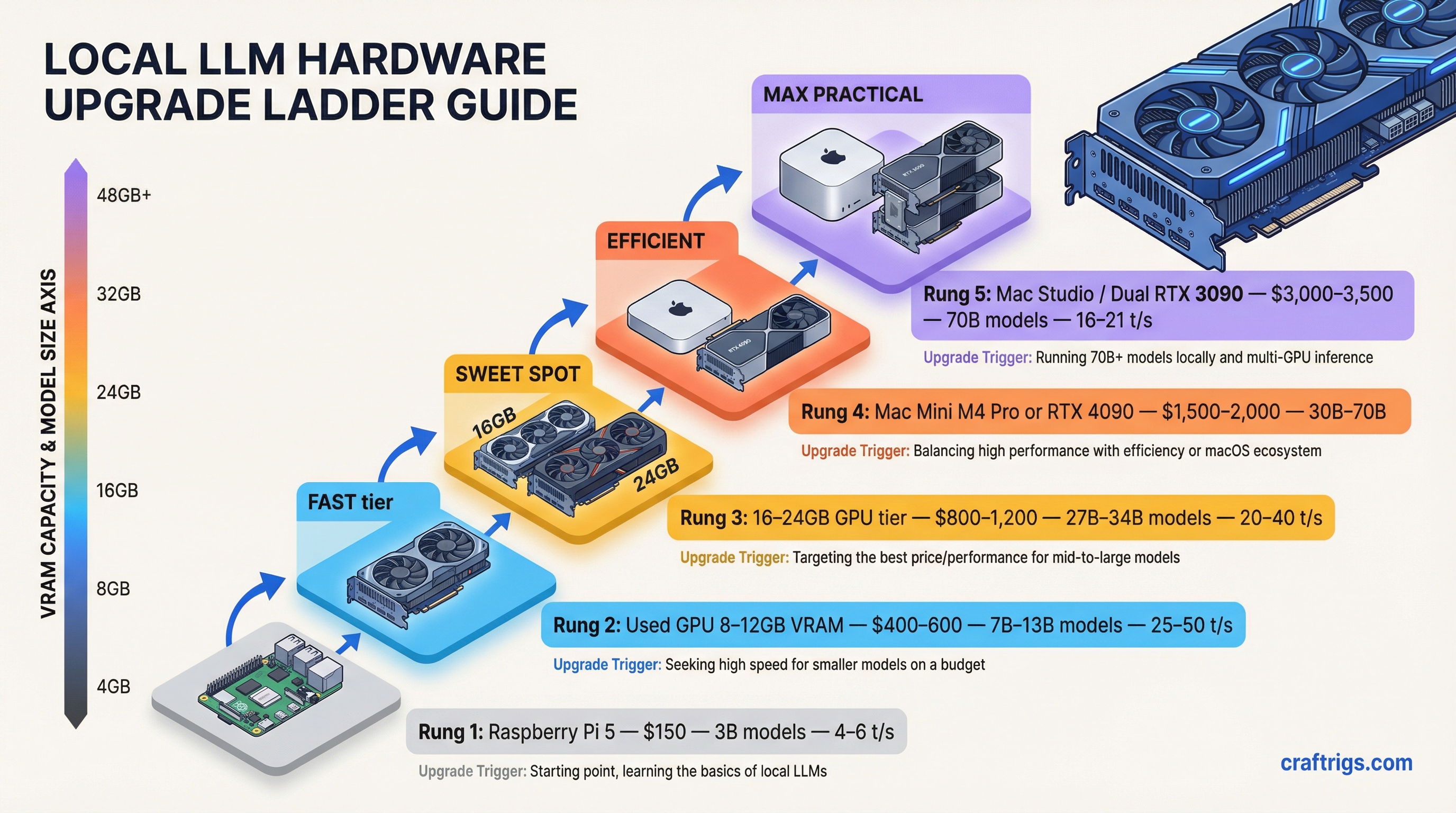
Someone posted on r/LocalLLM yesterday — a photo of their desk showing a Raspberry Pi, then a used gaming PC tower, then a Mac Mini, then a MacBook Pro. The caption: "three years and $4,700 later." Forty-seven comments deep and it had become an unofficial support group.
This is that journey, mapped out before you make all the same mistakes.
The upgrade ladder for local LLM hardware is real, well-worn, and surprisingly predictable. People don't jump straight to an M5 Max. They start cheap, get hooked faster than expected, and then spend the next 18 months justifying increasingly expensive purchases because they'd rather spend $2,000 now than pay $20/month to OpenAI forever. The math works out eventually. Sort of.
Here's every rung, what you actually get, and what will make you climb to the next one.
Rung 1: $150 — Raspberry Pi 5 (8GB)
The board itself is $80. Add a case, active cooler, power supply, and a fast microSD or NVMe SSD via the PCIe slot, and you're at roughly $147.
This is the curiosity tier. You're not here for performance. You're here to understand if this whole local LLM thing is real.
And it is real, but barely. The Pi 5 runs Llama 3.2 3B (Q4_K_M) at 4–6 tokens per second through Ollama. That's about the speed of a cautious typist. Mistral 7B drops to under 3 tokens per second, sometimes closer to 0.7. You can watch individual words appear. Every response is a small exercise in patience.
[!INFO] Pi 5 realistic performance: 4–6 t/s on 3B models, 0.7–3 t/s on 7B models (Q4_K_M quantization). Add the AI HAT+ 2 for modest thermal and compute improvements — CPU temps drop 8–14°C under load.
What happens at this stage: you ask the Pi a question, wait 45 seconds for the answer, and think "this is incredible." Then you try to have a real conversation. Then you understand why people own Mac Studios.
The Pi is not useless though. It runs fine for single-purpose offline agents — home automation, a local keyword classifier, a simple private chatbot that doesn't need to be fast. But for daily use as a reasoning tool? You'll be on r/LocalLLaMA within two weeks asking what GPU to buy.
Rung 2: $400–600 — Your First Real GPU
The move off the Pi isn't to a fancy new machine. It's to a used RTX 3060 12GB dropped into whatever PC you already have, or an entire used gaming tower picked up for $400–500 with a GPU already inside.
The RTX 3060 12GB runs $150–180 on eBay right now. That 12GB of VRAM is the threshold where local LLMs stop feeling like a science experiment. Llama 3.1 8B runs at around 35 tokens per second. That's faster than most people read. An actual conversation, at typing speed or better. Suddenly you're running Ollama, pulling models, testing Open WebUI, and realizing you've spent six hours doing this.
The Intel Arc B580 at $249 new is the other option here. 12GB GDDR6, works with Ollama and LM Studio, generates about 33–37 t/s on 8B models. The SYCL-based compute stack is less mature than CUDA but improving fast. If you're buying new and budget matters more than ecosystem compatibility, it's a legitimately good pick.
Warning
Don't buy an 8GB GPU in 2026. 8GB VRAM limits you to 7B models at aggressive quantization with no context headroom. When the conversation gets long, you'll watch the speed crater. 12GB is the new floor.
What breaks this tier: you want to run a 13B model. Or you want to run a 7B model with a 32K context window. Or you see someone benchmarking a 70B model and want that. The 12GB ceiling becomes obvious quickly.
Rung 3: $699–899 — Mac Mini M4
This is the fork in the road. Some people buy more GPU. Some people buy a Mac Mini M4.
The Mac Mini M4 base (16GB) is $699. The 24GB is $799. These aren't gamer specs, but the unified memory architecture changes the equation — the CPU and GPU share one memory pool, no VRAM-to-RAM transfers, no PCIe bottleneck.
At 16GB, you're running 7B–8B models at 28–35 t/s with Ollama. Comfortable. Fast enough that you stop thinking about speed. At 24GB, 13B models fit cleanly. A Mac Mini M4 Pro with 64GB (starting at $1,399) ran Qwen3 32B at 11.7 t/s in recent benchmarks — faster than a dual-RTX-3090 setup drawing 700W, while pulling under 40W itself.
The trade-off is real though. CUDA doesn't exist here. If you're doing anything beyond inference — fine-tuning, training experiments, image generation — the Mac is the wrong platform. Stable Diffusion on Apple Silicon works but the ecosystem lags NVIDIA by a significant margin.
Tip
Mac Mini M4 sweet spot: 24GB or 64GB config. The 16GB base struggles with long contexts and multitasking. KV cache growth under a long conversation can push the 16GB model into memory pressure territory fast — responses slow, quality dips. Spend the extra $200 for 24GB at minimum.
For pure LLM inference as a daily driver, the Mac Mini M4 is the best appliance at this price. It's also silent, small, and doesn't require a complete desktop setup.
Rung 4: $400–550 — RTX 4060 Ti 16GB or RTX 5060 Ti 16GB
If you're on Windows and want to stay there, this is where you land.
16GB VRAM is the sweet spot for 2026. The RTX 4060 Ti 16GB runs $380–420 new (or $300–350 used). The newer RTX 5060 Ti 16GB with GDDR7 comes in at $429–550 depending on where you catch it. Both run 13B models cleanly. Both hit around 40–44 t/s on 8B models. The 5060 Ti is faster — GDDR7 bandwidth is meaningfully better for inference workloads — but the 4060 Ti is everywhere and proven.
The upgrade motivation from Rung 2 is simple: 16GB vs 12GB sounds like a small jump but it's the difference between "I can run this model" and "I can run this model with a full context window and not watch it choke." The 4060 Ti also shows up well in dual-GPU setups for people who eventually want 32GB of pooled VRAM.
Note for people shopping used: there are two versions of the 4060 Ti — 8GB and 16GB. Sellers on eBay don't always label them correctly. Verify before you pay.
Rung 5: $1,999–2,500 — RTX 5090 or AMD Ryzen AI Max+ Mini PC
This is where the hobbyist becomes the enthusiast. Two totally different philosophies competing at the same price band.
The RTX 5090 ($1,999 MSRP, currently hard to find at that price) has 32GB GDDR7 and 1,792 GB/s of memory bandwidth — 78% more than the RTX 4090. On Llama 70B it runs at 85 tokens per second. The 4090 does 52 t/s on the same model. The 5090 also pulls 575W under load, needs a hefty power supply and proper case airflow. And here's the uncomfortable fact: 32GB still can't fit a 70B parameter model at Q4 quantization. You need ~40–45GB for that. So you're still quantizing aggressively or splitting across multiple GPUs.
The AMD Ryzen AI Max+ 395 mini PCs are the other option. The GMKtec EVO-X2 at $1,999 (64GB) or $2,499 (128GB) packs AMD's top APU — 16 Zen 5 cores, Radeon 8060S iGPU, and LPDDR5X-8000 memory. The 128GB version can allocate up to 96GB to the GPU. That means 70B models at Q4 fit. Actually fit, without splits, without swapping. You run massive models on hardware the size of a hardcover novel, at under 140W.
[!INFO] Bandwidth comparison: RTX 5090 has 1,792 GB/s GPU bandwidth. The AMD Ryzen AI Max+ 395 with 128GB hits around 256 GB/s memory bandwidth. The NVIDIA card is faster per token. But only the AMD can fit the big models in the first place on this budget.
The right pick depends entirely on what you're running. RTX 5090 for speed on small-to-mid models. AMD mini PC for capacity on the large ones.
Rung 6: $3,499 — M5 Max MacBook Pro (48GB)
Apple released the M5 Max MacBook Pro on March 11, 2026. The base M5 Max config — 48GB unified memory, 40-core GPU, 614 GB/s memory bandwidth — starts at $3,499.
The headline spec is the Neural Accelerator architecture: every single one of the 40 GPU cores has a dedicated Neural Accelerator built in. This isn't a new marketing term for the same silicon. It's what makes prompt processing 3.3–4x faster than the M4 Max. When you send a 10,000-token document to the model, the time to first token is dramatically lower than any previous Apple Silicon.
Token generation on 7B models runs around 95 t/s. On 32B models (which fit cleanly in 48GB alongside OS overhead), you're looking at 25–35 t/s depending on quantization. Real benchmarks on early M5 Max machines with 128GB show 122B parameter models running at usable speeds — that's territory that previously required multi-GPU workstation setups.
Tip
M5 Max vs M4 Max for LLM work: The 12% bandwidth increase from 546 to 614 GB/s produces modest token generation gains (~15% faster). The real win is the prompt processing speed. If you're doing heavy agentic work — lots of long-context reads, document analysis, tool calls — that 3–4x TTFT improvement changes how it feels to use.
Is this overkill? Obviously. But the community has caught up to "overkill" faster than anyone predicted. Three years ago a 7B model locally was impressive. Today people are running 120B parameter models on battery power on a laptop.
Honest Verdict
Most people should skip Rung 1. The Pi is a fun weekend project but it creates the illusion that you've done the local LLM thing when you've actually just tasted it. If you're serious, start at Rung 2 or 3.
The Mac Mini M4 24GB at $799 is the best all-around entry point for anyone who doesn't have a specific reason to stay on Windows. It just works. Ollama runs beautifully. The silence and power efficiency matter more than you'll expect.
The 16GB GPU rung at $400–550 is where Windows users end up, and it's genuinely great — the RTX 5060 Ti 16GB is fast, the ecosystem is mature, and you can expand with a second card later.
And if you end up looking at the M5 Max at $3,499 and thinking it might make sense? You've already spent $1,500 on hardware getting here. The upgrade math starts looking different.
Nobody buys just the Raspberry Pi.
Ready to skip straight to the top rung? See our Tinybox Red vs DIY Build — a 4-GPU comparison for builders who want maximum local AI power.
Hardware Upgrade Ladder
graph TD
    A["$150: GTX 1060 6GB"] -->|Upgrade| B["$400: RTX 3060 12GB"]
    B -->|Upgrade| C["$700: RTX 4070 12GB"]
    C -->|Upgrade| D["$1,100: RTX 4070 Ti 16GB"]
    D -->|Upgrade| E["$1,600: RTX 4090 24GB"]
    E -->|Upgrade| F["$2,000: RTX 5090 32GB"]
    A --> G["Run 3B-7B models"]
    C --> H["Run 13B models comfortably"]
    E --> I["Run 30B-70B at Q4"]
    style A fill:#1A1A2E,color:#fff
    style E fill:#F5A623,color:#000
    style F fill:#00D4FF,color:#000